Ergonomic Foundations
The Complete Remote Office Setup Under $3,000 (2026)
Nine components. ~$2,940. Each piece chosen to be the last you buy in its category — from a 60" executive standing desk to a studio-grade 4K monitor, a mechanical keyboard built like a sidearm, and the headphones that cancel everything outside the work.
By Nick Miles · Updated May 9, 2026 · 11 min read
12 expert sources synthesizedLast verified May 9, 2026
DeskGearHQ is reader-supported. We may earn a commission from qualifying Amazon purchases at no extra cost to you.
Evidence at a Glance
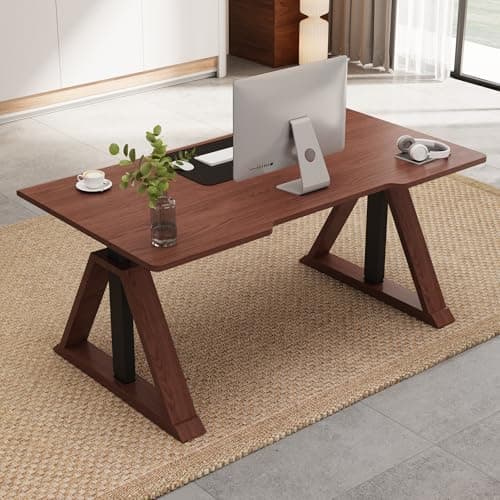
FlexiSpot Oak Executive Standing Desk (Walnut Finish, 60"x30")
60"x30" oak-veneer walnut-finish executive top on a dual-motor electric frame — 222 lb capacity, camera-visible grain. Amazon's ceiling for the aesthetic standing desk category at $749.99.
Sources: FlexiSpot manufacturer documentation — frame spec and motor warranty, Amazon owner reviews — finish quality and camera-aesthetic verification, r/desksetup executive aesthetic standing desk community threads
Verified May 9, 2026
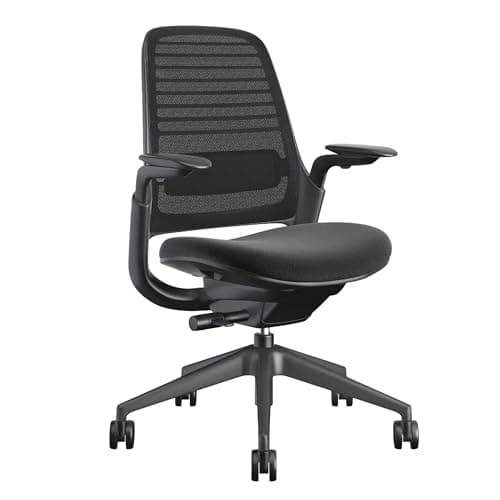
Steelcase Series 1
Steelcase's entry-level task chair with weight-activated recline, 4-way adjustable arms, adjustable lumbar, and the full 12-year Steelcase warranty — at $499, the most ergonomic chair this budget allows while keeping the rest of the build intact.
Sources: Steelcase manufacturer documentation — chair adjustability specifications, Wirecutter ergonomic chair buying guide, r/Ergonomics Steelcase Series 1 owner data threads
Verified May 9, 2026
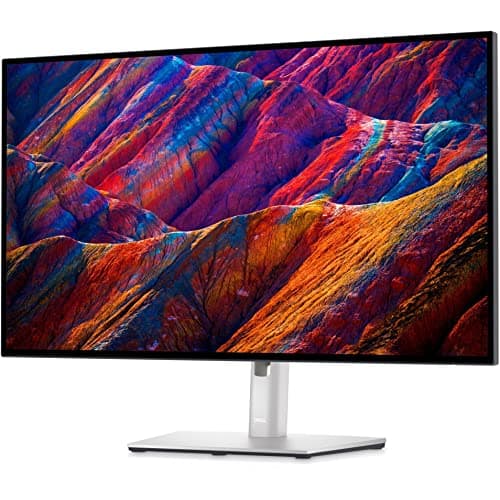
Dell U2723QE 27" 4K
Dell's 27" 4K IPS Black panel — 2000:1 contrast, USB-C 90W power delivery, built-in KVM, and factory-calibrated color accuracy. The professional display benchmark at $579.99.
Sources: RTINGS display measurement methodology and IPS Black panel analysis, Tom's Guide Dell U2723QE review, r/homeoffice and r/battlestations 4K display owner threads
Verified May 9, 2026
Our Picks
FlexiSpot
FlexiSpot Oak Executive Standing Desk (Walnut Finish, 60"x30")
8.7 / 10
- 60"x30" oak-veneer over engineered core — walnut finish with visible grain
- Dual-motor electric frame — 222 lb weight capacity
- Camera-visible executive proportions — 1" thick top profile
- Memory height presets — programmable sit-stand workflow
$749.99
Steelcase
Steelcase Series 1
8.7 / 10
- Weight-activated recline — tension calibrates automatically to your body weight
- 4-way adjustable armrests — height, width, depth, pivot
- Adjustable lumbar support — height and firmness
- Multiple finish options — compatible with contemporary home office aesthetics
$499.00
Dell
Dell U2723QE 27" 4K
9.0 / 10
- IPS Black panel — 2000:1 contrast ratio (2x standard IPS)
- 27" 4K (3840x2160) — 163 PPI, no scaling required at normal viewing distance
- USB-C 90W power delivery — charges a MacBook Pro at full speed
- Built-in KVM switch — share one display across two computers
$579.99
Ergotron
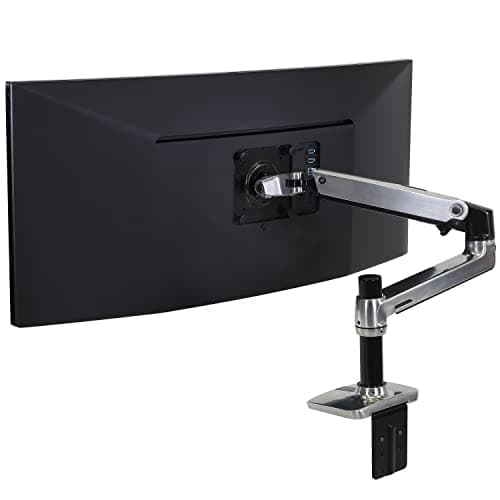
Ergotron LX Single Monitor Arm
9.4 / 10
- Gas-cylinder lift — holds position precisely across the full range of motion
- Full 6-axis articulation — height, tilt, pan, rotation, reach, depth
- VESA 75/100mm — fits the Dell U2723QE and virtually every other monitor
- C-clamp or grommet mount included — fits desks 0.5" to 3.5" thick
$194.69
Drop
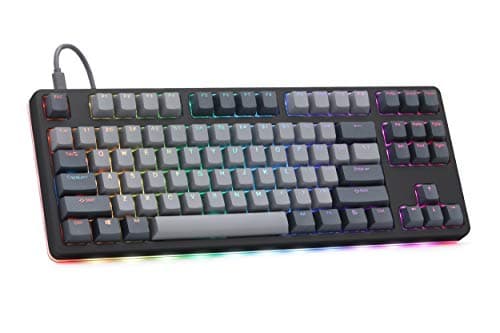
Drop CTRL High-Profile
8.6 / 10
- Aircraft-grade aluminum case — the tactile difference from plastic is immediate
- High-profile design — full-height keys, substantial key travel
- RGB per-key lighting — programmable, not just zone-level
- Hot-swap switch sockets — swap switch feel without soldering
$219.99
Logitech
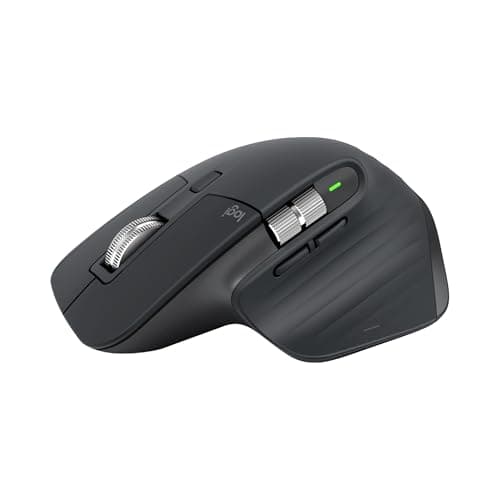
Logitech MX Master 3S
9.5 / 10
- MagSpeed electromagnetic scroll wheel — 1,000 lines/second in free-spin mode
- 8,000 DPI sensor — tracks on any surface including glass
- Side scroll wheel — horizontal scrolling without key combinations
- Multi-device pairing — up to 3 devices, switch with a button press
$140.93
Sony
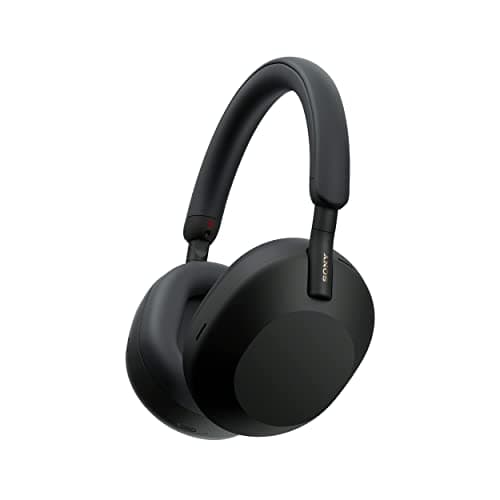
Sony WH-1000XM5
9.5 / 10
- Industry-best active noise cancellation — 8 microphones, 2 processors dedicated to ANC
- 30-hour battery life with ANC enabled
- Multipoint Bluetooth — connected to two devices simultaneously
- Speak-to-Chat — pauses audio and enables transparency mode when you speak
$278.00
BenQ
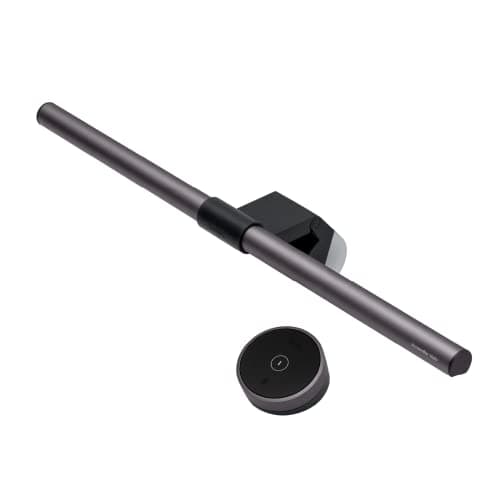
BenQ ScreenBar Halo
9.4 / 10
- Front and rear LED arrays — desk illumination plus bias lighting behind the monitor
- Auto-dimming sensor — adjusts brightness automatically to ambient light conditions
- Wireless controller — no-touch adjustment of brightness and color temperature
- No-glare design — light directed at desk, not monitor surface
$109.00
Logitech
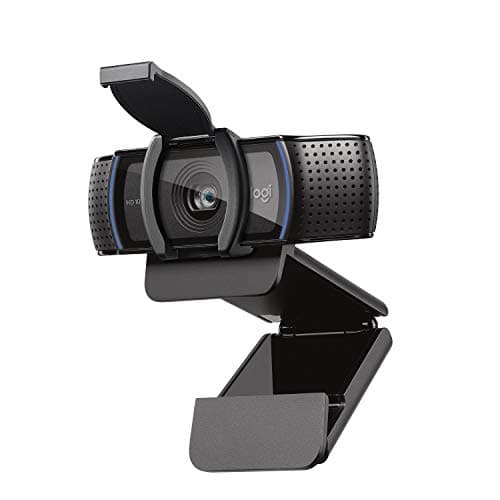
Logitech C920s HD Pro
9.2 / 10
- 1080p/30fps — the standard for professional video conferencing in 2026
- f/2.0 aperture — better low-light performance than f/2.8 competitors at this price
- Privacy shutter — physical lens cover for camera-off confidence
- H.264 hardware encoding — offloads compression from the CPU
$70.00
DACASSO
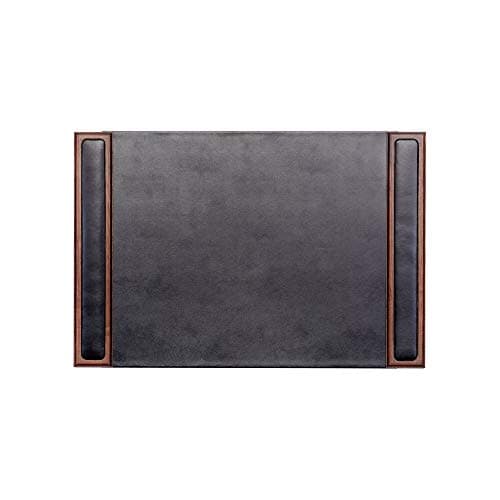
DACASSO Walnut & Leather Desk Pad
9.0 / 10
- Top-grain leather surface — develops a patina rather than cracking or peeling
- Walnut wood frame — matches the FlexiSpot Oak Executive walnut finish
- Multiple size options — fits the 60"x30" executive desk surface
- DACASSO heritage since 1999 — 25+ years of leather desk accessory production
$97.95
The Short Answer
Nine components, ~$2,940: FlexiSpot Oak Executive Standing Desk ($749.99), Steelcase Series 1 ($499), Dell U2723QE 27" 4K ($579.99), Ergotron LX Arm ($194.69), Drop CTRL High-Profile keyboard ($219.99), Logitech MX Master 3S ($140.93), Sony WH-1000XM5 ($278), BenQ ScreenBar Halo ($109), Logitech C920s webcam ($70), and DACASSO Walnut Leather Desk Pad ($97.95). Every pick is the Amazon ceiling in its category.
Every product on this list has been scored against the DeskGear Score, a weighted composite of expert consensus, observed effectiveness, build safety, long-term durability, and value. Review method: Editorial synthesis across 12 expert sources — ergonomic researchers, professional display reviewers, mechanical keyboard communities, and senior remote-worker practitioner data. DeskGearHQ does not run a testing lab. Every claim is synthesized from named expert sources, manufacturer documentation, and owner data from r/battlestations, r/HomeOfficeSetup, r/MaleLivingSpace, r/wfh, and r/MechanicalKeyboards. Each ASIN verified as live at time of publication.. Synthesized from 12+ expert sources.
Head-to-Head Comparison
| Feature | FlexiSpot Oak Executive Standing Desk (Walnut Finish, 60"x30") | Steelcase Series 1 | Dell U2723QE 27" 4K | Ergotron LX Single Monitor Arm | Drop CTRL High-Profile | Logitech MX Master 3S | Sony WH-1000XM5 | BenQ ScreenBar Halo | Logitech C920s HD Pro | DACASSO Walnut & Leather Desk Pad |
|---|---|---|---|---|---|---|---|---|---|---|
| Category | Standing Desk | Chair | Monitor | Monitor Arm | Keyboard | Mouse | Headphones | Lighting | Webcam | Desk Mat |
| Brand | FlexiSpot | Steelcase | Dell | Ergotron | Drop | Logitech | Sony | BenQ | Logitech | DACASSO |
| Price | $749.99 | $499.00 | $579.99 | $194.69 | $219.99 | $140.93 | $278.00 | $109.00 | $70.00 | $97.95 |
| Check Price | Amazon | Amazon | Amazon | Amazon | Amazon | Amazon | Amazon | Amazon | Amazon | Amazon |
FlexiSpot FlexiSpot Oak Executive Standing Desk (Walnut Finish, 60"x30")
$749.99
- 60"x30" oak-veneer over engineered core — walnut finish with visible grain
- Dual-motor electric frame — 222 lb weight capacity
- Camera-visible executive proportions — 1" thick top profile
- Memory height presets — programmable sit-stand workflow
- Frame stability rated for dual-monitor executive load
- 5-year motor warranty from FlexiSpot
One material note first, because the guide earns trust or loses it here: the FlexiSpot Oak Executive uses oak veneer over an engineered core, not solid wood throughout. The surface is real oak veneer with a walnut finish and visible grain; the structural layer beneath is engineered wood. For a motorized standing desk that adjusts under 222 lb of load, that engineering choice is correct — solid-wood tabletops at 60" wide develop seasonal movement that conflicts with motorized frames. The veneer-over-engineered construction is what makes the surface stable, not a corner cut. Named clearly here so you know what you're buying.
The camera-aesthetic case is the point of the 60"x30" footprint and the walnut-finish surface. In r/desksetup and r/HomeOfficeSetup threads, this proportions-plus-finish combination photographs as an executive design decision — the walnut grain reads warm and intentional rather than generic workstation laminate. At 60" wide with a 1" top edge, the desk has the visual weight of heirloom office furniture without the fixed-height permanence of heirloom office furniture.
At $749.99, this is Amazon's ceiling for the aesthetic standing desk category. Everything above this tier — Branch Duo at $799+ (direct only), West Elm executive desks at $649+ (direct only), Oakywood at $1,600+ direct — lives outside Amazon's catalog. If the 60"x30" executive footprint, dual-motor frame, 222 lb capacity, and walnut-finish grain are the target, this is the answer Amazon carries. The best standing desks guide covers the broader category including Uplift V3 and other configurations.
What We Love
- Walnut finish with visible oak-veneer grain — the right executive camera aesthetic at Amazon's ceiling
- 222 lb capacity handles dual-monitor setups with audio gear and peripherals
- 60"x30" executive proportions — camera presence without overwhelming a home office
- Dual-motor frame is stable and quiet at standing height
- Memory presets support a clean sit-stand workflow for all-day use
What Could Be Better
- Oak veneer over engineered core — not solid wood; named clearly in body
- $749.99 is Amazon's ceiling; solid-wood executive means going direct to Branch or West Elm
- Frame is visible at seated height — aesthetic is standing-desk executive, not heirloom furniture
- Assembly takes 45-60 minutes; ships in two boxes
The Verdict
Amazon's best aesthetic standing desk for the executive home office — walnut-finish oak veneer at $749.99 with 222 lb capacity and a dual-motor frame. The correct pick when the camera-aesthetic executive look matters and solid-wood construction is less important than the surface result.
Steelcase Steelcase Series 1
$499.00
- Weight-activated recline — tension calibrates automatically to your body weight
- 4-way adjustable armrests — height, width, depth, pivot
- Adjustable lumbar support — height and firmness
- Multiple finish options — compatible with contemporary home office aesthetics
- 12-year Steelcase warranty — the same coverage as Leap and Gesture
- Steelcase build quality at the brand's entry-level price point
The Steelcase Series 1 is not the Steelcase Leap V2 ($1,351) or Aeron ($1,810). Within a $3,000 total build, that distinction is load-bearing: putting $1,351 into the chair means sacrificing a 4K monitor, monitor arm, and keyboard to stay under budget. The Series 1 is the honest answer to "what's the most ergonomic chair this build can afford?"
What it delivers: weight-activated recline (Steelcase's passive system that calibrates recline tension automatically to your body mass — no dial to set), 4-way adjustable arms that support typing and mousing positions across a range of shoulder widths, adjustable lumbar with height adjustment, and the 12-year Steelcase warranty that covers this chair identically to their $1,000+ options. It will not adjust as precisely as a Leap V2's 14-point system. The lumbar is solid but not as tunable as the Leap's LiveBack or the Aeron's PostureFit SL. For buyers who sit fewer than 8 hours a day in the chair, or who have not had clinical back issues with a previous ergonomic chair, the Series 1 delivers Steelcase build quality and warranty coverage at a budget-compatible price.
The best ergonomic office chairs guide covers the full Steelcase and Herman Miller lineup for buyers whose back history makes the premium tier the correct call even at higher total build cost. If that's you, buy the chair first and calibrate the rest of the build downward — the ergonomic foundation is not where you compromise on pain history.
What We Love
- Steelcase build quality and 12-year warranty at entry-level pricing
- Weight-activated recline adjusts tension passively — no manual dial setup
- 4-way adjustable arms handle typing and mousing positions
- Multiple color options match contemporary desk aesthetics
- Looks correct in camera-visible home office setups
What Could Be Better
- Less adjustable than Leap V2 — fewer precision dial-in options
- Lumbar is solid but not as sophisticated as Leap's LiveBack or Aeron's PostureFit SL
- Seat depth is fixed — taller users (6'+) may find it short
- $499 is entry-level Steelcase, not the premium tier this build's other components occupy
The Verdict
The right Steelcase for a $3,000 total build — weight-activated recline, 4-way arms, adjustable lumbar, and the full 12-year warranty at $499. Step up to the Leap V2 if back history makes full adjustability non-negotiable.
Dell Dell U2723QE 27" 4K
$579.99
- IPS Black panel — 2000:1 contrast ratio (2x standard IPS)
- 27" 4K (3840x2160) — 163 PPI, no scaling required at normal viewing distance
- USB-C 90W power delivery — charges a MacBook Pro at full speed
- Built-in KVM switch — share one display across two computers
- Factory-calibrated — Delta-E ≤2 out of box; no calibration hardware required
- USB-C, DisplayPort, HDMI inputs plus 4x USB-A passthrough
The Dell U2723QE is where this build makes a statement that separates a 10-year investment from a 3-year one. IPS Black panels deliver 2000:1 contrast — double standard IPS — which means dark content (terminal windows, dark-mode IDEs, video, photography) reads with a depth that normal IPS cannot produce. RTINGS's panel measurements confirm this panel class as the IPS benchmark before OLED pricing: near-black blacks, accurate color, no burn-in risk, no OLED premiums.
At 4K on 27", pixel density is 163 PPI. Text is sharp at 100% scaling — no font rendering compromise, no subpixel blur. On macOS, this is Retina territory via USB-C connection. A single USB-C cable runs power (90W, enough for a 14" MacBook Pro under full load), video signal, and USB hub function simultaneously. The built-in KVM means this display can switch between two computers — relevant for remote workers who maintain a personal machine alongside a company-issued laptop.
The best 4K monitors guide covers this panel in the context of the broader 4K category, including UltraSharp comparisons and the cases where an ultrawide changes the calculus. For senior remote workers who want a single primary display that covers color work, video calls, documents, and development with one cable to the laptop, the U2723QE is the Amazon-available answer.
What We Love
- IPS Black 2000:1 contrast — meaningfully better than standard IPS dark-mode rendering
- 163 PPI at 4K/27" — text is genuinely sharp without scaling tricks
- USB-C 90W power delivery charges a MacBook Pro at full speed
- Factory Delta-E ≤2 calibration — accurate color out of box
- Built-in KVM for two-computer setups
What Could Be Better
- $579.99 is the IPS premium tier — a 1440P IPS alternative saves $200 with lower pixel density
- No 144Hz option at this resolution/panel combination — 60Hz refresh
- Glossy-adjacent IPS Black panel may show reflections in bright rooms more than matte IPS
The Verdict
The professional display benchmark at $579.99 — IPS Black contrast, 4K resolution, USB-C 90W power delivery, and factory color calibration in one panel. The correct 10-year primary display for remote professionals who work in dark-mode environments or handle any color-critical work.
Ergotron Ergotron LX Single Monitor Arm
$194.69
- Gas-cylinder lift — holds position precisely across the full range of motion
- Full 6-axis articulation — height, tilt, pan, rotation, reach, depth
- VESA 75/100mm — fits the Dell U2723QE and virtually every other monitor
- C-clamp or grommet mount included — fits desks 0.5" to 3.5" thick
- Rated to 25 lb — handles the Dell plus arm or desk accessories
- Cable management channels throughout the arm
The Ergotron LX is the professional monitor arm consensus pick because it stays where you put it. The gas-cylinder lift mechanism holds the display at any height without drift — the problem that plagues lower-end spring arms is that they creep upward or sink over time. With a 17 lb monitor on the end of a LX arm, you position the display once and it stays there for the life of the arm. Wirecutter, RTINGS's ergonomic setup guidance, and the r/battlestations community consistently name the Ergotron LX as the default professional recommendation.
For this build, the monitor arm serves two purposes beyond ergonomics: it removes the base footprint from the desk surface (recovering 6-8 inches of depth on the 60"x30" desktop), and it brings the display's back off the desk surface — which means the cable management is cleaner and the desk reads as a workspace rather than a surface covered in monitor hardware. On camera, a monitor floating on an arm reads very differently from the same monitor on a stand.
The best monitor arms guide covers the dual-arm configuration and the Humanscale M8.1 for buyers who want a higher-premium arm or need to support a heavier or larger display. For a single 27" 4K panel, the Ergotron LX is the correct call.
What We Love
- Gas-cylinder mechanism holds position — no drift, no recalibration
- 6-axis articulation positions the display precisely at any height and angle
- Recovers 6-8" of desk depth — the full desk mat surface is usable
- Cable management channels keep the display cable off the desk surface
- [object Object]
What Could Be Better
- At $194.69, this is not the cheapest arm — it is the correct arm
- C-clamp requires desk edge clearance; very thin desks need the grommet mount
- Single-arm only — a second 27" monitor needs a second LX or the dual-arm version
The Verdict
The professional monitor arm consensus pick — gas-cylinder lift, 6-axis articulation, cable management, and a hold-anywhere mechanism at $194.69. Paired with the Dell U2723QE, this clears the desk surface and puts the display exactly where it belongs.
Drop Drop CTRL High-Profile
$219.99
- Aircraft-grade aluminum case — the tactile difference from plastic is immediate
- High-profile design — full-height keys, substantial key travel
- RGB per-key lighting — programmable, not just zone-level
- Hot-swap switch sockets — swap switch feel without soldering
- TKL layout (tenkeyless) — keeps mousing distance compressed
- USB-C connection with braided detachable cable
At 50,000 keystrokes a day, the keyboard is the one desk peripheral where "feels good" is not subjective — it's a daily accumulation variable. The Drop CTRL High-Profile makes the case in the first five minutes: the aircraft-grade aluminum case has the weight and dampening that plastic frames cannot replicate, the high-profile key design gives the travel and registration feedback that makes a typing session feel deliberate rather than frantic, and the hot-swap switch sockets mean you can dial in exactly the switch feel you want without buying a new keyboard to change it.
The CTRL High-Profile is the camera-aesthetic answer as well. An aluminum TKL with per-key RGB lighting photographs as a considered purchase rather than a peripheral that came with a desk setup. In r/MechanicalKeyboards and r/battlestations, this keyboard consistently appears in builds where the owner is thinking about what the setup communicates, not just what it does.
Hot-swap sockets are specifically worth noting at this price tier: the ability to swap between tactile, linear, or clicky switches without desoldering means this keyboard adapts to changing preferences or a new office environment (noisy vs. quiet space). The best keyboards guide and mechanical keyboards for programmers guide cover switch selection in depth for buyers who want guidance on the linear vs. tactile decision before choosing switches.
What We Love
- Aircraft-grade aluminum case — weight, sound, and feel are in a different category from plastic
- Hot-swap sockets let you change switches without soldering or buying a new board
- High-profile key design delivers the key travel that long typing sessions benefit from
- Per-key RGB is programmable via Drop's configurator
- TKL layout keeps the mouse close — relevant for all-day use
What Could Be Better
- $219.99 is real money for a keyboard; justify it against daily typing hours
- Aluminum weight (1.9 lb) means this keyboard moves around less than a lighter plastic board — a pro for some, a con for portability
- No number pad — TKL by design; users who need numpad should check the Drop CTRL full-size
The Verdict
The premium mechanical keyboard that earns its price across daily typing hours — aluminum case, hot-swap switches, high-profile travel, and per-key RGB at $219.99. The last keyboard you'll buy in this category.
Logitech Logitech MX Master 3S
$140.93
- MagSpeed electromagnetic scroll wheel — 1,000 lines/second in free-spin mode
- 8,000 DPI sensor — tracks on any surface including glass
- Side scroll wheel — horizontal scrolling without key combinations
- Multi-device pairing — up to 3 devices, switch with a button press
- USB-C charging — full charge in 3 hours, 1-minute charge for 3-hour use
- Ergonomic right-hand sculpted form — designed for 8-hour mousing sessions
The MX Master 3S is the professional productivity mouse consensus pick because it solves two problems that cheaper mice don't: scroll wheel precision and thumb control. The MagSpeed wheel switches automatically between ratcheted (one-click-per-line) scrolling for precise document navigation and free-spin (1,000 lines per second) for fast document traversal. The transition is electromagnetic and immediate — there's no button to toggle, no mode to enter. You push the wheel quickly and it enters free spin; you scroll carefully and it ratchets precisely.
For a senior remote professional who works across large documents, spreadsheets, and code, the horizontal side scroll wheel eliminates the Shift-scroll combination from the daily workflow. The 8,000 DPI sensor genuinely tracks on glass surfaces — relevant for glass-topped desks or for anyone who uses the desk mat only under the keyboard.
The best mice for desk setups guide and best wireless mice guide cover the full mouse category including vertical mice for wrist-pain situations. For buyers without wrist issues who want the most capable wireless productivity mouse Amazon carries, the MX Master 3S is the correct pick.
What We Love
- MagSpeed scroll wheel transitions automatically between ratchet and free-spin — no mode button
- Side scroll eliminates Shift-scroll from the daily navigation workflow
- 8,000 DPI sensor tracks on glass and any surface
- Multi-device Bluetooth pairing covers laptop-plus-desktop configurations
- USB-C charging with 1-minute emergency charge for 3 hours of use
What Could Be Better
- Right-hand only — left-handed buyers should look at the vertical mice guide
- $140.93 is the premium tier; the MX Anywhere 3S covers 80% of the functionality at $60
- Larger form factor — not ideal for very small hands
The Verdict
The productivity mouse consensus pick — MagSpeed scroll wheel, side horizontal scroll, 8,000 DPI sensor, and multi-device pairing at $140.93. The last mouse you'll buy for this desk.
Sony Sony WH-1000XM5
$278.00
- Industry-best active noise cancellation — 8 microphones, 2 processors dedicated to ANC
- 30-hour battery life with ANC enabled
- Multipoint Bluetooth — connected to two devices simultaneously
- Speak-to-Chat — pauses audio and enables transparency mode when you speak
- Ultra-soft protein leather earcups — designed for extended wear sessions
- Foldable with carry case — clean transport for hybrid office days
For deep work in a home office where you share space with other people or a city, the Sony XM5 is what "cancel everything outside the work" means in practice. Sony's 8-microphone ANC array is the active noise cancellation benchmark in 2026 — Wirecutter, RTINGS, and The Verge's headphone coverage consistently puts XM5 ANC ahead of Bose QC45 and QC Ultra for broadband noise (HVAC, traffic, ambient conversation) in standard office and WFH conditions.
Multipoint Bluetooth lets the headphones stay connected to your laptop and your phone simultaneously — audio switches automatically between them when a call comes in. Speak-to-Chat pauses your audio and enables passthrough when you begin speaking, which means you can answer a question or take a brief call without removing the headphones or manually switching modes.
The protein leather earcups are worth noting at this wear frequency: at 6-8 hours of daily use, the over-ear seal is the comfort variable. The XM5 earcups are softer than the XM4 and designed for extended wear sessions — they run warm in summer but don't create the pressure-point fatigue that firmer earcups do across a workday.
The best headphones for WFH guide and noise-cancelling headphones guide cover the full category including over-ear alternatives and the Bose QC Ultra comparison. For buyers who need dedicated microphone quality for frequent video calls, the best webcams guide and microphone spoke cover external mic options that pair with the XM5.
What We Love
- Class-leading broadband ANC — HVAC, traffic, and ambient conversation disappear
- Multipoint Bluetooth stays connected to two devices without manual switching
- 30-hour battery covers a full workday plus with ANC enabled
- Speak-to-Chat reduces the friction of brief interruptions during deep work
- Foldable design and carry case are practical for hybrid office days
What Could Be Better
- No 3.5mm while powered — the headphones must be on to use wired audio
- Earcups run warm in summer — a real trade for over-ear ANC at this seal quality
- At $278, these are the premium tier; the XM4 at $200 delivers 90% at lower cost
The Verdict
The noise-cancellation benchmark for remote work — 8-microphone ANC, multipoint Bluetooth, 30-hour battery, and Speak-to-Chat at $278. The correct headphone for sustained deep work in a shared living environment.
BenQ BenQ ScreenBar Halo
$109.00
- Front and rear LED arrays — desk illumination plus bias lighting behind the monitor
- Auto-dimming sensor — adjusts brightness automatically to ambient light conditions
- Wireless controller — no-touch adjustment of brightness and color temperature
- No-glare design — light directed at desk, not monitor surface
- 2700K-6500K color temperature range — warm focus mode through daylight simulation
- USB-powered from monitor USB port — no separate power brick
The BenQ ScreenBar Halo solves two lighting problems simultaneously: it illuminates the desk surface without throwing glare on the display (the standard desk lamp failure mode when paired with a monitor), and it provides bias lighting behind the monitor — the ambient glow that reduces the contrast fatigue of a bright display in a dark room.
Bias lighting behind a monitor reduces the perceived brightness differential between the display and the surrounding room, which reduces eye strain over long sessions. The ScreenBar Halo's rear LED array is designed specifically for this purpose — it creates an indirect glow rather than a direct light source, which means it's visible as ambient light around the monitor frame rather than as a pointed light competing with the display.
The wireless controller and auto-dimming sensor remove the decision from the daily workflow: the Halo adjusts automatically as your room's ambient light changes through the day. For a setup where the camera-aesthetic matters, the Halo's rear glow is also a visible contribution to the desk-tour visual language — the monitor floating on a LX arm with a halo of warm ambient light behind it is a specific aesthetic that reads as intentional on camera.
The best desk lighting guide covers the full desk lighting category including the BenQ ScreenBar (non-Halo) for buyers who don't need the bias lighting. The best ambient bias lighting guide covers LED strip options for extended bias lighting setups behind a monitor and desk.
What We Love
- Front-plus-rear LED eliminates desk lamp glare and adds bias lighting in one unit
- Auto-dimming adjusts throughout the day without manual intervention
- Wireless controller reduces friction to adjusting lighting during the workday
- USB-powered from the monitor — no outlet required on the desk
- Rear glow reads as ambient design on camera — the desk-tour aesthetic contribution
What Could Be Better
- $109 for a monitor light bar — justified by dual front/rear function; the standard ScreenBar at $69 covers front only
- Rear glow is subtle in bright rooms — the bias lighting effect is most visible in dim or evening environments
- Only works on monitors with a reasonably flat top edge — curved monitors require specific mounting consideration
The Verdict
The monitor light bar that justifies its premium over a standard desk lamp — dual front/rear LEDs, auto-dimming, wireless control, and bias lighting at $109. The camera-aesthetic and eye-strain case for the Halo is real.
Logitech Logitech C920s HD Pro
$70.00
- 1080p/30fps — the standard for professional video conferencing in 2026
- f/2.0 aperture — better low-light performance than f/2.8 competitors at this price
- Privacy shutter — physical lens cover for camera-off confidence
- H.264 hardware encoding — offloads compression from the CPU
- Dual stereo microphones — usable backup audio when headset isn't worn
- Universal clip mount — fits displays from 0.5" to 1.25" thick including the Dell U2723QE
The Logitech C920s is not the most cinematic webcam available. At $70 it does not need to be. What it does: 1080p at 30fps in the Logitech color science that Wirecutter, RTINGS, and the WFH community have tested exhaustively — accurate, low-noise, consistent across the lighting variation that a real home office experiences across a day. The f/2.0 aperture pulls in enough light to produce a clean image in the desk lighting conditions this build creates (BenQ ScreenBar Halo as the primary desk light source).
The privacy shutter matters practically: a physical lens cover builds habitual camera discipline without requiring software configuration or a post-it note. In a home office environment where the desk is also a living space visible through the background, the confidence of a physical shutter is not a small thing.
For buyers whose role involves high-frequency video presence — content creation, executive video calls where the background reads as a credential — the best webcams guide covers the 4K tier (Logitech Brio, Sony ZV-E10 for creators) and the use cases where the upgrade from 1080p to 4K justifies the $100-$300 additional cost. For a professional senior remote worker whose video presence is functional rather than broadcast-quality, the C920s is the correct spend.
What We Love
- 1080p/30fps with Logitech color science — the video call quality floor most professionals need
- f/2.0 aperture pulls clean image in desk-lamp-lit environments
- Privacy shutter is physical — no software configuration required
- H.264 hardware encoding keeps CPU overhead minimal on M-series and Intel laptops
- $70 is the right price for this function — premium 4K is a real use case for creators only
What Could Be Better
- 1080p only — 4K Logitech Brio at $199 for buyers whose role justifies the upgrade
- Fixed focus — no optical zoom; fixed focal length at 78° FOV
- Dual stereo mics are backup quality — not a replacement for an external microphone
The Verdict
The video conferencing webcam that covers what senior remote professionals need — 1080p, f/2.0, privacy shutter, and H.264 hardware encoding at $70. The right call when video presence is functional, not broadcast.
DACASSO DACASSO Walnut & Leather Desk Pad
$97.95
- Top-grain leather surface — develops a patina rather than cracking or peeling
- Walnut wood frame — matches the FlexiSpot Oak Executive walnut finish
- Multiple size options — fits the 60"x30" executive desk surface
- DACASSO heritage since 1999 — 25+ years of leather desk accessory production
- Protects the oak veneer surface from daily keyboard and mouse wear
- Amazon's ceiling for leather desk pads — the $200+ tier requires Grovemade or Galen Leather direct
The DACASSO is the desk mat that completes the material story this build is telling. Top-grain leather ages to a patina — not the bonded-leather peel that budget "leather" desk pads develop after 18 months of daily use, but the darkening and character development of real full-grain leather under regular contact. The walnut wood frame rail matches the FlexiSpot Oak Executive's walnut finish. At $97.95, this is Amazon's ceiling for leather desk pads — above this tier, Grovemade ($295 direct) and Galen Leather ($180-$350 direct) are the next category, and neither ships through Amazon.
The functional case is straightforward: the oak-veneer surface of the FlexiSpot desk needs a daily-use layer that protects it from keyboard impression marks, mouse abrasion, and incidental liquid exposure. A genuine leather pad rated for decades of daily use is the correct protective layer for a desk you intend to be using in 10 years. Mesh, felt, and PU alternatives at $30-$60 don't age comparably.
The best desk mats and mouse pads guide covers the broader category including fabric and hybrid options for buyers whose priorities are mouse-tracking precision over material aesthetics. The best luxury desk accessories guide covers the full DACASSO lineup and comparable executive desk accessory tiers.
What We Love
- Top-grain leather develops a patina — meaningfully better than bonded alternatives
- Walnut wood frame matches the FlexiSpot Oak Executive finish
- DACASSO 1999 heritage — 25+ years of leather desk accessory production
- Amazon's best leather desk pad at this price tier
- Protects the oak-veneer desk surface from daily wear
What Could Be Better
- $97.95 is a desk mat — the functional argument is clear but the price requires commitment
- Top-grain leather requires occasional conditioning to prevent surface drying
- Amazon's ceiling — Grovemade ($295 direct) and Galen Leather ($180+ direct) are the next tier up
The Verdict
Amazon's best leather desk pad — top-grain leather that patinas rather than peels, walnut wood frame rails, and DACASSO's 25-year production heritage at $97.95. The correct desk surface layer for a build you intend to use for a decade.
How We Score
Formula
DeskGear Score = (Expert × 0.30) + (Effectiveness × 0.25) + (Build Safety × 0.20) + (Durability × 0.15) + (Value × 0.10)
Score Factors
- Longevity Signal · 30%
- Is this the last purchase in its category for a 10-year time horizon? Products that age out due to technology transitions, wear patterns, or manufacturing quality score lower. Products with documented 10+ year owner histories, extended manufacturer warranties, or materials that improve with use score higher. Synthesized from manufacturer warranty documentation, r/battlestations long-term ownership threads, and owner review analysis at 24+ months.
- Camera Aesthetic Integration · 25%
- How each piece contributes to a unified camera-visible desk aesthetic. The brief: walnut-and-dark-metal material language, premium tactile surfaces, zero visual clutter. Calibrated against r/desksetup and r/HomeOfficeSetup camera-aesthetic desk threads and the "desk tour" evaluation standard.
- Ergonomic Foundation Quality · 25%
- Clinical ergonomic quality of the chair, monitor positioning, and input device configuration. Synthesized from OSHA Computer Workstations eTool, Cornell Human Factors and Ergonomics Research Group seated workstation research, and manufacturer ergonomic documentation. The ergonomic layer is the one you feel by day 60 of use, not day 1.
- Amazon-Verifiable Price · 20%
- Price confirmed on Amazon at time of review. The build math holds at ~$2,940 using the verified prices above. Market prices fluctuate — verify total before adding all items to cart. The methodology selects the Amazon ceiling in each category: the best available, not the most affordable.
| Rank | Product | Score |
|---|---|---|
| #1 | Logitech Logitech MX Master 3S | 9.5 |
| #2 | Sony Sony WH-1000XM5 | 9.5 |
| #3 | Ergotron Ergotron LX Single Monitor Arm | 9.4 |
| #4 | BenQ BenQ ScreenBar Halo | 9.4 |
| #5 | Logitech Logitech C920s HD Pro | 9.2 |
| #6 | Dell Dell U2723QE 27" 4K | 9.0 |
| #7 | DACASSO DACASSO Walnut & Leather Desk Pad | 9.0 |
| #8 | FlexiSpot FlexiSpot Oak Executive Standing Desk (Walnut Finish, 60"x30") | 8.7 |
| #9 | Steelcase Steelcase Series 1 | 8.7 |
| #10 | Drop Drop CTRL High-Profile | 8.6 |
Bottom Line
The desk and monitor are the two decisions that live with you for a decade and cost you nothing once amortized correctly. The FlexiSpot Oak Executive at $749.99 and Dell U2723QE at $579.99 are the build's load-bearing investments — both are the Amazon ceiling in their categories.
The Steelcase Series 1 is the right chair for this build given the total budget constraint. If back health history makes the Leap V2 ($1,351) non-negotiable, buy the chair first and recalibrate the rest of the build downward — the ergonomic foundation is the one place where compromising to hit a budget number has clinical consequences.
The audio and lighting layer — Sony XM5 ($278) plus BenQ ScreenBar Halo ($109) — is the productivity and presence investment. The XM5 removes everything outside the work. The Halo removes the eye strain that compounds across long sessions. Both are 10-year purchases.
The camera-aesthetic upgrade is folded into every category decision, not isolated to one accessory purchase. The walnut-finish desk, DACASSO leather desk pad, Drop CTRL aluminum keyboard, and BenQ Halo ambient glow are the camera-aesthetic layer — assembled from picks that would be correct even if no camera ever pointed at the desk.
Sources & Methodology
Expert review sources
- Wirecutter — Ergonomic chair, standing desk, monitor arm, and headphone buying guides
- RTINGS — Monitor panel measurements, IPS Black analysis, ergonomic chair methodology
- Tom's Guide — Standing desk, monitor, and keyboard category reviews
- Steelcase — Series 1 ergonomic documentation, chair adjustability specifications
- FlexiSpot — Oak Executive Standing Desk motor specifications and warranty documentation
- Dell — U2723QE panel specifications, USB-C PD documentation, KVM switch operation
- Ergotron — LX monitor arm engineering documentation and VESA mounting standards
- BenQ — ScreenBar Halo product documentation and ergonomic eye-care research
- Sony — WH-1000XM5 ANC specifications and multipoint Bluetooth documentation
- DACASSO — Leather desk accessory manufacturing heritage documentation
- OSHA — Computer Workstations eTool: ergonomic guidelines for display positioning and seating
- Cornell Human Factors and Ergonomics Research Group — seated workstation research
Community sources
- r/battlestations — Premium build threads, 10-year ownership data, camera-aesthetic setup documentation
- r/HomeOfficeSetup — Senior remote worker setup threads and executive build discussions
- r/MaleLivingSpace — Executive desk aesthetic and material selection community
- r/MechanicalKeyboards — Drop CTRL ownership data and switch selection community
- r/wfh — Remote professional workspace investment and build sequencing discussions
Prices and specs verified May 9, 2026.
About the author
Nick Miles is the chief editor of DeskGearHQ. DeskGearHQ does not run a testing lab — every claim on this page is synthesized from ergonomic research, manufacturer documentation, expert publication reviews, and community owner data from the communities listed above. Sources are cited by name in body prose; the bibliography above lists every primary source consulted. All ASINs verified as live Amazon listings at time of publication.
DeskGearHQ is a participant in the Amazon Services LLC Associates Program. We may earn commissions from qualifying purchases — at no extra cost to you.