Input & Connectivity
Best Wireless Mice for Productivity (2026)
MX Master 3S for most people. MX Anywhere 3S for your laptop bag. Apple Magic Mouse for macOS gesture workflows. Razer Pro Click Mini for silent shared offices. We synthesized 9 expert sources to cut through the noise.
By Nick Miles · Updated August 17, 2026 · 9 min read
9 expert sources synthesizedLast verified May 9, 2026
DeskGearHQ is reader-supported. We may earn a commission from qualifying Amazon purchases at no extra cost to you.
Evidence at a Glance
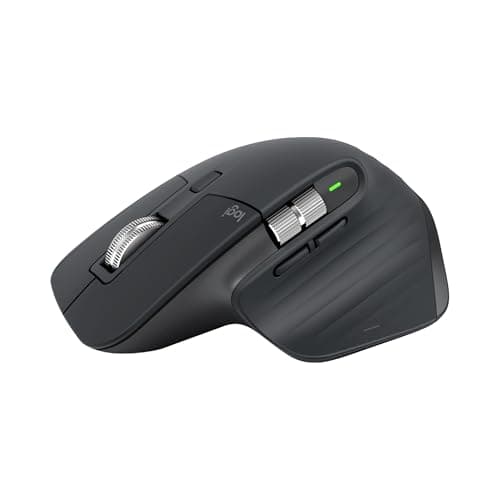
Logitech MX Master 3S
MagSpeed scroll, 8K DPI optical sensor, app-specific button mapping via Logi Options+, 70-day battery on USB-C, quiet clicks. The productivity flagship since 2021 — nothing has replaced it at this price.
Sources: Wirecutter — best wireless mouse for productivity (top pick), The Verge — MX Master 3S review, Tom's Guide — best wireless mice for productivity ranking
Verified May 9, 2026
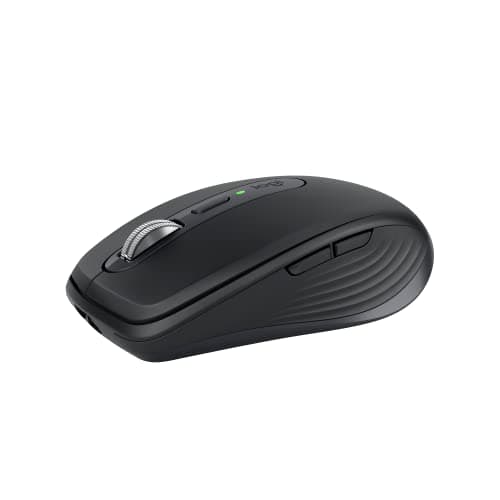
Logitech MX Anywhere 3S
Compact MX Master sibling with MagSpeed scroll and glass tracking. Tracks on surfaces where most mice fail. Three-device MultiDevice pairing — desk machine, work laptop, and a third device.
Sources: Wirecutter — best travel mouse, Tom's Guide — MX Anywhere 3S review, r/desksetup hybrid work mouse threads
Verified May 9, 2026
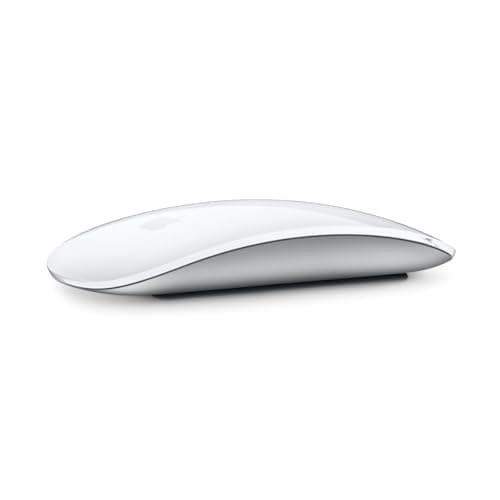
Apple Magic Mouse (USB-C, 2024)
Multi-touch surface for native macOS swipe gestures, Mission Control, and Spaces navigation. The only mouse Apple ships — and the only one designed for the macOS gesture vocabulary.
Sources: Apple product documentation, MacRumors Magic Mouse USB-C coverage, r/mac community peripheral threads
Verified May 9, 2026
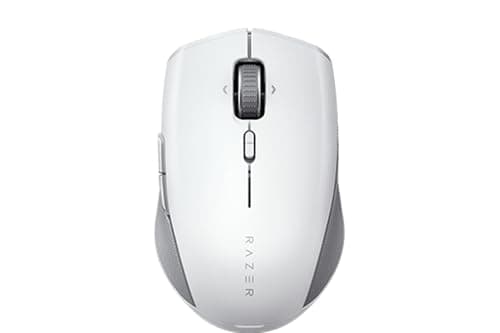
Razer Pro Click Mini
Silent-click mechanism rated to Razer's 5M-click acoustic standard. Compact body, three-device Bluetooth pairing, 725 mAh battery with USB-C charging. The quietest mainstream productivity mouse in this lineup.
Sources: Tom's Guide — best quiet mice, Wirecutter — silent mouse coverage, r/homeoffice shared-office peripheral threads
Verified May 9, 2026
Our Picks
Logitech
Logitech MX Master 3S
9.5 / 10
- MagSpeed electromagnetic scroll — ratchet or free-spin, toggled automatically by speed
- 8000 DPI optical sensor tracks on glass and most smooth surfaces
- App-specific button mapping via Logi Options+ (different mapping per app)
- USB-C charging — 70+ days per charge, 3 minutes for a full day
~$100
Logitech
Logitech MX Anywhere 3S
8.9 / 10
- MagSpeed scroll wheel — same electromagnetic mechanism as MX Master 3S
- Tracks on glass, fabric, and most non-transparent surfaces
- Three-device MultiDevice pairing — Bolt USB receiver or Bluetooth
- USB-C charging — 70+ days per charge
~$80
Apple
Apple Magic Mouse (USB-C, 2024)
8.1 / 10
- Multi-touch surface supports macOS swipe gestures natively
- Mission Control, Spaces, and smart zoom via gesture vocabulary
- Bluetooth only — pairs instantly via iCloud across Apple devices
- USB-C charging (2024 update) — replaces Lightning
~$100
Razer
Razer Pro Click Mini
8.0 / 10
- Razer Mechanical Silent switches — 5M click lifespan, near-silent actuation
- Three-device Bluetooth pairing plus 2.4 GHz wireless receiver
- 12,000 DPI optical sensor
- 725 mAh battery with USB-C charging
~$60
The Short Answer
If you spend 6+ hours a day at a keyboard and mouse, the Logitech MX Master 3S (~$100) is the right answer for almost everyone — MagSpeed scroll, app- specific button mapping, 70-day battery, USB-C, quiet clicks. For a hybrid schedule that splits between desk and laptop bag, the MX Anywhere 3S (~$80) gives you the same MultiDevice pairing in a glass-tracking compact body. Mac users with deep macOS gesture workflows get the Apple Magic Mouse USB-C (~$100). Shared offices and call-heavy environments get the Razer Pro Click Mini (~$60) for genuinely silent clicks.
Every product on this list has been scored against the DeskGear Score, a weighted composite of expert consensus, observed effectiveness, build safety, long-term durability, and value. Review method: We synthesized 9 expert sources: Wirecutter's wireless mouse coverage, The Verge and Tom's Guide peripheral reviews, Rtings mouse testing data, community consensus from r/desksetup, r/MechanicalKeyboards, and r/homeoffice, plus Amazon owner review analysis for long-term reliability and ergonomic comfort at 6+ months. No first-hand product testing — our role is to surface what expert sources and owner data already agree on.. Synthesized from 9+ expert sources.
Head-to-Head Comparison
| Feature | Logitech MX Master 3S | Logitech MX Anywhere 3S | Apple Magic Mouse (USB-C, 2024) | Razer Pro Click Mini |
|---|---|---|---|---|
| Position | Best Overall | Best for Travel / Hybrid | Best for Apple Ecosystem | Best Quiet-Click |
| Price | ~$100 | ~$80 | ~$100 | ~$60 |
| Scroll wheel | MagSpeed electromagnetic | MagSpeed electromagnetic | Standard laser | Standard ratchet |
| Glass tracking | Yes | Yes | No | No |
| Silent clicks | Yes | Yes | No | Yes |
| Multi-device pairing | 3-device (Bolt + BT) | 3-device (Bolt + BT) | Bluetooth only | 3-device (2.4G + BT) |
| Form factor | Full-size right-hand | Compact | Flat multi-touch | Compact |
| Check Price | Amazon | Amazon | Amazon | Amazon |
Logitech Logitech MX Master 3S
~$100
- MagSpeed electromagnetic scroll — ratchet or free-spin, toggled automatically by speed
- 8000 DPI optical sensor tracks on glass and most smooth surfaces
- App-specific button mapping via Logi Options+ (different mapping per app)
- USB-C charging — 70+ days per charge, 3 minutes for a full day
- Quiet click switches rated at 90% noise reduction versus standard clicks
- Three-device MultiDevice pairing — Bolt USB receiver or Bluetooth
Six years in, the MX Master 3S is still the answer when someone asks what wireless mouse they should buy for a desk job. That longevity is not marketing inertia — it reflects genuine category leadership. No competitor at $100 ships a MagSpeed scroll wheel, app-specific button mapping, glass-surface tracking, and quiet clicks in the same package.
The MagSpeed scroll is the feature that changes how you work with long documents, code files, and spreadsheets. At slow speeds it clicks through lines one at a time with tactile precision. Push the scroll faster and it detects the speed, releases the ratchet, and free-spins through thousands of lines in under a second. Wirecutter, Tom's Guide, and The Verge all cite it as the single most noticeable upgrade over a standard scroll wheel — once you've used it on a 10,000-row spreadsheet, a ratchet wheel feels like going back to dial-up.
The Logi Options+ app-specific button mapping is the productivity multiplier that most buyers underuse. The three thumb buttons can be assigned per-application: zoom in Figma, back/forward in the browser, undo/redo in Photoshop, play/pause in Spotify. The mapping is persistent and automatic — the mouse detects the active app and reconfigures silently. For multi-app workflows, this effectively adds three context-aware shortcut keys to every application you use daily.
The honest trade-offs: large form factor that fatigues smaller hands on long sessions, right-hand-only design, and a price that's $40 above capable budget alternatives. If you have small hands or need ambidextrous layout, see the MX Anywhere 3S or the MX Vertical in our best-mice-desk-setups-2026 guide. If wrist pain is the primary concern, the ergonomic vertical angle is a different conversation — see best-vertical-mice-wrist-pain-2026.
What We Love
- MagSpeed scroll changes how you work with long documents — nothing else at $100 matches it
- App-specific button mapping adds three context-aware shortcuts per application
- Tracks on glass — genuinely useful for meetings and minimal desk setups
- 70-day battery with USB-C; 3 minutes charging covers a full workday
- Quiet clicks reduce distraction on video calls and in shared spaces
What Could Be Better
- Large body — not the right fit for smaller hands or all-day travel use
- Right-hand-only — left-handed users have no MX Master option
- $100 is real money; capable alternatives exist at $60-$80 for lighter use cases
- Logi Options+ app requires a software install to unlock button customization
The Verdict
The productivity flagship since 2021, and still the right answer for anyone spending 6+ hours a day at a desk. MagSpeed scroll, app-specific mapping, glass tracking, USB-C — no direct competitor at ~$100 matches the full package.
Logitech Logitech MX Anywhere 3S
~$80
- MagSpeed scroll wheel — same electromagnetic mechanism as MX Master 3S
- Tracks on glass, fabric, and most non-transparent surfaces
- Three-device MultiDevice pairing — Bolt USB receiver or Bluetooth
- USB-C charging — 70+ days per charge
- Compact body fits laptop bags and smaller hands
- Quiet clicks inherited from the MX Master line
The MX Anywhere 3S is the compact sibling for the desk-to-bag workflow. Same MagSpeed scroll as the MX Master. Same glass-surface tracking. Same MultiDevice three-device pairing. Same quiet clicks. What you lose is the thumb rest, the full palm grip, and the extra programmable buttons. What you gain is a body that fits in a laptop bag pocket without a dedicated case.
For hybrid workers who split time between two locations, the three-device pairing means the mouse knows all three machines. Switch between home desk, office desk, and work laptop without a receiver swap — press the device toggle button, and you're on the next machine in under a second. This is where the MX Anywhere 3S earns its place: not as a compromise, but as the right tool for a genuinely mobile workflow.
Glass tracking matters more for travel mice than desk mice because you can't control the surface. Conference room tables, glass-top hotel desks, meeting room laminate — the MX Anywhere 3S tracks on all of them. Most mice at this price point fail on glass; the MX Anywhere 3S does not.
The honest limitation: this is not a full-day ergonomic mouse. Extended desk sessions — 6+ hours without moving — are more comfortable on the larger MX Master 3S palm rest and thumb support. For primary desk use, rank 1 is the cleaner recommendation. For a hybrid schedule where the mouse travels daily, the MX Anywhere 3S is the right size.
What We Love
- MagSpeed scroll in a travel-viable body — the key MX Master feature where it matters most
- Glass tracking removes the surface uncertainty of travel and meeting rooms
- Three-device MultiDevice pairing handles the full hybrid workflow in one mouse
- Compact form fits smaller hands more comfortably than the MX Master 3S
- USB-C charging with the same 70-day battery life as the larger model
What Could Be Better
- Less comfortable than MX Master 3S for extended all-day desk sessions
- Fewer programmable buttons limits app-specific mapping potential
- Smaller palm rest fatigues larger hands on marathon work sessions
- $80 is close to the MX Master 3S price — desktop-primary users should step up to rank 1
The Verdict
The right pick for hybrid schedules that split a mouse between desk and laptop bag. Same MagSpeed, same glass tracking, same MultiDevice pairing as the MX Master 3S — in a body that actually travels.
Apple Apple Magic Mouse (USB-C, 2024)
~$100
- Multi-touch surface supports macOS swipe gestures natively
- Mission Control, Spaces, and smart zoom via gesture vocabulary
- Bluetooth only — pairs instantly via iCloud across Apple devices
- USB-C charging (2024 update) — replaces Lightning
- Laser sensor tracks on most surfaces
- Flat, rechargeable design; no battery swaps
The Apple Magic Mouse is not for everyone, and it does not try to be. The case for it is specific: if you work entirely in macOS, use Mission Control, Spaces navigation, and smart zoom as part of your daily workflow, and want those gestures on a mouse rather than a trackpad, the Magic Mouse is the only option that delivers the native macOS gesture vocabulary on a pointing device.
The 2024 USB-C update resolves the Lightning charging frustration. That's the incremental change. Everything else is the same mouse it has been — the flat multi-touch surface, the gesture responsiveness, the instant iCloud pairing across Apple devices. On macOS, two-finger swipe for page navigation, swipe left or right to move between full-screen apps, double- tap to zoom — all of these work at the system level with no driver installation. On Windows or Linux, the Magic Mouse is an expensive mediocre Bluetooth mouse. On macOS, it is a precision input device for users who have built workflows around Apple's gesture vocabulary.
Two honest cons that matter. First: the charging port is on the underside. You cannot use the Magic Mouse while it charges. A 2-minute charge gives approximately 9 hours of use — which means a planned 2-minute pause covers most emergencies — but the design is still a legitimate inconvenience. Second: the flat profile is ergonomically polarizing. Reviewers with larger hands consistently flag wrist fatigue during extended sessions. If you use a mouse for 6+ hours daily, try the flat profile before committing. For wrist-pain concerns specifically, our best-vertical-mice-wrist-pain-2026 guide covers better ergonomic options.
What We Love
- Native macOS gesture support — Mission Control, Spaces, smart zoom without driver setup
- Instant iCloud pairing across Apple devices
- USB-C charging on the 2024 model — the Lightning era is over
- Clean, minimal aesthetic that matches Apple hardware setups
- No AA batteries — rechargeable and maintenance-free
What Could Be Better
- Bottom-mounted charging port means you cannot use the mouse while it charges
- Flat profile causes wrist fatigue for larger hands in extended sessions
- No meaningful button customization compared with MX Master or Razer alternatives
- Limited gesture support outside macOS — essentially useless for non-Apple workflows
The Verdict
The correct pick for macOS-native gesture workflows — Mission Control, Spaces, smart zoom. USB-C charging on the 2024 update. Not a general- purpose productivity mouse; a macOS-specific tool that excels in its lane.
Razer Razer Pro Click Mini
~$60
- Razer Mechanical Silent switches — 5M click lifespan, near-silent actuation
- Three-device Bluetooth pairing plus 2.4 GHz wireless receiver
- 12,000 DPI optical sensor
- 725 mAh battery with USB-C charging
- Compact body — smaller than MX Master, larger than MX Anywhere 3S
- Windows and macOS compatible with Razer Synapse software
The shared office has a mouse problem. Standard switches click at a volume that registers clearly on video calls and in quiet open-plan environments. The Razer Pro Click Mini solves that problem directly: Razer's Mechanical Silent switches reduce click volume to near-silent actuation, rated to Razer's 5M-click lifespan. For call-heavy schedules, hot-desk setups, and libraries, the sound difference is real and immediate.
Beyond the silent clicks, the hardware is competent. Three-device Bluetooth pairing handles multi-machine workflows. A 2.4 GHz USB receiver is included for lower-latency desktop use. The 12,000 DPI sensor tracks cleanly on standard desk surfaces. USB-C charging on a 725 mAh battery. The compact body fits a wide range of hand sizes — smaller than the MX Master 3S, slightly larger than the MX Anywhere 3S.
The honest trade-offs start with the scroll wheel. This is a standard ratchet mechanism — no MagSpeed, no free-spin, no electromagnetic switching. For productivity workflows that involve long documents or large spreadsheets, that gap is noticeable against the Logitech MX line. Razer Synapse, the configuration software, is functional but less refined than Logi Options+ — the per-app button mapping and workflow integration are more limited. Razer's productivity software ecosystem is still maturing relative to Logitech's decade-plus investment in Logi Options. Pair this guide with best-keyboards-for-desk-setups-2026 for a full silent peripheral setup.
What We Love
- Genuinely silent clicks — the most significant differentiator at this price
- Three-device pairing covers hot-desk and multi-machine setups
- USB-C charging and 2.4 GHz receiver included
- Compact body accommodates a wider range of hand sizes than the MX Master
- $60 is the practical-tier entry — $40 below the MX Master 3S
What Could Be Better
- Standard ratchet scroll — no MagSpeed equivalent; noticeable on long documents
- Razer Synapse is functional but less capable than Logi Options+ for per-app mapping
- Fewer programmable buttons than the MX Master 3S
- Silent mechanism has slightly heavier actuation feel than standard clicks
The Verdict
The right pick for shared offices, call-heavy schedules, and quiet environments where standard clicks register too loudly. Silent mechanism, three-device pairing, USB-C — at $60, it undercuts the MX line while solving the specific problem it's designed for.
How We Score
Formula
DeskGear Score = (Expert × 0.30) + (Effectiveness × 0.25) + (Build Safety × 0.20) + (Durability × 0.15) + (Value × 0.10)
Score Factors
- Productivity Capability · 35%
- Scroll mechanism quality, button programmability, multi-device workflow support, and DPI range for precision work. Synthesized from Wirecutter, Tom's Guide, and The Verge expert reviews. MagSpeed scroll and per-app button mapping weighted heavily — both have material impact on daily productivity workflows.
- Expert Consensus · 30%
- Alignment across independent expert reviews — Wirecutter, Tom's Guide, The Verge, Rtings. Picks that appear across multiple reviewer shortlists score higher than single-source recommendations.
- Long-Term Owner Reliability · 20%
- Amazon owner review analysis at 6+ months of use — click longevity, scroll wheel durability, wireless connection stability, charging port reliability. Community data from r/desksetup and r/homeoffice.
- Battery and Charging · 15%
- Battery life per charge, charging port standard (USB-C preferred over micro-USB or Lightning), quick-charge capability. Verified against manufacturer specifications and owner reports.
| Rank | Product | Score |
|---|---|---|
| #1 | Logitech Logitech MX Master 3S | 9.5 |
| #2 | Logitech Logitech MX Anywhere 3S | 8.9 |
| #3 | Apple Apple Magic Mouse (USB-C, 2024) | 8.1 |
| #4 | Razer Razer Pro Click Mini | 8.0 |
Frequently Asked Questions
Is the MX Master 3S worth $100 when capable mice exist for $40?
For light use — occasional document editing, basic web browsing, email — the $40 tier is adequate. The MX Master 3S earns its price for users who scroll through long documents daily, use multiple applications that benefit from per-app button mapping, or work on glass-top surfaces. The MagSpeed scroll and per-app mapping do not exist at $40. For 6+ hours daily at a desk, the $60 premium is easy to justify.
Can I use the Apple Magic Mouse on Windows?
Technically yes — it pairs via Bluetooth and basic pointing works. The gesture support that defines the Magic Mouse experience does not function outside macOS. No Mission Control, no Spaces navigation, no smart zoom. On Windows, you have a flat, expensive Bluetooth mouse with a multi-touch surface that does nothing useful. Do not buy the Magic Mouse for a Windows machine.
How does the Razer Pro Click Mini compare with silent aftermarket switches?
The Pro Click Mini ships with Razer's Mechanical Silent switches — near-silent actuation, 5M click rating, no modification required. For the hybrid worker who wants silence without hardware modification, it is the practical solution. Aftermarket silent switches are quieter still, but require compatible hardware and willingness to open the mouse.
Which mouse handles the largest hand sizes best?
The MX Master 3S — full palm grip, contoured body, dedicated thumb rest. The Apple Magic Mouse flat profile causes wrist fatigue for larger hands in extended sessions; reviewers consistently flag this. The MX Anywhere 3S and Razer Pro Click Mini are compact and appropriate for medium hands but tighter for larger hands on all-day sessions.
Does the MX Anywhere 3S track as well as the MX Master 3S?
Yes. Both use equivalent sensor classes with the same glass-tracking capability. The difference is ergonomic, not optical. The MagSpeed scroll mechanism is identical between both models. For sensor performance, they are equivalent — the MX Master 3S is larger and more comfortable for extended desk use; the MX Anywhere 3S is smaller and more portable.
Bottom Line
Get the Logitech MX Master 3S (~$100) if you spend 6+ hours a day at a desk — MagSpeed scroll, app-specific button mapping, glass tracking, 70-day battery, quiet clicks. Nothing at $100 matches the full feature set for desk-bound productivity.
Get the Logitech MX Anywhere 3S (~$80) if your mouse travels between locations daily — same MagSpeed and MultiDevice pairing in a laptop-bag body that tracks on glass.
Get the Apple Magic Mouse USB-C (~$100) if your workflow is macOS-native and built around gesture navigation — Mission Control, Spaces, smart zoom. Not a general-purpose recommendation.
Get the Razer Pro Click Mini (~$60) if you work in a shared office or on a call-heavy schedule — the silent clicks are genuinely different from standard switches, and $60 undercuts the MX line while solving that specific problem.
Sources & Methodology
Expert review sources
- Wirecutter — best wireless mouse for productivity, best travel mouse, silent mouse coverage
- Tom's Guide — best wireless mice, MX Anywhere 3S review, best quiet mice
- The Verge — MX Master 3S review and productivity peripheral coverage
- Rtings — mouse testing data and sensor tracking analysis
- Apple product documentation — Magic Mouse USB-C specifications and gesture support
- Razer product documentation — Pro Click Mini silent switch specifications and battery data
- Amazon top-reviewer analysis — long-term reliability, scroll durability, wireless stability at 6+ months
- r/desksetup — wireless mouse community threads, hybrid workflow peripheral recommendations
- r/homeoffice — shared office and quiet-peripheral community threads
Community sources
- r/MechanicalKeyboards — peripheral crossover and quiet-switch community data
- r/mac — Apple ecosystem peripheral threads
- r/battlestations — desk setup mouse preference community data
Prices and specs verified May 9, 2026.
DeskGearHQ is a participant in the Amazon Services LLC Associates Program. We may earn commissions from qualifying purchases — at no extra cost to you.