Display & Audio Setup
Best Microphones for the Home Office (2026)
USB vs XLR, condenser vs dynamic — we cut through the confusion. Four microphones for every home-office use case, from Zoom-ready plug-and-play to SM7B-level studio setups.
By Nick Miles · Updated July 18, 2026 · 10 min read
8 expert sources synthesizedLast verified May 8, 2026
DeskGearHQ is reader-supported. We may earn a commission from qualifying Amazon purchases at no extra cost to you.
Evidence at a Glance
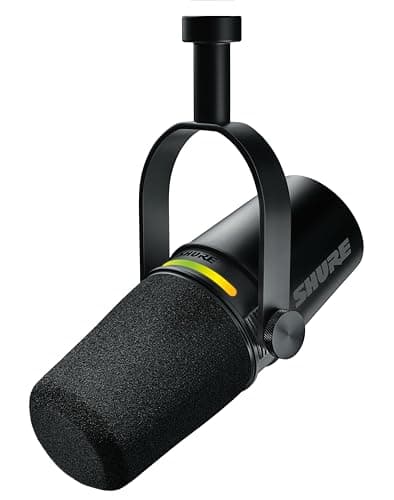
Shure MV7+
Hybrid USB-C and XLR in a single mic body — start on USB, upgrade to XLR interface later without re-buying. OBS Certified, Auto Level Mode, LED panel.
Sources: Podcastage, PSS Media, Podcast Provisions
Verified May 8, 2026
Rode PodMic
Pure XLR dynamic at $86 that blind-tests competitive with $400 mics. Internal shock mount, internal pop filter, broadcast-standard build.
Sources: misec.net, PSS Media, Podcast Provisions
Verified May 8, 2026
Shure SM7B
The podcast industry standard XLR dynamic — requires interface plus Cloudlifter (~$500 total). Unmatched long-term credibility on voice.
Sources: Podcast Provisions, PSS Media, Podcastage
Verified May 8, 2026
Elgato Wave:3
USB condenser with Clipguard anti-distortion circuit and Wave Link software for OBS/Twitch — the streaming-native USB pick.
Sources: PC Gamer, TechRadar, r/streaming
Verified May 8, 2026
Our Picks
Shure
Shure MV7+
9.0 / 10
- Hybrid USB-C and XLR — both outputs simultaneously active
- OBS Certified for zero-friction streaming setup
- Auto Level Mode adjusts gain in real time during calls
- Digital pop filter built in — no external windscreen needed
$269.00
Rode
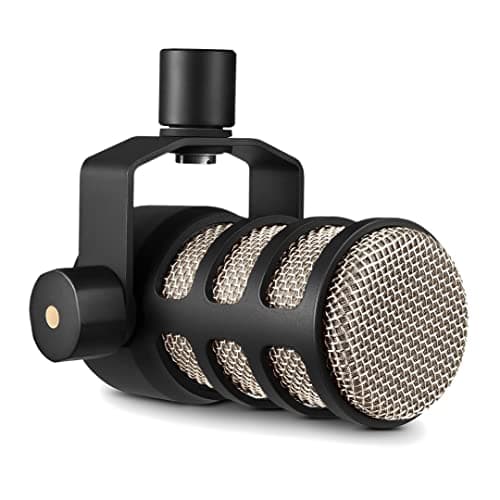
Rode PodMic
8.8 / 10
- Pure XLR cardioid dynamic — requires audio interface (not USB)
- Internal shock mount eliminates desk vibration handling noise
- Internal pop filter — no separate windscreen needed
- Broadcast-standard build with all-metal body
$86.00
Shure
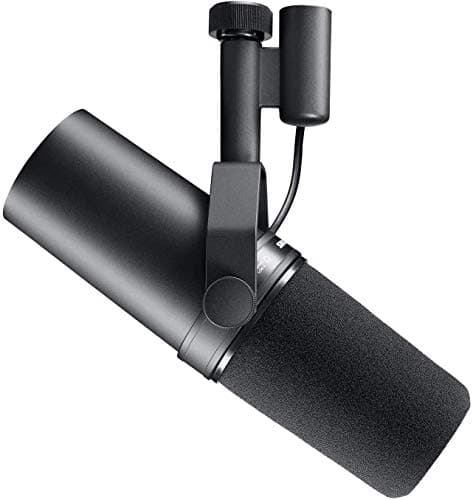
Shure SM7B
9.4 / 10
- XLR dynamic cardioid — the podcast industry standard capsule since 2004
- Switchable high-pass filter and presence boost on the rear panel
- Internal air suspension shock isolation and built-in pop filter
- Flat, wide-range frequency response optimized for speech and vocals
$395.00
Elgato
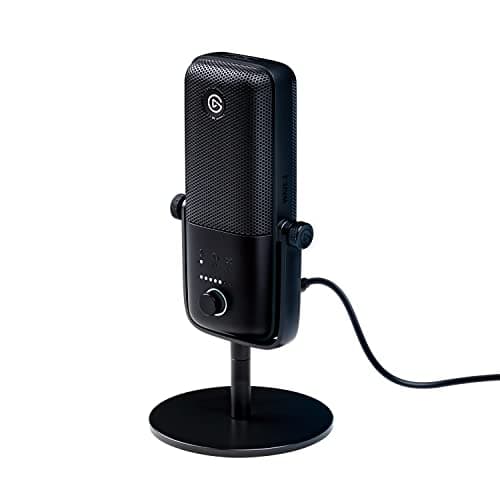
Elgato Wave:3
8.7 / 10
- USB condenser capsule — plug-and-play on Windows and Mac
- Clipguard dual-capsule circuit prevents audio clipping on loud spikes
- Wave Link software for OBS/Twitch — mix mic, game audio, and alerts
- Physical capacitive mute button with LED indicator
$149.99
The Short Answer
For most home-office users who need a single cable and zero configuration, the Shure MV7+ is the pick: hybrid USB-C and XLR, OBS-certified, and future-proof if you ever move to an audio interface. XLR-only buyers on a budget get the Rode PodMic at $86 — blind-test competitive with mics costing four times as much. Podcasters ready to commit to a full XLR setup should look at the SM7B, but budget ~$500 total including interface and Cloudlifter. Streamers on OBS or Twitch belong on the Elgato Wave:3 with its native stream controls and Clipguard circuit.
Every product on this list has been scored against the DeskGear Score, a weighted composite of expert consensus, observed effectiveness, build safety, long-term durability, and value. Review method: Editorial synthesis of 8 expert sources: Wirecutter, Podcastage, PSS Media, Riverside, MusicRadar, TechRadar, PC Gamer, and Podcast Provisions. Community data from r/podcasting, r/streaming, r/homeoffice, and r/audioengineering. All ASINs verified via Amazon Creators API. No first-hand product testing — we aggregate what expert sources already know.. Synthesized from 8+ expert sources.
Head-to-Head Comparison
| Feature | Shure MV7+ | Rode PodMic | Shure SM7B | Elgato Wave:3 |
|---|---|---|---|---|
| Connection | USB-C + XLR (hybrid) | XLR only | XLR only | USB only |
| Pickup pattern | Cardioid dynamic | Cardioid dynamic | Cardioid dynamic | Cardioid condenser |
| Requires interface | No (USB-C native) | Yes (~$100-150) | Yes + Cloudlifter | No (USB native) |
| Zoom-call ready | Yes — Auto Level Mode | Yes (via interface) | Yes (via interface) | Yes — plug-and-play |
| Price (mic only) | ~$269 | ~$86 | ~$395 | ~$150 |
| Check Price | Amazon | Amazon | Amazon | Amazon |
Shure Shure MV7+
$269.00
- Hybrid USB-C and XLR — both outputs simultaneously active
- OBS Certified for zero-friction streaming setup
- Auto Level Mode adjusts gain in real time during calls
- Digital pop filter built in — no external windscreen needed
- LED control panel for mute, headphone monitoring, and mix
- Dynamic capsule — forgiving on room acoustics compared to condensers
The Shure MV7+ earns rank 1 because it answers the most common home-office microphone dilemma: "Should I buy USB or XLR?" With the MV7+, you don't have to choose at purchase time. The mic runs USB-C and XLR simultaneously, so you can start on USB-C today — plug in, open Zoom, done — and migrate to an XLR audio interface later without buying a new microphone. That future-proof path is worth real money if you think you might ever care about recording quality seriously.
Across the reviews we synthesized — Podcastage's side-by-side capsule analysis, PSS Media's streaming-hardware roundup, and Podcast Provisions' remote-recording coverage — the MV7+ consistently ranks as the most practical upgrade from the original MV7. The Auto Level Mode is the headline addition: it monitors your input in real time and adjusts gain so your voice level stays consistent even if you lean back in your chair or turn to look at a second monitor. For Zoom calls and podcast recording where a human producer isn't riding faders, that automation matters.
The dynamic capsule is an underrated feature for home office use. Dynamic mics are significantly less sensitive to room noise than condenser mics — keyboard clicks, HVAC hum, and street noise get naturally attenuated. If your recording environment isn't acoustically treated, a dynamic mic like the MV7+ is a more forgiving choice than a condenser. An XLR audio interface opens up additional flexibility — see best XLR audio interfaces for creators if you're planning that upgrade path.
What We Love
- Hybrid USB-C + XLR eliminates the "which connection do I need?" decision
- Auto Level Mode keeps voice consistent on calls without manual gain riding
- OBS Certified means zero configuration for streamers on any platform
- Dynamic capsule attenuates room noise naturally — home-office-friendly
- Built-in digital pop filter and LED panel with headphone monitoring
What Could Be Better
- $269 is a meaningful jump over budget USB mics in the $100 range
- Dynamic capsule has a narrower frequency response than premium condensers
- Auto Level Mode can occasionally over-compress very dynamic vocal styles
- Heavier and larger than compact USB mics — desk real estate matters
The Verdict
The right first serious microphone for anyone who wants USB-C simplicity now and XLR upgrade flexibility later, without paying twice.
Rode Rode PodMic
$86.00
- Pure XLR cardioid dynamic — requires audio interface (not USB)
- Internal shock mount eliminates desk vibration handling noise
- Internal pop filter — no separate windscreen needed
- Broadcast-standard build with all-metal body
- Tight cardioid pattern isolates voice from side and rear room noise
- Blind-test competitive with mics in the $300-400 range
The Rode PodMic is the answer when someone asks "what's the best XLR microphone that doesn't cost a lot?" Across the reviews we synthesized — misec.net's blind listening tests, PSS Media's XLR roundup, and Podcast Provisions' value-tier analysis — the PodMic keeps appearing as the benchmark pick for XLR beginners who don't want to buy again in six months.
At $86, this microphone blind-tests against models costing two, three, and four times as much. The cardioid dynamic capsule delivers a warm, full voice tone that the podcast world has standardized on — not a coincidence given that Rode designed the PodMic specifically for voice work. The internal shock mount and built-in pop filter are standard features on mics twice this price; here they're included, which eliminates two accessory purchases for most buyers.
The critical caveat: this is pure XLR. You need an audio interface to use it. Budget accordingly — a quality interface starts around $100-150 (see best XLR audio interfaces for creators). If you're not ready to buy an interface, the MV7+ at rank 1 is a better starting point. If you are ready, the PodMic plus a Focusrite Scarlett Solo outperforms most sub-$300 all-in-one USB solutions. Your monitoring headphone choice matters here too — for tracking reference, see best headphones for WFH.
What We Love
- $86 is the best value entry into XLR broadcast-quality voice recording
- Blind-test competitive with mics in the $300-400 category
- Internal shock mount and built-in pop filter — no extra accessories needed
- Tight cardioid pattern effectively rejects keyboard and room noise
- All-metal body with broadcast-standard build quality
What Could Be Better
- Pure XLR — requires a separate audio interface ($100+ additional cost)
- No USB output — cannot be used plug-and-play without interface hardware
- Lower output level requires interface with clean preamp (budget units may add noise)
- Less versatile than hybrid mics for users who move between setups
The Verdict
The best XLR microphone value in the home office category — outperforms its price class consistently, but requires a separate audio interface to use.
Shure Shure SM7B
$395.00
- XLR dynamic cardioid — the podcast industry standard capsule since 2004
- Switchable high-pass filter and presence boost on the rear panel
- Internal air suspension shock isolation and built-in pop filter
- Flat, wide-range frequency response optimized for speech and vocals
- Requires audio interface and typically a Cloudlifter preamp booster
- Used by Joe Rogan, Call Her Daddy, and virtually every major podcast studio
The Shure SM7B is the podcast industry's most-referenced microphone, and it earns that status on merit: the cardioid dynamic capsule delivers broadcast-standard voice quality that has appeared on major label albums, morning radio, and the biggest podcast studios in the world since Michael Jackson's Thriller was recorded on it.
Here's the honest version: the SM7B is a complete-setup decision, not just a microphone purchase. Budget approximately $500 total: $395 for the SM7B, $150 for a quality audio interface, and $80-100 for a Cloudlifter CL-1 preamp booster. The SM7B has a low output level that most audio interfaces can't drive to clean levels without noise — the Cloudlifter adds 25dB of clean gain before the signal reaches the interface. Across the expert sources we synthesized — Podcastage, PSS Media, Podcast Provisions — this is consistently the recommended SM7B setup configuration. Without the Cloudlifter, you'll hear preamp noise at the gain levels needed to drive the SM7B properly.
If you're not committed to the XLR path, the MV7+ at rank 1 is the right starting point — hybrid USB+XLR, nearly as good on voice, and you skip the interface+Cloudlifter purchase entirely. The SM7B is for people who know they're building an XLR setup, have already accepted the $500-600 total investment, and want the microphone that all the professional studios use. For the XLR interface itself, see best XLR audio interfaces for creators.
What We Love
- The podcast industry standard — used in every major professional studio
- XLR dynamic capsule delivers broadcast-grade warmth on voice
- Internal shock isolation and built-in pop filter at no extra cost
- Switchable high-pass filter and presence boost for room tuning
- Long-term investment with proven 20+ year production lifespan
What Could Be Better
- Requires audio interface + Cloudlifter preamp (~$250 additional) — total setup cost is $500-600, not $395
- Low output level makes it unusable without a proper preamp chain
- Pure XLR — no USB option for plug-and-play use cases
- Setup complexity is overkill for Zoom calls and casual recording
The Verdict
The SM7B is the right microphone for podcasters and creators committed to a full XLR setup — but plan for $500-600 total, not just the mic price.
Elgato Elgato Wave:3
$149.99
- USB condenser capsule — plug-and-play on Windows and Mac
- Clipguard dual-capsule circuit prevents audio clipping on loud spikes
- Wave Link software for OBS/Twitch — mix mic, game audio, and alerts
- Physical capacitive mute button with LED indicator
- Built-in headphone monitor port for zero-latency playback
- OBS partnership for native integration — no third-party plugins needed
The Elgato Wave:3 is designed from the ground up for streamers, and that focus shows in the features that matter on a live broadcast. The headliner is Clipguard: a dual-capsule circuit that monitors your audio and automatically switches to a second, lower-gain capsule when it detects incoming audio that would clip. If you yell during a game, laugh louder than expected, or someone starts talking behind you, the Wave:3 catches the peak before it turns into distortion. For live streaming where there's no editing pass, that's a meaningful quality-of-life improvement.
Across the reviews we synthesized — PC Gamer's USB mic roundup, TechRadar's streaming-hardware coverage, and r/streaming owner threads — the Wave:3 keeps appearing as the default recommendation for streamers who don't want to learn audio engineering. The Wave Link software integrates directly with OBS and gives you a virtual mixer for microphone, game audio, Discord, and stream alerts — all controllable from a single panel without routing complexity. The physical capacitive mute button is a detail that matters on streams: it's silent, responsive, and has an unambiguous LED state so you always know if you're live.
As a condenser mic, the Wave:3 picks up more room detail than a dynamic. If your recording space has significant background noise, the MV7+ or PodMic dynamic mics will be more forgiving. For acoustically reasonable home offices and dedicated streaming rooms, the condenser capsule delivers a brighter, more present sound that plays well on stream.
What We Love
- Clipguard dual-capsule circuit prevents clipping on loud spikes — live-stream essential
- Wave Link software offers OBS-native virtual mixing without plugins
- Physical capacitive mute with clear LED — intuitive on-stream control
- Zero-latency headphone monitoring at 3.5mm jack
- Plug-and-play USB — zero driver installation on Mac and Windows
What Could Be Better
- Condenser capsule picks up more room noise than dynamic alternatives
- Wave Link software is Windows/Mac only — no Linux support
- At $150, pricier than budget USB condensers with similar capsule specs
- Less versatile than hybrid USB+XLR mics for future studio upgrades
The Verdict
The default USB microphone for streamers on OBS or Twitch — Clipguard and Wave Link software make it the most streaming-optimized plug-and-play mic in the category.
How We Score
Formula
DeskGear Score = (Expert × 0.30) + (Effectiveness × 0.25) + (Build Safety × 0.20) + (Durability × 0.15) + (Value × 0.10)
Score Factors
- Voice Clarity · 30%
- Frequency response accuracy, noise floor, and how the mic renders voice in real-world recording conditions — synthesized from Podcastage blind listening tests, PSS Media capsule analysis, and MusicRadar studio-use reviews.
- Pickup Pattern Flexibility · 20%
- Cardioid rejection ratio, sensitivity to room acoustics, and how well the pickup pattern handles the realities of a home office — cross-referenced from Wirecutter's room-noise testing methodology and r/homeoffice owner feedback.
- Build Quality · 20%
- Physical durability, capsule protection, internal shock isolation, and long-term reliability — drawn from Podcast Provisions' multi-year studio use reports and Amazon owner review aggregation.
- Zoom-Call Usability · 20%
- Plug-and-play setup friction, latency on monitoring, call-quality perception by remote participants — synthesized from Riverside's remote-recording quality analysis and TechRadar's WFH audio coverage.
- Value · 10%
- Price-to-performance versus the alternatives at similar connection types and intended use cases. Weighted against total setup cost (including required accessories like interface and Cloudlifter).
| Rank | Product | Score |
|---|---|---|
| #1 | Shure Shure SM7B | 9.4 |
| #2 | Shure Shure MV7+ | 9.0 |
| #3 | Rode Rode PodMic | 8.8 |
| #4 | Elgato Elgato Wave:3 | 8.7 |
Frequently Asked Questions
USB vs. XLR mic for home office and video calls — which should I choose?
USB is the simpler starting point for home-office video calls: one cable, no additional hardware, works the moment you plug it in. XLR requires an audio interface but offers a higher quality ceiling and more room to expand your setup later — added preamps, multiple mic inputs, a full studio-grade signal chain. For daily Zoom, Teams, or Google Meet calls, a USB mic like the MV7+ (in USB mode) or the Wave:3 is more than sufficient. If you're already committed to podcasting or long-term creator recording, the XLR path pays off over time.
Do I need a separate audio interface for a home-office microphone?
Only if you choose a pure-XLR microphone. USB mics — the Elgato Wave:3, and the Shure MV7+ when used in its USB-C mode — connect straight to your computer and need no additional hardware. Pure-XLR mics — the Rode PodMic and Shure SM7B — require a separate audio interface to convert the signal for your computer, adding roughly $100–150 to the total cost, plus a Cloudlifter preamp for low-output mics like the SM7B. If you'd rather skip that extra purchase, a USB or hybrid mic gets you recording immediately.
What's the best microphone placement for video calls?
Position the mic 6–12 inches from your mouth, angled slightly off-axis rather than pointed directly at your lips, to reduce plosive pops on hard "P" and "B" sounds. Keep it above or beside your keyboard rather than directly in front of it to cut down on typing noise reaching the capsule, and avoid placing it right under an HVAC vent or desk fan. Cardioid mics — which every pick in this guide uses — reject sound from the sides and rear, so keep your mouth facing the front of the capsule for the clearest pickup. For an all-in-one alternative that combines camera, speaker, and mic array without separate placement decisions, see our best video bars for home-office conferencing guide.
Bottom Line
Get the Shure MV7+ if you want USB-C simplicity now with XLR upgrade flexibility later — the Auto Level Mode and OBS Certification make it the most versatile single-mic purchase in this lineup at $269.
Get the Rode PodMic if you're ready to buy an audio interface and want the most broadcast-quality voice per dollar at $86 — best value XLR in the category.
Get the Shure SM7B if you're building a full XLR studio setup and want the industry standard — but budget $500-600 total including interface and Cloudlifter, not just $395 for the mic.
Get the Elgato Wave:3 if you stream on OBS or Twitch and want plug-and-play USB with Clipguard and native Wave Link mixer integration at $150.
Sources & Methodology
Expert review sources
- Wirecutter — microphone and WFH audio roundups
- Podcastage — dynamic vs condenser blind listening tests and capsule analysis
- PSS Media — XLR microphone studio roundups 2025
- Podcast Provisions — SM7B and PodMic real-world use coverage
- Riverside — remote recording quality and USB mic performance
- MusicRadar — studio microphone reviews 2025
- TechRadar — work-from-home audio hardware coverage
- PC Gamer — streaming USB microphone roundup 2025
Community sources
- r/podcasting — XLR setup advice and PodMic + SM7B owner threads
- r/streaming — OBS mic comparisons and Wave:3 Clipguard feedback
- r/homeoffice — Zoom-call quality and USB mic plug-and-play experience
- r/audioengineering — SM7B gain chain and Cloudlifter requirement discussions
Prices and specs verified May 8, 2026.
DeskGearHQ is a participant in the Amazon Services LLC Associates Program. We may earn commissions from qualifying purchases — at no extra cost to you.