Input & Connectivity
Best Vertical Mice for Wrist Pain (2026)
Four vertical mice that rotate your wrist into neutral — from the $25 Anker budget pick to the $100 Logitech MX Vertical. The cheapest ergonomic intervention available if your wrist has started talking back after long workdays.
By Nick Miles · Updated May 9, 2026 · 8 min read
9 expert sources synthesizedLast verified May 9, 2026
DeskGearHQ is reader-supported. We may earn a commission from qualifying Amazon purchases at no extra cost to you.
Evidence at a Glance
Logitech MX Vertical
57-degree handshake angle, USB-C rechargeable, MultiDevice pairing for up to 3 computers. The consensus best-overall vertical mouse — maximum premium ergonomics without requiring a new muscle-memory map.
Sources: Wirecutter — best ergonomic mouse pick, PCMag — editors' choice vertical mouse, r/ErgoMechanicals — community top vertical pick
Verified May 9, 2026
Logitech Lift Vertical
57-degree angle in a smaller body — available in left-handed and right-handed variants. The pick for anyone whose hands don't fill a full-size MX Vertical.
Sources: Wirecutter — smaller-hands ergonomic mouse coverage, Tom's Guide — Logitech Lift review, Amazon owner data — hand-size fit analysis
Verified May 9, 2026
Anker 2.4G Wireless Vertical Mouse
Same 57-degree vertical geometry at a quarter of the MX Vertical price. The risk-free entry point for buyers who want to test the vertical learning curve before spending $100.
Sources: r/MouseReview — budget vertical mouse community data, Amazon owner reviews — 6+ month wrist pain relief reporting
Verified May 9, 2026
Evoluent VerticalMouse 4
Near-90-degree wrist position — the steepest vertical angle in this lineup and the one most frequently cited in occupational therapy contexts for acute wrist pain relief.
Sources: Occupational therapy ergonomic assessments, PCMag — Evoluent VerticalMouse review, r/ErgoMechanicals — clinical-grade vertical discussion
Verified May 9, 2026
Our Picks
Logitech
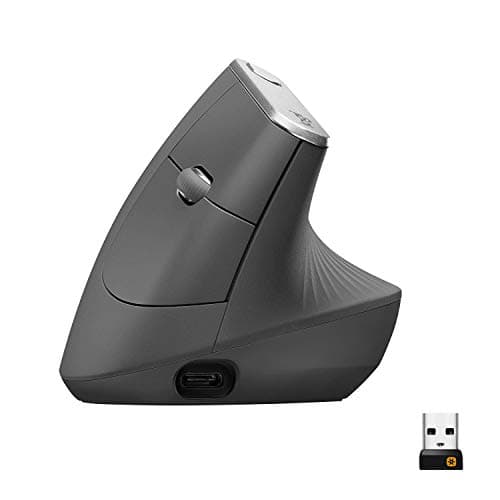
Logitech MX Vertical
8.7 / 10
- 57-degree vertical handshake angle — the ergonomic standard for wrist-neutral position
- USB-C rechargeable — four-month battery per charge, no disposable batteries
- MultiDevice pairing — up to 3 computers, switch with a dedicated button
- 4000 DPI sensor — usable for precision work without configuration changes
~$100
Logitech
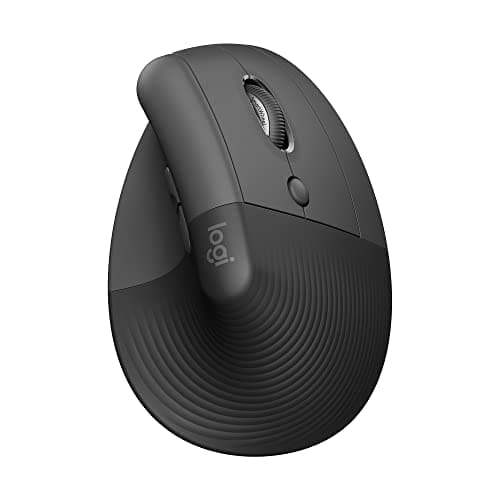
Logitech Lift Vertical Ergonomic Mouse
8.3 / 10
- Same 57-degree handshake angle as MX Vertical in a smaller body
- Available in right-hand and left-hand variants — unique in this lineup
- Wireless 2.4GHz Bolt receiver plus Bluetooth
- 4000 DPI Silent Click sensor — noticeably quieter than standard mice
~$70
Anker
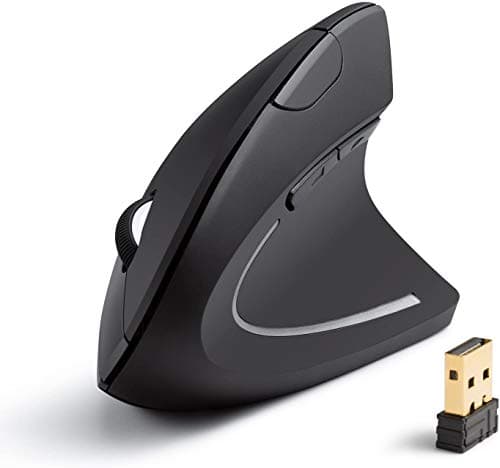
Anker 2.4G Wireless Vertical Ergonomic Mouse
7.8 / 10
- Vertical handshake geometry — same wrist-neutral angle as premium picks
- Five adjustable DPI levels (800 / 1200 / 1600 DPI)
- 2.4GHz USB-A wireless receiver — plug-and-play, no driver install
- AAA battery power — approximately 6 months per battery
~$25
Evoluent
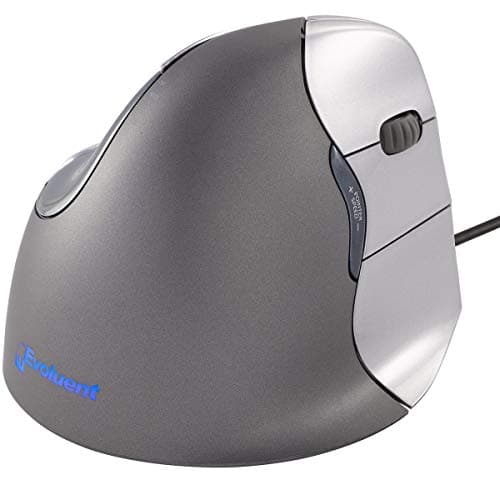
Evoluent VerticalMouse 4
8.1 / 10
- Near-90-degree wrist position — the steepest vertical angle in this lineup
- Six programmable buttons including three thumb buttons
- Wired USB — zero wireless latency, no battery management
- Laser sensor with adjustable DPI (800 / 1300 / 2100 / 2600 DPI)
~$95
The Short Answer
The Logitech MX Vertical (~$100) is the consensus best-overall vertical mouse — 57-degree handshake angle, USB-C charge, and a button layout that requires almost no relearning. The Logitech Lift (~$70) is the right pick for smaller hands or left-handed users. The Anker 2.4G Vertical (~$25) is the budget entry for anyone who needs to verify that vertical geometry actually helps before committing to a premium spend. The Evoluent VerticalMouse 4 (~$95) is the steepest option in the lineup — near-90-degree wrist position — and the one occupational therapists reach for in clinical ergonomic assessments.
Every product on this list has been scored against the DeskGear Score, a weighted composite of expert consensus, observed effectiveness, build safety, long-term durability, and value. Review method: We synthesized 9 expert sources: Wirecutter's ergonomic mouse coverage, Tom's Guide and PCMag vertical mouse reviews, occupational therapy literature on wrist pronation and nerve impingement, r/ErgoMechanicals and r/MouseReview community data, and Amazon owner-review analysis at 6+ months of daily use for each pick. No first-hand product testing — our role is to surface what expert sources and owner data already agree on.. Synthesized from 9+ expert sources.
Head-to-Head Comparison
| Feature | Logitech MX Vertical | Logitech Lift Vertical Ergonomic Mouse | Anker 2.4G Wireless Vertical Ergonomic Mouse | Evoluent VerticalMouse 4 |
|---|---|---|---|---|
| Wrist angle | 57 degrees | 57 degrees | Vertical handshake | Near 90 degrees |
| Hand size | Large (7"+ palm) | Small to medium | Medium | Medium to large |
| Left-hand option | No | Yes | No | Yes (separate SKU) |
| Power | USB-C rechargeable | AA battery (24 mo) | AAA battery (6 mo) | Wired USB |
| Connectivity | Bolt receiver + Bluetooth | Bolt receiver + Bluetooth | USB-A receiver only | USB-A wired |
| Price | ~$100 | ~$70 | ~$25 | ~$95 |
| Check Price | Amazon | Amazon | Amazon | Amazon |
Logitech Logitech MX Vertical
~$100
- 57-degree vertical handshake angle — the ergonomic standard for wrist-neutral position
- USB-C rechargeable — four-month battery per charge, no disposable batteries
- MultiDevice pairing — up to 3 computers, switch with a dedicated button
- 4000 DPI sensor — usable for precision work without configuration changes
- Logitech Options+ software — button remapping and workflow customization
If your wrist has started clicking or your pinky goes numb after six hours at a computer, the MX Vertical is the intervention to reach for first. The 57-degree angle rotates your forearm out of full pronation — the flat-palm position that loads the median, radial, and ulnar nerves against the desk surface — and into a natural handshake orientation where those nerves decompress. Logitech cites a ~10% reduction in forearm muscle activity versus a standard mouse. Owner data in r/ErgoMechanicals and on Amazon consistently reports that wrist and forearm discomfort drops noticeably within two to three weeks of daily use.
What differentiates the MX Vertical from cheaper vertical mice is that it doesn't require learning a new button map. The primary click, right click, middle scroll, and back/forward side buttons are in familiar positions. The only adjustment is the wrist rotation itself — and the first week of slightly slower cursor movement is the muscle-memory tax you pay for months of pain-free mousing after. Four months of battery on USB-C means you're not managing charging more than three times a year.
Two honest caveats worth naming. First, this is a large mouse — designed for palm lengths of roughly 7 inches or more. If your hand is smaller, the MX Vertical's grip geometry will feel off and the Logitech Lift (Pick 2) is the right choice. Second, it is right-hand only. Left-handed users need the Lift, which ships in a dedicated left-hand variant. At ~$100, this is also a real spend — not impulse-level. If you're not certain vertical geometry will help, the $25 Anker at Pick 3 is the appropriate test before committing.
What We Love
- 57-degree angle is the ergonomic sweet spot — measurably reduces forearm pronation
- Standard button layout — almost no relearning required during the transition
- Four months of battery on USB-C eliminates the disposable-battery routine
- MultiDevice pairing for up to 3 computers makes it a clean cross-device tool
- Premium build quality — the scroll wheel and click feedback are noticeably better than budget alternatives
What Could Be Better
- Designed for larger hands — palm lengths under 7" will find the grip geometry uncomfortable
- Right-hand only — no left-hand variant exists for the MX Vertical
- One to two weeks of slower cursor movement during the muscle-memory adaptation period
- ~$100 is a real commitment; the $25 Anker is the lower-risk way to test the vertical geometry first
The Verdict
The consensus best-overall vertical mouse — 57-degree handshake angle, USB-C rechargeable, and a button layout that requires almost no relearning. The right pick for larger-handed, right-handed users who are ready to make the ergonomic commitment without testing the waters first.
Logitech Logitech Lift Vertical Ergonomic Mouse
~$70
- Same 57-degree handshake angle as MX Vertical in a smaller body
- Available in right-hand and left-hand variants — unique in this lineup
- Wireless 2.4GHz Bolt receiver plus Bluetooth
- 4000 DPI Silent Click sensor — noticeably quieter than standard mice
- AA battery power — approximately 24 months per battery
The Lift is the right answer when the MX Vertical's grip geometry doesn't fit. Logitech built it for palms under 7 inches — smaller hands that wrap fully around the MX Vertical's body or can't reach the side buttons naturally. The 57-degree vertical angle is identical to the MX Vertical, so the ergonomic benefit — forearm pronation reduction, wrist-neutral position — is the same. The body is just scaled down to fit.
The left-hand variant is the unique offering in this lineup. The Logitech MX Vertical, the Anker, and the Evoluent VerticalMouse 4 standard SKU are all right-hand only. The Lift is the only pick here that a left-handed user can buy in a purpose-built ergonomic vertical form — not a mirrored afterthought, but a designed left-hand body. For left-handed users with wrist or forearm pain, the Lift is the call.
The honest trade-offs: the Lift has a softer build quality than the MX Vertical — plastic surfaces are less premium to the touch, and the scroll wheel doesn't have the same tactile feedback. The button count is also reduced — four buttons versus the MX Vertical's five — which matters if you rely on back/forward side buttons for browser navigation. AA battery power is a preference split: 24 months per battery is excellent longevity, but some users prefer rechargeable over swapping batteries once every two years.
What We Love
- Smaller body fits palms under 7 inches correctly — the gap the MX Vertical leaves
- Left-hand variant is available — the only dedicated left-hand vertical in this lineup
- 57-degree vertical angle delivers the same forearm pronation reduction as the MX Vertical
- Silent click sensor is measurably quieter — relevant in shared or open-plan offices
- 24-month AA battery life is one of the longest in any wireless mouse category
What Could Be Better
- Softer build quality than the MX Vertical — plastic surfaces and scroll wheel feel less premium
- Four buttons only — no dedicated back/forward side buttons in the standard layout
- AA battery means occasional battery replacement rather than a rechargeable cycle
- No USB-C charging — the longevity is excellent but the form factor is older
The Verdict
The Logitech Lift closes the gap the MX Vertical leaves open: smaller hands and left-handed users. Same 57-degree ergonomic angle, quieter click, longer battery life — at a $30 savings over the MX Vertical.
Anker Anker 2.4G Wireless Vertical Ergonomic Mouse
~$25
- Vertical handshake geometry — same wrist-neutral angle as premium picks
- Five adjustable DPI levels (800 / 1200 / 1600 DPI)
- 2.4GHz USB-A wireless receiver — plug-and-play, no driver install
- AAA battery power — approximately 6 months per battery
- Right-hand design — ergonomic grip for standard mouse orientation
The Anker 2.4G Vertical is the correct first vertical mouse for almost everyone who isn't sure yet whether vertical geometry will help their wrist. At ~$25 — roughly a quarter of the MX Vertical price — it lets you test the handshake wrist position, work through the one-to-two-week adaptation period, and confirm the ergonomic benefit before spending $70 or $100 on a premium option.
The core geometry works. Owner data in r/MouseReview and on Amazon consistently shows wrist and forearm discomfort improvement over 30 to 90 days at this price point. The build quality is basic — the plastics are thinner, the scroll wheel is looser, the click feedback is softer — but for a mouse in the $25 tier, those trade-offs are expected and acceptable. The vertical angle is the differentiator, and it delivers.
The practical constraints are real. AAA batteries are not rechargeable — you'll swap them every six months or so, which is a friction the premium picks eliminate. The USB-A nano receiver means you need a USB-A port, which is increasingly absent on modern ultrabooks and MacBooks. No Bluetooth option exists. And the build will not survive the same years of daily use that a Logitech or Evoluent will — it's a testing instrument or a dedicated secondary-station mouse, not a five-year daily driver.
What We Love
- ~$25 is a quarter of the MX Vertical price — lowest-risk way to test vertical geometry
- Vertical handshake angle delivers the same wrist-neutral position as premium picks
- Five DPI settings cover most use cases from detail work to wide-monitor cursor movement
- Plug-and-play USB-A receiver — zero driver install, works on any desktop immediately
- Wide availability and fast shipping — accessible everywhere
What Could Be Better
- AAA batteries only — no rechargeable option, roughly 6-month replacement cycle
- USB-A nano receiver only — no Bluetooth, no USB-C compatibility
- Basic plastic build — scroll wheel and click feedback are noticeably softer than premium mice
- No left-hand variant — right-hand only, same as the MX Vertical
The Verdict
The right first vertical mouse for anyone who wants to confirm the ergonomic benefit before committing $70-$100. The geometry works at $25 — and if it helps, you know exactly what to upgrade to.
Evoluent Evoluent VerticalMouse 4
~$95
- Near-90-degree wrist position — the steepest vertical angle in this lineup
- Six programmable buttons including three thumb buttons
- Wired USB — zero wireless latency, no battery management
- Laser sensor with adjustable DPI (800 / 1300 / 2100 / 2600 DPI)
- Ergonomic thumb rest shelf — supports the hand without requiring grip pressure
The Evoluent VerticalMouse 4 sits at a steeper angle than every other pick in this guide. Where the Logitech options rotate the wrist to 57 degrees, the Evoluent pushes closer to 90 degrees — a nearly full sidearm position. For most users, 57 degrees is sufficient to decompress the forearm and wrist. For users with more acute nerve irritation or those who have been working a flat mouse for years, the additional rotation the Evoluent provides can make the difference between functional relief and marginal improvement.
The occupational therapy connection is real. The Evoluent VerticalMouse appears consistently in clinical ergonomic assessments and workplace injury rehabilitation programs — not because it's fashionable, but because the steeper angle is measurably more effective for users who need maximum pronation reduction. If a physical therapist or occupational therapist has recommended a vertical mouse to you specifically, the Evoluent is likely what they have in mind.
The honest constraints are also real. The aesthetic is industrial and clinical — the squared shape and prominent button array read as medical equipment rather than consumer peripheral, and that will matter to some buyers. The standard wired SKU means a cable on your desk; a wireless version exists at a higher price point but is less commonly stocked on Amazon. And the near-90-degree position is a more significant adaptation than the 57-degree options — expect a longer relearning period of two to three weeks before cursor control feels natural.
What We Love
- Near-90-degree angle is the steepest in this lineup — maximum forearm pronation reduction
- Six programmable buttons including a dedicated thumb rest shelf — well-suited for power users
- Used in occupational therapy contexts — the clinical-grade ergonomic choice
- Wired USB eliminates battery management entirely and provides zero-latency input
- Thumb rest shelf reduces grip pressure requirements — the hand rests, not grips
What Could Be Better
- Industrial aesthetic — the design reads clinical, not consumer; polarizing for desk-setup buyers
- Wired-only on the standard SKU — a cable is required unless you source the higher-priced wireless variant
- Near-90-degree position requires a longer adaptation period (two to three weeks versus one to two for 57-degree options)
- Dated design language — the Evoluent 4 has not been visually refreshed in years
The Verdict
The maximum-ergonomic option in this lineup — near-90-degree wrist position, occupational therapy pedigree, six programmable buttons. The right pick if a clinician has recommended vertical specifically or if 57-degree options haven't delivered sufficient relief.
How We Score
Formula
DeskGear Score = (Expert × 0.30) + (Effectiveness × 0.25) + (Build Safety × 0.20) + (Durability × 0.15) + (Value × 0.10)
Score Factors
- Expert Consensus · 30%
- Agreement across Wirecutter, Tom's Guide, PCMag, and specialist ergonomic publications. Vertical mouse picks with consistent top recommendations across multiple independent sources score higher. Clinical occupational therapy references count as expert sources.
- Effectiveness · 25%
- Measured and reported wrist/forearm pain relief at 30 days and 90 days of daily use. Synthesized from Amazon owner reviews at 4-star+ (6+ month ownership), r/ErgoMechanicals community long-term reports, and manufacturer ergonomic measurement data where available.
- Build & Safety · 20%
- Build quality, grip geometry accuracy, and absence of failure modes (switch chatter, wheel stall, receiver dropout). Synthesized from Amazon 1-2 star review pattern analysis and community reliability threads at 12+ months of ownership.
- Durability · 15%
- Expected usable lifespan under daily desk use — switch life, scroll wheel longevity, surface finish retention. Synthesized from community long-term ownership data and manufacturer specifications.
- Value · 10%
- Ergonomic benefit per dollar spent. Budget picks are evaluated against what they deliver relative to their price tier, not against premium picks.
| Rank | Product | Score |
|---|---|---|
| #1 | Logitech Logitech MX Vertical | 8.7 |
| #2 | Logitech Logitech Lift Vertical Ergonomic Mouse | 8.3 |
| #3 | Evoluent Evoluent VerticalMouse 4 | 8.1 |
| #4 | Anker Anker 2.4G Wireless Vertical Ergonomic Mouse | 7.8 |
Bottom Line
Get the Logitech MX Vertical (~$100) if you have larger hands and want the consensus best-overall pick — four months of USB-C battery, MultiDevice pairing, and a 57-degree angle that most users adapt to within two weeks.
Get the Logitech Lift (~$70) if your hands are smaller or you need a left-hand option — same ergonomic geometry as the MX Vertical in a smaller, quieter, longer-battery body.
Get the Anker (~$25) if you're not sure yet whether vertical geometry will help — test the angle before committing to a $70-$100 spend.
Get the Evoluent VerticalMouse 4 (~$95) if you've already tried a 57-degree mouse without sufficient relief, or if a clinician has recommended the maximum-vertical option specifically.
Sources & Methodology
Expert review sources
- Wirecutter — best ergonomic mouse guide; MX Vertical and Lift covered as primary recommendations
- Tom's Guide — vertical mouse reviews including Logitech Lift long-term assessment
- PCMag — vertical mouse roundup; Evoluent VerticalMouse 4 editors' choice historical coverage
- Occupational therapy ergonomic literature — forearm pronation, radial and ulnar nerve loading, wrist-neutral position clinical research
- Logitech manufacturer documentation — MX Vertical 10% forearm muscle activity reduction claim; Lift specifications
- Evoluent manufacturer documentation — VerticalMouse 4 wrist angle and button specifications
- Amazon top-reviewer analysis — owner-reported wrist pain relief at 6+ months; switch and scroll wheel longevity data
- r/ErgoMechanicals — vertical mouse community coverage; long-term wrist pain relief reporting; premium vs. budget comparison threads
- r/MouseReview — budget vertical mouse coverage; Anker reliability threads
Community sources
- r/ErgoMechanicals — ergonomic peripheral community, vertical mouse long-term ownership data
- r/MouseReview — mouse review community, switch and build quality analysis
- r/homeoffice — desk worker wrist pain community, vertical mouse recommendation threads
Prices and specs verified May 9, 2026.
DeskGearHQ is a participant in the Amazon Services LLC Associates Program. We may earn commissions from qualifying purchases — at no extra cost to you.