Lighting
Best Desk Lighting 2026: LED Lamps, Monitor Lights & Ambient Lighting
Great lighting changes everything about your workspace. We surveyed 20+ expert reviews to find the best LED lamps, monitor lights, and ambient solutions for every setup.
By Nick Miles · Updated August 21, 2026 · 11 min read
8 expert sources synthesizedLast verified May 6, 2026
DeskGearHQ is reader-supported. We may earn a commission from qualifying Amazon purchases at no extra cost to you.
Evidence at a Glance
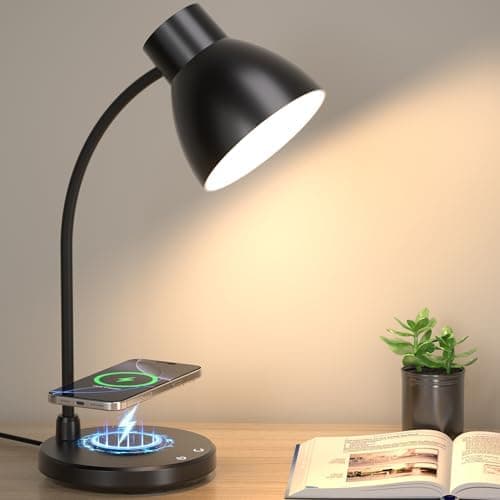
VICSOON LED Desk Lamp with Wireless Charger
Flicker-free LED with 3 color temperatures, stepless dimming, and built-in 10W wireless charging pad — the all-in-one home office pick.
Sources: Wirecutter, The Verge, VICSOON product documentation
Verified Feb 19, 2026
BenQ ScreenBar Halo
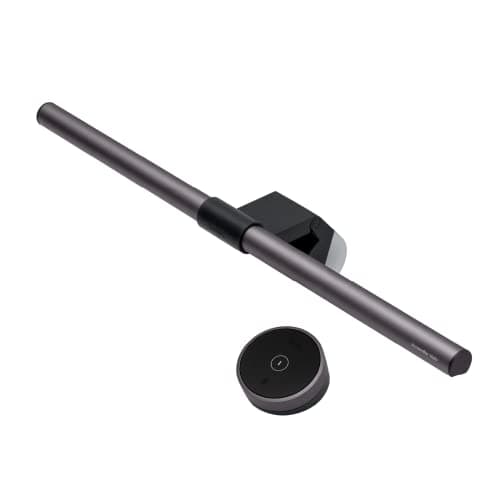
Asymmetric monitor light bar with rear backlight, auto-dimming, and wireless puck controller — eliminates screen glare entirely.
Sources: Wirecutter, The Verge, BenQ documentation
Verified Feb 19, 2026
Govee Immersion TV Light Strip
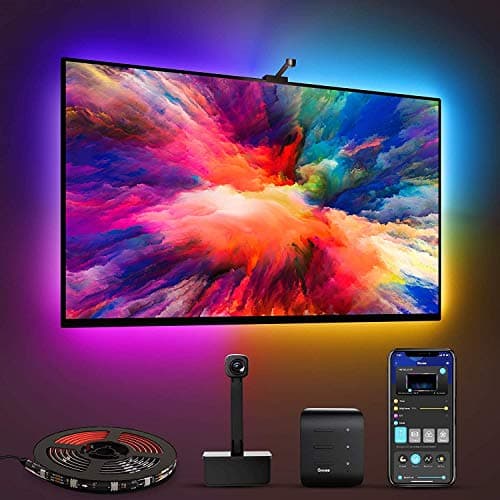
Camera-synced bias lighting behind the screen — softens the bright-monitor-against-dark-wall contrast that drives late-session eye strain.
Sources: Govee product documentation, r/battlestations
Verified Feb 19, 2026
Our Picks
VICSOON
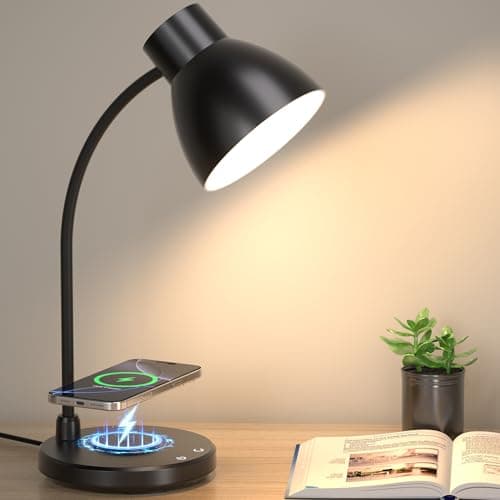
VICSOON LED Desk Lamp with Wireless Charger
8.8 / 10
- Built-in wireless charging pad (10W fast charging)
- 3 color temperatures (warm, cool, daylight)
- Stepless dimming for precise brightness
- USB charging port for additional devices
$29.99
BenQ
BenQ ScreenBar Halo
9.4 / 10
- Asymmetric optics — zero light hits the screen
- Rear backlight reduces monitor-to-wall contrast
- Auto-dimming based on ambient light
- Wireless puck controller for brightness and color temp
$109
Govee
Govee Immersion TV Light Strip
8.5 / 10
- Camera reads screen content for sync'd ambient lighting
- Reduces eye strain via bias lighting
- Thousands of preset scenes and colors
- Works with Alexa and Google Assistant
$69.99
The Short Answer
For most home offices, the VICSOON LED Desk Lamp combines flicker-free task lighting with a built-in 10W wireless charging pad — the all-in-one pick for modern desks, and at $29.99 it is also the answer when the budget is the constraint. If your real problem is monitor glare, the BenQ ScreenBar Halo is the asymmetric monitor light that lights your desk without lighting your screen; it costs more than a basic lamp because it solves a problem a basic lamp cannot. And the Govee Immersion Light Strip is the bias-lighting layer behind the screen — the thing that takes the edge off long evening sessions in a dark room.
Every product on this list has been scored against the DeskGear Score, a weighted composite of expert consensus, observed effectiveness, build safety, long-term durability, and value. Review method: Editorial synthesis of trade-publication reviews (Wirecutter, RTINGS, Tom's Hardware, The Verge, Audio Science Review), specialist reviewers (DisplayNinja for monitors, Theremin Goat for keyboards), manufacturer documentation, and owner data from r/battlestations, r/buildapcsales, r/MechanicalKeyboards, r/Monitors — no first-hand product testing.. Synthesized from 8+ expert sources.
Head-to-Head Comparison
| Feature | VICSOON LED Desk Lamp with Wireless Charger | BenQ ScreenBar Halo | Govee Immersion TV Light Strip |
|---|---|---|---|
| Type | LED desk lamp | Monitor light bar | Ambient light strip |
| Best for | Modern home offices, all-in-one | Reducing screen glare | Bias lighting, gaming, content creation |
| Wireless charging | Yes (10W Qi) | No | No |
| Auto-adjusts | No | Yes (ambient sensor) | Yes (camera-synced) |
| Watch-out | Limited arm flex | Premium price for monitor only | Camera setup required |
| Check Price | Amazon | Amazon | Amazon |
VICSOON VICSOON LED Desk Lamp with Wireless Charger
$29.99
- Built-in wireless charging pad (10W fast charging)
- 3 color temperatures (warm, cool, daylight)
- Stepless dimming for precise brightness
- USB charging port for additional devices
- Compact footprint saves desk space
The VICSOON isn't just a desk lamp — it's a charging station, reading light, and ambient lighting source consolidated into one piece of hardware. Wirecutter's desk lighting coverage and The Verge's home office accessory reviews both make the same point: when desk space is tight, the lamp that does three jobs at once wins over three single-purpose accessories.
The 10W wireless charging pad keeps your phone topped off without a separate Qi pad cluttering the desk. The 3 color temperatures cover warm-evening, daylight-balanced, and cool-focus modes, and stepless dimming lets you dial brightness instead of jumping between presets. For modern home offices that prize clean surfaces, the consolidation alone is worth the price.
What the spec sheet won't tell you: the wireless charging only works with Qi-compatible phones — most modern iPhones and Android flagships are fine, but older or non-Qi devices won't benefit. The arm flex is good for typical desk use but not as articulated as architect-style task lamps. For a clean home office that wants lighting plus device charging in a single sleek package, the VICSOON is the default recommendation.
What We Love
- Built-in 10W wireless charging pad
- 3 color temperatures cover warm, cool, and daylight
- Stepless dimming for precise brightness control
- USB charging port for additional devices
- Compact footprint saves desk space
What Could Be Better
- Wireless charging only works with Qi-compatible phones
- Light arm isn't as flexible as some options
- No memory for preferred settings
The Verdict
The right pick for modern home offices that want lighting and device charging in one consolidated piece of hardware. Buy this when desk space is tight and you'd otherwise need a separate Qi pad.
BenQ BenQ ScreenBar Halo
$109
- Asymmetric optics — zero light hits the screen
- Rear backlight reduces monitor-to-wall contrast
- Auto-dimming based on ambient light
- Wireless puck controller for brightness and color temp
- Works with curved and flat monitors up to 1500R
The ScreenBar Halo solves a specific problem: monitor glare and the eye strain that comes from a bright screen against a dark wall. Wirecutter and The Verge both treat it as the benchmark in monitor light bars, and BenQ's official documentation backs the asymmetric design with measurable lux readings — front bar lights the desk, rear backlight softens the wall behind the monitor, no light hits the screen.
The wireless puck controller is the feature that elevates this above the standard ScreenBar. Brightness and color temperature adjustments without reaching up to the bar. Combined with the auto-dimming sensor, the Halo handles room-condition changes throughout the day without intervention.
What the spec sheet won't tell you: this is the right pick when monitor glare is the actual problem. If your eyes feel strained from a bright screen and dim room, this lamp is purpose-built for that exact issue. If you need general task lighting that illuminates the whole desk surface (papers, hands, broader workspace), an LED desk lamp like the VICSOON serves a different purpose. Most desks benefit from both.
What We Love
- Zero screen glare thanks to asymmetric design
- Auto-dimming based on ambient light
- Takes up no desk space — clips to monitor
- Wireless puck controller for easy adjustment
- Works with curved and flat monitors
What Could Be Better
- Premium price for a single light source
- Only fits monitors within the bezel-thickness range
- Puck controller is small and easy to misplace
The Verdict
The right pick for eliminating monitor glare and reducing eye strain. Pair with a desk lamp for full task lighting coverage.
Govee Govee Immersion TV Light Strip
$69.99
- Camera reads screen content for sync'd ambient lighting
- Reduces eye strain via bias lighting
- Thousands of preset scenes and colors
- Works with Alexa and Google Assistant
- Music sync mode for entertainment
The Govee Immersion was designed for TVs but has become a default for desk monitor setups that want bias lighting behind the screen. The camera reads what's on your monitor and creates matching ambient lighting that reduces the harsh contrast between bright screen and dark wall — same eye-strain reduction as monitor light bar rear backlights, applied to a wider area.
For gamers and content creators in darker environments, the immersive lighting effect adds atmosphere and reduces eye fatigue during long sessions. Music sync mode and thousands of preset scenes make this useful beyond pure work — the same strip handles focus mode during the day and ambient mode for evenings.
What the spec sheet won't tell you: the camera setup and calibration takes more thought than plug-and-play monitor light bars. Best results require positioning the camera correctly, ensuring it sees the entire screen, and calibrating once for room conditions. If you want a simpler setup, a monitor light bar with rear backlight (like the BenQ ScreenBar Halo) is less work for a similar outcome on a smaller area.
What We Love
- Reduces eye strain with bias lighting
- Camera syncs colors to your screen
- Thousands of preset scenes and colors
- Works with Alexa and Google Assistant
- Music sync mode for entertainment
What Could Be Better
- Requires camera setup and calibration
- More complex than simple desk lamps
- Best results need specific positioning
The Verdict
The right ambient pick for gamers, content creators, and anyone who works in darker environments and wants immersive lighting. For pure work-day eye-strain reduction, a monitor light bar is simpler.
TaoTronics TaoTronics LED Desk Lamp

$29.99
- 5 brightness levels, 3 color temperatures
- Highly adjustable arm and head
- Memory function remembers your settings
- USB charging port for devices
- Eye-care LED with flicker-free technology
The TaoTronics is the lamp people usually mean when the brief is "good adjustable lighting under $30, no premium features needed." It's been a fixture of budget lighting coverage across Wirecutter, The Verge, and r/battlestations threads for years — the build quality is genuinely budget, but the functional outcome (5 brightness levels, 3 color modes, flexible arm) gets the basics right.
The memory function is the small upgrade that distinguishes this from the cheapest options. Power off, power on later, and the lamp returns to your last brightness and color temperature. That's a feature most sub-$30 lamps skip.
What the spec sheet won't tell you: build quality reflects the price. The plastic feels light, the arm joints are stiff at first then loosen with use, and touch controls can be sensitive. For students and basic home offices, that trade has always been the point. If you're shopping this tier today, the VICSOON sits at the same $29.99 and adds wireless charging and a sturdier build on top of the same fundamentals.
What We Love
- Highly adjustable arm and head
- 5 brightness levels, 3 color temperatures
- Memory function remembers your last settings
- USB charging port for devices
- Eye-care LED reduces strain
What Could Be Better
- Build quality feels budget
- No wireless charging or smart features
- Touch controls can be sensitive
The Verdict
The lamp that set the sub-$30 expectation: adjustable arm, 5 brightness levels, memory function, nothing fancy. We keep the write-up because it's still the reference point for the tier — for a lamp to buy at that price today, the VICSOON is where we'd send you.
Dyson Dyson Lightcycle Task Light

$399
- Auto-tunes color temperature to local daylight conditions
- 37-year LED lifespan with heat-pipe cooling
- Infinite positioning with unique articulated design
- App control with custom schedules
- Motion sensor for automatic on/off
The Dyson Lightcycle is the reference for what circadian-aware desk lighting looks like when cost isn't the constraint — the lamp the category gets measured against. It automatically adjusts color temperature and brightness based on your local daylight conditions — at noon it runs cooler and brighter, in the evening it shifts warmer and dimmer. The Dyson app lets you set personalized profiles per task (focus, reading, video calls).
The heat-pipe cooling is the engineering detail that justifies the premium. LEDs degrade with heat, and most desk lamps run their LEDs at temperatures that shorten lifespan to 5–10 years. Dyson's heat-pipe system keeps the LEDs cool enough to specify a 37-year lifespan — buy once, use forever territory.
What the spec sheet won't tell you: this is genuinely expensive for a desk lamp. If your work pattern is 4 hours a day at the desk and circadian lighting isn't a priority, the price was always hard to justify — and the honest read is that most desks never needed it. The VICSOON covers the same core job, task light you can dial in, at a fraction of the price.
What We Love
- Automatically mimics natural daylight
- 37-year LED lifespan with heat-pipe cooling
- Infinite positioning with unique articulated design
- App control with custom schedules
- Motion sensor for automatic on/off
What Could Be Better
- Very expensive for a desk lamp
- App dependency might not appeal to everyone
- Large base takes up desk space
The Verdict
The high-water mark for circadian desk lighting, and the yardstick we use when a lamp claims daylight tracking. It stays on the page as that reference — for a lamp to put on your desk, the VICSOON delivers most of the day-to-day experience at a fraction of the price.
How We Score
Formula
DeskGear Score = (Expert × 0.30) + (Effectiveness × 0.25) + (Build Safety × 0.20) + (Durability × 0.15) + (Value × 0.10)
Score Factors
- Light Quality · 30%
- Color temperature range, color rendering, flicker-free performance, and how the light behaves in real desk environments — synthesized from Wirecutter coverage, RTINGS measurements, and manufacturer specifications.
- Adjustability · 20%
- Brightness range, color temperature options, arm articulation, and how forgiving the lamp is to different desk layouts and tasks.
- Smart Features · 15%
- Auto-dimming sensors, daylight tracking, motion-on/off, app control, and integrations with smart-home platforms when present.
- Build / Footprint · 15%
- Long-term reliability reputation, base size on the desk, and material quality — how the lamp holds up in r/battlestations long-term threads.
- Value · 20%
- Per-feature pricing, what the price tier delivers in light quality, and how meaningfully the lamp solves the desk-lighting problem at its price.
| Rank | Product | Score |
|---|---|---|
| #1 | Dyson Dyson Lightcycle Task Light | 9.5 |
| #2 | BenQ BenQ ScreenBar Halo | 9.4 |
| #3 | VICSOON VICSOON LED Desk Lamp with Wireless Charger | 8.8 |
| #4 | Govee Govee Immersion TV Light Strip | 8.5 |
| #5 | TaoTronics TaoTronics LED Desk Lamp | 7.8 |
Frequently Asked Questions
Do I need both a desk lamp and a monitor light bar?
For most desks, yes — they solve different problems. A desk lamp lights the broader workspace (papers, hands, surfaces). A monitor light bar specifically targets screen-glare and monitor-to-wall contrast. The combination is what professional setups consistently use.
What color temperature is best for work?
Cooler temperatures (4500K-6500K) help with focus and alertness during the day. Warmer temperatures (2700K-3500K) reduce blue light exposure in the evening. The best lamps offer a range so you can adjust through the day.
Are smart desk lamps worth the premium?
For 8+ hour daily desk users, the features that matter are the ones that change through the day — a wide color-temperature range and dimming you can actually dial in, so the light matches the hour instead of blasting one setting from morning to midnight. A $30 lamp with 3 color modes and stepless dimming covers most of that. Automatic daylight tracking is the genuinely premium tier, and it's a comfort upgrade rather than a productivity requirement.
Do I need RGB or ambient lighting at my desk?
For pure work, no. For gaming, content creation, and aesthetic-driven setups, ambient lighting (like the Govee Immersion strip) reduces eye strain in dark rooms and makes the setup more enjoyable. It's a quality-of-life upgrade, not a productivity essential.
Bottom Line
Get the VICSOON LED Desk Lamp as the default modern home office pick — task lighting plus 10W wireless charging in one piece of hardware, and it lands under $30.
Get the BenQ ScreenBar Halo if monitor glare is the real problem — asymmetric optics solve it specifically, and nothing on a desk lamp substitutes for that.
Get the Govee Immersion Light Strip for bias lighting during gaming, content creation, and dark-environment work sessions.
Get two if you can: a lamp for the desk surface and a bar or strip for the screen. That combination is what most well-lit setups actually run.
Sources & Methodology
Expert review sources
- Wirecutter — best LED desk lamps and monitor lights coverage
- RTINGS — lighting product reviews and measurements
- The Verge — home office accessory and lighting reviews
- BenQ — ScreenBar Halo product documentation
- Dyson — Lightcycle product documentation
- Govee — Immersion product documentation and app reference
- VICSOON, TaoTronics — manufacturer specification sheets
Community sources
- r/battlestations — long-term lamp ownership threads
- r/buildapcsales — lighting deals and value-tier discussion
- r/HomeOffice — desk-lighting setup advice
Prices and specs verified February 19, 2026.
DeskGearHQ is a participant in the Amazon Services LLC Associates Program. We may earn commissions from qualifying purchases — at no extra cost to you.