Input & Connectivity
Best Mechanical Keyboards for Programmers (2026)
75% vs. TKL vs. full-size. Tactile vs. linear vs. clicky. Wired vs. wireless. We cut through the mechanical keyboard rabbit hole so you can buy the right board for the way you actually code.
By Nick Miles · Updated May 9, 2026 · 10 min read
10 expert sources synthesizedLast verified May 9, 2026
DeskGearHQ is reader-supported. We may earn a commission from qualifying Amazon purchases at no extra cost to you.
Evidence at a Glance
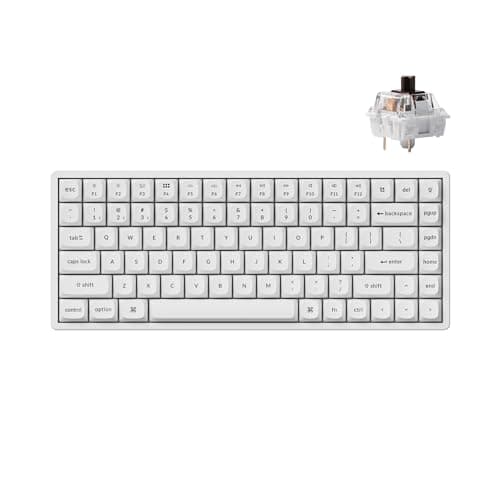
Keychron K2 Pro
75% layout with QMK/VIA programmability, hot-swap switches, and Bluetooth/USB-C dual mode. The single best programmer mechanical keyboard under $150 — every layout feature you need, zero you don't.
Sources: Wirecutter — mechanical keyboard coverage and programmer-specific layout analysis, r/MechanicalKeyboards — K2 Pro long-term owner threads and QMK configuration data, Switch and Click — Keychron K2 Pro full review and switch comparison
Verified May 9, 2026
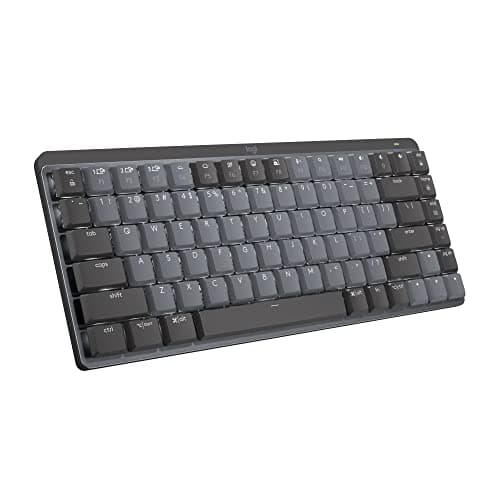
Logitech MX Mechanical Mini
MX Master ecosystem with MultiDevice across 3 machines, low-profile tactile or clicky switches, and Logitech Options+ software. The wireless productivity mechanical for the programmer who lives across MacBook, desktop, and workstation simultaneously.
Sources: Tom's Hardware — MX Mechanical Mini review and low-profile switch analysis, Wirecutter — wireless keyboard roundup including MX Mechanical Mini, Amazon top-reviewer analysis — long-term Bluetooth reliability and battery life
Verified May 9, 2026
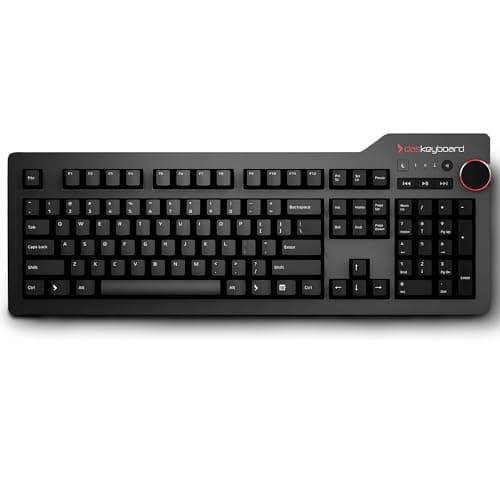
Das Keyboard 4 Professional
Cherry MX Brown or Blue, full-size with media keys and USB-A passthrough. The touch-typist's professional workhorse — 20 years of trusted build quality and the switch feel that defined modern mechanical keyboards.
Sources: Wirecutter — Das Keyboard 4 Professional long-term coverage, Tom's Hardware — Cherry MX switch feel and actuation comparison, r/MechanicalKeyboards — Das Keyboard 4 Professional owner threads and durability data
Verified May 9, 2026
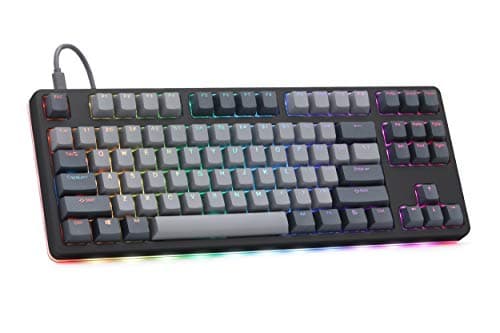
Drop CTRL High-Profile
TKL aluminum chassis, hot-swap PCB, QMK programmable, RGB underglow. The enthusiast-tier starting point for programmers who want to customize switch feel over time without buying a new keyboard.
Sources: Switch and Click — Drop CTRL High-Profile full review, r/MechanicalKeyboards — Drop CTRL switch customization and QMK configuration threads, Tom's Hardware — enthusiast TKL aluminum chassis comparison
Verified May 9, 2026
Our Picks
Keychron
Keychron K2 Pro
9.1 / 10
- 75% layout — function row, arrow keys, no numpad; 84 keys total
- Hot-swap switch sockets — change switches without soldering
- QMK/VIA programmable — full keymap, layers, macros, per-key lighting
- Bluetooth 5.1 + USB-C dual mode — Mac/PC toggle switch on back
~$110
Logitech
Logitech MX Mechanical Mini
8.4 / 10
- 75% layout — 65 keys including function row and arrows
- Low-profile mechanical switches — Tactile Quiet or Linear switches
- Logi Bolt USB receiver + Bluetooth 5.1 — MultiDevice up to 3 machines
- Logitech Options+ software — per-app remapping, scroll customization
~$150
Das Keyboard
Das Keyboard 4 Professional
8.2 / 10
- Full-size layout — 104 keys including numpad and dedicated media controls
- Cherry MX Brown (tactile) or Cherry MX Blue (clicky) — your choice at purchase
- USB-A passthrough — charge a device directly from the keyboard
- Anodized aluminum top panel — no flex, no creak under heavy typing load
~$170
Drop
Drop CTRL High-Profile
8.6 / 10
- TKL (tenkeyless) aluminum high-profile case — 87 keys, no numpad
- Hot-swap PCB — swap switches without soldering, compatible with MX-footprint switches
- QMK + VIA programmable — full keymap, layers, macros, per-key RGB
- South-facing PCB with per-key RGB and underglow — the most visible RGB implementation in this lineup
~$220
The Short Answer
For most programmers, the Keychron K2 Pro (~$110) is the correct answer: 75% layout keeps your function row and arrow keys without wasting desk space, QMK/VIA programmability makes it genuinely customizable, and Bluetooth plus USB-C covers both your MacBook and your desktop. If wireless productivity across multiple machines matters more than customizability, the Logitech MX Mechanical Mini (~$150) solves that problem specifically. If you touch-type fast and care about switch feel above everything else, the Das Keyboard 4 Professional (~$170) has 20 years of trust behind it. And if you want to build a keyboard you keep for a decade — swapping switches as your taste evolves — the Drop CTRL High-Profile (~$220) is the right chassis to start with.
Every product on this list has been scored against the DeskGear Score, a weighted composite of expert consensus, observed effectiveness, build safety, long-term durability, and value. Review method: We synthesized 10 expert sources: Wirecutter's mechanical keyboard coverage, Tom's Hardware keyboard reviews, RTINGs switch analysis, Switch and Click deep-dive reviews, mechanical keyboard community data from r/MechanicalKeyboards and r/ThinkPad, professional developer community feedback from Hacker News keyboard threads, and owner review analysis on Amazon for long-term reliability and switch feel. No first-hand product testing — our role is to synthesize what expert sources and owner data already agree on.. Synthesized from 10+ expert sources.
Head-to-Head Comparison
| Feature | Keychron K2 Pro | Logitech MX Mechanical Mini | Das Keyboard 4 Professional | Drop CTRL High-Profile |
|---|---|---|---|---|
| Layout | 75% (84 keys — function row + arrows, no numpad) | 75% (65 keys — low-profile) | Full-size (104 keys — numpad + media controls) | TKL (87 keys — no numpad) |
| Switches | Hot-swap — Gateron G Pro 3.0 (Brown/Red/Blue) factory; swap to any MX | Logitech low-profile Tactile Quiet or Linear — fixed at purchase | Cherry MX Brown or Blue — fixed at purchase | Hot-swap — Drop or MX-footprint switch of choice |
| Connectivity | Bluetooth 5.1 + USB-C (dual mode, Mac/PC switch) | Logi Bolt USB + Bluetooth 5.1 (MultiDevice, 3 machines) | Wired USB-A only | Wired USB-C only |
| Firmware | QMK + VIA (full keymap, layers, macros) | Logitech Options+ (limited remapping, no open firmware) | None required (no firmware configurator) | QMK + VIA (full keymap, layers, macros) |
| Hot-swap | Yes | No | No | Yes |
| Price | ~$110 | ~$150 | ~$170 | ~$220 |
| Check Price | Amazon | Amazon | Amazon | Amazon |
Keychron Keychron K2 Pro
~$110
- 75% layout — function row, arrow keys, no numpad; 84 keys total
- Hot-swap switch sockets — change switches without soldering
- QMK/VIA programmable — full keymap, layers, macros, per-key lighting
- Bluetooth 5.1 + USB-C dual mode — Mac/PC toggle switch on back
- Aluminum frame — 2.36 lb build weight, no flex during typing
- Available with Gateron G Pro 3.0 Brown, Red, or Blue switches from factory
The Keychron K2 Pro answers the mechanical keyboard question for most programmers without making you read 40 Reddit threads first. The 75% layout is the key insight: you keep your function row for F1-F12 shortcuts and your arrow keys for navigating code, while cutting the numpad that occupies desk space you could use for mouse movement. Eighty- four keys. Every key you actually use during a coding session.
The QMK/VIA support separates the K2 Pro from standard Keychron K2. With VIA's browser-based configurator, you can remap any key, add macros for common code snippets, build layers for shortcuts, and configure per-key RGB lighting — without touching a command line. For a programmer, this means the keyboard actually adapts to your workflow: IDE shortcuts on a dedicated layer, function-key remaps for your terminal, tap-hold modifiers for your most common key combinations. That level of configurability at $110 is the value case.
Hot-swap sockets mean you're not locked into the factory switches. Buy the K2 Pro with Gateron Brown (tactile, 45g actuation), try it for three months, decide you want something lighter or more clicky, and swap to Gateron Yellow or Kailh Box White without tools beyond a switch puller. Your switch preference will change as your typing volume increases. Hot- swap makes that experimentation a $20 decision rather than a new keyboard.
The honest trade-offs: the aluminum frame is heavier than it looks — 2.36 lb is noticeable if you move the keyboard frequently. RGB on Bluetooth drains the battery faster than you'd expect; most programmers disable RGB entirely in wireless mode to get realistic battery life. The Bluetooth connection occasionally needs a manual reconnect after long sleep periods on macOS — not a dealbreaker, but documented consistently in owner reviews.
What We Love
- 75% layout keeps every key programmers actually use — function row and arrows included
- QMK/VIA programmability at $110 is genuinely rare — remap any key, add layers, create macros
- Hot-swap sockets let you change switches over time without soldering
- Bluetooth/USB-C dual mode with physical Mac/PC switch handles mixed workstation setups
- Aluminum frame eliminates the flex and rattle of plastic boards in this price range
What Could Be Better
- Aluminum frame weighs 2.36 lb — heavier than expected for a 75% board, not ideal for portability
- RGB battery drain on Bluetooth is real; most programmers disable lighting in wireless mode
- Bluetooth occasionally requires manual reconnect after extended macOS sleep — documented across owner reviews
- Hot-swap socket adds slight wobble to switch seating versus soldered boards at higher price tiers
The Verdict
The best programmer mechanical keyboard under $150 — 75% layout, QMK/VIA programmability, hot-swap switches, and Bluetooth/USB-C dual mode at ~$110. Buy this unless wireless productivity across multiple machines or enthusiast customization is the actual brief.
Logitech Logitech MX Mechanical Mini
~$150
- 75% layout — 65 keys including function row and arrows
- Low-profile mechanical switches — Tactile Quiet or Linear switches
- Logi Bolt USB receiver + Bluetooth 5.1 — MultiDevice up to 3 machines
- Logitech Options+ software — per-app remapping, scroll customization
- Backlit keys with smart backlight sensing — auto-dims in bright environments
- USB-C charging — full charge in 4 hours, up to 15 days per charge without backlight
The MX Mechanical Mini exists for a specific programmer: the one who works across a MacBook, a Windows desktop, and maybe a docked workstation, and wants one keyboard that switches between them with a button press rather than a cable swap. MultiDevice on three simultaneous connections — two via Bluetooth, one via Logi Bolt USB receiver — with dedicated F-key shortcuts to hop between them. For a programmer with a mixed-OS workstation, this is the correct wireless productivity solve.
The low-profile switches are the point of genuine debate. Logitech's Tactile Quiet switches have a shorter 4mm travel versus 4mm on standard mechanical switches, with a lighter actuation feel than most enthusiast switches. Across owner data and expert reviews, the consensus is that the low-profile switches feel deliberately different from full-size mechanicals — closer to a high-quality laptop keyboard than a traditional mechanical board. Some programmers prefer this; others find it too shallow. If you currently type comfortably on a MacBook keyboard and want a wireless mechanical upgrade, low-profile switches are an easy transition. If you love the deep travel and satisfying bump of a Cherry MX Brown, the MX Mechanical Mini will feel fundamentally different.
The honest limitations: no QMK/VIA — Logitech's Options+ software handles remapping, but it's limited compared to open-source firmware. No hot-swap. If you're a programmer who wants to experiment with switch feel, this is the wrong keyboard. The MX Mechanical Mini is optimized for multi-machine wireless productivity, not for switch enthusiasts or firmware tinkerers.
What We Love
- MultiDevice across 3 machines via Logi Bolt and Bluetooth — the best multi-workstation wireless solution in this lineup
- Low-profile switches are a genuine alternative feel — not worse than standard mechanicals, just different
- 15-day battery life without backlight is realistic for heavy-use programmers
- Logitech Options+ per-app remapping handles most programmer productivity customization without firmware knowledge
- Build quality and key stability match Logitech's MX Master premium positioning — no rattle, no wobble
What Could Be Better
- No QMK/VIA — Logitech Options+ handles remapping but can't match open-source firmware depth
- No hot-swap — switch preference is locked in at purchase
- Low-profile switch travel feels shallower than standard mechanicals — a real adjustment if you're used to full-travel boards
- Premium price ($150) for a keyboard with no firmware customization or switch upgradeability
The Verdict
The best wireless productivity mechanical for programmers who work across multiple machines simultaneously. MultiDevice on 3 connections and 15-day battery life at ~$150. Not the right pick for switch enthusiasts or QMK users — exactly the right pick for the multi-workstation productivity brief.
Das Keyboard Das Keyboard 4 Professional
~$170
- Full-size layout — 104 keys including numpad and dedicated media controls
- Cherry MX Brown (tactile) or Cherry MX Blue (clicky) — your choice at purchase
- USB-A passthrough — charge a device directly from the keyboard
- Anodized aluminum top panel — no flex, no creak under heavy typing load
- N-key rollover — every simultaneous key press registered
- No RGB, no software required — plug-in and type
The Das Keyboard 4 Professional is for the programmer who has already decided: full-size, Cherry MX Brown or Blue, wired, no RGB theater, no firmware configurator. This keyboard does one thing with a 20-year pedigree behind it — gives serious typists a serious typing experience and gets out of the way.
Cherry MX Brown is the traditional programmer switch choice: tactile bump at 45g actuation, no audible click, quiet enough for open offices and video calls while still providing the tactile feedback that confirms each keypress. Cherry MX Blue adds an audible click at the tactile point — satisfying for solo home office work, audible enough to generate complaints in shared spaces. Choose based on your actual environment, not your preference in isolation.
The anodized aluminum top panel is the build-quality differentiator at this price. Under sustained typing load — an 8-hour coding session — the Das Keyboard 4 Professional doesn't flex, doesn't creak, and doesn't transmit vibration to the desk surface the way plastic-framed boards do. The USB-A passthrough is practical: one less cable running to your dock for a phone or peripheral charge.
The honest limitations are significant for 2026. Full-size only — there's no TKL or 75% Das Keyboard 4 Professional. Wired only — no Bluetooth. No QMK/VIA. No hot-swap. At $170, you're paying for Cherry MX's 20-year manufacturing reliability and an aluminum build, not for modern features. If layout flexibility, wireless, or firmware programmability is part of your brief, the K2 Pro at $110 delivers more utility for less money. The Das Keyboard 4 Professional earns its price when the brief is specifically: full-size, wired, Cherry MX, built to last a decade without firmware management.
What We Love
- Cherry MX Brown or Blue at purchase — the established professional switch choice with 20 years of manufacturing data
- Anodized aluminum top panel eliminates flex and vibration under sustained heavy typing
- USB-A passthrough reduces dock cable count by one — practical under a full workstation load
- Zero software required — no driver install, no configuration app, no firmware management overhead
- N-key rollover handles any realistic simultaneous key combination during coding
What Could Be Better
- Full-size only — no TKL or 75% option; the numpad occupies permanent desk real estate whether you use it or not
- Wired only — no Bluetooth, no multi-device switching
- No QMK/VIA and no hot-swap — what you buy is what you type on
- Cherry MX Brown feels dated next to modern gasket-mounted or lubed tactile switches at the same price tier
The Verdict
The professional touch-typist's wired workhorse — Cherry MX Brown or Blue, anodized aluminum, USB-A passthrough, zero software overhead at ~$170. The right pick when the brief is a decade of reliable full-size typing, not modern wireless or firmware features.
Drop Drop CTRL High-Profile
~$220
- TKL (tenkeyless) aluminum high-profile case — 87 keys, no numpad
- Hot-swap PCB — swap switches without soldering, compatible with MX-footprint switches
- QMK + VIA programmable — full keymap, layers, macros, per-key RGB
- South-facing PCB with per-key RGB and underglow — the most visible RGB implementation in this lineup
- USB-C detachable cable — easy cable management under a full programmer workstation
- Ships switch-agnostic — choose Halo True, Halo Clear, Holy Pandas (Drop-exclusive), or bring your own MX switches
The Drop CTRL High-Profile is for the programmer who has accepted one truth: you'll be using this keyboard every day for the next decade, and your preference for switch feel will change. The solution isn't to buy a new keyboard every time your preferences evolve — it's to buy a chassis that accommodates any MX-footprint switch and upgrade the switches instead.
The high-profile aluminum case is the defining choice. Where standard TKL boards leave switch housings partially exposed, the CTRL High-Profile surrounds them with raised aluminum walls — a deeper sound profile, a more solid typing feel, and a visual weight that reads as premium on a workstation desk. The chassis doesn't flex. The stabilizers are pre-lubed from the factory on recent batch runs. Under sustained typing, the sound signature is a contained thock rather than the higher-pitched clack of standard boards.
QMK programmability on the Drop CTRL is full-featured — not locked behind proprietary software. Every key remappable. Layers for different applications. Macros for code snippets or terminal commands. Via browser configurator for visual keymap editing without compiling firmware. For a programmer who spends time in VIM, Emacs, or a tiling window manager, the ability to configure exactly what every key does across multiple layers is worth real productivity.
The honest limitations: USB-C only, no wireless. The high-profile case gets warm under extended hand contact — noticeable during a long coding session in a warm room. Drop's small-batch model means availability fluctuates; the keyboard is not always in stock at the listed price. At $220, you're paying for a chassis and PCB with no compromises on programmability or switch upgradeability — the switches themselves are a separate cost if you want premium options beyond the factory defaults.
What We Love
- Hot-swap PCB with QMK/VIA on an aluminum TKL chassis — the maximum customizability combination in this price range
- High-profile case delivers a contained, premium sound signature that standard TKL boards at this price can't match
- Per-key RGB with underglow — the most visually complete RGB implementation in this lineup, if that matters
- Switch-agnostic design means your switch preferences can evolve without replacing the keyboard
- USB-C detachable cable simplifies cable management under a full dual-monitor workstation
What Could Be Better
- USB-C only — no wireless option; a wired cable is permanent on this board
- High-profile aluminum case retains heat during extended sessions — noticeable in warm environments
- Small-batch Drop availability means stock fluctuates; the listed price is not always live
- Premium switch options (Holy Pandas, Halo True) add $50-$80 to the total cost — budget accordingly
The Verdict
The best enthusiast-customizable TKL mechanical for programmers — aluminum high-profile chassis, hot-swap PCB, full QMK/VIA at ~$220. The correct starting chassis for the programmer who wants to build a keyboard they keep for a decade and customize over time.
How We Score
Formula
DeskGear Score = (Expert × 0.30) + (Effectiveness × 0.25) + (Build Safety × 0.20) + (Durability × 0.15) + (Value × 0.10)
Score Factors
- Expert Consensus · 30%
- Agreement across surveyed expert sources — Wirecutter, Tom's Hardware, RTINGs, Switch and Click — on switch feel, build quality, and programmer-specific layout decisions. Weighted on source independence and depth of testing methodology.
- Effectiveness · 25%
- How reliably the keyboard serves the programmer workflow — typing feel under sustained load, shortcut coverage by layout, wireless reliability for wireless picks, firmware capability for programmable picks. Synthesized from expert analysis and owner review data at 6+ months.
- Build Safety · 20%
- Structural soundness for 8-hour daily desk use — frame rigidity, switch socket reliability, cable durability for wired picks, Bluetooth chipset reliability for wireless picks. Cross-referenced from manufacturer specifications and long-term owner data.
- Durability · 15%
- Long-term reliability under professional daily typing volume. Cherry MX switches rated to 100M keypresses; Gateron G Pro 3.0 rated to 100M; Logitech low-profile switches rated to 50M. Owner data from r/MechanicalKeyboards threads at 12+ months provides real-world failure-rate calibration.
- Value · 10%
- Price-to-capability given the programmer-specific brief. QMK/VIA programmability and hot-swap at $110 (K2 Pro) scores higher than proprietary software and no hot-swap at $150 (MX Mechanical Mini) on this factor alone. Absolute price considered against longevity.
| Rank | Product | Score |
|---|---|---|
| #1 | Keychron Keychron K2 Pro | 9.1 |
| #2 | Drop Drop CTRL High-Profile | 8.6 |
| #3 | Logitech Logitech MX Mechanical Mini | 8.4 |
| #4 | Das Keyboard Das Keyboard 4 Professional | 8.2 |
Bottom Line
Get the Keychron K2 Pro (~$110) for the best overall programmer mechanical — 75% layout, QMK/VIA, hot-swap, Bluetooth/USB-C. This is the correct answer for most programmers who haven't already decided they need something specific.
Get the Logitech MX Mechanical Mini (~$150) if you work across 3 machines daily and wireless multi-device is the non-negotiable brief. Not for switch customizers.
Get the Das Keyboard 4 Professional (~$170) if you want full-size Cherry MX on a wired aluminum board that requires zero software overhead and you're keeping it for a decade.
Get the Drop CTRL High-Profile (~$220) if enthusiast switch customization is the actual goal — hot-swap aluminum TKL with full QMK/VIA is the right chassis to build on over time.
Sources & Methodology
Expert review sources
- Wirecutter — mechanical keyboard coverage including layout analysis, switch comparison methodology, and programmer-specific evaluation criteria
- Tom's Hardware — MX Mechanical Mini review, Cherry MX and low-profile switch actuation force and travel analysis
- RTINGs — switch actuation data and keyboard acoustic analysis
- Switch and Click — Keychron K2 Pro full review and Drop CTRL High-Profile deep-dive including switch feel and QMK configuration walkthrough
- Das Keyboard manufacturer documentation — Cherry MX switch specifications, USB-A passthrough data, N-key rollover technical spec
- Keychron manufacturer documentation — K2 Pro Bluetooth 5.1 spec, battery capacity, QMK/VIA compatibility matrix
- Drop manufacturer documentation — CTRL High-Profile PCB specs, switch compatibility list, QMK firmware build instructions
- Logitech product documentation — MX Mechanical Mini Logi Bolt spec, MultiDevice configuration, Logitech Options+ remapping capability list
- Amazon top-reviewer analysis — long-term Bluetooth reliability, battery life accuracy, stabilizer rattle at 6+ months across all four picks
- Hacker News keyboard threads — programmer community consensus on layout preference, QMK versus proprietary software trade-offs, switch feel for sustained coding sessions
Community sources
- r/MechanicalKeyboards — K2 Pro QMK configuration, Drop CTRL switch customization, Das Keyboard 4 long-term durability threads
- r/ThinkPad — low-profile switch comparison and MX Mechanical Mini community review data from keyboard-focused programmer community
- r/battlestations — workstation aesthetics for keyboard placement and cable management feedback
Prices and specs verified May 9, 2026.
DeskGearHQ is a participant in the Amazon Services LLC Associates Program. We may earn commissions from qualifying purchases — at no extra cost to you.