Ergonomic Foundations
Best Monitor Arms $200+ for Ergonomic Setups (2026)
The Ergotron LX Single Tall Pole is the canonical premium single-arm choice. The Humanscale M8.1 Dual handles ultrawides and 4K heavyweights up to 40 lbs per arm. The Ergotron HX Dual is the heavy-duty Ergotron build for dual setups.
By Nick Miles · Updated July 19, 2026 · 10 min read
7 expert sources synthesizedLast verified July 18, 2026
DeskGearHQ is reader-supported. We may earn a commission from qualifying Amazon purchases at no extra cost to you.
Evidence at a Glance
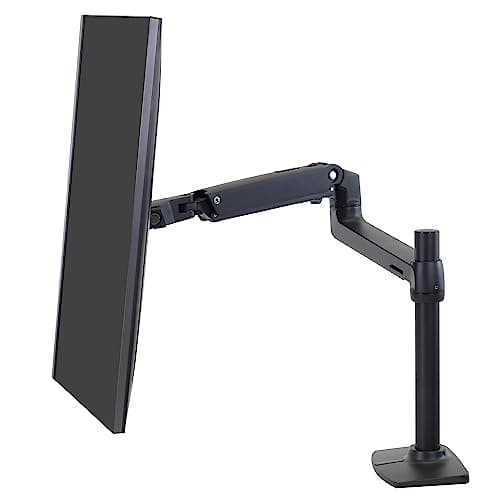
Ergotron LX Single Tall Pole Monitor Arm
Industrial Constant Force gas-spring, 10-year warranty, and a taller mast for ultrawides — the canonical premium single-arm choice at $289.99.
Sources: Wirecutter, PCWorld, Tom's Hardware
Verified Jul 18, 2026
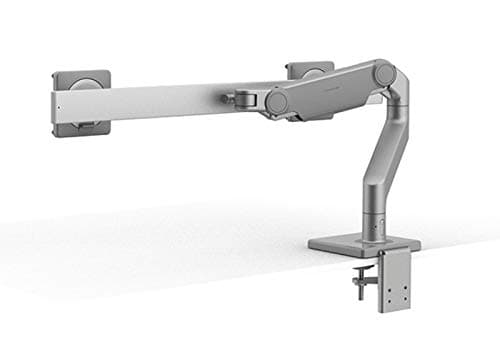
Humanscale M8.1 Dual Monitor Arm
Counterbalance mechanism, up to 40 lbs per arm — the highest-capacity premium dual arm here for heavy ultrawides and 4K panels, and cheaper than the Ergotron HX.
Sources: Humanscale product engineering documentation, TechRadar, r/battlestations
Verified Jul 18, 2026
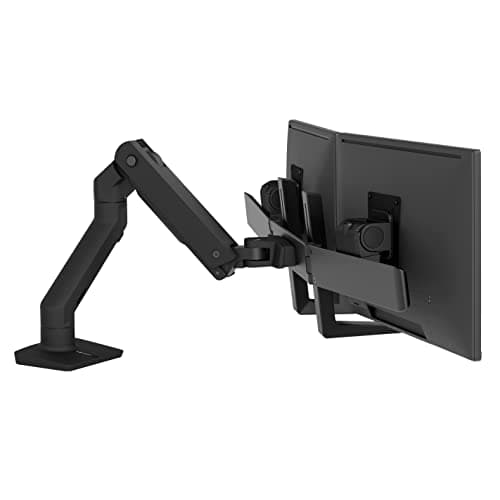
Ergotron HX Dual Monitor Arm
Heavy-duty cast-aluminum dual arm with a 10-year warranty, independent articulation, up to 32-inch monitors at 17.5 lbs each — the premium Ergotron build at $577.75.
Sources: PCWorld, Tom's Hardware, r/battlestations
Verified Jul 18, 2026
Our Picks
Ergotron
Ergotron LX Single Tall Pole Monitor Arm
9.4 / 10
- Constant Force gas-spring — smooth, one-finger repositioning
- Fits monitors 7–25 lbs, up to 34 inches wide (including curved ultrawides)
- Taller pole for extra height range on standing-desk transitions
- VESA 75x75mm and 100x100mm compatible
$289.99
Humanscale
Humanscale M8.1 Dual Monitor Arm
9.3 / 10
- Counterbalance mechanism — effortless repositioning for heavy monitors
- Up to 40 lbs per arm — designed for ultrawides and 4K 32"+ panels
- Tool-free height, tilt, and pan adjustment
- Premium minimalist aesthetic — clean form for executive setups
$499.00
Ergotron
Ergotron HX Dual Monitor Arm
9.2 / 10
- Heavy-duty cast-aluminum frame — Ergotron's most robust arm line
- Fits two monitors up to 32 inches, 5–17.5 lbs each
- Independent height, tilt, pan, and rotation per arm
- Constant Force gas-spring engineering on both arms
$577.75
The Short Answer
For most ergonomic setups, the Ergotron LX Single Tall Pole Monitor Arm is the right pick: industrial Constant Force gas-spring motion, a 10-year warranty, and the extra mast height that fits ultrawides and standing-desk transitions. For two screens, the Humanscale M8.1 Dual is the best-value premium dual — up to 40 lbs per arm for heavy ultrawides and 4K panels, at $499. If you specifically want Ergotron's heavy-duty cast-aluminum build and 10-year warranty on two 24"–32" panels, the Ergotron HX Dual is the premium alternative at $577.75.
Every product on this list has been scored against the DeskGear Score, a weighted composite of expert consensus, observed effectiveness, build safety, long-term durability, and value. Review method: We synthesized 7 expert sources — Wirecutter, PCWorld, Tom's Hardware, TechRadar, BTOD (Btod.com), Humanscale product documentation, and Ergotron product documentation — alongside owner durability data from r/battlestations and r/wfh dual-monitor threads. Every pick has a verified Amazon ASIN, re-checked live against the Amazon Creators API for New condition and buy-box merchant on 2026-07-18. No first-hand product testing.. Synthesized from 7+ expert sources.
Head-to-Head Comparison
| Feature | Ergotron LX Single Tall Pole Monitor Arm | Humanscale M8.1 Dual Monitor Arm | Ergotron HX Dual Monitor Arm |
|---|---|---|---|
| Best for | Single-monitor ergonomic setups | Dual heavy ultrawides + 4K panels | Dual 24"–32" Ergotron heavy-duty build |
| Weight capacity | 25 lbs (single) | 40 lbs per arm | 17.5 lbs per arm |
| Max monitor size | 34 inches | Ultrawide / 4K 32"+ | 32 inches |
| Range of motion | Full: height, tilt, pan, rotation | Full per arm, independent | Full per arm, independent |
| Warranty | 10 years | Humanscale limited | 10 years |
| Price | ~$290 | ~$499 | ~$578 |
| Check Price | Amazon | Amazon | Amazon |
Ergotron Ergotron LX Single Tall Pole Monitor Arm
$289.99
- Constant Force gas-spring — smooth, one-finger repositioning
- Fits monitors 7–25 lbs, up to 34 inches wide (including curved ultrawides)
- Taller pole for extra height range on standing-desk transitions
- VESA 75x75mm and 100x100mm compatible
- Full range of motion: 360° rotation, tilt, pan, height
- Matte black finish and a 10-year Ergotron warranty
The Ergotron LX Single is the arm that every other premium arm is measured against. This is the Tall Pole variant — the same Constant Force mechanism as the standard LX, on a taller mast that gives you more height range, which matters for both standing-desk transitions and getting a 34-inch ultrawide up to eye level. Across the reviews we surveyed — Wirecutter's multi-year monitor arm roundup, PCWorld's editor's choice analysis, BTOD's deep-dive on gas-spring mechanics — three things keep surfacing: the Constant Force spring mechanism, the 10-year warranty, and the fact that the LX has been the dominant recommendation for years without a credible challenger at the price point.
Constant Force means the spring tension is calibrated to a specific monitor weight and holds position at any height without drift. Budget arms use friction-based locking that requires a screwdriver to re-tighten every few months. With the LX, you adjust once and the arm holds. For chronic-pain sufferers who depend on exact positioning — standing-desk transitions, sit-stand cycling through the day — that stability difference is material.
The 25-lb limit and 34-inch width cover virtually every flat-panel and curved monitor in the 24"–34" range, including the lighter ultrawides. Heavier ultrawides and 4K 32"+ panels over 20 lbs are the edge case — see the Humanscale M8.1 Dual (rank 2) for that weight class. VESA compatibility is near-universal: 75x75 and 100x100 patterns cover the overwhelming majority of monitors sold in the past decade. If you're pairing this arm with the ultrawide it will hold, our best ultrawide monitors guide covers panels sized for this arm's 34-inch, 25-lb envelope.
A monitor arm only works if the rest of the ergonomic foundation is right — pair with an adjustable chair (best-ergonomic-office-chairs-2026) and lumbar support (best-lumbar-support-cushions-2026) for a complete back-pain recovery setup.
What We Love
- Constant Force spring holds position without drift — no re-tightening
- Taller mast adds height range for ultrawides and standing-desk use
- 10-year warranty — the category benchmark for single-monitor arms
- Full articulation: height, tilt, pan, rotation, all tool-free
- VESA 75x75 + 100x100 covers nearly all monitors
What Could Be Better
- 25-lb / 34-inch limit excludes the heaviest ultrawides and 32"+ 4K panels
- Single-arm only — dual-monitor users need rank 2 or 3
- Cable management clip system is functional but not elegantly hidden
- Clamp base requires a desk edge — grommet mount sold separately
The Verdict
The default premium single-monitor arm recommendation for ergonomic setups. Buy this unless you have two monitors or a monitor heavier than 25 lbs.
Humanscale Humanscale M8.1 Dual Monitor Arm
$499.00
- Counterbalance mechanism — effortless repositioning for heavy monitors
- Up to 40 lbs per arm — designed for ultrawides and 4K 32"+ panels
- Tool-free height, tilt, and pan adjustment
- Premium minimalist aesthetic — clean form for executive setups
- Independent dual-arm articulation with crossbar mount
- Available in Silver (B07KKDVYJT) and Black (B07KKDHKXD)
The Humanscale M8.1 Dual is the pick for the weight class no gas-spring dual in this guide can serve: heavy ultrawides, 4K 32"+ panels, and anything approaching 40 lbs per arm. Expert reviewer consensus across TechRadar and specialist ergonomics reviewers consistently cites the M8.1 as the preferred arm when monitor weight exceeds what a standard gas-spring dual handles — the counterbalance mechanism is calibrated for the heavier load range rather than the standard range. At $499 it is also cheaper than the Ergotron HX Dual while carrying more than twice its per-arm capacity, which is why it takes the top dual slot here.
The zero-effort feel is the differentiator most owners flag. With heavy monitors, gas-spring arms can feel stiff at certain heights because the spring tension is optimized for a narrower weight range. The M8.1's counterbalance mechanism handles the full 40-lb weight smoothly across the full height range — which matters for sit-stand transitions where a 35-lb ultrawide needs to move up 12 inches with one hand. Owner reports on r/battlestations ultrawide threads consistently describe the motion as effortless at weight classes where lighter-duty arms start to feel stiff. If you're speccing the ultrawide that will sit on this arm, our best ultrawide monitors guide and best 4K monitors guide cover the heavy 40"–49" panels this arm is built to carry — the arm plus the monitor it holds is the real ergonomic purchase.
The premium minimalist aesthetic is a real differentiator for executive setups. Where the Ergotron arms have visible spring housing and cable clips, the M8.1 routes cables internally and presents a clean tube form. At $499 in Silver (the Black variant, B07KKDHKXD, is priced higher), this is justified when your monitors push 35–40 lbs and you want the arm-plus-cable-management to disappear into the desk.
What We Love
- 40-lb-per-arm capacity — the highest-capacity dual arm here for heavy ultrawides
- Counterbalance mechanism delivers smooth repositioning at high monitor weight
- Premium minimalist aesthetic — cables route internally
- Cheaper than the Ergotron HX Dual while carrying far more weight per arm
- Available in silver and black for aesthetic matching
What Could Be Better
- $499 (Silver) is a premium price — the Black variant runs higher still
- Overkill for standard 24"–27" monitors — the Ergotron LX Single does that for far less
- Installation is more involved than the clamp-and-go Ergotron
- Less owner review data on Amazon than Ergotron's long-established LX line
The Verdict
The default premium dual-monitor arm for heavy ultrawides, 4K 32"+ panels, or any setup where monitor weight exceeds a gas-spring dual's ceiling — cheaper than the Ergotron HX Dual and rated for more than twice its per-arm weight.
Ergotron Ergotron HX Dual Monitor Arm
$577.75
- Heavy-duty cast-aluminum frame — Ergotron's most robust arm line
- Fits two monitors up to 32 inches, 5–17.5 lbs each
- Independent height, tilt, pan, and rotation per arm
- Constant Force gas-spring engineering on both arms
- Matte black finish for executive and studio setups
- VESA 75x75mm and 100x100mm on both mounting plates
Ergotron appears twice in this guide because the LX and HX lines genuinely solve both the single and dual cases at the premium tier. The HX Dual is the heavy-duty, executive-grade Ergotron dual: a cast-aluminum frame that's noticeably more robust than the standard LX Dual, with the same Constant Force gas-spring engineering scaled across two independently articulating arms and backed by Ergotron's 10-year warranty. For two 24"–32" monitors in a demanding programmer or executive setup, it's the arm r/battlestations dual-monitor threads reach for when Ergotron build quality and a 10-year warranty are the priority.
The Constant Force spring on each arm means two monitors can be repositioned independently with one hand — sit-stand transitions where both screens move together, or portrait-landscape combinations where each arm needs different positioning. PCWorld's dual-monitor arm roundup and BTOD's gas-spring analysis both flag independent-per-arm articulation as the feature that separates premium dual arms from cheaper units that use shared spring mechanisms and lock both monitors into the same height range. The HX adds a heavier cast build on top of that — the difference you feel is rock-solid stability with no sag over years of daily repositioning.
The 17.5-lb-per-arm limit and 32-inch maximum cover most standard 24"–32" flat panels; verify a heavier 32" panel near 20 lbs against the 17.5-lb-per-arm limit before ordering. Genuinely heavy ultrawides and 4K heavyweights sit above the HX Dual's 17.5-lb-per-arm envelope; for those, the Humanscale M8.1 Dual (rank 2) is both cheaper and higher-capacity. Choose the HX when you specifically want the Ergotron 10-year warranty and cast-aluminum build on two 24"–32" panels.
What We Love
- Heavy-duty cast-aluminum frame — the most rigid dual arm from Ergotron
- Independent per-arm articulation — each monitor moves separately
- Constant Force gas-spring on both arms holds position without drift
- 10-year Ergotron warranty backs the heavy-duty build
- Matte black finish suits executive and studio desks
What Could Be Better
- 17.5-lb per-arm limit is below the Humanscale M8.1's 40-lb ceiling
- Pricier than the higher-capacity Humanscale M8.1 Dual — you pay for the Ergotron build and warranty, not extra capacity
- Overkill for two light 24-inch panels — the LX line does that for less
- Heavier frame makes installation a two-hands job
The Verdict
The pick for buyers who want Ergotron's heavy-duty cast-aluminum build and 10-year warranty on two 24"–32" panels. If you need more weight capacity for less money, the Humanscale M8.1 Dual (rank 2) is the better buy.
How We Score
Formula
DeskGear Score = (Gas-Spring Quality × 0.30) + (Weight Capacity & Range × 0.25) + (Warranty & Durability × 0.20) + (Mount Versatility × 0.15) + (Value × 0.10)
Score Factors
- Gas-Spring Quality · 30%
- Smoothness of repositioning, spring hold accuracy at position, and whether the mechanism maintains calibration over multi-year use — drawn from Wirecutter long-term data, BTOD gas-spring mechanics analysis, and r/battlestations owner reports.
- Weight Capacity & Range of Motion · 25%
- Maximum monitor weight, size limits, and whether the arm covers the full range of height, tilt, pan, and rotation — cross-referenced against manufacturer specs and reviewer confirmation.
- Warranty & Durability · 20%
- Warranty length and coverage scope, and multi-year owner durability data from r/battlestations and r/wfh — the arms on this page that have been on the market for 3+ years have the richest evidence base.
- Mount Versatility · 15%
- Whether clamp and grommet mount options are available or purchasable, VESA pattern coverage, and desk-edge compatibility across standard desk thicknesses.
- Value · 10%
- Price relative to feature set and weight class. Evaluated within tier: single-arm against single-arm alternatives, dual-arm against dual-arm alternatives — not cross-tier.
| Rank | Product | Score |
|---|---|---|
| #1 | Ergotron Ergotron LX Single Tall Pole Monitor Arm | 9.4 |
| #2 | Humanscale Humanscale M8.1 Dual Monitor Arm | 9.3 |
| #3 | Ergotron Ergotron HX Dual Monitor Arm | 9.2 |
Frequently Asked Questions
Do I need a $200+ monitor arm, or is a $50 VIVO arm fine?
It depends on how much you reposition your monitor. If you set it once and leave it, a $50 friction arm works. The premium pays for itself when you adjust multiple times a day — sit-stand transitions, portrait/landscape flips, video calls versus deep-work positioning. Gas-spring and counterbalance arms hold position without drift; friction arms need re-tightening every few months. If you have a standing desk and move your monitor more than once a day, the Ergotron LX is the right call.
Single vs. dual monitor arm — which setup is right for me?
Single arms give you one monitor with full articulation. Dual arms mount both monitors on a shared base with independent per-arm articulation — freeing two desk-clamp slots and aligning both screens on the same height reference. For programmers who split code and documentation across two monitors at matched eye level, dual arms are the cleaner solution. For home-office users with one primary and one secondary screen at a fixed position, two separate single arms work as well and relocate more easily.
VESA 75 vs. 100 mount compatibility — how do I know which my monitor uses?
VESA 75x75mm is standard for most monitors under 27 inches; VESA 100x100mm is standard for 27 inches and above. All three arms in this guide support both patterns. Check the back of your monitor for four screw holes arranged in a square — measure the distance between holes in millimeters. Some ultrawides use non-standard VESA patterns (200x100mm on certain LG models) — verify before purchase.
How much weight capacity do I actually need?
Most 24"–27" monitors weigh 8–14 lbs. 32" panels weigh 14–20 lbs. Ultrawides (34"–40") run 16–25 lbs. The 49" super-ultrawides can push 30–35 lbs. The Ergotron LX Single (25 lbs) covers most single monitors, and the Ergotron HX Dual (17.5 lbs per arm) covers lighter dual setups; heavier 32" panels near 20 lbs, ultrawides, and 4K heavyweights need the Humanscale M8.1 Dual (40 lbs per arm). Always verify against your specific monitor's manufacturer spec sheet before ordering.
Monitor arm vs. monitor stand — is the upgrade worth it?
It depends on what's limiting you. A stand is cheaper and adds storage underneath, but it's fixed in position and takes up desk footprint for its base. A gas-spring arm costs more but clamps to the desk edge, frees that footprint, and lets you reposition the screen instantly for sit-stand transitions, portrait/landscape flips, or pulling the monitor closer for a video call. If you're not repositioning your monitor regularly and just need eye-level elevation, a stand does that job for a fraction of the price — see our best monitor stands guide. The arm upgrade pays off specifically when you need the arm's range of motion, not just the height.
Will a monitor arm hold an ultrawide? How much weight can it handle?
It depends on which arm. The Ergotron LX Single Tall Pole tops out at 25 lbs and 34 inches — enough for lighter 34" ultrawides, but it can run into trouble with a heavier one. The Ergotron HX Dual handles two panels up to 32 inches at 17.5 lbs per arm. The Humanscale M8.1 Dual (rank 2 above) is built for this weight class specifically: up to 40 lbs per arm, which covers ultrawides in the 34"–49" range. Before buying an arm for an ultrawide, check your specific monitor's weight against the arm's rated capacity — ultrawides vary more in weight than standard 16:9 panels do.
Single vs. dual arm — does it matter if I'm pairing with a standing desk?
Not for the desk itself — any of the arms in this guide clamp to a standard desk edge (1"–4" thick), which covers most standing desks. The single-vs-dual decision comes down to how many monitors you're mounting, not the desk type: one monitor gets a single arm, two monitors get a dual arm (or two separate single arms, which are easier to relocate independently). What does matter with a standing desk specifically is the gas-spring mechanism — see the sit-stand question above for why that matters more than arm count. For desk options that pair well with either arm configuration, see our best standing desks guide.
Bottom Line
Get the Ergotron LX Single Tall Pole if you have one monitor and want the proven Wirecutter-consensus premium arm. At ~$290, it's the canonical answer to 'what's the best single monitor arm,' with the mast height for ultrawides and standing desks.
Get the Humanscale M8.1 Dual if you run two monitors and want the most capacity for the money — ultrawides, 32"+ 4K panels, or anything up to 40 lbs per arm. At $499 it undercuts the Ergotron HX Dual while carrying more than twice its per-arm weight.
Get the Ergotron HX Dual if you specifically want Ergotron's heavy-duty cast-aluminum build and 10-year warranty on two 24"–32" panels, and don't need the M8.1's extra weight capacity.
Sources & Methodology
Methodology
DeskGear Score = (Gas-Spring Quality × 0.30) + (Weight Capacity & Range × 0.25) + (Warranty & Durability × 0.20) + (Mount Versatility × 0.15) + (Value × 0.10)
Expert review sources
- Wirecutter — Monitor Arms buying guide (multi-year, sustained Ergotron LX recommendation)
- PCWorld — Editor's Choice monitor arm analysis and dual-monitor roundup
- Tom's Hardware — Best Monitor Arms 2025
- TechRadar — Humanscale M8.1 expert review
- BTOD (Btod.com) — Gas-spring mechanics deep-dive and pricing analysis
- Humanscale — M8.1 product engineering documentation
- Ergotron — LX and HX product specification documentation
Community sources
- r/battlestations — Dual-monitor arm consensus threads and ultrawide owner data
- r/wfh — Single-monitor arm reliability and long-term use reports
- r/homeoffice — Ergotron LX ownership duration and spring-hold accuracy reports
Prices and specs verified July 18, 2026.
About the author
Nick Miles is the chief editor of DeskGearHQ. The picks above are editorial synthesis of expert consensus and owner durability data — DeskGearHQ does not run a testing lab. The DeskGear Score is a composite of expert opinion weighted by the methodology formula above. All ASINs verified via Amazon Creators API on 2026-07-18 for New condition and buy-box merchant.
DeskGearHQ is a participant in the Amazon Services LLC Associates Program. We may earn commissions from qualifying purchases — at no extra cost to you.