Keyboards
Best Keyboards for Desk Setups 2026: Mechanical, Wireless, and Ergonomic
The Keychron V3 Max is the best mechanical keyboard recommendation under $150 and the typing benchmark for the price. The Logitech MX Keys S is the best low-profile wireless option for multi-device workers. The Microsoft Ergonomic Keyboard is the unglamorous answer to wrist pain that actually works.
By Nick Miles · Updated May 6, 2026 · 11 min read
9 expert sources synthesizedLast verified May 6, 2026
DeskGearHQ is reader-supported. We may earn a commission from qualifying Amazon purchases at no extra cost to you.
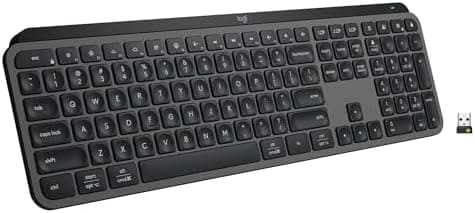
Evidence at a Glance
Keychron V3 Max
Hot-swappable Gateron switches, tri-mode wireless (USB-C + Bluetooth + 2.4GHz), gasket-mounted with sound dampening — the price-to-quality benchmark in r/MechanicalKeyboards consensus and Wirecutter coverage.
Sources: Wirecutter, Theremin Goat, r/MechanicalKeyboards, Keychron product documentation
Verified May 6, 2026
Logitech MX Keys S
Low-profile mechanical-feeling typing, smart backlighting, three-device Bluetooth pairing, 10-day battery — the consistent pick for cross-device wireless typing.
Sources: Wirecutter, The Verge, Logitech product documentation
Verified May 6, 2026
Microsoft Ergonomic Keyboard
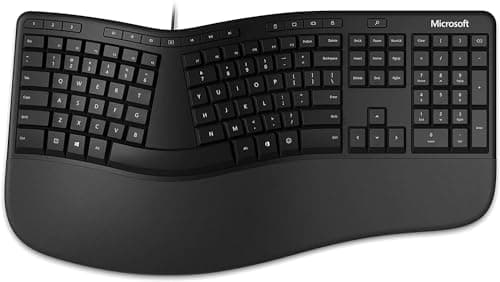
Split layout with curved key rows and integrated palm rest at $59 — the lowest-friction answer to wrist strain when a custom split keyboard isn't on the table.
Sources: Wirecutter, RTINGS, r/HomeOfficeSetup, Microsoft product documentation
Verified May 6, 2026
Our Picks
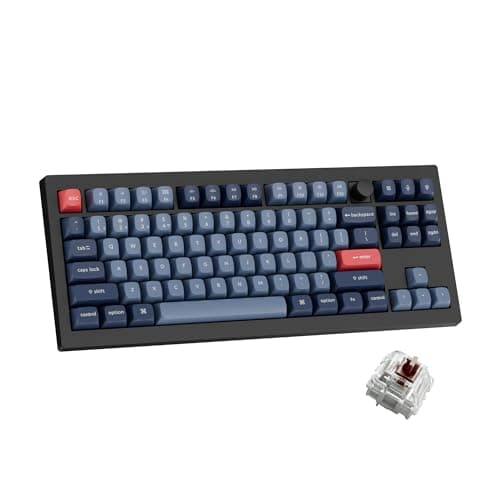
Keychron
Keychron V3 Max
9.3 / 10
- Hot-swappable Gateron Jupiter switches
- Tri-mode connectivity (USB-C, Bluetooth, 2.4GHz)
- Gasket-mount design with multi-layer sound dampening
- South-facing PCB compatible with Cherry-profile keycaps
$114.99
Logitech
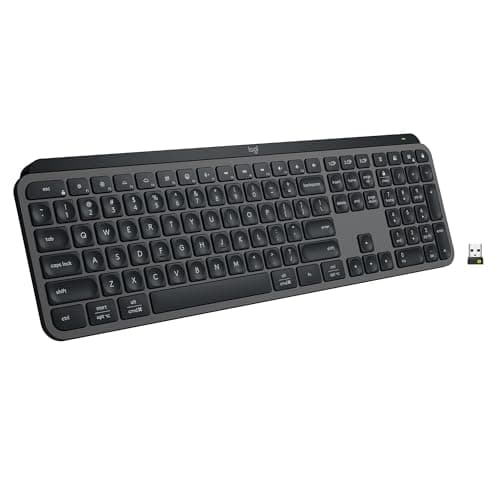
Logitech MX Keys S
9.0 / 10
- Low-profile scissor switches with mechanical-feeling travel
- Smart illumination that activates only when hands approach
- Three-device Bluetooth pairing with instant switch
- USB-C charging — about 10 days per charge with backlighting
$129.99
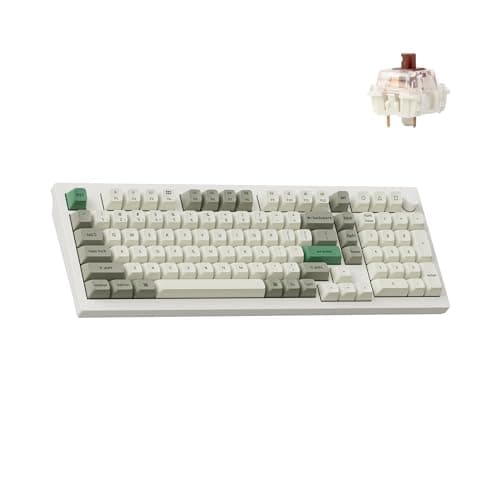
Keychron
Keychron Q5 Max
9.5 / 10
- CNC-machined 6063 aluminum case
- Gasket-mount with multi-layer dampening
- Hot-swappable Gateron Jupiter switches
- South-facing PCB with QMK/VIA support
$199
Microsoft
Microsoft Ergonomic Keyboard
8.4 / 10
- Split ergonomic layout with curved key rows
- Integrated cushioned palm rest
- Dedicated media and shortcut keys
- Plug-and-play USB connection
$299.90
The Short Answer
For most desk setups, the Keychron V3 Max at around $109 is the keyboard to buy — hot-swappable, tri-mode wireless, gasket-mounted, and good enough that the enthusiast-keyboard community broadly agrees it's the price-to-quality benchmark. If you want something quiet and low-profile that works across a Mac, a PC, and a phone, the Logitech MX Keys S is the consensus pick for multi-device wireless typing. If you have wrist pain, the Microsoft Ergonomic Keyboard is the unglamorous $59 split-design answer that consistently improves comfort within a week. The Keychron Q5 Max is the upgrade path for anyone who wants a CNC-machined enthusiast experience without building a custom board, and the Redragon K596 Vishnu is the entry-level mechanical for budget-conscious buyers who want to try clicky switches before committing.
Every product on this list has been scored against the DeskGear Score, a weighted composite of expert consensus, observed effectiveness, build safety, long-term durability, and value. Review method: Editorial synthesis of trade-publication reviews (Wirecutter, RTINGS, Tom's Hardware, The Verge), specialist reviewers (Theremin Goat for keyboards, Audio Science Review for microphones, RTINGS for input devices), manufacturer documentation, and owner data from r/MechanicalKeyboards, r/MouseReview, r/HomeOfficeSetup — no first-hand product testing.. Synthesized from 9+ expert sources.
Head-to-Head Comparison
| Feature | Keychron V3 Max | Logitech MX Keys S | Keychron Q5 Max | Microsoft Ergonomic Keyboard |
|---|---|---|---|---|
| Switch type | Hot-swappable Gateron Jupiter (mechanical) | Low-profile scissor (mechanical-feel) | Hot-swappable Gateron Jupiter (mechanical) | Membrane (ergonomic) |
| Connectivity | USB-C / Bluetooth / 2.4GHz | Bluetooth (3 devices) | USB-C / Bluetooth / 2.4GHz | USB wired |
| Best for | Default mechanical keyboard | Multi-device wireless typing | Premium enthusiast experience | Wrist pain relief at low cost |
| Watch-out | Heavy at 2.2 lbs — not for travel | Not hot-swappable | 4.4 lbs — desk-only | Membrane switches, no wireless option |
| Check Price | Amazon | Amazon | Amazon | Amazon |
Keychron Keychron V3 Max
$114.99
- Hot-swappable Gateron Jupiter switches
- Tri-mode connectivity (USB-C, Bluetooth, 2.4GHz)
- Gasket-mount design with multi-layer sound dampening
- South-facing PCB compatible with Cherry-profile keycaps
- QMK/VIA programmable, ~80-hour battery
The V3 Max is the keyboard the enthusiast community broadly agrees you should buy first. It does what $200+ custom builds did three years ago — hot-swappable switches, gasket mount, sound dampening, south-facing PCB, QMK/VIA programming — at $109. There's no longer a real argument that you need to spend more for "good" mechanical typing.
The tri-mode wireless is what makes it work as an office keyboard. USB-C wired for the desk, Bluetooth for a tablet or phone, 2.4GHz for a second machine — it switches without re-pairing and the latency is low enough that even careful gamers don't notice. Battery life is around 80 hours with backlighting on, longer if you turn the lights off.
What the spec sheet doesn't tell you: the included Gateron Jupiter switches are conservative. They're a fine starting point — smooth, slightly tactile, not too loud — but the whole point of buying a hot-swappable keyboard is changing them. If you want louder clickiness or a heavier press, swap the switches; if you want a different sound, swap the keycaps. The V3 Max is the platform, not the final answer.
What We Love
- Hot-swappable — try different switches without soldering
- Tri-mode wireless covers Mac, PC, tablet, and phone
- Gasket mount produces a quieter, denser typing sound than budget boards
- QMK/VIA support for full layout customization
What Could Be Better
- Heavy at 2.2 lbs — not the right pick for travel
- No dedicated media keys
- Stock Gateron Jupiter switches feel light to some typists
The Verdict
The default mechanical keyboard recommendation for any desk setup in 2026. The price-to-quality ratio is the strongest argument in the category, and the tri-mode wireless makes it work for the multi-device workflows most home-office users actually have.
Logitech Logitech MX Keys S
$129.99
- Low-profile scissor switches with mechanical-feeling travel
- Smart illumination that activates only when hands approach
- Three-device Bluetooth pairing with instant switch
- USB-C charging — about 10 days per charge with backlighting
- Compatible with Logitech Flow for cross-device cursor + clipboard
The MX Keys S is the consensus pick for low-profile wireless typing because Logitech got the typing feel right. Scissor switches usually feel mushy compared with mechanical, but the MX Keys S has a denser, more responsive press than almost any competitor, and the spherical key dish makes finger placement consistent.
Multi-device pairing is the practical superpower. Three devices, one button to cycle through them, near-instant switch. Combined with Logitech Flow software, you can move your cursor across a Mac and a PC running side-by-side and the keyboard follows automatically. For anyone running a laptop next to a desktop, this single feature is the reason to buy this keyboard over almost any cheaper wireless option.
What the spec sheet doesn't tell you: the keycaps show fingerprints. The matte finish looks great when new, but oily fingertip residue accumulates visibly within a few weeks. It wipes off easily, but if you photograph your desk or are particular about visible marks, this is a small daily cleanup tax.
What We Love
- Best typing feel of any low-profile wireless keyboard
- Smart backlighting only activates when needed — saves battery
- Three-device Bluetooth pairing with instant switch
- Logitech Flow extends cross-device cursor + clipboard
What Could Be Better
- Not hot-swappable — what you buy is what you get
- No wired-only option
- Keycaps show fingerprint residue
The Verdict
The right pick for professionals who work across multiple devices and want a premium typing experience without the desk footprint of a full mechanical keyboard. Skip it only if you specifically want full key travel; for low-profile wireless, this is the benchmark.
Keychron Keychron Q5 Max
$199
- CNC-machined 6063 aluminum case
- Gasket-mount with multi-layer dampening
- Hot-swappable Gateron Jupiter switches
- South-facing PCB with QMK/VIA support
- Rotary knob for volume or per-app shortcuts
The Q5 Max is the upgrade path for anyone who wants a custom-keyboard experience without buying parts and assembling. CNC-machined aluminum case, gasket mount with multiple dampening layers, hot-swappable PCB, programmable rotary knob — the build sheet matches keyboards twice the price two years ago.
The aluminum case and 4.4-pound weight are the actual differentiators. Heavy keyboards stay put under aggressive typing, absorb vibration that lighter plastic cases transmit, and produce a denser, more controlled sound on each press. The difference between the V3 Max and the Q5 Max isn't features — both are hot-swappable, gasket-mounted, programmable — it's the materials and the resulting acoustics.
What the spec sheet doesn't tell you: the weight is exactly the reason this isn't a travel keyboard. At 4.4 pounds, the Q5 Max is heavier than most laptops. It's a desk keyboard that lives where you put it; that's the trade-off for the build quality.
What We Love
- CNC-machined aluminum build feels and sounds premium
- Gasket mount produces the best stock typing experience in this price range
- Hot-swappable for switch experimentation
- Programmable rotary knob
What Could Be Better
- Expensive for entry-level mechanical buyers
- Heavy — not a travel-friendly keyboard
- Requires VIA software knowledge to fully customize
The Verdict
The right pick for enthusiasts who want a finished, opinionated mechanical keyboard without sourcing parts. If you're not sure you want a $200 keyboard yet, start with the V3 Max — many users find it's already enough.
Microsoft Microsoft Ergonomic Keyboard
$299.90
- Split ergonomic layout with curved key rows
- Integrated cushioned palm rest
- Dedicated media and shortcut keys
- Plug-and-play USB connection
- Membrane switches with reasonable feedback
The Microsoft Ergonomic Keyboard is the unglamorous answer to wrist pain. It is not a custom-built split board with hot-swappable switches; it is a $59 keyboard from Microsoft that is widely cited in r/HomeOfficeSetup, RTINGS, and Wirecutter as the lowest-friction way to start fixing the way your wrists are angled while you type.
The curved key layout encourages a slightly outward hand position that matches the natural angle of your forearms — closer to the position your hands rest in when you stand with your arms at your sides. The integrated palm rest keeps your wrists straight rather than dipped down into the desk. Both adjustments take roughly a week to acclimate to, and most people who experience wrist strain report meaningful relief within that adaptation period.
What the spec sheet doesn't tell you: it's not mechanical, it's not wireless, and the customization options are limited compared with a Kinesis or ZSA Voyager. The trade-off is price and friction — for $59, you can try ergonomic typing without committing to a $300 enthusiast split board, and for many users the Microsoft Ergonomic Keyboard is enough that they never feel the need to upgrade.
What We Love
- Dramatically reduces wrist strain within a week of use
- Integrated palm rest saves desk space
- Microsoft build quality and reliability
- Cheap entry into ergonomic typing
What Could Be Better
- Membrane switches — not for users who want mechanical feel
- Wired only
- Limited customization compared with enthusiast split boards
The Verdict
The right pick for anyone with wrist or RSI symptoms who wants the lowest-friction path to ergonomic typing. The week of adaptation is real, but the relief afterward is what makes this $59 keyboard a longstanding consensus recommendation.
How We Score
Formula
DeskGearHQ Editorial Score = (Switch Quality × 0.25) + (Build / Layout × 0.25) + (Connectivity / Features × 0.20) + (Expert Consensus × 0.15) + (Value × 0.15)
Score Factors
- Switch Quality · 25%
- Switch feel, sound, consistency across the keyboard, and whether the keyboard is hot-swappable to allow future change. The single biggest determinant of long-term satisfaction with a mechanical keyboard.
- Build / Layout · 25%
- Case material, gasket vs. tray mount, keycap profile and material, layout completeness, and chassis weight. Build quality affects acoustics, stability, and how the keyboard ages.
- Connectivity / Features · 20%
- Wireless modes (Bluetooth, 2.4GHz, USB), multi-device support, programmability (QMK/VIA), backlighting, and battery life. The connectivity features that determine how the keyboard fits into a multi-device workflow.
- Expert Consensus · 15%
- Synthesized from Wirecutter, RTINGS, Theremin Goat, manufacturer documentation, and r/MechanicalKeyboards consensus. The DeskGearHQ Editorial Score is a composite of expert opinion — DeskGearHQ does not run a testing lab.
- Value · 15%
- Per-feature pricing relative to the next tier up and down. Whether the extra $50 or $100 buys a meaningful upgrade for the typical home-office or enthusiast user.
| Rank | Product | Score |
|---|---|---|
| #1 | Keychron Keychron Q5 Max | 9.5 |
| #2 | Keychron Keychron V3 Max | 9.3 |
| #3 | Logitech Logitech MX Keys S | 9.0 |
| #4 | Microsoft Microsoft Ergonomic Keyboard | 8.4 |
When NOT to Buy
Skip the V3 Max if you specifically want a low-profile keyboard — the V3 Max is full-height and the MX Keys S is a better fit. Skip the MX Keys S if you want full key travel and tactile press; scissor switches don't feel like mechanical no matter how good the implementation. Skip the Q5 Max if you're not sure you want a $200 keyboard yet — the V3 Max delivers most of the typing experience for $90 less. Skip the Redragon K596 in Blue switch form if you share a workspace, take video calls, or live with anyone sensitive to noise; the clickiness is the feature, but it's also the problem. Skip the Microsoft Ergonomic Keyboard if you're already comfortable on a regular keyboard with no wrist pain — the layout has a real adaptation curve and the benefit isn't preventative for users without symptoms. And skip every mechanical keyboard on this list if your typing problem is layout (Dvorak, Colemak, custom split) rather than feel — those needs are better served by enthusiast boards from ZSA, Kinesis, or Mistel.
Frequently Asked Questions
Mechanical vs. membrane — is mechanical actually worth it?
For most desk users, yes — but not for the reasons most people cite. Mechanical switches last longer (50M+ keystrokes versus 5–10M on membrane), feel more consistent across the lifetime of the keyboard, and can be replaced individually on hot-swappable boards. The "satisfying typing feel" argument is real but subjective; the longevity and serviceability arguments are objective and apply to every desk that's used heavily.
Are mechanical keyboards too loud for office use?
It depends on the switch. Linear switches (Gateron Red, Cherry MX Red) are quiet enough for video calls and most shared spaces. Tactile switches (Brown, Holy Panda) are slightly louder but acceptable. Clicky switches (Blue) are not appropriate for offices, video calls, or shared homes. Choose the switch by your environment, not by what the box looks coolest.
Can I upgrade switches later?
Only on hot-swappable keyboards — the Keychron V3 Max and Q5 Max in this guide both qualify, the Redragon K596 does not. Hot-swap is becoming common at the $80+ price point and is worth paying for if you might evolve your switch preferences.
Do I need a numpad?
Only if you regularly type numbers (accounting, spreadsheets, data entry). Most users find that dropping the numpad to a TKL or 75% layout gives them noticeably more desk width — useful for low-sensitivity mouse users and small desks.
Wireless vs. wired — does latency matter?
For typing, no. Modern Bluetooth and 2.4GHz wireless add 1–5ms of latency, which is undetectable for typing tasks. For competitive gaming, the conventional wisdom is to use wired or 2.4GHz wireless rather than Bluetooth. For office use, wireless is the better choice for desk cleanliness and multi-device support.
Bottom Line
Get the Keychron V3 Max as the default mechanical keyboard for most desk setups. Hot-swappable, tri-mode wireless, and priced where the price-to-quality ratio is hard to beat.
Get the Logitech MX Keys S if you work across a Mac, a PC, a tablet, or a phone and want the best low-profile wireless typing experience available.
Get the Keychron Q5 Max if you want a finished enthusiast-tier keyboard without sourcing parts. The CNC-aluminum build is what justifies the price.
Get the Redragon K596 Vishnu only if you specifically want clicky switches and don't share a workspace. For office use, the V3 Max with quieter switches is a better choice.
Get the Microsoft Ergonomic Keyboard if you have wrist pain and want the lowest-friction path to relief. The week of adaptation is the cost; long-term comfort is the return.
Sources & Methodology
Methodology
DeskGearHQ Editorial Score = (Switch Quality × 0.25) + (Build / Layout × 0.25) + (Connectivity / Features × 0.20) + (Expert Consensus × 0.15) + (Value × 0.15)
Expert review sources
- Wirecutter — The Best Mechanical Keyboards
- Wirecutter — The Best Wireless Keyboards
- RTINGS — Keyboard reviews
- Theremin Goat — Keyboard switch and board reviews
- Tom's Hardware — Keyboard roundups
- Keychron — V3 Max and Q5 Max product documentation
- Logitech — MX Keys S product documentation
- Microsoft — Ergonomic Keyboard product documentation
- Redragon — K596 Vishnu product documentation
Community sources
- r/MechanicalKeyboards — switch and board recommendation threads
- r/HomeOfficeSetup — wrist pain and ergonomic discussion
Prices and specs verified May 6, 2026.
About the author
Nick Miles is the chief editor of DeskGearHQ. The picks above are editorial synthesis of expert consensus and enthusiast community feedback — DeskGearHQ does not run a testing lab. The DeskGearHQ Editorial Score is a composite of expert opinion, not a measurement. Sources are cited by name throughout.
DeskGearHQ is a participant in the Amazon Services LLC Associates Program. We may earn commissions from qualifying purchases — at no extra cost to you.
More Guides
Mice
Best Mice for Desk Setups 2026: Wireless, Ergonomic, and Gaming
Input & Connectivity
Best Productivity Gadgets for Your Office 2026: Tools That Actually Work
Lighting
Best Monitor Light Bars 2026: Reduce Eye Strain & Upgrade Your Setup
Display & Audio Setup
Best Microphones for the Home Office (2026)
Display & Audio Setup