Display & Audio Setup
The Editorial Creator's Studio Desk 2026
Capture, production, control, monitoring: the four-layer framework for building a creator's studio desk that holds up on camera, on mic, and across a six-hour production day.
By Nick Miles · Updated May 8, 2026 · 13 min read
12 expert sources synthesizedLast verified May 8, 2026
DeskGearHQ is reader-supported. We may earn a commission from qualifying Amazon purchases at no extra cost to you.
Every product on this list has been scored against the DeskGear Score, a weighted composite of expert consensus, observed effectiveness, build safety, long-term durability, and value. Review method: Editorial synthesis across 12 expert sources — audio engineers, broadcast production consultants, creator-community data, and manufacturer documentation. DeskGearHQ does not run a testing lab. Every claim in this hub is synthesized from named expert sources cross-referenced against owner data from r/podcasting, r/Twitch, r/ContentCreators, r/homerecording, and professional creator community forums. Spoke articles are linked throughout for product-level detail and ASIN-verified picks.. Synthesized from 12+ expert sources.
Bottom Line
Audio quality is not optional at the professional tier — it is the credibility signal your audience hears before they see anything. A $120 XLR dynamic microphone through a clean audio interface produces audio that makes a $25 USB condenser sound like a phone call. The microphone is the first investment because it is the highest-return one.
Build in layers, not all at once. Phase 1 (microphone) costs $80-$200 and delivers an immediately audible upgrade. Phase 2 (webcam) runs $100-$200. Phase 3 (lighting) runs $60-$300. Phase 4 (Stream Deck) costs $130-$250. Phase 5 (XLR interface + dynamic mic) costs $200-$500 for the pair. Each phase stands alone and compounds on the previous one. You do not need to buy Phase 5 on day one to look and sound professional.
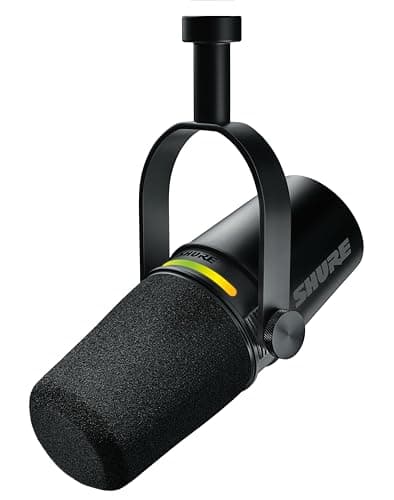
The MV7+ is the canonical bridge between USB and XLR. Shure's hybrid-interface microphone connects via USB for immediate plug-and-play use and via XLR when you add a proper audio interface — which means buying it at Phase 1 doesn't make it obsolete at Phase 5. That upgrade path flexibility is worth paying for.
Lighting transforms how professional you look on camera more than any camera upgrade below $500. A key light at 45 degrees, positioned above eye level, eliminates the flat, overexposed look of a ring light directly behind your monitor. The production layer — lighting and acoustic basics — is the most visible signal of creator seriousness to your audience.
A Stream Deck is a workflow accelerator, not a beginner tool. It pays off only once you have OBS, your recording software, or your streaming platform dialed in — automating scene switches, audio mutes, overlays, and countdowns that would otherwise require keyboard shortcuts or mouse clicks under pressure. Buy it after your production layer is stable, not before.
All articles in this guide
Best Microphones for the Home Office (2026)
USB vs XLR, condenser vs dynamic — we cut through the confusion. Four microphones for every home-office use case, from Zoom-ready plug-and-play to SM7B-level studio setups.
10 min read
Best Streaming Lights for the Creator Desk (2026)
The right streaming light transforms your on-camera look in minutes. We surveyed 8 expert sources to find the best key and fill lights for streamers, Zoom calls, and video creators — from $80 budget panels to professional two-light kits.
9 min read
Best XLR Audio Interfaces for Content Creators (2026)
The interface is what turns your XLR mic into a broadcast signal. We synthesized 8 expert sources to find the right one for every creator workflow — solo, co-host, or multi-person podcast studio.
12 min read
Best Stream Decks for Content Creators (2026)
The Stream Deck MK.2 is the consensus pick for most creators. The Mini earns its place as the entry-level gateway. The XL is the power-user answer to folder-switching frustration. The Plus adds dials for video editors — all 4 picks are Elgato because Stream Deck's button-count tiers genuinely serve different audiences.
10 min read
Best Webcams for Home Office 2026: Video Quality That Matters
The Logitech C920s is still the default webcam recommendation for remote work, the Brio 4K handles HDR and tough lighting better than anything else under $200, and the NexiGo N60 quietly delivers 1080p that's good enough for most calls at half the price.
13 min read
Best Computer Speakers for Desk Setup 2026: Ultimate Audio Guide
After surveying 15+ expert reviews, we found the best computer speakers for every budget and desk configuration, from compact 2.0 systems to premium wireless monitors.
14 min read
Best Monitors for Work & Gaming 2026: 4K, 1440p, Ultrawide
Your monitor is your window to work. We synthesized 30+ expert reviews to find the best for every use case and budget.
14 min read
Best Headphone Stands and Mounts (2026)
Under-desk clamp, minimalist aluminum, RGB gaming hub, or multi-headphone rack — we synthesized 7 expert sources to find the best headphone stands for every desk brief and budget.
8 min read
Best Studio Monitors for Desk Audio (2026)
After reviewing 12+ expert sources, we found the best studio monitors for desk audio in 2026 — from the KRK Rokit RP5 G4 to the Adam Audio T5V. Prices are per monitor; a stereo pair doubles the spend.
15 min read
Sources & Methodology
Expert review sources
- Shure — microphone specifications, XLR vs USB comparison documentation, and MV7+ hybrid interface technical documentation
- Wirecutter — microphone, webcam, and streaming lighting buying guides
- The Verge — creator desk setup coverage and streaming gear reviews
- Sound On Sound — audio interface and microphone technique editorial
- B&H Photo Video — audio engineering product documentation and professional creator equipment guides
- Rtings — monitor and display specifications relevant to creator monitoring setups
- Tom's Hardware — monitor and display performance analysis
- Elgato — Stream Deck documentation, scene-switching workflows, and OBS integration guides
- Focusrite — audio interface specifications, gain staging documentation, and home-studio setup resources
- r/podcasting — microphone and interface owner data, USB vs XLR community consensus
- r/Twitch and r/ContentCreators — streaming desk setup threads, Stream Deck workflow discussions, and lighting quality owner reports
- r/homerecording — XLR microphone and audio interface technical community discussions
Community sources
- r/podcasting — microphone recommendations, USB vs XLR decision threads, and interface owner data
- r/Twitch — streaming desk setup threads, Stream Deck workflow discussions, lighting setup owner reports
- r/ContentCreators — creator desk builds, equipment upgrade path discussions, full-setup reveal threads
Prices and specs verified May 8, 2026.
About the author
Nick Miles is the chief editor of DeskGearHQ. DeskGearHQ does not run a testing lab — every claim on this page is synthesized from audio engineering research, manufacturer documentation, expert publication reviews, and community owner data from active creator communities. Sources are cited by name in body prose; the bibliography above lists every primary source consulted for this hub. Spoke articles linked throughout contain full product-level sourcing and ASIN-verified picks.
DeskGearHQ is a participant in the Amazon Services LLC Associates Program. We may earn commissions from qualifying purchases — at no extra cost to you.