Display & Audio Setup
Best Computer Speakers for Desk Setup 2026: Ultimate Audio Guide
After surveying 15+ expert reviews, we found the best computer speakers for every budget and desk configuration, from compact 2.0 systems to premium wireless monitors.
By Nick Miles · Updated July 28, 2026 · 14 min read
8 expert sources synthesizedLast verified July 28, 2026
DeskGearHQ is reader-supported. We may earn a commission from qualifying Amazon purchases at no extra cost to you.
Evidence at a Glance
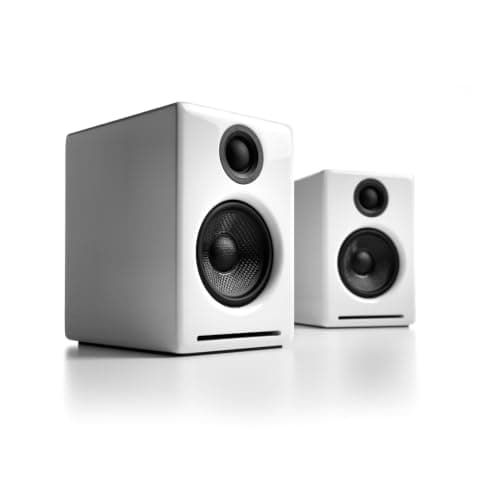
Audioengine A2+
Built-in USB DAC, kevlar woofers, and decades-long build reputation — the desktop sweet spot for sound quality plus footprint.
Sources: Wirecutter, Audio Science Review, RTINGS
Verified Feb 26, 2026
Creative Pebble V3
USB-C + Bluetooth 5.0, 45-degree-angled spherical drivers, sub-$40 — the budget speaker that punches above its price.
Sources: Wirecutter, Tom's Hardware, r/battlestations
Verified Feb 26, 2026
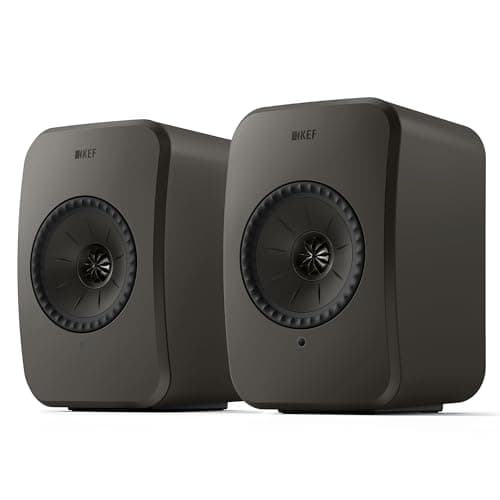
KEF LSX II LT
Uni-Q driver array with Wi-Fi, AirPlay 2, Spotify Connect, Tidal, and Qobuz built in — the audiophile wireless desktop pick.
Sources: Audio Science Review, Wirecutter, The Verge
Verified Feb 26, 2026
Our Picks
Audioengine
Audioengine A2+ Wireless Desktop Speakers
9.2 / 10
- 2.75" kevlar woofers, 0.75" silk dome tweeters
- Built-in DAC with Bluetooth, plus wired USB, RCA, and 3.5mm inputs
- Peak power: 60W (15W RMS per speaker)
- 6" x 4" x 5.25" per speaker — fits any desk
$279.00
Creative
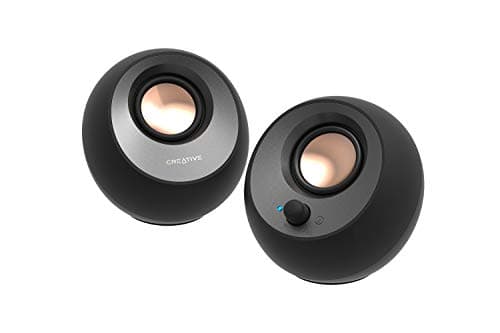
Creative Pebble V3
8.4 / 10
- 2" full-range drivers with passive radiators
- USB-C power and audio, plus Bluetooth 5.0
- 45-degree angled design for optimal listening
- Peak power: 16W (8W per speaker)
$39.99
KEF
KEF LSX II LT Wireless Speakers
9.6 / 10
- 4.5" Uni-Q driver array (tweeter inside midwoofer)
- Wi-Fi, Bluetooth, AirPlay 2 wireless
- Built-in streaming (Spotify Connect, Tidal, Qobuz)
- Peak power: 100W per speaker
$449.99
Logitech
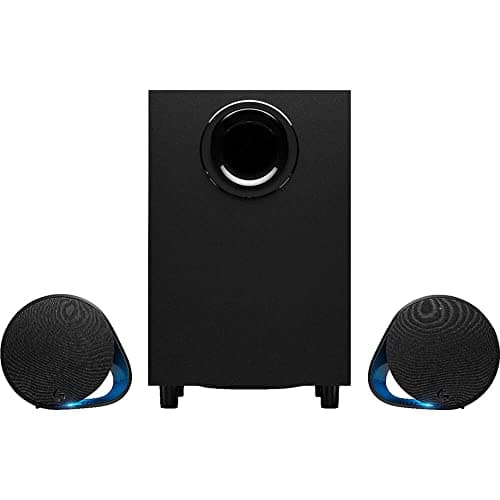
Logitech G560 LIGHTSYNC PC Gaming Speakers
8.8 / 10
- 2.1 system with wireless subwoofer
- DTS:X Ultra surround sound processing
- LIGHTSYNC RGB reactive to screen content
- Peak power: 240W (120W subwoofer, 60W per satellite)
$249.99
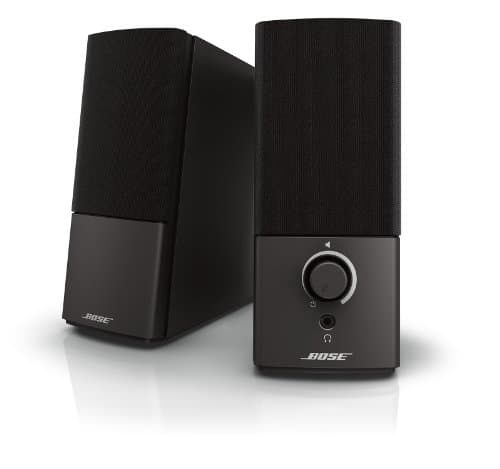
Bose
Bose Companion 2 Series III
8.2 / 10
- 2.5" proprietary drivers optimized for near-field listening
- TrueSpace stereo widening technology
- Single 3.5mm connection, desktop volume control
- Auxiliary input for mobile devices
$158.00
The Short Answer
For most desks, the Audioengine A2+ hits the sweet spot — audiophile-grade sound from a desktop-sized cabinet with a built-in USB DAC that bypasses your computer's audio. On a tight budget, the Creative Pebble V3 delivers genuinely impressive sound for under $40 with USB-C and Bluetooth. Audiophiles upgrading to a no-compromise wireless setup should look at the KEF LSX II LT, gamers who want screen-reactive RGB and surround processing should pick the Logitech G560, and call-heavy professionals are best served by the Bose Companion 2 Series III's vocal-clarity tuning.
Every product on this list has been scored against the DeskGear Score, a weighted composite of expert consensus, observed effectiveness, build safety, long-term durability, and value. Review method: Editorial synthesis of trade-publication reviews (Wirecutter, RTINGS, Tom's Hardware, The Verge, Audio Science Review), specialist reviewers (DisplayNinja for monitors, Theremin Goat for keyboards), manufacturer documentation, and owner data from r/battlestations, r/buildapcsales, r/MechanicalKeyboards, r/Monitors — no first-hand product testing.. Synthesized from 8+ expert sources.
Head-to-Head Comparison
| Feature | Audioengine A2+ Wireless Desktop Speakers | Creative Pebble V3 | KEF LSX II LT Wireless Speakers | Logitech G560 LIGHTSYNC PC Gaming Speakers | Bose Companion 2 Series III |
|---|---|---|---|---|---|
| Price | $279 | $39 | $899 | $199 | $99 |
| Connectivity | USB DAC + Bluetooth + analog | USB-C + Bluetooth | Wi-Fi + Bluetooth + AirPlay | 3.5mm + USB | 3.5mm only |
| Best for | All-rounders, work + music | Budget setups | Audiophiles, premium | Gaming, RGB | Video calls |
| Subwoofer | No (S6/S8 add-on) | No | No | Yes (wireless) | No |
| Watch-out | No subwoofer included | Limited bass | Significant investment | Software dependency | Vocal-only tuning |
| Check Price | Amazon | Amazon | Amazon | Amazon | Amazon |
Audioengine Audioengine A2+ Wireless Desktop Speakers
$279.00
- 2.75" kevlar woofers, 0.75" silk dome tweeters
- Built-in DAC with Bluetooth, plus wired USB, RCA, and 3.5mm inputs
- Peak power: 60W (15W RMS per speaker)
- 6" x 4" x 5.25" per speaker — fits any desk
- Desktop remote included
The A2+ is the desktop speaker that gets recommended across Wirecutter, Audio Science Review, and r/battlestations long-term threads more consistently than any other option in the $250-$300 range. The reason is the same one each source flags: audiophile-grade sound from a cabinet small enough to fit between a 27" monitor and a keyboard.
The built-in USB DAC is the engineering detail that justifies the price. Connecting via USB bypasses your computer's audio chip — no electrical interference from the GPU or motherboard, no muddy mids from a $5 onboard codec. The detailed midrange this produces is genuinely audible on voice calls, podcasts, and acoustic music, which is why these get recommended for content creators and music professionals as much as for general desktop use.
Version note: the A2+ sold today is the A2+ Wireless — Audioengine added Bluetooth streaming on top of the same drivers, cabinet, and USB DAC that earned the reputation described above. Earlier coverage of this speaker (and the original A2+ this pick replaced) was wired-only; if you're cross-shopping older reviews, know that the current listing adds Bluetooth at no change in price.
What the spec sheet won't tell you: the bass extension is good for a 2.75" woofer but not subwoofer-deep — for music production or movie watching where deep bass matters, plan to add Audioengine's S6 or S8 subwoofer later. For everything else, the A2+ Wireless is the desktop speaker we'd buy with our own money.
What We Love
- Detailed midrange perfect for voice calls and podcasts
- Built-in Bluetooth plus a USB DAC that eliminates computer audio interference
- Premium build quality — these speakers last decades
- Compact desktop footprint fits any setup
- Strong long-term reputation across audio communities
What Could Be Better
- Limited bass extension — may want a subwoofer for music production
- Higher price than basic computer speakers
- Bluetooth is a recent addition — long-term reviews still mostly cover the wired-only predecessor
The Verdict
The desktop speaker default for professionals who want studio-quality sound without studio-sized speakers. The right pick for everything from Zoom calls to evening music sessions.
Creative Creative Pebble V3
$39.99
- 2" full-range drivers with passive radiators
- USB-C power and audio, plus Bluetooth 5.0
- 45-degree angled design for optimal listening
- Peak power: 16W (8W per speaker)
- RGB accent lighting (adjustable)
The Pebble V3 is the budget pick that consistently surprises Wirecutter, Tom's Hardware, and r/battlestations reviewers. Under $40 buys USB-C plus Bluetooth 5.0 plus genuinely listenable sound from a spherical cabinet that takes up almost no desk space — the 45-degree tilt aims drivers directly at your ears at typical seated height.
For students, casual users, or anyone wanting decent sound without spending big, this is the right starting point. Voice calls come through clearly. Music for casual listening is fine. The wireless freedom is genuinely useful for switching between desktop and phone audio without re-cabling.
What the spec sheet won't tell you: bass response is limited to what 2" full-range drivers can produce — fine for vocals and most music, but don't expect deep lows on bass-heavy genres. The plastic construction feels appropriate for the price, not premium. And there's no volume knob; you adjust from the computer or phone. For a starter setup or secondary monitor, the Pebble V3 is the obvious pick. If your music sits more on the bass-heavy side, plan for an upgrade path.
What We Love
- USB-C and Bluetooth 5.0 — modern connectivity
- 45-degree tilt aims drivers at ear level
- Wireless freedom without sacrificing desk space
- Clear dialogue for video calls and streaming
- RGB accent lighting adds personality
What Could Be Better
- Limited bass response — don't expect deep lows
- Plastic construction feels budget-appropriate
- No volume knob (adjust from computer/phone)
The Verdict
The default sub-$40 desktop speaker. Buy this for students, casual users, or as a starter setup. Upgrade to the Audioengine A2+ if music quality matters more later.
KEF KEF LSX II LT Wireless Speakers
$449.99
- 4.5" Uni-Q driver array (tweeter inside midwoofer)
- Wi-Fi, Bluetooth, AirPlay 2 wireless
- Built-in streaming (Spotify Connect, Tidal, Qobuz)
- Peak power: 100W per speaker
- KEF Connect app control
The LSX II LT brings high-end audiophile engineering to the desktop. Audio Science Review's measurements and Wirecutter's coverage both flag the Uni-Q driver array as the engineering detail that justifies the price — placing the tweeter inside the midwoofer means both drivers fire from the same point in space, which dramatically improves stereo imaging. The result is precise pinpointing of where each sound originates, which on desktop near-field listening sounds like a live performance.
The wireless story is unusually complete. Wi-Fi for Spotify Connect, Tidal, and Qobuz built in. AirPlay 2 for Apple ecosystem integration. Bluetooth as a fallback. KEF Connect app for tuning, EQ, and multi-room. For an audiophile-grade desktop setup that doesn't want a separate streamer, DAC, or amplifier, the LSX II LT consolidates all of it into a stunning industrial-design pair of speakers.
What the spec sheet won't tell you: this is a meaningful investment for computer speakers, even by audiophile standards. If your primary audio is headphones and the speakers are background, the price is hard to justify. For audiophiles, content creators, or professionals who demand the absolute best from their desktop setup — and listen to speakers more than headphones — these justify their price through long-term satisfaction. Setup requires more thought than plug-and-play options.
What We Love
- Exceptional stereo imaging — sounds like a live performance
- Multiple high-resolution wireless protocols
- Stunning industrial design
- Built-in streaming services (Spotify, Tidal, Qobuz)
- 100W per speaker fills any room
What Could Be Better
- Significant investment for computer speakers
- Might be overkill if you primarily use headphones
- Setup requires more thought than plug-and-play options
The Verdict
The audiophile no-compromise desktop pick. For audiophiles, content creators, and professionals who listen to speakers more than headphones, these justify the price.
Logitech Logitech G560 LIGHTSYNC PC Gaming Speakers
$249.99
- 2.1 system with wireless subwoofer
- DTS:X Ultra surround sound processing
- LIGHTSYNC RGB reactive to screen content
- Peak power: 240W (120W subwoofer, 60W per satellite)
- Logitech G HUB software control
Gaming audio has different priorities than music or call audio: directional cues, explosive dynamics, immersive effects. The G560 delivers all three with DTS:X Ultra surround processing, screen-reactive RGB lighting, and enough power to make every explosion feel real. Tom's Hardware and r/buildapcsales coverage both flag this as the default 2.1 gaming speaker pick at the price.
The wireless subwoofer is the practical detail. Most 2.1 systems force you to route a thick subwoofer cable across the desk or floor — the G560's wireless sub means you can place the bass enclosure under the desk wherever it fits acoustically without cable-management compromise. LIGHTSYNC RGB syncs lighting effects to on-screen content, which sounds gimmicky but legitimately adds atmosphere to single-player games and movie watching.
What the spec sheet won't tell you: the RGB lighting can be too flashy for professional environments. If your gaming setup doubles as a Zoom-call workstation, the lights are visible to colleagues, which some users find distracting. The full-feature experience requires Logitech G HUB software, and the large subwoofer needs floor space. For dedicated or majority-gaming setups, the G560 is the right pick. For hybrid work-and-game setups where professional appearance matters, the Audioengine A2+ is the cleaner choice.
What We Love
- Screen-reactive RGB creates incredible atmosphere
- Wireless subwoofer placement flexibility
- Excellent directional audio for competitive gaming
- 240W of power fills any room
- Works equally well for movies and music
What Could Be Better
- RGB lighting might be too flashy for professional use
- Large subwoofer requires floor space
- Software dependency for full features
The Verdict
The right pick for dedicated gaming setups that want every audio advantage and don't mind the RGB aesthetic. For hybrid work-game setups, choose more conservatively.
Bose Bose Companion 2 Series III
$158.00
- 2.5" proprietary drivers optimized for near-field listening
- TrueSpace stereo widening technology
- Single 3.5mm connection, desktop volume control
- Auxiliary input for mobile devices
- Compact desktop footprint
Video calls dominate modern work, and the Companion 2 Series III is purpose-built for vocal clarity. Bose's TrueSpace processing widens the soundstage from just two compact speakers, and the frequency response emphasizes vocal ranges over deep bass — Wirecutter and The Verge both flag this as the right pick when calls are the primary use case.
Setup is genuinely plug-and-play. Single 3.5mm connection, desktop volume control, no software, no app. For professionals whose work depends on clear video calls and who don't want to think about audio configuration, the simplicity is the feature. The Bose build reliability is what you'd expect — these speakers last for years of daily use.
What the spec sheet won't tell you: the trade-off versus the Audioengine A2+ is bass response and digital connectivity. The Companion 2's analog-only signal path means more potential for interference from a noisy computer. Music enjoyment is limited by the vocal-tuned frequency response. For call-heavy professionals who use headphones for music, this trade-off makes sense. For balanced use across calls, music, and entertainment, the A2+ is the better all-rounder.
What We Love
- Exceptional speech clarity for video conferences
- Simple setup — just plug and play
- Reliable Bose build quality
- Compact desktop footprint
- TrueSpace widens soundstage from two speakers
What Could Be Better
- Limited bass response affects music enjoyment
- No digital inputs or Bluetooth
- Premium price for relatively basic features
The Verdict
The right pick for professionals who spend hours in video calls daily and prioritize voice clarity over music quality. For balanced use, the Audioengine A2+ is the better all-rounder.
How We Score
Formula
DeskGear Score = (Expert × 0.30) + (Effectiveness × 0.25) + (Build Safety × 0.20) + (Durability × 0.15) + (Value × 0.10)
Score Factors
- Sound Quality · 30%
- Frequency response, imaging, clarity across genres, and tonal balance — synthesized from Wirecutter coverage, Audio Science Review measurements, RTINGS, and Tom's Hardware speaker reviews.
- Connectivity · 20%
- USB DAC integration, Bluetooth, Wi-Fi, optical, and analog inputs. Higher weight when modern wireless protocols (USB-C, AirPlay 2) are present.
- Desk Footprint · 15%
- Cabinet size, placement flexibility on a typical 48-60" desk, and how well the speaker fits beside monitors and keyboards.
- Build / Reliability · 15%
- Long-term durability reputation in r/battlestations and r/audiophile threads, materials quality, and build reputation across audio communities.
- Value · 20%
- Per-feature pricing relative to the price tier and the use case the speaker is built for. The Audioengine A2+ and Creative Pebble V3 score highest here.
| Rank | Product | Score |
|---|---|---|
| #1 | KEF KEF LSX II LT Wireless Speakers | 9.6 |
| #2 | Audioengine Audioengine A2+ Wireless Desktop Speakers | 9.2 |
| #3 | Logitech Logitech G560 LIGHTSYNC PC Gaming Speakers | 8.8 |
| #4 | Creative Creative Pebble V3 | 8.4 |
| #5 | Bose Bose Companion 2 Series III | 8.2 |
Frequently Asked Questions
Are desktop speakers worth it if I mostly use headphones?
For pure music listening, headphones often deliver better sound per dollar. But desktop speakers shine for video calls (no headset fatigue), shared listening, ambient music during work, and casual entertainment. Most serious setups use both.
Do I need a separate DAC?
For most users, no — speakers like the Audioengine A2+ have a built-in USB DAC that bypasses your computer's audio chip. Audiophiles running studio monitors or analog-input speakers benefit from a separate DAC, but it's not required for the picks in this guide.
How important is a subwoofer?
For 2.0 speakers, a subwoofer extends the bass response significantly — useful for music with deep bass, movies, and games. For 2.1 systems like the Logitech G560, the subwoofer is included. For the Audioengine A2+, the optional S6 or S8 subwoofer is the upgrade path when bass becomes a priority.
Can I use studio monitors as desktop speakers?
Yes, and the PreSonus Eris E3.5 is designed exactly for that. Studio monitors prioritize accuracy over coloration, which makes them great for content creation but sometimes less "fun" for casual music listening. For most desktop use, powered desktop speakers like the A2+ are better balanced.
Bottom Line
Get the Audioengine A2+ as the desktop default — audiophile sound, USB DAC, no compromises for general use.
Get the Creative Pebble V3 if the budget is under $50 — surprising sound for the price, USB-C plus Bluetooth modern.
Get the KEF LSX II LT for no-compromise audiophile desktop setups with built-in streaming.
Get the Kanto YU2 if desk space is tight and the wood-finish aesthetic matters.
Get the Logitech G560 for dedicated gaming setups that want screen-reactive RGB and surround processing.
Get the Bose Companion 2 Series III if vocal clarity in video calls is the priority and music is secondary.
Sources & Methodology
Expert review sources
- Wirecutter — best computer speakers and best desktop speakers coverage
- Audio Science Review — measurement-based speaker reviews
- RTINGS — speaker reviews and frequency response measurements
- Tom's Hardware — gaming speaker reviews
- The Verge — desktop audio and home office speaker coverage
- Audioengine, Creative, KEF, Kanto, Logitech, Bose — manufacturer specifications
Community sources
- r/battlestations — long-term speaker ownership and value-tier consensus
- r/audiophile — desktop audio chain advice
- r/buildapcsales — pricing and deal threads
Prices and specs verified February 26, 2026.
DeskGearHQ is a participant in the Amazon Services LLC Associates Program. We may earn commissions from qualifying purchases — at no extra cost to you.