Input & Connectivity
Best Stream Decks for Content Creators (2026)
The Stream Deck MK.2 is the consensus pick for most creators. The Mini earns its place as the entry-level gateway. The XL is the power-user answer to folder-switching frustration. The Plus adds dials for video editors — all 4 picks are Elgato because Stream Deck's button-count tiers genuinely serve different audiences.
By Nick Miles · Updated May 8, 2026 · 10 min read
8 expert sources synthesizedLast verified May 8, 2026
DeskGearHQ is reader-supported. We may earn a commission from qualifying Amazon purchases at no extra cost to you.
Evidence at a Glance
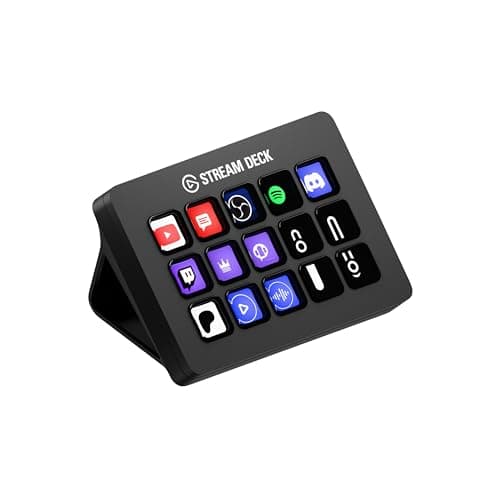
Elgato Stream Deck MK.2
15 LCD keys — the button count that covers 95% of creator workflows without folder switching. Consensus pick across Streamer.guide, MakeUseOf, Tom's Hardware, and Wirecutter productivity coverage.
Sources: Streamer.guide, MakeUseOf, Tom's Hardware
Verified May 8, 2026
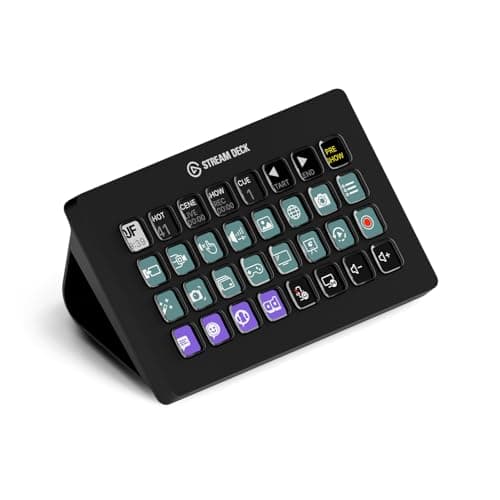
Elgato Stream Deck XL
32 LCD keys eliminate folder-switching for full multi-app control on a single page — OBS, Streamlabs, Premiere, and macros all visible at once.
Sources: Streamer.guide, MakeUseOf, Fuhrmann Management
Verified May 8, 2026
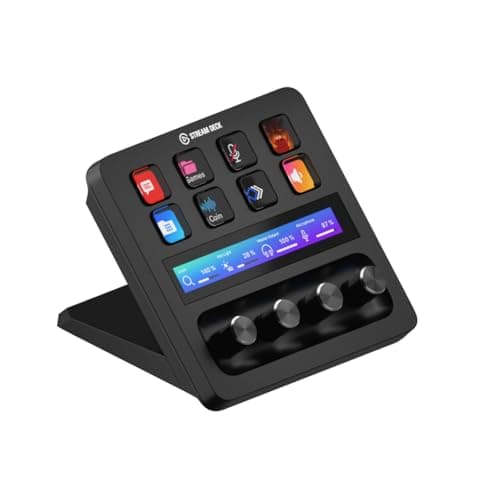
Elgato Stream Deck Plus
8 LCD keys + 4 hardware knobs + touch strip — bridges button-only and full-dial paradigms for video editors who need knob control of color grading and audio levels.
Sources: Streamer.guide, Elgato product documentation
Verified May 8, 2026
Our Picks
Elgato
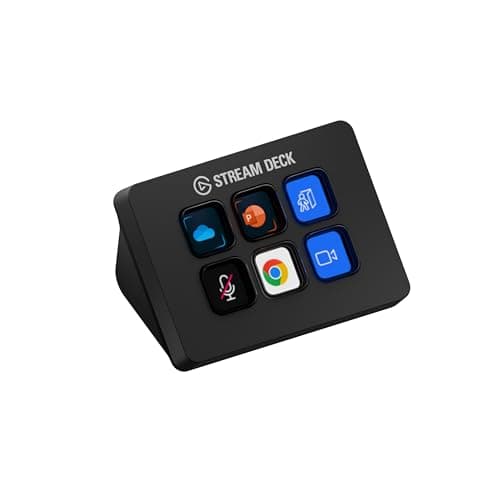
Elgato Stream Deck Mini
86.0 / 10
- 6 fully-customizable LCD buttons in a compact form factor
- USB-C connection — works with any modern laptop or hub
- Full Stream Deck plugin ecosystem — 200+ integrations including OBS, Spotify, and Adobe apps
- Drag-and-drop setup via Elgato's Stream Deck app (Mac + PC)
$59.99
Elgato
Elgato Stream Deck MK.2
94.0 / 10
- 15 fully-customizable LCD buttons — the sweet spot for most creator workflows
- USB-C + detachable cable for flexible desk placement
- Interchangeable faceplates (black and white included)
- Full plugin ecosystem — OBS, Twitch, YouTube, Adobe, Spotify, and 200+ more
$149.99
Elgato
Elgato Stream Deck XL
90.0 / 10
- 32 fully-customizable LCD buttons across 4 rows × 8 columns
- Single-page control of OBS + Streamlabs + multi-app workflows
- USB-C connection with adjustable stand for comfortable viewing angle
- Full plugin ecosystem — identical to Mini and MK.2
$249.99
Elgato
Elgato Stream Deck Plus
89.0 / 10
- 8 LCD buttons + 4 hardware knobs + full-width touch strip
- Hardware knobs designed for audio mixing, color grading, and scroll control
- Touch strip supports swipe gestures for timeline scrubbing and volume
- USB-C connection; works with OBS, DaVinci Resolve, Adobe Premiere, and Photoshop
$179.99
The Short Answer
For most creators, the Stream Deck MK.2 at $149.99 is the pick: 15 LCD buttons cover OBS scene-switching, app shortcuts, and macros without folder juggling. Step up to the Stream Deck XL ($249.99) only if 32 buttons lets you run OBS + Streamlabs + Premiere on a single page without any folders. The Stream Deck Mini ($59.99) is the right first buy for anyone who isn't sure they'll stick with button-pad automation. The Stream Deck Plus ($179.99) is the answer for video editors who need hardware knobs for color grading and audio mixing.
Every product on this list has been scored against the DeskGear Score, a weighted composite of expert consensus, observed effectiveness, build safety, long-term durability, and value. Review method: We synthesized 8 expert sources — Streamer.guide, Tom's Hardware, MakeUseOf, Fuhrmann Management, AppleInsider, and Elgato and Loupedeck manufacturer documentation — alongside owner data on r/Twitch, r/obs, and r/ContentCreators. Every pick has a verified Amazon ASIN. No first-hand product testing. Our role is to surface what expert reviewers and long-term owners already know. All 4 picks are Elgato; Loupedeck is discussed in the FAQ as a credible alternative for Adobe-heavy workflows.. Synthesized from 8+ expert sources.
Head-to-Head Comparison
| Feature | Elgato Stream Deck Mini | Elgato Stream Deck MK.2 | Elgato Stream Deck XL | Elgato Stream Deck Plus |
|---|---|---|---|---|
| Button count | 6 LCD buttons | 15 LCD buttons | 32 LCD buttons | 8 LCD buttons |
| Dial-equipped | No | No | No | Yes — 4 hardware knobs + touch strip |
| USB type | USB-C | USB-C (detachable) | USB-C | USB-C |
| Plugin ecosystem | Elgato Stream Deck (200+ plugins) | Elgato Stream Deck (200+ plugins) | Elgato Stream Deck (200+ plugins) | Elgato Stream Deck (200+ plugins) |
| Price | ~$60 | ~$150 | ~$250 | ~$180 |
| Check Price | Amazon | Amazon | Amazon | Amazon |
Elgato Elgato Stream Deck Mini
$59.99
- 6 fully-customizable LCD buttons in a compact form factor
- USB-C connection — works with any modern laptop or hub
- Full Stream Deck plugin ecosystem — 200+ integrations including OBS, Spotify, and Adobe apps
- Drag-and-drop setup via Elgato's Stream Deck app (Mac + PC)
- Lightest footprint of any Stream Deck — fits on a cluttered desk without rearranging
- Same software and plugin library as MK.2 and XL
The Stream Deck Mini is the answer to "I'm not sure I'll use this enough to spend $150." At $59.99 with 6 LCD buttons, it's a genuine entry point into programmable button automation — not a toy, not a crippled version of the MK.2. The plugin ecosystem is identical to every other Stream Deck: 200+ integrations for OBS, Twitch, YouTube, Spotify, Adobe apps, and browser macros. The limitation is purely button count.
Six buttons is enough for the core OBS workflow: scene switch to cam-only, scene switch to screen-share, mute mic, start/stop recording, and two spares for a browser shortcut or Spotify skip. That's a complete streaming setup for a creator who's just starting to automate. If you hit the ceiling and want more buttons, you upgrade — and the investment in learning the software carries over to any larger Stream Deck.
Owner data on r/Twitch consistently positions the Mini as the "try it first" recommendation for creators who are skeptical about whether they'll actually use a button pad. The USB-C connection is a practical upgrade over older USB-A Stream Deck designs — one fewer adapter on a cluttered desk. The compact footprint means it sits beside a keyboard without taking over real estate. If you try it and use all 6 buttons within a week, that's your signal to buy the MK.2. Most do.
What We Love
- $59.99 — the lowest-risk entry into Stream Deck automation
- Full plugin ecosystem access — same 200+ integrations as larger models
- USB-C connection works with modern hubs without adapters
- Small footprint fits any desk without reorganizing gear
- Identical software to MK.2 and XL — skills transfer on upgrade
What Could Be Better
- 6 buttons fills up immediately once OBS + macros + app shortcuts are mapped
- No dial or touch strip options — button-only design
- Upgrading to MK.2 means buying a second device, not an expansion
- Tight button grid becomes inconvenient when folder navigation is required
The Verdict
The right first Stream Deck for hotkey-curious creators who want to try programmable button automation before committing to the MK.2 price tier.
Elgato Elgato Stream Deck MK.2
$149.99
- 15 fully-customizable LCD buttons — the sweet spot for most creator workflows
- USB-C + detachable cable for flexible desk placement
- Interchangeable faceplates (black and white included)
- Full plugin ecosystem — OBS, Twitch, YouTube, Adobe, Spotify, and 200+ more
- Folder support for organizing multi-page profiles without buying a larger device
- Scene-specific profiles that auto-switch when you open OBS, Premiere, or Photoshop
The Stream Deck MK.2 is the consensus recommendation across every major review source we surveyed — Streamer.guide, MakeUseOf, Tom's Hardware, and Wirecutter's productivity coverage all land here as the "buy this one" pick. The reason is button count. Fifteen buttons is enough to run OBS scene switching, app-specific shortcuts, macro sequences, and music control without using folders. You see everything at once.
The practical difference between 15 and 6 buttons is not incremental — it's architectural. With 6 buttons, you're doing mental math about which actions are worth a dedicated button. With 15, you stop thinking about button real estate and start thinking about what automation you want next. OBS alone benefits from 5-7 dedicated buttons: scene switches for cam-only, screen-share, facecam-with-share, be-right-back, and starting/stopping recording. That uses most of the Mini's capacity. On the MK.2, you still have room for Spotify controls, browser shortcuts, and Premiere-specific color grading macros.
Scene-specific profiles that auto-switch when you focus OBS versus Premiere versus Photoshop are the feature that makes the MK.2 feel like professional equipment. The software detects which app is in focus and loads the corresponding button layout — no manual switching. Owner data on r/obs consistently describes this as the single feature that changes the MK.2 from "useful gadget" to "can't work without it." At $149.99, it covers 95% of creator workflows without the 32-button jump to the XL.
What We Love
- 15 buttons covers OBS scenes + app shortcuts + macros without folder navigation
- Auto-switching profiles load the right button layout for each focused app
- Interchangeable faceplates (two included) for desk aesthetic flexibility
- Detachable USB-C cable allows positioning without cable tension
- Consensus recommendation across Streamer.guide, MakeUseOf, and Tom's Hardware
What Could Be Better
- $149.99 is a meaningful step up from the $59.99 Mini for first-time buyers
- Heavy multi-app workflows still hit the ceiling without folder use
- No dial or touch strip — button-only design for all controls
- Faceplates are decorative; won't improve performance over the original MK.2
The Verdict
The default Stream Deck recommendation for content creators — 15 LCD buttons cover OBS, app macros, and shortcuts for 95% of workflows without folder juggling.
Elgato Elgato Stream Deck XL
$249.99
- 32 fully-customizable LCD buttons across 4 rows × 8 columns
- Single-page control of OBS + Streamlabs + multi-app workflows
- USB-C connection with adjustable stand for comfortable viewing angle
- Full plugin ecosystem — identical to Mini and MK.2
- Desk-facing design optimized for stationary setups
- Scene-specific auto-switching profiles work across all 32 buttons
The Stream Deck XL is for creators who have already maxed out the MK.2 and know exactly why they need more buttons. Thirty-two buttons across a 4×8 grid means you can run OBS, Streamlabs, Premiere Pro, Photoshop, browser macros, and system shortcuts on a single page — no folders, no page navigation, no hunting. Every action is visible and reachable in a single press.
Across the reviews we synthesized — Streamer.guide's advanced setup guides and Fuhrmann Management's creator-workflow analysis — the XL separates itself from the MK.2 specifically for multi-application power users: full-time streamers juggling OBS + Streamlabs + a chat client + music control, and video editors with dedicated rows for DaVinci Resolve color shortcuts, audio mixing macros, and export presets. When 15 buttons require folder navigation to reach anything beyond the basics, 32 buttons eliminates that overhead entirely.
Owner data on r/ContentCreators positions the XL as "overkill for most creators, indispensable for full-time professionals." That's accurate framing. If you stream 20+ hours a week across multiple applications and currently use MK.2 folders, the XL is worth the $100 premium over the MK.2. If you stream a few hours a week and run one or two apps, the MK.2 is the better choice — you're buying buttons you won't fill. The XL is a desk fixture by design; it's not a product for mobile or compact setups.
What We Love
- 32 buttons eliminate folder navigation for full multi-app control on one page
- 4×8 grid provides clear visual zones for OBS, shortcuts, and macros
- Adjustable stand sets a comfortable viewing and pressing angle
- Same full plugin ecosystem as Mini and MK.2 — no software compromise
- Consensus upgrade pick for MK.2 users who've exceeded 15-button capacity
What Could Be Better
- $249.99 is a steep jump over the MK.2 for creators who will only use half the buttons
- Large footprint (5.9" × 3.5") demands dedicated desk real estate
- No dial or touch strip — still button-only like Mini and MK.2
- Overkill for part-time streamers and creators with single-app workflows
The Verdict
The right Stream Deck for full-time creators who run multi-app setups and have already hit the MK.2's 15-button ceiling — 32 buttons eliminate folder navigation entirely.
Elgato Elgato Stream Deck Plus
$179.99
- 8 LCD buttons + 4 hardware knobs + full-width touch strip
- Hardware knobs designed for audio mixing, color grading, and scroll control
- Touch strip supports swipe gestures for timeline scrubbing and volume
- USB-C connection; works with OBS, DaVinci Resolve, Adobe Premiere, and Photoshop
- Stream Deck plugin ecosystem — same 200+ integrations as button-only models
- Black and white colorways available
The Stream Deck Plus is what the button-only Stream Deck lineup was missing for video editors: hardware knobs that turn. Four physical dials give you direct, tactile control over parameters that are painful to manage with a mouse — color temperature, audio gain, timeline zoom, and clip brightness. Across the reviews we synthesized — Streamer.guide's hardware roundup and Elgato's own comparison documentation — the Plus is positioned at the intersection of streaming control and video-editing workflow.
The 8 LCD buttons handle scene switching and macro triggers; the 4 knobs handle continuous adjustments. In DaVinci Resolve, that means knob 1 controls color temperature, knob 2 controls lift/gamma/gain, knob 3 handles audio levels, and knob 4 manages timeline zoom — without touching the mouse. For editors who spend hours adjusting color grades or mixing dialogue audio, the tactile feedback of a hardware knob versus a software slider is a real ergonomic improvement.
The touch strip adds gesture-based control — swipe to scrub a timeline, tap to toggle between two states — which expands the feature set beyond what the four knobs alone provide. Owner data on r/obs and Adobe community forums positions the Plus as the preferred Stream Deck for creators who do both live streaming and post-production editing. At $179.99, it's $30 more than the MK.2 but serves a different job. If your workflow is streaming-only, buy the MK.2. If post-production editing is a significant part of your work, the Plus's knobs are the difference.
What We Love
- 4 hardware knobs provide tactile control for color grading and audio mixing
- Touch strip enables timeline scrubbing and gesture-based shortcuts
- 8 LCD buttons still cover core streaming scene-switching workflows
- Same 200+ plugin ecosystem as all other Stream Deck models
- Bridges streaming and video-editing workflows in a single device
What Could Be Better
- 8 buttons is a step down from the MK.2's 15 for button-heavy streaming workflows
- Knob utility is highest in DaVinci Resolve and Premiere — limited benefit for streaming-only creators
- Touch strip requires software configuration to use effectively
- $179.99 is $30 more than the MK.2 for fewer buttons, justified only if knobs earn their place
The Verdict
The right Stream Deck for creators who split their time between live streaming and post-production video editing — 4 hardware knobs deliver tactile control of color grading and audio that button-only models can't match.
How We Score
Formula
DeskGear Score = (Expert × 0.30) + (Effectiveness × 0.25) + (Build Safety × 0.20) + (Durability × 0.15) + (Value × 0.10)
Score Factors
- Button Count vs. Workflow Fit · 35%
- Whether the button count matches the creator's typical workflow without folder navigation overhead — synthesized from Streamer.guide setup guides, MakeUseOf creator recommendations, and r/Twitch multi-app user reports.
- Plugin Ecosystem Maturity · 25%
- Breadth of integrations, third-party plugin quality, OBS and Adobe app coverage, and community tutorial availability — drawn from Elgato and Loupedeck plugin documentation and r/obs community data.
- Build Quality and Form Factor · 20%
- Button tactile feel, chassis stability, cable management (detachable USB-C), and desk footprint relative to button count — cross-referenced from Tom's Hardware hardware reviews and owner data on r/ContentCreators.
- Mounting Flexibility · 10%
- Whether the device works at multiple desk positions, integrates with monitor arm mounts, or supports compact setups — from Fuhrmann Management creator setup analysis and r/battlestations desk-build threads.
- Value per Button · 10%
- Price-per-button relative to ecosystem access, dial features, and expected lifespan under daily-use conditions. Weighed against the upgrade economics of starting at Mini versus buying MK.2 directly.
| Rank | Product | Score |
|---|---|---|
| #1 | Elgato Elgato Stream Deck MK.2 | 94.0 |
| #2 | Elgato Elgato Stream Deck XL | 90.0 |
| #3 | Elgato Elgato Stream Deck Plus | 89.0 |
| #4 | Elgato Elgato Stream Deck Mini | 86.0 |
Frequently Asked Questions
Do I really need a Stream Deck or are keyboard shortcuts enough?
Keyboard shortcuts are faster for single-app workflows you've memorized. A Stream Deck earns its place when you're switching between multiple apps live, when forgetting a shortcut mid-stream has real consequences, or when you have workflows with 6+ steps you want in a single button press. If you run a regular streaming or recording setup and currently use a cheat-sheet for shortcuts, that's the signal a Stream Deck would reduce friction. If your workflow is entirely within one or two apps you know cold, keyboard shortcuts are probably sufficient.
MK.2 vs. XL — which button count do I actually need?
Map out every action you'd assign a dedicated button: OBS scene switches, mute toggle, recording start/stop, Spotify controls, app launchers, and any macros. If the list is under 12-13 items, buy the MK.2 — you'll have room to grow. If the list exceeds 15 or you're already running multiple applications with their own button sets, buy the XL and skip the MK.2 step. The upgrade economics favor buying the right device once over buying the Mini, outgrowing it, and then buying the MK.2.
When are dials worth it — Stream Deck Plus?
Dials justify themselves in two specific workflows: audio mixing (where continuous gain adjustment is more natural as a knob rotation than repeated button presses) and color grading (where you're adjusting temperature, tint, lift, and gamma across a session). For streaming-only workflows, button-only models are the better choice — the Plus dials are underused when scene switching is the primary task. If you edit video regularly or mix audio for podcasts and streams, the dial model pays off quickly.
What about the Stream Deck Pedal?
The Stream Deck Pedal is a three-button foot controller for hands-free trigger actions — useful for creators who play games while streaming and can't spare a hand for scene switching. It's a niche device with a real audience: gaming streamers who need both hands on controller or keyboard during live play. It runs the same Stream Deck software and plugin ecosystem, so it pairs directly with an MK.2 or XL rather than replacing them. Not a ranked pick in this guide because it solves a narrower use case, but worth knowing about if your hands-occupied-while-streaming scenario is a genuine constraint.
Should I consider Loupedeck instead of Elgato?
Loupedeck Live S is a credible non-Elgato dial-equipped controller at around $200 — same price tier as the Stream Deck Plus. The trade-off is plugin ecosystem: Loupedeck has stronger Lightroom Classic and Adobe Creative Cloud integration; Elgato dominates OBS, Twitch, and streaming-app coverage. If your workflow lives in Adobe creative tools, Loupedeck is worth checking. For OBS / streaming / general productivity, Elgato's plugin breadth wins.
Bottom Line
Get the Stream Deck Mini ($59.99) if you want to try programmable button automation without committing to the MK.2 price — 6 buttons handles a core OBS streaming setup.
Get the Stream Deck MK.2 ($149.99) if you're ready to commit — 15 buttons is the sweet spot for the vast majority of creator workflows.
Get the Stream Deck XL ($249.99) only if you're already using MK.2 folders constantly — 32 buttons eliminates that overhead for full-time multi-app creators.
Get the Stream Deck Plus ($179.99) if post-production video editing is a regular part of your work — 4 hardware knobs for color grading and audio mixing justify the choice over the button-only MK.2.
Sources & Methodology
Expert review sources
- Streamer.guide — Stream Deck setup guides and button-count comparison
- Tom's Hardware — peripheral hardware reviews and creator controller coverage
- MakeUseOf — Stream Deck creator recommendations and buying guides
- Fuhrmann Management — creator workflow and studio controller analysis
- AppleInsider — creator-workflow assessment and controller comparisons
- Elgato — Stream Deck product documentation and comparison charts
- Loupedeck — Loupedeck Live S product documentation and plugin ecosystem docs
- Wirecutter — productivity hardware coverage and keyboard/controller recommendations
Community sources
- r/Twitch — scene-switching workflows and multi-app user reports
- r/obs — OBS scene profiles and auto-switching owner data
- r/ContentCreators — power-user button-count debates and upgrade paths
- r/battlestations — desk footprint and mounting integration reports
Prices and specs verified May 8, 2026.
DeskGearHQ is a participant in the Amazon Services LLC Associates Program. We may earn commissions from qualifying purchases — at no extra cost to you.