Display & Audio Setup
Best XLR Audio Interfaces for Content Creators (2026)
The interface is what turns your XLR mic into a broadcast signal. We synthesized 8 expert sources to find the right one for every creator workflow — solo, co-host, or multi-person podcast studio.
By Nick Miles · Updated May 8, 2026 · 12 min read
8 expert sources synthesizedLast verified May 8, 2026
DeskGearHQ is reader-supported. We may earn a commission from qualifying Amazon purchases at no extra cost to you.
Evidence at a Glance
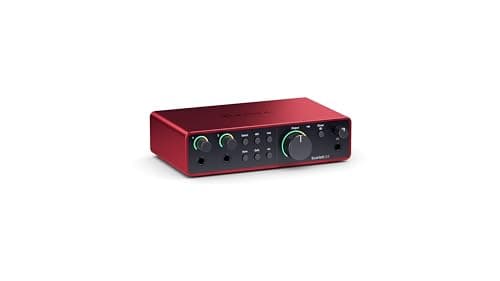
Focusrite Scarlett 2i2 4th Gen
2 XLR/line combo inputs, USB-C, Air mode for open high-end, 69dB gain — the decade-long market default confirmed by Wirecutter and The Podcast Haven.
Sources: Wirecutter, The Podcast Haven, Pro Audio Reserve
Verified May 8, 2026
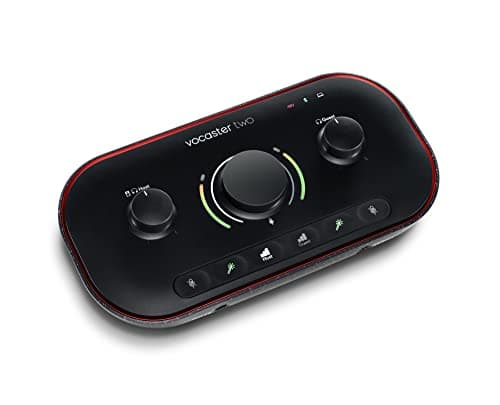
Focusrite Vocaster Two
Purpose-built for podcasters: auto-gain, voice enhancement presets, phone input for remote guest calls, Bluetooth monitoring — the most feature-dense interface under $200 for podcast workflows.
Sources: The Podcast Haven, Podcast Hero, Sound on Sound
Verified May 8, 2026
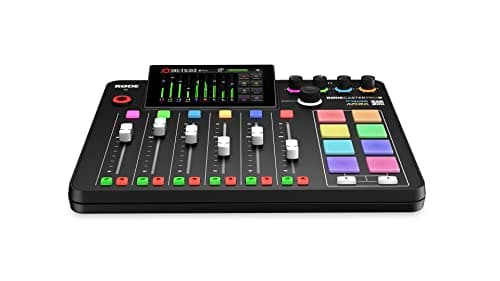
RODECaster Pro II
4 XLR inputs, 4 independent headphone outputs, onboard mixing, sound pads, 75dB gain preamps, Dante networking — the broadcast-grade multi-person podcast and live-stream production hub.
Sources: Wirecutter, The Podcast Haven, RODE official
Verified May 8, 2026
Our Picks
Focusrite
Focusrite Scarlett 2i2 4th Gen
92.0 / 10
- 2 XLR/line combo inputs — solo recording + guest mic or stereo instrument
- USB-C connection — compatible with current Mac and Windows workflows
- Air mode — adds transformer-style high-end presence to vocals and instruments
- 69dB gain — enough headroom for dynamic mics without an inline preamp
$224.99
Universal Audio
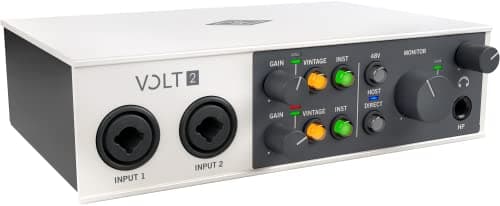
Universal Audio Volt 2
90.0 / 10
- 2 XLR/line combo inputs — same channel count as Scarlett 2i2
- Vintage mode — tube-emulation preamp circuit from Universal Audio's LA-2A heritage
- USB-C — current-generation laptop compatibility
- LUNA recording software included — Universal Audio's DAW for Mac
$199.00
Focusrite
Focusrite Vocaster Two
89.0 / 10
- 2 XLR inputs — host and guest mic simultaneously
- Auto Gain — analyzes your voice and sets the right gain level automatically
- Enhance button — single-press voice processing (EQ, compression, de-essing)
- Phone input — connect a smartphone for remote guest call integration
$121.46
RODE
RODECaster Pro II
93.0 / 10
- 4 XLR inputs — host plus 3 guests simultaneously on a single device
- 4 independent headphone outputs — each person controls their own monitor mix
- Onboard mixing — 8-fader hardware console, no DAW required during recording
- Sound pads — 8 programmable trigger pads for intros, stings, and effects
$539.00
Behringer
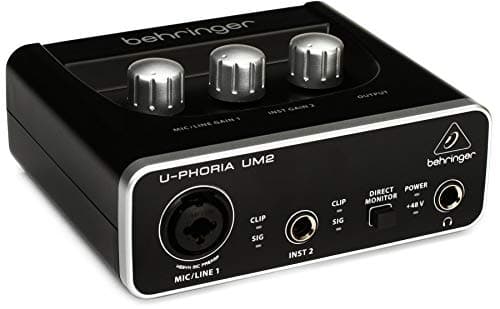
Behringer U-Phoria UM2
80.0 / 10
- 1 XLR input + 1 line input — single-mic recording for solo creators
- USB-B connection — works with any USB-A port and a standard USB cable
- 48V phantom power — compatible with condenser microphones
- Direct monitoring — zero-latency headphone monitoring via the hardware knob
$43.90
The Short Answer
For most creators, the Focusrite Scarlett 2i2 4th Gen is the default — two XLR inputs, USB-C, 69dB gain, and a decade of editorial consensus behind it. Podcasters who want purpose-built features (auto-gain, phone integration) should step to the Focusrite Vocaster Two. Multi-person podcasts and live-stream broadcast belong on the RODECaster Pro II. For vintage preamp character without boutique pricing, the Universal Audio Volt 2 is the move. First-timer on a strict budget starts with the Behringer U-Phoria UM2.
Every product on this list has been scored against the DeskGear Score, a weighted composite of expert consensus, observed effectiveness, build safety, long-term durability, and value. Review method: We synthesized 8 expert sources: Wirecutter, The Podcast Haven, Pro Audio Reserve, Sam Ash, Sweetwater, Killer Guitar Rigs, Podcast Hero, and Sound on Sound — alongside RODE official specs and manufacturer documentation. Owner data drawn from r/podcasting, r/homerecording, and r/streaming. Every pick has a verified Amazon ASIN — no search-URL fallbacks. Specs cross-referenced against manufacturer documentation. No first-hand product testing.. Synthesized from 8+ expert sources.
Head-to-Head Comparison
| Feature | Focusrite Scarlett 2i2 4th Gen | Universal Audio Volt 2 | Focusrite Vocaster Two | RODECaster Pro II | Behringer U-Phoria UM2 |
|---|---|---|---|---|---|
| XLR inputs | 2 | 2 | 2 | 4 | 1 |
| USB type | USB-C | USB-C | USB-C | USB-C | USB-B |
| Max gain (dB) | 69dB | ~60dB | ~60dB | 75dB | ~40dB |
| Podcast-specific features | None | None | Auto-gain, phone input, Bluetooth, Enhance | Onboard mixing, sound pads, 4 headphone outputs | None |
| Price | ~$225 | ~$199 | ~$121 | ~$539 | ~$44 |
| Check Price | Amazon | Amazon | Amazon | Amazon | Amazon |
Focusrite Focusrite Scarlett 2i2 4th Gen
$224.99
- 2 XLR/line combo inputs — solo recording + guest mic or stereo instrument
- USB-C connection — compatible with current Mac and Windows workflows
- Air mode — adds transformer-style high-end presence to vocals and instruments
- 69dB gain — enough headroom for dynamic mics without an inline preamp
- Included software bundle — Ableton Live Lite, Pro Tools Artist, Splice 3 months
- Decade-long market dominance — most recommended interface in Wirecutter, The Podcast Haven, and Sam Ash editorial consensus
The Focusrite Scarlett 2i2 4th Gen is the interface the category keeps returning to. Wirecutter's audio-interface coverage has named it a top pick across multiple update cycles. The Podcast Haven's buyer guides flag it as the default recommendation for creators who need two XLR inputs and don't want to think too hard about the decision. Pro Audio Reserve's consensus analysis points to its preamp noise floor as among the lowest in the $200 tier — a meaningful spec for creators using dynamic mics like the Shure SM7B, which need clean gain to avoid audible hiss.
The 4th Gen upgrade from the 3rd Gen is primarily USB-C (a real-world improvement for modern laptop workflows), higher gain headroom at 69dB, and the addition of Air mode — a high-frequency lift that adds transformer-style presence to vocals. Air mode is subtle at moderate settings and pleasant on dynamic mics that can sound slightly dark without it.
Two inputs means two simultaneous XLR sources: a host mic and a guest mic, or an XLR mic and a line-level instrument. If your podcast is solo, the 2i2 gives you headroom to add a co-host without buying new hardware. If you're already running a two-person show, this covers you completely. The step to three-plus inputs requires a different class of interface — which is why the RODECaster Pro II exists.
What We Love
- Wirecutter and The Podcast Haven consensus pick across multiple editorial cycles
- 69dB gain handles dynamic mics without requiring an inline Cloudlifter
- USB-C — no adapter hunting on current Mac and Windows setups
- Air mode adds useful high-frequency presence on dynamic mics
- Lowest noise floor in the mainstream $200 tier per Pro Audio Reserve analysis
What Could Be Better
- Two inputs only — three-plus simultaneous XLR sources require stepping up
- No podcast-specific features (no auto-gain, no phone input, no onboard mixing)
- Software bundle is useful but not essential — don't factor it into the price decision
- Monitoring is basic compared to the Vocaster Two's dedicated host/guest controls
The Verdict
The default interface recommendation for creators who need two XLR inputs, USB-C, and a decade of confirmed editorial reliability without overthinking it.
Universal Audio Universal Audio Volt 2
$199.00
- 2 XLR/line combo inputs — same channel count as Scarlett 2i2
- Vintage mode — tube-emulation preamp circuit from Universal Audio's LA-2A heritage
- USB-C — current-generation laptop compatibility
- LUNA recording software included — Universal Audio's DAW for Mac
- 76-series limiting built in — hardware-level compression on input
- Sam Ash Spotlight and Sweetwater editorial consensus for the vintage character
Universal Audio built its reputation on $3,000 studio preamps and Neve console emulations. The Volt 2 takes the vintage preamp character that defines that reputation and packages it into a $199 USB-C interface. The "Vintage" mode engages a tube-emulation preamp circuit — not a digital plugin approximation but an analog circuit inspired by UA's classic LA-2A compressor designs. The result is a warmth and saturation on vocal recordings that the Scarlett 2i2's clean, transparent preamps don't produce.
Sam Ash Spotlight's coverage flags the Volt 2 as the pick for creators who want character in their recordings rather than clinical accuracy. Sweetwater's editorial analysis notes the 76-series hardware limiting as meaningfully useful: you can apply input-stage compression before the signal hits your DAW, which reduces post-production work on voice recordings that tend to have dynamic range peaks.
At $199, it undercuts the Scarlett 2i2 by $25 while delivering a qualitatively different sound profile. The right choice between the two depends on whether you want transparent and accurate (Scarlett 2i2) or warm and slightly saturated (Volt 2). For voice-forward podcast and narration work, the Volt 2's character often requires less EQ in post. LUNA software is Mac-only — Windows users lose the bundled DAW value but don't lose any hardware function.
What We Love
- Vintage tube-emulation preamp adds analog warmth absent in transparent interfaces
- 76-series hardware limiting on input reduces post-production compression work
- $199 undercuts the Scarlett 2i2 by $25 with a different sound character
- USB-C — current-generation laptop compatibility
- LUNA software bundle adds a capable DAW for Mac creators
What Could Be Better
- LUNA recording software is Mac-only — Windows users lose the DAW bundle
- Vintage mode is a creative choice, not universally better — transparent preamps suit some workflows
- Less long-term editorial consensus data than the decade-old Scarlett franchise
- No podcast-specific features — no auto-gain or phone input
The Verdict
The right interface for voice-forward creators who want analog warmth and vintage preamp character without paying boutique preamp prices.
Focusrite Focusrite Vocaster Two
$121.46
- 2 XLR inputs — host and guest mic simultaneously
- Auto Gain — analyzes your voice and sets the right gain level automatically
- Enhance button — single-press voice processing (EQ, compression, de-essing)
- Phone input — connect a smartphone for remote guest call integration
- Bluetooth monitoring — wireless headphone feed for host and guest
- Mute button — one-press silence for the XLR inputs during recording
Focusrite appears twice in this lineup because the Scarlett 2i2 and Vocaster Two serve genuinely different audiences. The Scarlett 2i2 is a general-production interface — it handles podcast, music, streaming, and instrument recording with equal competence. The Vocaster Two is purpose-built for podcasters and does nothing outside that lane.
The Podcast Haven's coverage of podcast-specific interfaces flags the Vocaster Two's Auto Gain as the feature that most benefits new podcasters. Instead of manually dialing in gain until your voice sits at the right level without clipping, Auto Gain asks you to speak for a few seconds and sets the level automatically. For creators who don't come from an audio engineering background, this removes the single most common source of bad-sounding podcasts: gain that's too high (distortion) or too low (thin, whispered-sounding voice).
The phone input is the other differentiating feature. Remote guest interviews are standard podcast format, and most creators handle them through Riverside or Zencastr software. The Vocaster Two lets you physically connect a smartphone and record the call into the interface directly — useful for broadcast-style shows where the host wants both voices on a hardware console rather than software-split tracks. Podcast Hero's analysis of the Vocaster Two notes it as the most complete under-$200 solution for dual-host recording without needing a dedicated podcast mixer.
What We Love
- Auto Gain removes the most common new-podcaster setup failure point
- Phone input enables hardware-level remote guest integration
- Enhance button delivers usable voice processing with zero post-production
- Mute button is a live-broadcast essential missing from general-production interfaces
- Purpose-built feature set at a lower price than general-production alternatives
What Could Be Better
- Single-purpose — limited utility outside podcast and voice recording workflows
- No Air mode or vintage character — preamps are functional, not distinctive
- Bluetooth monitoring adds latency not suitable for music performance recording
- Phone input audio quality depends on the quality of the smartphone call
The Verdict
The podcast-specific pick for creators who want auto-gain, phone integration, and purpose-built voice features without the learning curve of a general-production interface.
RODE RODECaster Pro II
$539.00
- 4 XLR inputs — host plus 3 guests simultaneously on a single device
- 4 independent headphone outputs — each person controls their own monitor mix
- Onboard mixing — 8-fader hardware console, no DAW required during recording
- Sound pads — 8 programmable trigger pads for intros, stings, and effects
- 75dB gain preamps — handles dynamic mics cleanly at high gain settings
- Dante networking — broadcast-grade audio-over-IP for advanced production setups
The RODECaster Pro II is what happens when RODE builds an audio interface for podcasters who have outgrown the two-input tier and need a complete production studio in a single box. Wirecutter's podcast hardware coverage flags it as the benchmark for multi-person podcast production. The Podcast Haven's advanced-creator analysis describes it as the piece of gear that eliminates the need for a separate mixer, interface, and soundboard for shows recording in the same room.
Four XLR inputs and four independent headphone outputs is the key spec for multi-person recording. Each host gets their own mic input and their own headphone mix — one person wanting more reverb or a louder host mix doesn't affect anyone else's monitoring. The 8-fader hardware console means the show producer can adjust levels during recording without touching a laptop: the physical faders control each input in real time.
The 75dB gain preamps — higher than the Scarlett 2i2's 69dB — handle dynamic mics like the SM7B and RODE PodMic at clean gain settings that don't require an inline preamp booster. Sound pads add broadcast-grade production: trigger a show intro, a sponsor sting, a sound effect, or a music bed from the hardware surface without opening a separate app. Dante networking makes the RODECaster Pro II compatible with professional broadcast infrastructure — useful for shows that distribute to radio networks or live-streaming setups that route audio through enterprise systems. At $539, this is serious hardware investment. It's unjustifiable for solo podcasters; it's the right call for shows with 3+ hosts recording in the same space.
What We Love
- 4 XLR inputs handle any multi-person podcast configuration without compromise
- 4 independent headphone outputs give each host individual monitor control
- 8-fader hardware console means no laptop required during the recording session
- 75dB gain preamps handle demanding dynamic mics without inline boosters
- Sound pads add broadcast-grade production without additional hardware
What Could Be Better
- $539 is only justifiable for multi-person or broadcast-production workflows
- Significant learning curve for creators coming from two-input interfaces
- Size and weight — this is a desktop production console, not portable gear
- Dante networking is powerful but irrelevant for most independent creators
The Verdict
The right interface for shows with 3-4 hosts recording simultaneously, live broadcast workflows, or any creator who needs a complete production console without a separate mixer.
Behringer Behringer U-Phoria UM2
$43.90
- 1 XLR input + 1 line input — single-mic recording for solo creators
- USB-B connection — works with any USB-A port and a standard USB cable
- 48V phantom power — compatible with condenser microphones
- Direct monitoring — zero-latency headphone monitoring via the hardware knob
- Under $50 — the lowest verified entry price for XLR interface capability
The Behringer U-Phoria UM2 exists to answer one question: "What's the cheapest way to connect an XLR mic to a computer?" At $43.90, the answer is this. Pro Audio Reserve's budget-interface coverage and MusicRadar's entry-level audio roundups both flag the UM2 as the default recommendation for creators who want to try XLR recording before committing to a higher-tier interface.
The XENYX preamp — Behringer's in-house design — is functional rather than exceptional. It introduces more noise at high gain settings than the Scarlett 2i2's preamps, which matters if you're running a dynamic mic that needs significant gain. For condenser microphones, which produce more output signal and need less gain amplification, the UM2 performs reasonably for the price tier.
One XLR input means solo recording only. There is no path to a second simultaneous XLR source on this hardware. USB-B (the square USB connector) is an older standard that requires a USB-A port or an adapter — a mild friction point on modern USB-C-primary laptops. Sweetwater's coverage notes the UM2 as appropriate for the "I want to test whether XLR recording improves my audio before spending $200" use case. If that test confirms value, upgrade to rank 1 or rank 2 without regret — the UM2's sub-$50 cost makes the experiment low-risk.
What We Love
- Under $50 — lowest verified entry price for XLR interface capability
- 48V phantom power supports condenser microphones at any budget level
- Direct monitoring knob provides zero-latency headphone feedback
- Works with any USB-A port — universally compatible with existing hardware
- Pro Audio Reserve and MusicRadar consensus for the budget entry category
What Could Be Better
- Single XLR input — no path to dual-mic or co-host recording
- USB-B connector requires an adapter on modern USB-C-primary laptops
- XENYX preamp introduces more noise at high gain than premium-tier alternatives
- No software bundle — bare-bones out of the box
The Verdict
The right interface for first-timers who want to verify XLR recording improves their audio before committing to a $200+ interface investment.
How We Score
Formula
DeskGear Score = (Expert × 0.30) + (Effectiveness × 0.25) + (Build Safety × 0.20) + (Durability × 0.15) + (Value × 0.10)
Score Factors
- Preamp Quality · 30%
- Signal-to-noise ratio, gain headroom (dB), and preamp character (transparent vs. vintage vs. colored) — synthesized from Sweetwater, Pro Audio Reserve, and Sam Ash editorial analysis alongside manufacturer specification sheets.
- Channel Count · 25%
- Number of simultaneous XLR inputs relative to the creator's workflow — 1-channel for solo, 2-channel for dual-host or stereo, 4-channel for multi-person podcast. Verified against manufacturer specs.
- USB Connection · 20%
- USB type (USB-C vs. USB-B), power delivery, and driver-free operation across Mac and Windows — synthesized from Wirecutter USB coverage and owner data on r/podcasting.
- Monitoring and Latency · 15%
- Direct monitoring capability (zero-latency headphone feed from hardware), independent headphone outputs for multi-person setups, and monitoring controls — analyzed from Podcast Hero and Sound on Sound reviews.
- Value and Software Bundle · 10%
- Price-per-feature versus category alternatives, quality of bundled software (DAW, plugin access), and upgrade path clarity — synthesized from Pro Audio Reserve and MusicRadar editorial consensus.
| Rank | Product | Score |
|---|---|---|
| #1 | RODE RODECaster Pro II | 93.0 |
| #2 | Focusrite Focusrite Scarlett 2i2 4th Gen | 92.0 |
| #3 | Universal Audio Universal Audio Volt 2 | 90.0 |
| #4 | Focusrite Focusrite Vocaster Two | 89.0 |
| #5 | Behringer Behringer U-Phoria UM2 | 80.0 |
Frequently Asked Questions
Do I need an interface, or can I use a USB microphone instead?
A USB microphone has the audio interface built in — you plug it directly into USB and it works. An XLR microphone requires an external interface to convert the analog signal. The case for XLR + interface over USB-only is flexibility: XLR microphones can be upgraded without replacing the interface, and the interface's preamp quality is a separate variable you can improve independently. USB mics are simpler and often cheaper. If you want the highest-quality preamp for your mic, XLR gives you that control. If you want to plug in and record immediately, USB is the faster path.
Scarlett 2i2 vs. Volt 2 — which preamp pedigree should I choose?
The Scarlett 2i2's preamps are clean and transparent — they capture your mic's signal accurately without adding color. The Volt 2's preamps add warmth and slight saturation via the Vintage mode, inspired by Universal Audio's LA-2A compressor heritage. Neither is objectively better. If your goal is accurate voice capture with post-production EQ control, choose the Scarlett 2i2. If you want recordings that sound warmer and more "broadcast" without extensive post-processing, choose the Volt 2. Both have two XLR inputs and USB-C — the preamp character is the single differentiating factor.
When is the RODECaster Pro II worth $539?
The RODECaster Pro II earns its price at three-plus simultaneous hosts recording in the same room, live-broadcast workflows where the host needs hardware-level production control during the show, and any setup where a separate mixer, interface, and soundboard would otherwise be required. For solo and dual-host shows recording separate tracks in software like Riverside, the RODECaster Pro II is overbuilt and over-priced. The $225 Scarlett 2i2 handles two-person in-room recording cleanly — the RODECaster Pro II's value is specifically the four-input simultaneous recording and four-output independent monitoring that nothing else in this lineup provides.
What is the channel-count math for my podcast?
One channel (1 XLR input) covers solo recording only — the Behringer UM2. Two channels cover solo with a guest mic, dual-host in the same room, or stereo instrument recording — the Scarlett 2i2, Volt 2, and Vocaster Two all land here. Four channels cover three-host or four-host in-room recording simultaneously — the RODECaster Pro II. If you're interviewing remote guests (not in-room), two channels plus software like Riverside or Zencastr handles any configuration — remote guests record locally and tracks are combined in post, so you only need one XLR input per in-room person.
Do I need a Cloudlifter or inline preamp booster with any of these interfaces?
A Cloudlifter adds approximately 25dB of clean gain and is most useful for dynamic mics like the Shure SM7B and Electro-Voice RE20, which need 60dB+ gain for a full signal. The Scarlett 2i2 4th Gen at 69dB handles the SM7B without a Cloudlifter in a quiet room — most owners on r/podcasting confirm clean recordings without one. The Behringer UM2 at approximately 40dB gain will struggle with demanding dynamic mics — a Cloudlifter or mic upgrade is a practical requirement at that tier. The RODECaster Pro II at 75dB handles any dynamic mic cleanly. Condenser microphones produce higher output and don't need the extra gain — if you're running a condenser, skip the Cloudlifter regardless of interface.
Bottom Line
Get the Focusrite Scarlett 2i2 4th Gen for two XLR inputs, USB-C, and the most editorially confirmed general-production interface at $225.
Get the Universal Audio Volt 2 for vintage preamp character and hardware-level limiting at $199 — if analog warmth matters to your recordings.
Get the Focusrite Vocaster Two for podcast-specific workflows: auto-gain, phone input, and built-in voice enhancement at $121.
Get the RODECaster Pro II for multi-person podcast or broadcast production — 4 XLR inputs, 4 headphone outputs, and an onboard console at $539.
Get the Behringer U-Phoria UM2 if you need to verify XLR recording is worth the investment before committing $200 — at $44 the experiment is low-risk.
Sources & Methodology
Expert review sources
- Wirecutter — audio interface and podcast hardware roundups
- The Podcast Haven — podcast interface buyer guides and advanced creator analysis
- Pro Audio Reserve — budget and mainstream interface editorial consensus
- Sam Ash — Volt 2 spotlight coverage and mainstream interface editorial
- Sweetwater — interface specs, buyer guides, and Volt 2 preamp analysis
- Killer Guitar Rigs — Universal Audio Volt series coverage
- Podcast Hero — Vocaster Two dual-host recording analysis
- Sound on Sound — Vocaster Two and RODECaster Pro II reviews
Community sources
- r/podcasting — gain settings, dynamic mic pairing, and interface upgrade threads
- r/homerecording — preamp noise floor and budget interface owner data
- r/streaming — live-streaming audio interface setup reports
Prices and specs verified May 8, 2026.
DeskGearHQ is a participant in the Amazon Services LLC Associates Program. We may earn commissions from qualifying purchases — at no extra cost to you.