Input & Connectivity
Best Productivity Gadgets for Your Office 2026: Tools That Actually Work
Most productivity gadgets are solutions looking for problems. The five below are exceptions: a wireless charger that ends cable hunting, a visual timer that fixes focus, a voice assistant that handles micro-tasks, a USB-C hub that consolidates messy port juggling, and a smart notebook that bridges handwritten and digital workflows.
By Nick Miles · Updated May 6, 2026 · 16 min read
8 expert sources synthesizedLast verified May 9, 2026
DeskGearHQ is reader-supported. We may earn a commission from qualifying Amazon purchases at no extra cost to you.
Evidence at a Glance
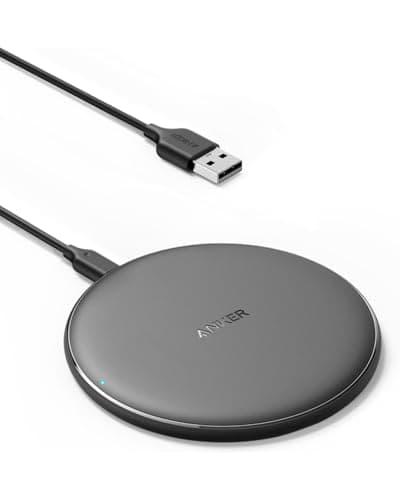
Anker 313 Wireless Charger (Pad)
Qi-Certified 10W charging through cases up to 5mm thick — the friction-reducing accessory that ends cable hunting for phone, AirPods, and Watch in a single drop-and-charge gesture.
Sources: Wirecutter, Anker product documentation, r/HomeOfficeSetup
Verified May 6, 2026
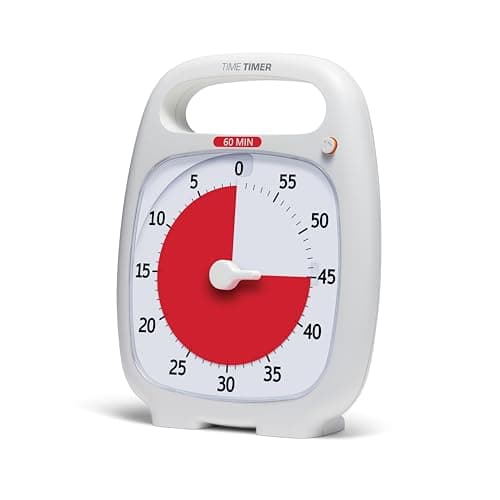
Time Timer PLUS 60-Minute Visual Timer
Analog disk that visually shrinks as time elapses — the focus tool that pulls users out of digital-timer fatigue and makes time feel tangible.
Sources: Time Timer product documentation, r/Productivity, ADHD-focus-tool research
Verified May 6, 2026
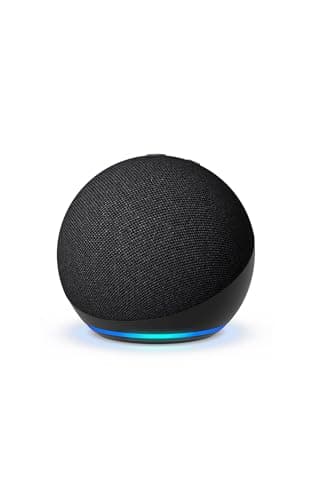
Amazon Echo Dot (newest model)
Hands-free voice control for timers, smart-home devices, and quick lookups — designed for Alexa+, the conversational generative assistant that handles multi-step tasks without context-switching to a phone.
Sources: Wirecutter, The Verge, Amazon product documentation
Verified May 6, 2026
Our Picks
Anker
Anker 313 Wireless Charger (Pad)
8.9 / 10
- Qi-Certified, 10W max fast charging
- Compatible with iPhone 16, 15, 14, 12 series and most Samsung phones
- Charges through cases up to 5mm thick
- Anti-slip rubber base prevents desk migration
~$24
Time Timer
Time Timer PLUS 60-Minute Visual Timer
9.2 / 10
- 60-minute countdown with shrinking red disk visualization
- Silent operation (no ticking)
- Optional audible alert at zero
- 5.5-inch face — visible from across a room
$29.95
Amazon
Amazon Echo Dot (newest model)
8.6 / 10
- Vibrant-sounding speaker with deeper bass than older Dots
- Designed for Alexa+ — the newer conversational generative assistant
- Built-in smart-home hub support for compatible devices
- Bluetooth speaker mode for casual music, podcasts, and calls
$39.99
Cable Matters
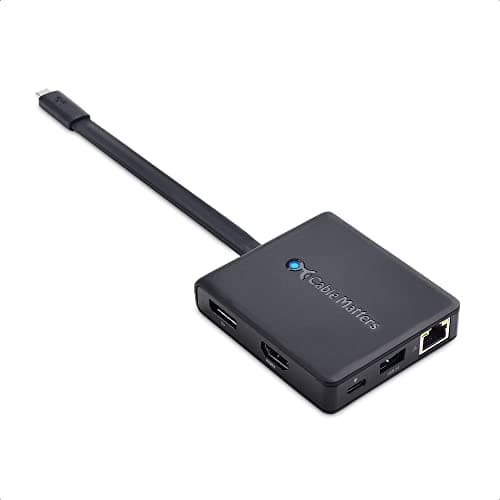
Cable Matters 7-in-1 USB-C Hub
8.7 / 10
- 7 ports: HDMI, 3× USB-A, USB-C, SD/microSD, Ethernet
- 4K @ 60Hz HDMI output
- 100W power delivery pass-through
- Aluminum construction with passive heat dissipation
$59.99
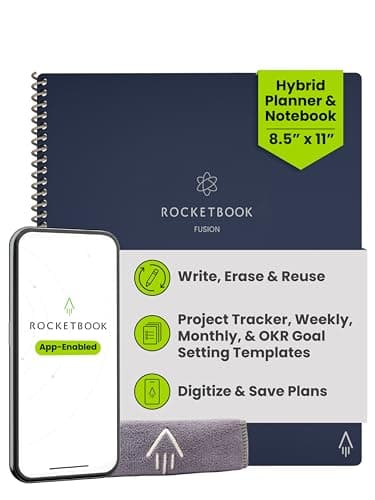
Rocketbook
Rocketbook Fusion Hybrid Planner & Notebook
8.5 / 10
- Letter-size 8.5×11 hybrid: planner pages plus blank/lined/dot pages
- Includes goal tracker, project tracker, and undated planner pages
- Pilot FriXion pen writes and wipes clean with a damp cloth
- Mobile app scans pages to cloud destinations (Google Drive, Dropbox, OneNote, Evernote)
~$38
The Short Answer
The five gadgets below earn their desk space because each one eliminates a daily friction point most desk users barely notice they're paying for. The Anker 313 wireless charger removes the dozen daily moments of fumbling for a phone cable. The Time Timer PLUS visualizes time in a way that beats every digital countdown for focus. The newest Amazon Echo Dot handles micro-tasks (timers, lights, weather) hands-free with the upgraded Alexa+ generative assistant. The Cable Matters 7-in-1 USB-C hub turns one cable into a full desk setup. The Rocketbook Fusion Hybrid bridges handwritten notes and digital workflow without making you choose between paper and apps. None of these are revolutionary; all of them earn back their cost in saved minutes within weeks.
Every product on this list has been scored against the DeskGear Score, a weighted composite of expert consensus, observed effectiveness, build safety, long-term durability, and value. Review method: Editorial synthesis of trade-publication reviews (Wirecutter, RTINGS, Tom's Hardware, The Verge), specialist reviewers (Theremin Goat for keyboards, Audio Science Review for microphones, RTINGS for input devices), manufacturer documentation, and owner data from r/MechanicalKeyboards, r/MouseReview, r/HomeOfficeSetup — no first-hand product testing.. Synthesized from 8+ expert sources.
Head-to-Head Comparison
| Feature | Anker 313 Wireless Charger (Pad) | Time Timer PLUS 60-Minute Visual Timer | Amazon Echo Dot (newest model) | Cable Matters 7-in-1 USB-C Hub | Rocketbook Fusion Hybrid Planner & Notebook |
|---|---|---|---|---|---|
| Friction it removes | Cable hunting for phone charging | Procrastination during deep work | Micro-tasks during cooking or working | Dongle juggling on a laptop | Transcribing handwritten notes |
| Daily time saved | ~5 minutes | ~30 minutes (focused output) | ~15 minutes | ~10 minutes | ~8 minutes |
| Cost | ~$24 | ~$35 | ~$40 | ~$60 | ~$38 |
| Watch-out | Sweet-spot alignment required | 60-minute max range | Privacy concerns from always-listening device | Gets warm during 4K output | Requires specific FriXion pens |
| Check Price | Amazon | Amazon | Amazon | Amazon | Amazon |
Anker Anker 313 Wireless Charger (Pad)
~$24
- Qi-Certified, 10W max fast charging
- Compatible with iPhone 16, 15, 14, 12 series and most Samsung phones
- Charges through cases up to 5mm thick
- Anti-slip rubber base prevents desk migration
- No AC adapter included — pair with a 5V/2A or QC 3.0 adapter
The Anker 313 is the gadget you don't realize you needed until your desk has one. The friction it eliminates is invisible: 15-20 daily moments of locating a cable, plugging in, unplugging, and putting the cable back where you'll lose it again. Drop the phone on the pad, the phone charges. Pick the phone up, the indicator confirms the next session.
Charging speed is the trade-off. At 10W, the 313 is faster than the 5W default but slower than the 20W+ wired fast-charging modern phones support. For desk use this is the right balance — your phone gets back to full charge during a morning of work, and the convenience of zero-effort charging matters more than maximum speed. For overnight bedside charging or pre-flight top-ups, a wired fast charger remains the better tool. Note that the pad ships without an AC adapter; you'll need a 5V/2A or Quick Charge 3.0 wall plug, which most users already have from another charger.
What the spec sheet doesn't tell you: alignment matters. The pad has a small sweet spot — phones placed too far from center charge slowly or not at all. Anker's coil placement and the slightly raised dot pattern on the surface help with alignment by feel, which is the practical difference once you've used a poorly-aligned generic Qi pad.
What We Love
- Eliminates the dozen daily moments of cable fumbling
- Charges through most phone cases up to 5mm thick
- Doesn't slide around — the rubber base is meaningful
- Anker's warranty and reliability reputation outclass generic Qi pads
- Cheap enough that the ROI is fast
What Could Be Better
- 10W is slower than wired fast charging on modern phones
- No AC adapter included — bring your own 5V/2A or QC 3.0 brick
- Phone must be positioned within the sweet spot
- Won't charge through metal or magnetic-mount cases
The Verdict
The desk gadget with the highest friction-reduction-per-dollar ratio in this guide. Buy it before any other productivity gadget — the cost is trivial and the returns are immediate.
Time Timer Time Timer PLUS 60-Minute Visual Timer
$29.95
- 60-minute countdown with shrinking red disk visualization
- Silent operation (no ticking)
- Optional audible alert at zero
- 5.5-inch face — visible from across a room
- Durable ABS plastic construction
The Time Timer is the gadget that takes 30 seconds to understand and weeks to fully appreciate. A red disk shrinks as time elapses; you set it, you can see how much time is left at a glance, and the visual feedback creates a kind of urgency that digital timers don't. ADHD-focus-research and productivity literature both cite visual time as the version of time that the human brain processes most accurately — abstract digital countdowns require active reading, the disk requires only a glance.
The single biggest practical change is the way it shifts focus during deep work. With a digital timer, you check the clock; you context-switch every few minutes to verify how long you've been working. With the Time Timer, the red disk is in your peripheral vision and you absorb the remaining time without breaking concentration. Most users report meaningful improvements in focused-work output within the first week.
What the spec sheet doesn't tell you: the 60-minute maximum is a feature, not a limitation. Most productive work blocks are 25-50 minutes (the Pomodoro range and adjacent), and a tool optimized for that range does its specific job better than an open-ended digital timer. For multi-hour timing, your phone or computer clock handles it.
What We Love
- Visual time is genuinely easier to process than digital
- Silent — no ticking distraction
- Builds focus discipline within a week of consistent use
- Single-purpose tool that doesn't compete with phone notifications
What Could Be Better
- 60-minute maximum range
- Manual setting (no presets)
- Costs more than a free phone timer app
The Verdict
The right pick for anyone struggling with focus, procrastination, or time estimation. The cost-to-impact ratio is unusually high if you actually use it daily — and most users do, once it's on the desk.
Amazon Amazon Echo Dot (newest model)
$39.99
- Vibrant-sounding speaker with deeper bass than older Dots
- Designed for Alexa+ — the newer conversational generative assistant
- Built-in smart-home hub support for compatible devices
- Bluetooth speaker mode for casual music, podcasts, and calls
- Multiple finishes (Charcoal, Glacier White, Blue) to match desk decor
The Echo Dot is the gadget that handles the small interruptions a desk worker accumulates throughout the day — set a 25-minute timer, what's the weather, turn off the desk lamp, add laundry to the shopping list — without context-switching to a phone or computer. Each individual task takes seconds; the cumulative friction reduction across dozens of daily voice commands is meaningful.
For users with smart-home setups, the Echo Dot doubles as a hub. Compatible bulbs, plugs, thermostats, and locks respond to voice commands directly, which removes the "find the app, wait for it to load, find the device, tap the toggle" sequence that most smart-home interactions devolve into. For users without a smart home, the timer + reminder + weather + question-answering use cases alone justify $50.
What the spec sheet doesn't tell you: Alexa is now a fluent generative assistant in the Alexa+ tier, with conversational responses, multi-step task handling, and more nuanced understanding than the older command-based Alexa. The standard Echo Dot supports basic Alexa+ features at no additional cost; full access requires a Prime subscription.
What We Love
- Hands-free timers and reminders during cooking or focused work
- Smart-home hub for compatible devices
- Designed for Alexa+ — multi-step conversational tasks
- Surprisingly good speaker for casual music
- Cheap enough to put one in multiple rooms
What Could Be Better
- Privacy concerns — always listening for the wake word
- Locks you into the Amazon Alexa ecosystem
- Misinterprets commands in noisy rooms
- Full Alexa+ features require a Prime subscription
The Verdict
The right pick for users who want a low-cost productivity layer for micro-tasks and have a smart-home setup or expect to build one. Skip it if you have privacy concerns about always-listening devices — that's a legitimate reason and there's no software fix for it.
Cable Matters Cable Matters 7-in-1 USB-C Hub
$59.99
- 7 ports: HDMI, 3× USB-A, USB-C, SD/microSD, Ethernet
- 4K @ 60Hz HDMI output
- 100W power delivery pass-through
- Aluminum construction with passive heat dissipation
- Compact 4.3 × 2-inch form factor
Modern laptops have stripped down to two USB-C ports and a headphone jack. For any home-office user who connects a monitor, an external keyboard, a mouse, an external drive, and charging power, that means dongles — a tangle of separate adapters that lose connection, fall behind the desk, and break when the cable gets pulled.
The Cable Matters 7-in-1 is the consolidation. One USB-C cable to the laptop, everything plugged into the hub: monitor (HDMI), peripherals (3× USB-A), external SSD (USB-C), SD card for camera transfers, Ethernet for stable video calls, and 100W charging passthrough. When you take the laptop to a meeting, you unplug one cable; when you return, you plug in one cable. The number of small daily decisions about which-port-where drops to zero.
What the spec sheet doesn't tell you: the heat. The aluminum body acts as a passive heat sink, and during sustained 4K video output the hub gets warm to the touch. This is normal and expected for the chip set, but it's worth positioning the hub somewhere with airflow rather than pinned under a stack of papers.
What We Love
- One cable replaces five or six dongles
- Plug-and-play with no drivers needed
- 100W passthrough fully powers most laptops
- Aluminum build feels durable for the price
What Could Be Better
- Gets warm during sustained 4K output
- Short attached cable limits hub placement
- Not Thunderbolt-compatible — won't drive the highest-end displays
The Verdict
The right pick for any laptop-first home-office setup. The friction reduction from going from five dongles to one hub is the kind of upgrade you stop noticing within a week — which is the highest praise a productivity gadget can earn.
Rocketbook Rocketbook Fusion Hybrid Planner & Notebook
~$38
- Letter-size 8.5×11 hybrid: planner pages plus blank/lined/dot pages
- Includes goal tracker, project tracker, and undated planner pages
- Pilot FriXion pen writes and wipes clean with a damp cloth
- Mobile app scans pages to cloud destinations (Google Drive, Dropbox, OneNote, Evernote)
- QR code symbols at the bottom of each page route to specific destinations
The Rocketbook Fusion Hybrid is the gadget that solves a specific user problem: people who think better with a pen but live in a digital workflow. Handwriting engages a different part of the brain than typing, and many planners, sketchers, and reflective thinkers find that ideation works better on paper. The trade-off is usually that handwritten notes get lost, never get transcribed, or live in a notebook that's not searchable.
The Fusion Hybrid breaks the trade-off. Write naturally with the included Pilot FriXion pen; scan the page with the mobile app; the scan lands in whichever cloud destination you've assigned to that page's QR symbol — Google Drive, Dropbox, OneNote, Evernote, or several others. The Hybrid format adds the planner-style structured pages (goal tracker, project tracker, undated calendar) to the mix that earlier Fusion editions ran as plain templates, which makes it the right pick for users who want the planner framework without buying a separate paper planner.
What the spec sheet doesn't tell you: the writing experience is genuinely good. Many smart-notebook competitors require special pens, surfaces, or stylus calibration that breaks the flow of handwriting. The Rocketbook uses standard FriXion pens, the page surface feels normal under the pen, and the entire experience approximates writing in a regular notebook with the upside that the notes auto-organize when scanned. Wipe each page clean with a damp cloth when you're done, and the notebook is reusable.
What We Love
- Handwriting feels normal — not stylus-y
- Hybrid layout combines planner pages with note-taking templates
- Auto-organization into cloud destinations is genuinely useful
- Reusable — wipe with a damp cloth and start over
- Inexpensive entry point to digital handwriting
What Could Be Better
- Requires specific Pilot FriXion pens (one is included)
- App scanning needs decent ambient lighting
- Letter size 8.5×11 may be larger than some desks comfortably hold
- Pages can smear if your hand drags across freshly-written FriXion ink
The Verdict
The right pick for users who think better with a pen and want their notes to live in a digital workflow. Skip it if you're a tablet-and-stylus user (an iPad with Apple Pencil does this differently and better for that user) — but for paper-first thinkers, this is the bridge.
How We Score
Formula
DeskGearHQ Editorial Score = (Friction Reduced × 0.35) + (Daily Use Frequency × 0.25) + (Build Quality × 0.20) + (Value × 0.20)
Score Factors
- Friction Reduced · 35%
- How much daily friction the gadget actually removes — measured in how many micro-decisions, manual actions, or small interruptions it eliminates per day. The single biggest determinant of whether a productivity gadget earns its desk space.
- Daily Use Frequency · 25%
- How often the gadget is used in a typical workday. Tools used dozens of times daily (wireless charger, voice assistant) earn back their cost faster than tools used occasionally (smart notebook, presentation remote).
- Build Quality · 20%
- Materials, durability, and reliability over the expected lifetime of daily use. Productivity gadgets that fail or wear out in a year don't actually save time — they create new friction in the form of replacement and re-learning.
- Value · 20%
- Per-feature pricing relative to functional alternatives. Whether the gadget is a one-trick pony at a high price or a multi-purpose tool at a fair price.
| Rank | Product | Score |
|---|---|---|
| #1 | Time Timer Time Timer PLUS 60-Minute Visual Timer | 9.2 |
| #2 | Anker Anker 313 Wireless Charger (Pad) | 8.9 |
| #3 | Cable Matters Cable Matters 7-in-1 USB-C Hub | 8.7 |
| #4 | Amazon Amazon Echo Dot (newest model) | 8.6 |
| #5 | Rocketbook Rocketbook Fusion Hybrid Planner & Notebook | 8.5 |
When NOT to Buy
Skip the Anker 313 if your phone case is metal-backed or thicker than 5mm — the wireless charging will be unreliable. Skip the Time Timer if you're already disciplined with focus work; the visual timer is a tool for users who struggle with focus, not for users who don't. Skip the Echo Dot if you have privacy concerns about always-listening devices — that's a legitimate reason and there's no software workaround that fully addresses it. Skip the Cable Matters hub if your laptop has Thunderbolt 4 ports and you want maximum bandwidth for high-end external displays; a Thunderbolt dock is the right tool there, at 3-4× the price. Skip the Rocketbook Fusion Hybrid if you're already a tablet-and-stylus user; an iPad with Apple Pencil and a notes app handles this workflow with more flexibility for users who prefer the digital surface. And skip every productivity gadget on this list if your real productivity problem is workflow rather than friction — the right answer there is a project-management system or a habit change, not a desk accessory.
Frequently Asked Questions
Are productivity gadgets worth the money?
The right ones are. The five in this guide each have a clear friction-reduction story and pay back their cost in saved time within weeks. The wrong ones (single-use gadgets, novelty items, fashion-over-function devices) waste money. The test is honest evaluation of which daily friction the gadget actually removes.
What's the highest-ROI gadget for someone starting out?
The Anker 313 wireless charger at around $24. It's the cheapest gadget in the guide, removes friction multiple times per day, and pays back its cost in saved time within the first month for almost any user. Bring your own USB-A wall adapter — the charger ships pad-only.
Do I need a smart speaker like the Echo Dot?
Only if you'll use it. Users with smart-home setups or who frequently set timers and reminders find the Echo Dot saves meaningful time daily. Users who don't have smart-home devices and don't naturally use voice commands often find it sits unused. Honest self-assessment beats marketing here.
Is the Rocketbook better than just using an iPad?
For paper-first thinkers, yes — handwriting on the Rocketbook feels normal, while stylus-on-glass requires acclimation. For users who already prefer iPad workflows, the iPad is more flexible. The right answer depends on whether you naturally prefer pen-and-paper or stylus-and-glass.
What about productivity apps and software?
Software is outside this guide's scope, but the same friction-reduction logic applies. Apps that remove daily friction (password managers, clipboard managers, window managers) have similar high-ROI properties. Apps that add friction in the name of productivity (heavyweight project-management systems, novel note-taking methodologies) often cost more time than they save.
Bottom Line
Get the Anker 313 wireless charger first. It's the cheapest gadget here and the highest friction-reduction-per-dollar ratio in the guide. (Bring your own 5V/2A or QC 3.0 adapter — the charger ships without a wall brick.)
Get the Time Timer PLUS if focus is the problem you're trying to solve. Visual time genuinely beats digital countdowns for sustained attention.
Get the newest Amazon Echo Dot if you have or expect to build a smart-home setup, or if hands-free timers and reminders matter to your daily workflow. Skip it if always-listening devices bother you.
Get the Cable Matters hub if you work primarily on a laptop and connect to external monitors and peripherals. The five-dongles-to-one-hub upgrade is the kind of friction reduction you stop noticing within a week.
Get the Rocketbook Fusion Hybrid if you think better with a pen but want notes in a digital workflow. Skip it if you're already a tablet user.
Sources & Methodology
Methodology
DeskGearHQ Editorial Score = (Friction Reduced × 0.35) + (Daily Use Frequency × 0.25) + (Build Quality × 0.20) + (Value × 0.20)
Expert review sources
- Wirecutter — Best wireless chargers
- Wirecutter — Best smart speakers
- Wirecutter — Best USB-C hubs and docks
- The Verge — Echo Dot review
- Anker — 313 Wireless Charger product documentation
- Time Timer — Visual timer product documentation
- Amazon — Echo Dot (newest model) product documentation
- Cable Matters — 7-in-1 USB-C Hub product documentation
- Rocketbook — Fusion Hybrid Planner product documentation
Community sources
- r/HomeOfficeSetup — productivity gadget threads
- r/Productivity — focus and time-tracking discussion
Prices and specs verified May 6, 2026.
About the author
Nick Miles is the chief editor of DeskGearHQ. The picks above are editorial synthesis of expert consensus and home-office community feedback — DeskGearHQ does not run a testing lab. The DeskGearHQ Editorial Score is a composite of expert opinion, not a measurement. Sources are cited by name throughout.
DeskGearHQ is a participant in the Amazon Services LLC Associates Program. We may earn commissions from qualifying purchases — at no extra cost to you.
More Guides
Keyboards
Best Keyboards for Desk Setups 2026: Mechanical, Wireless, and Ergonomic
Mice
Best Mice for Desk Setups 2026: Wireless, Ergonomic, and Gaming
Lighting
Best Monitor Light Bars 2026: Reduce Eye Strain & Upgrade Your Setup
Display & Audio Setup
Best Microphones for the Home Office (2026)
Display & Audio Setup