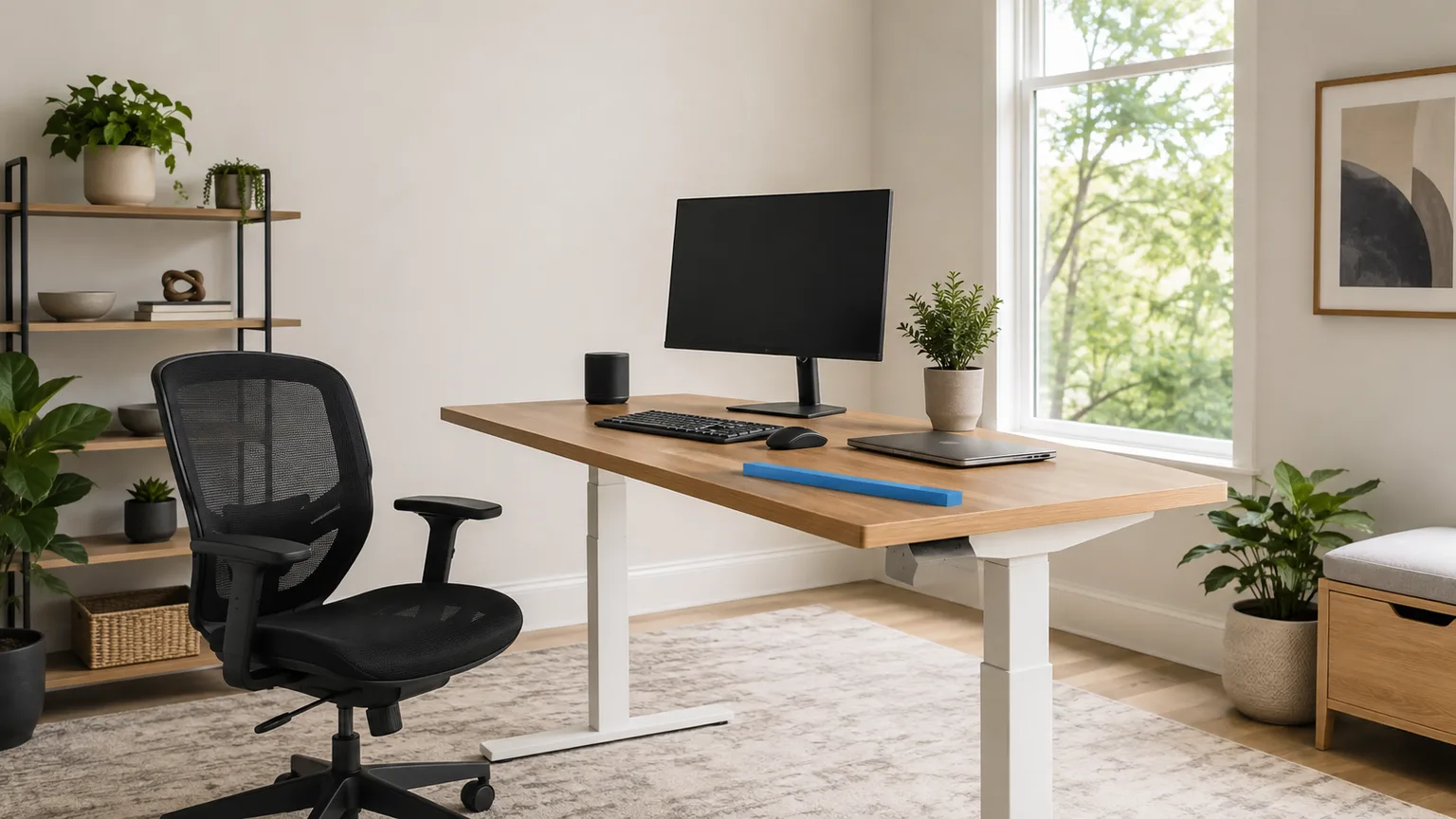
What Height Should Your Desk Be? 2026 Numbers
On the derived figures below, a 29-inch desktop suits a seated typist near 6 ft 3 in. Here are the seated, standing, chair and monitor numbers for your own height, plus the hardware that closes the gap when the desk will not move.
This article contains affiliate links. We may earn a commission at no extra cost to you. Learn more
Featured in this Guide
VIVO
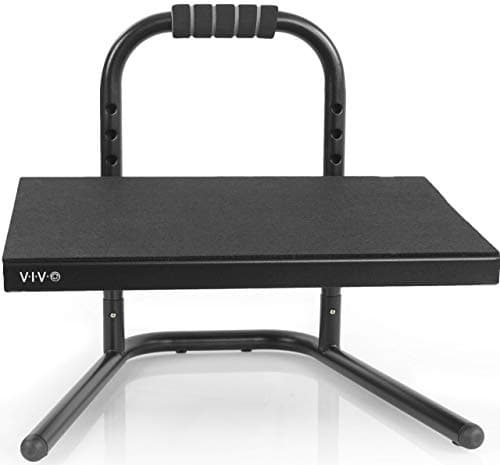
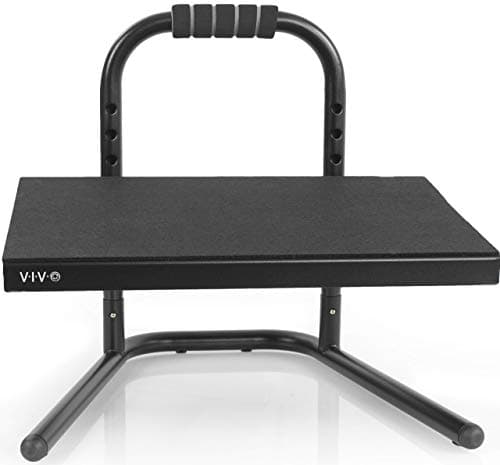
Ergonomic Height Adjustable Foot Rest
- •5 in to 10.25 in of adjustment under your feet on a 55 lb steel frame — the widest correction here when a fixed desk cannot drop.
Mount-It!
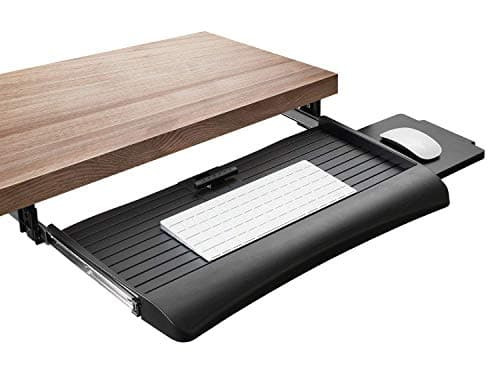
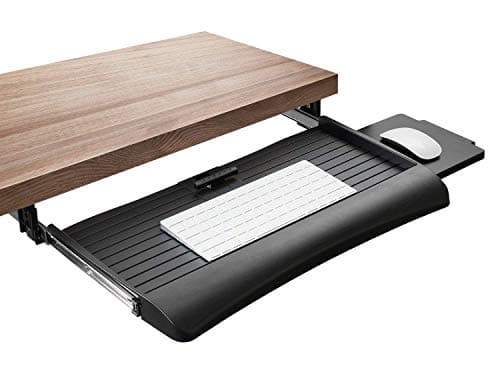
Keyboard Tray with Adjustable Mouse Platform
- •A 21 in sliding tray with three height steps across 1.25 in
- •plus a mouse platform that mounts on either the left or the right.
VIVO
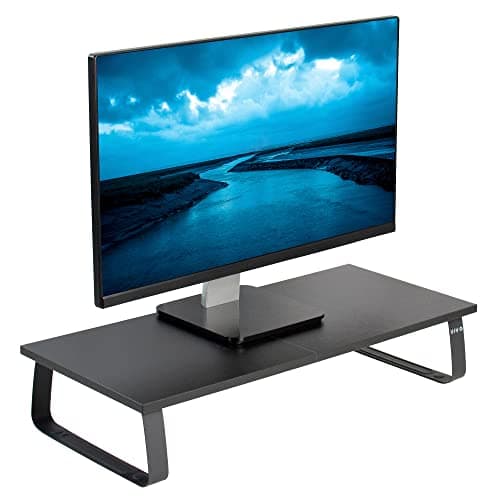
Single Monitor Stand
- •A 23.8 by 10.3 in riser that adds 4.6 in of screen height and carries a 44 lb monitor
- •for the lowest price in this roster.
VIVO
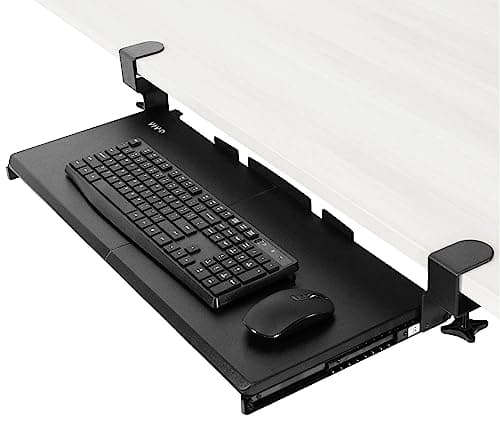
Large Keyboard Tray (MOUNT-KB05E)
- •A 26.8 by 11 in clamp-on platform
- •the largest typing surface here
- •although it locks at a single height once mounted.
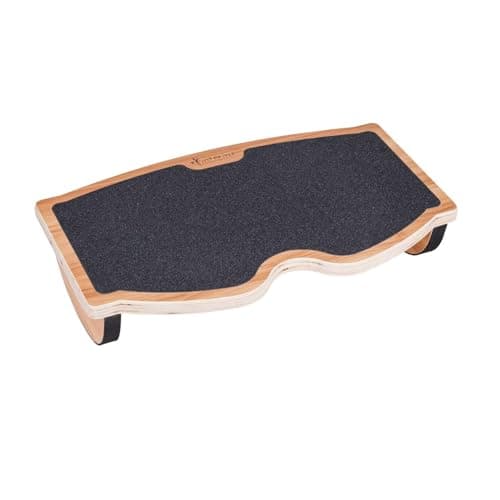
StrongTek
Ergonomic Wood Foot Rest Rocker
- •Wood rated to 350 lb that tilts under calf pressure — movement during a long session rather than height correction.
The Short Answer
Adjust the chair to your body first, then the work surface to your elbow: roughly 27 inches seated, 42 inches standing, measured at 5 ft 10 in. When a fixed desktop prevents that adjustment, the VIVO Ergonomic Height Adjustable Foot Rest is the recommendation.
Desk height is a single measurement problem wearing three disguises. Cornell's CUergo positions the seated keyboard beneath seated elbow height, with the keyboard base sloped gently away. OSHA's Computer Workstations eTool positions elbows at approximately keyboard height, bent between 90 and 120 degrees. Autonomous, not Cornell, supplies the standing figure: a surface 1 to 2 inches beneath your standing elbow. None of that describes furniture. All of it describes your arm.
Wirecutter identifies 29 to 30 inches as the standard desktop. On our derived figures below, that suits a seated typist near 6 ft 3 in. The DeskGear Height Fit Score below is a weighted composite of five factors, dominated by correction range at 35 percent. It ranks inexpensive hardware by the mismatch each accessory removes, which delivers a ranking a price comparison cannot. Every recommendation repositions your keyboard, your feet or your screen, never the furniture itself.
Five height fixes, side by side
Ergonomic Foundations
Chart
 DeskGearHQ.com
Best overall height fix: VIVO Ergonomic Height Adjustable Foot Rest
VIVO Ergonomic Height Adjustable Foot Rest
(Current price, subject to change)
The sequence matters considerably more than the particular product. Position the chair so your thighs sit level and your forearms reach the keyboard comfortably. Only if your feet leave the floor at that position does a footrest genuinely earn its place. Autonomous approaches the identical problem from the opposite direction, observing that adding elevation to a workstation is easier than subtracting it. VIVO's specification rates this platform from 5 inches to 10.25 inches, delivering 5.25 inches of usable adjustment. That correction accommodates most of the deficit a 29 inch desktop produces for anybody under approximately 6 ft. The steel framework carries 55 pounds, and VIVO specifies a foot rest rather than a step stool. Compared to the rocking platform reviewed immediately below, this accessory purchases elevation instead of movement. That is precisely why correction range, weighted at 35 percent, positions it above everything else on the DeskGear Height Fit Score.
What We Love
- VIVO's listing rates the platform from 5 in to 10.25 in, so it spans a genuine range of chair-to-floor gaps rather than one guess.
- A steel frame rated to 55 lb does not compress underfoot over a long session the way a moulded foam wedge does.
- The textured top and the padded underside stop both your feet and the unit itself from sliding around.
- It resets between a sitting height and a standing session, which a fixed block of any kind cannot.
What Could Be Better
- Adjustment happens in discrete steps rather than on a continuous ramp, so your ideal height may fall between two of them.
- At $49.99 it is the priciest footrest here, and the StrongTek rocker undercuts it by a full $10.
- Steel and black plastic read utilitarian beside a warm wood desktop.
The Verdict
When the desk will not drop and your feet stop reaching the floor, the VIVO Ergonomic Height Adjustable Foot Rest closes the gap. The 8.5 reflects 5 in to 10.25 in of adjustment on a steel frame rated to 55 lb. It is the only pick here with real travel rather than a single fixed setting.
Best for lowering the keyboard: Mount-It! Keyboard Tray with Adjustable Mouse Platform
Mount-It! Keyboard Tray with Adjustable Mouse Platform
(Current price, subject to change)
A keyboard tray answers one specific question: what happens when the desktop itself cannot descend? OSHA's eTool answers conditionally, noting that a keyboard tray may be needed if the work surface or the chair cannot be properly adjusted. Wirecutter frames the identical problem from the furniture side, identifying 29 to 30 inches as the standard desktop you can raise or lower to sit more ergonomically. This particular tray relocates the board beneath that surface, and the three-position mechanism contributes another 1.25 inches of trim. Its 21 inch width remains the honest limitation compared to the wider VIVO platform. So does the absent tilt adjustment, since OSHA requests height and tilt together, and only elevation is available here. Measured against a completely fixed tray it still ranks higher, because adjustment precision carries a quarter of the DeskGear Height Fit Score. On our own derived figures, that standard desktop sits nearly three inches above a neutral seated elbow at 5 ft 8 in.
What We Love
- Three height levels across 1.25 in give the tray a small adjustment range, which most budget trays simply do not offer.
- The mouse platform mounts on the left or the right, so left-handed setups are a mounting choice rather than a compromise.
- Steel ball-bearing glide tracks handle the retract-and-extend cycle that a daily-use tray goes through.
- Mount-It! lists a lifetime warranty and US-based support, which is unusual at $50.99.
What Could Be Better
- The main keyboard platform has no tilt adjustment, and OSHA's guidance asks for a tray adjustable in both height and tilt.
- At 21 in the tray is narrower than the VIVO alternative, which matters if you run a full-size board beside a mouse.
- Mounting it wants clear knee space and an under-desk session with a screwdriver.
The Verdict
If your desktop is fixed at the 29 to 30 in Wirecutter names as standard, the Mount-It! Keyboard Tray with Adjustable Mouse Platform moves the typing surface instead of the desk. The 7.8 reflects a 21 in tray, three height steps spanning 1.25 in, and a mouse platform you can mount on either side.
Best for raising the screen: VIVO Single Monitor Stand
VIVO Single Monitor Stand
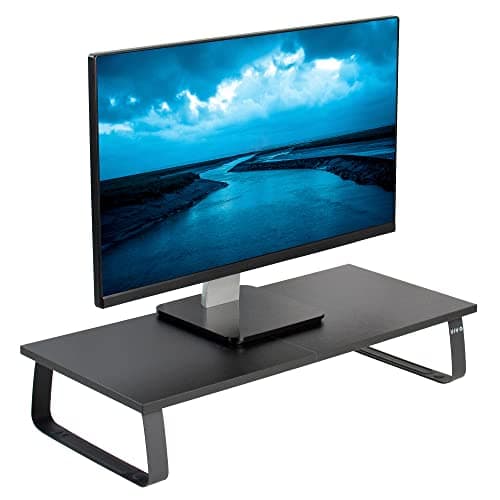
(Current price, subject to change)
Screen elevation is the half of this problem that people typically notice last. OSHA positions the top of the monitor at or slightly beneath eye level, with the centre 15 to 20 degrees below horizontal. Cornell's CUergo guidance is considerably more specific about the arrangement. Your eyes should align with a position 2 to 3 inches beneath the top of the monitor casing. That geometry places the screen centre approximately seventeen and a half degrees below eye level. How-To Geek's monitor riser roundup supplies the practical argument, observing that a stand reduces neck strain by elevating the display. VIVO's specification rates this particular riser at 4.6 inches of elevation with a 44 pound capacity. Whether that measurement suits you depends entirely on your seated eye height. That is why the CUergo arm test below beats any published chart, including this one. Correction range dominates our weighted composite, and a single unchangeable elevation is what ultimately restricts this recommendation.
What We Love
- VIVO lists the riser at 23.8 by 10.3 by 4.6 in, so you can check the lift against your own eye height before ordering.
- A 44 lb rating covers essentially any single monitor, and it leaves room for a laptop parked beside the screen.
- The wood top on steel legs reads better on a desk than the moulded plastic risers at this price.
- Assembly is minutes, and the silicone pads keep it from marking the desktop.
What Could Be Better
- The height is fixed at 4.6 in, so getting a different lift means stacking something underneath or buying a different size.
- It occupies 23.8 by 10.3 in of desk depth, which a shallow desktop may not spare.
- A monitor arm does the same job continuously, though it costs considerably more and needs a clampable edge.
The Verdict
If your screen sits low enough that you tip your head forward, the VIVO Single Monitor Stand raises it by a measured amount. The 7.3 reflects 4.6 in of lift, a 23.8 by 10.3 in top, and a 44 lb capacity at $34.99. The catch is honest: that lift is fixed.
Best budget keyboard drop: VIVO Large Keyboard Tray (MOUNT-KB05E)
VIVO Large Keyboard Tray (MOUNT-KB05E)
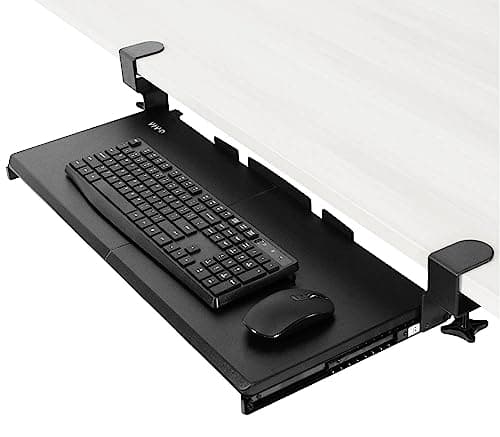
(Current price, subject to change)
This recommendation is the value tier of an identical correction. The VIVO tray relocates your keyboard beneath a desktop positioned excessively high. It provides a 26.8 by 11 inch surface to accomplish that, comfortably the largest platform reviewed here. VIVO's specification lists the span at 32.5 inches including the mounting clamps, so measure your available desk edge before ordering. The tradeoff versus the Mount-It! tray is adjustment: this platform offers absolutely none, and it carries the lowest rated capacity in the roster at 11 pounds. That combination is exactly what the adjustment-precision factor exists to identify, and it separates the two trays on the DeskGear Height Fit Score. Neither tray provides tilt adjustment, and OSHA requests elevation and tilt together, so the entire tray category delivers a partial answer. Wirecutter's 29 to 30 inch standard desktop is the starting height every tray reviewed here is built to work around.
What We Love
- At 26.8 by 11 in the platform swallows a full-size keyboard and a mouse without either one hanging off an edge.
- The C-clamp mount needs no drilling, so it comes off a rented desk without leaving holes behind.
- Gliding tracks and anti-skid padding are the two details that decide whether a tray survives daily use.
- It costs the same $49.99 as the adjustable footrest, and less than the Mount-It! tray it competes with.
What Could Be Better
- There is no height or tilt adjustment once it is mounted, so the drop you get is the drop you keep.
- VIVO rates the tray to 11 lb, the lowest capacity in this roster, which rules out heavy metal-bodied boards.
- The 32.5 in span including clamps needs a matching stretch of clear desk edge underneath.
The Verdict
For the widest typing surface at the lowest tray price, the VIVO Large Keyboard Tray (MOUNT-KB05E) is the straightforward option. The 7.2 reflects a 26.8 by 11 in platform, a 32.5 in span including clamps, and an 11 lb rating at $49.99. It mounts by C-clamp and then stays at one height.
Best for ankle movement: StrongTek Ergonomic Wood Foot Rest Rocker
StrongTek Ergonomic Wood Foot Rest Rocker
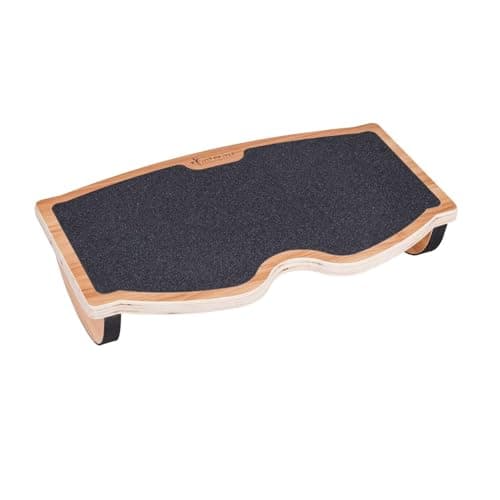
(Current price, subject to change)
This recommendation earns its position by being honest about what it is not. StrongTek's listing describes a wooden rocking footrest rated to 350 pounds whose angle responds to gentle calf pressure. That is fundamentally a movement product. Every measurement on this page concerns static elevation, and a rocking platform changes absolutely none of it. Correction range, weighted at 35 percent, is why it finishes last on the DeskGear Height Fit Score despite the sturdiest construction in the roster. Interpret it as a companion to a correctly measured workstation rather than a remedy for a wrong one. If you have reviewed the reference numbers below and your feet cannot reach the floor, the adjustable VIVO platform is the recommendation instead. If they do reach comfortably and your ankles stiffen by mid-afternoon, this delivers exactly what the steel platform cannot.
What We Love
- A 350 lb rating on a wooden platform is the sturdiest construction in this roster, and StrongTek says you can stand on it during a break.
- The tilt responds to calf pressure, so ankle movement continues without any conscious effort during a long stretch of desk work.
- There is nothing to assemble, adjust or calibrate, which also means there is nothing to loosen over a few years.
- At $39.99 it is the cheapest footrest here, and the wood suits a warm desk better than a steel frame.
What Could Be Better
- It has no height adjustment at all, so it does not solve dangling feet under a desk that sits too high.
- The rocking motion suits some people and irritates others; a stable platform is the safer buy if you are unsure.
- Solid wood is heavy to shift out of the way when you want the floor back.
The Verdict
If your seated height already measures right and the problem is sitting still, the StrongTek Ergonomic Wood Foot Rest Rocker is the pick that fits. The 7.0 reflects a wooden platform rated to 350 lb, a tilt you control with your calves, and $39.99 with no assembly. It corrects movement, not height.
How We Score: DeskGear Height Fit Score
DeskGear Height Fit Score
Score Formula
0.35 * height_correction_range + 0.25 * adjustment_precision + 0.20 * build_durability + 0.10 * install_effort + 0.10 * valueScore Factors
- Height Correction RangeHow many inches of mismatch the piece can remove, from the VIVO footrest's 5.25 in of travel down to a rocker that changes no height at all
- Adjustment PrecisionWhether the correction is continuous, stepped or fixed — three tray steps across 1.25 in beat a single mounted position, and both beat none
- Build & DurabilityRated capacity and material: a 350 lb wooden platform, a 55 lb steel footrest frame, a 44 lb riser and an 11 lb tray platform
- Install EffortWhat it takes to get the piece working, from a rocker that needs nothing to an under-desk tray that needs knee space and a screwdriver
- ValueDelivered correction against a narrow $34.99 to $50.99 band, where the cheapest pick is not automatically the weakest one
DeskGear Height Fit Score — Ranked
VIVO Ergonomic Height Adjustable Foot Rest
8.5/10Widest correction — 5 in to 10.25 in of adjustment on a 55 lb steel frame, for feet that no longer reach.
Mount-It! Keyboard Tray with Adjustable Mouse Platform
7.8/10Best keyboard drop — a 21 in tray, three steps across 1.25 in, and a mouse platform that mounts either side.
VIVO Single Monitor Stand
7.3/10Screen lift — 4.6 in on a 23.8 by 10.3 in top rated to 44 lb, at the lowest price in the roster.
VIVO Large Keyboard Tray (MOUNT-KB05E)
7.2/10Budget drop — the largest platform at 26.8 by 11 in, but fixed at one height and rated to just 11 lb.
StrongTek Ergonomic Wood Foot Rest Rocker
7.0/10Movement, not height — a 350 lb wooden platform that tilts under calf pressure, with no height adjustment at all.
Desk height by your height: the reference table
These figures are derived, not quoted: no ergonomics authority publishes a height-by-height chart, so this reference combines published proportions with an estimate of our own. The published portion is a pair of standard anthropometric ratios, putting standing elbow height at 0.630 of stature and knee height at 0.285 of stature. We did not consult a primary source for those ratios, so read them as conventional published figures rather than something we independently verified. The operating rules come from elsewhere: Cornell's CUergo positions the seated keyboard beneath your seated elbow height. OSHA's eTool positions seated elbows at roughly keyboard height, with forearms parallel to the floor. Autonomous, not Cornell, positions the standing surface 1 to 2 inches beneath your standing elbow.
The calculation combines those inputs to produce the reference below, and its seated column rests on a third constant, 0.385 of stature. That constant is entirely ours: no published source supplies it, and the two anthropometric ratios above cannot generate it. Treat it as DeskGear's own seated-elbow estimate rather than an established ergonomics standard. The chair-seat column applies 0.285, and the standing band occupies one to two inches beneath the 0.630 elbow figure. Autonomous publishes a standing chart from a comparable 60-to-63-percent elbow ratio, and its numbers run at or slightly beneath our band. Figures appear in whole inches because a derived estimate carrying a decimal implies precision the underlying proportions cannot support. Multiply your own height by those constants whenever you want an exact figure rather than the rounded tier.
5 ft 0 in (60 in) — chair seat 17 in · seated keyboard 23 in · standing desk 36-37 in
5 ft 2 in (62 in) — chair seat 18 in · seated keyboard 24 in · standing desk 37-38 in
5 ft 4 in (64 in) — chair seat 18 in · seated keyboard 25 in · standing desk 38-39 in
5 ft 6 in (66 in) — chair seat 19 in · seated keyboard 25 in · standing desk 40-41 in
5 ft 8 in (68 in) — chair seat 19 in · seated keyboard 26 in · standing desk 41-42 in
5 ft 10 in (70 in) — chair seat 20 in · seated keyboard 27 in · standing desk 42-43 in
6 ft 0 in (72 in) — chair seat 21 in · seated keyboard 28 in · standing desk 43-44 in
6 ft 2 in (74 in) — chair seat 21 in · seated keyboard 28 in · standing desk 45-46 in
6 ft 4 in (76 in) — chair seat 22 in · seated keyboard 29 in · standing desk 46-47 in
Read the seated column against whatever desk you already own. Wirecutter identifies 29 to 30 inches as the standard desktop elevation, and our derived seated column only reaches 29 inches at approximately 6 ft 3 in. At 5 ft 10 in you sit roughly two inches beneath a 29 inch desktop, and at 5 ft 4 in the deficit exceeds four inches. That accumulated deficit is the entire reason the correction hardware in this guide exists.
Cornell's guidance does not contradict Wirecutter, and the distinction genuinely matters. CUergo recommends a flat 28 to 30 inch surface for any desk supporting handwriting alongside computing. Immediately afterward it suggests attaching a height-adjustable keyboard tray underneath. The taller surface accommodates paper. The adjustable tray accommodates your hands. A desktop reading as excessively tall for typing may be exactly correct for everything else you accomplish on it.
Two additional adjustments Autonomous publishes belong on top of any reference chart. Incorporate your heel elevation into the standing measurement beforehand, because footwear genuinely alters the arithmetic. Subtract approximately an inch whenever a mechanical keyboard or a wrist rest elevates the stack beneath your hands. Autonomous additionally advises beginning at the lower row whenever your stature falls between two adjacent rows.
The order of operations is the component most workstations get wrong. Establish the chair initially, applying OSHA's recommended test. Chair elevation is correct when the entire sole of your foot rests comfortably on the floor. The rear of your knee should sit slightly higher than the seat itself. Establish the working surface second, positioned relative to your elbow. Introduce a footrest third, and only whenever a fixed desktop forced the chair higher than your legs wanted.
Monitor height, viewing distance and multiple screens
Screen elevation has a better test than any single number, and both authorities describe it. OSHA positions the top of the monitor at or slightly beneath eye level, with the centre 15 to 20 degrees below horizontal eye level. Cornell's CUergo guidance narrows that considerably. Your eyes should align with a position 2 to 3 inches beneath the top of the monitor casing. Published research places the screen centre approximately seventeen and a half degrees below eye level. CUergo's self-check converts everything into a single movement. Sit backward, extend your arm horizontally, and your middle finger should indicate the centre of the screen.
Viewing distance follows the identical arm. Cornell recommends approximately an arm's length measured from your eye to the screen. OSHA supplies the measured band: 20 to 40 inches, equivalently 50 to 100 centimetres, from your eye to the front of the panel. OSHA additionally establishes 20 inches as an absolute minimum. Read that band as approximate, because OSHA's own eTool states a narrower 18 to 20 inches elsewhere. Whenever text appears too small at that distance, CUergo explicitly recommends enlarging the characters rather than repositioning the chair forward. How-To Geek's riser roundup adds the practical corollary, observing that elevating a display also returns the desk space underneath it.
Larger and multiple displays alter the geometry rather than the underlying rule. OSHA warns that a very large monitor can push the downward viewing angle beyond its 60-degree ceiling. That constraint applies across the entire visible area, so a substantial panel generally sits lower and further backward. OSHA additionally caps sideways placement: a monitor should never sit more than 35 degrees to your left or right. OSHA does publish a multiple-monitor rule, in its workstation Evaluation checklist: the primary monitor belongs directly in front of you, with any additional monitors directly beside it. We found no equivalent Cornell rule, so nothing beyond OSHA's is claimed here. For a single large display running left-aligned software, CUergo suggests aligning yourself approximately a third of the distance across from the left edge.
One additional figure regularly confuses people: tilt. OSHA requests the screen roughly perpendicular to your line of sight, which generally means tilting it no more than 10 to 20 degrees. Cornell publishes no general screen-tilt rule. Its only screen-tilt advice sits inside its guidance for bifocal and progressive-lens wearers, and its other tilt-away instructions concern the keyboard rather than the display. Bifocal wearers should position the display beneath the standard recommendation, which OSHA observes may consequently require raising the chair, the keyboard and a supporting foot rest.
When NOT to Buy
The fence here is deliberate: this guide gives you the numbers and the hardware that corrects a height mismatch, and it stops there. No desk or desk frame appears in the roster, because buying a desk is a different decision with a different budget. If the answer to your mismatch is a desk that moves, start at our standing desk guide rather than here.
We have also left out desk-height calculator widgets. The table above is a derived reference you can check against your own elbow in ten seconds. A form field returning the same calculation adds nothing you cannot do yourself. What it would add is a false sense that one number is correct for your body, when OSHA's own neutral range spans 90 to 120 degrees at the elbow. OSHA states a tighter 90 to 100 degrees in places, which only widens the point.
Two related pages start from the other end. If something already hurts, our guides on wrist pain at your desk and eye strain at your computer begin from the symptom and work back. This page begins from the tape measure. Every pick here also sits inside a category roundup: the trays in our keyboard tray guide, the footrests in our footrest guide, and the riser in our monitor stand guide. We have not re-argued those categories here, because each pick appears as the fix for one specific mismatch.
Who Should Buy What
Who Should Buy What
| If you are… | Recommended pick |
|---|---|
Shorter user at a fixed 29 in desk Under about 5 ft 6 in, so the seated column reads 25 in or lower and the chair has to come up to reach the desktop. | VIVO Ergonomic Height Adjustable Foot Rest |
Typist with raised shoulders Elbows sit below the keyboard on a desk that cannot be lowered, and the mouse needs its own adjustable position. | Mount-It! Keyboard Tray with Adjustable Mouse Platform |
Anyone tipping their head forward The top of the screen sits below eye level and the monitor's own stand has already bottomed out at its lowest setting. | VIVO Single Monitor Stand |
Full-size keyboard and mouse user Wants the largest under-desk typing platform, has a clampable desk edge, and accepts a single fixed mounted height. | VIVO Large Keyboard Tray (MOUNT-KB05E) |
Correctly measured but restless Chair, desk and screen heights all check out, feet reach the floor, and the ankles stiffen through a long seated stretch. | StrongTek Ergonomic Wood Foot Rest Rocker |
Renter who cannot modify a desk Needs every correction to be removable, with no drilling into a desktop that has to go back unmarked. | VIVO Large Keyboard Tray (MOUNT-KB05E) |
Frequently Asked Questions
What is the correct desk height for my height?
Seated, our own estimate is roughly 0.385 of your height: about 26.2 in at 5 ft 8 in, 27.0 in at 5 ft 10 in, and 27.7 in at 6 ft. That 0.385 constant is DeskGear's, not a published one, so treat it as an estimate. Standing, aim 1 to 2 in below your standing elbow, a figure Autonomous publishes. Standing elbow height sits near 0.630 of your stature on standard published anthropometric ratios. Check any of it against your own elbow before you trust it.
Is a 29 or 30 inch desk too tall for most people?
For typing, usually yes. Wirecutter names 29 to 30 in as the standard desk height, and our derived seated figure only reaches 29 in at around 6 ft 3 in. At 5 ft 8 in that derived figure is 26.2 in, nearly three inches lower. Cornell still recommends a 28 to 30 in surface for a desk you also write on, but pairs that recommendation with a height-adjustable keyboard tray underneath.
How high should a standing desk be?
About 1 to 2 in below your standing elbow, which is the clearance Autonomous publishes. Using the 0.630 elbow proportion, that lands near 40.8 to 41.8 in at 5 ft 8 in and 43.4 to 44.4 in at 6 ft. Autonomous also publishes a chart from a 60-to-63-percent ratio and lands slightly lower. Measure your own elbow height in the shoes you actually wear, then set the desk from that.
What angle should my elbows be at while typing?
OSHA's Computer Workstations eTool asks for elbows close to the body and bent between 90 and 120 degrees, with hands, wrists and forearms straight, in line and roughly parallel to the floor. Cornell's CUergo puts the same limit differently, asking that the elbow angle stay at or above 90 degrees to avoid nerve compression at the elbow. Neither treats 90 degrees as a single target.
How high should my monitor be?
OSHA places the top of the monitor at or slightly below eye level, with the centre 15 to 20 degrees below horizontal eye level. Cornell's CUergo is more specific: your eyes should line up 2 to 3 in below the top of the monitor casing, with the screen centre near 17.5 degrees below eye level. The quickest check is CUergo's arm test — sit back, extend your arm, and your middle finger should point at the screen centre.
How far away should my monitor be?
Cornell recommends about an arm's length from your eye to the screen. OSHA gives the measured range: 20 to 40 in, or 50 to 100 cm, from the eye to the front surface of the panel, and never closer than 20 in. If text is hard to read at that distance, enlarge the text rather than pulling the chair forward, which is CUergo's explicit advice.
Does a bigger monitor change the height rules?
It changes the geometry. OSHA warns that a very large monitor can push the downward viewing angle past its 60-degree ceiling across the full visible area, so a big panel generally sits lower and further back than a small one. The side-to-side cap holds at 35 degrees either way. For a single wide display running left-aligned software, CUergo suggests lining yourself up about a third of the way across from the left edge.
Should I set the chair or the desk first?
The chair, always. OSHA's test is that chair height is right when the entire sole of your foot rests on the floor with the back of the knee slightly higher than the seat. Set that first, then bring the work surface to your elbow. Only after both are set does a footrest make sense, and only if a fixed desk forced the chair higher than your legs wanted.
What do I do if my desk cannot be lowered?
OSHA's guidance is a chain: lower the surface if you can, and if you cannot, raise the chair to fit the user and then add a footrest to support the feet. That is exactly the sequence the picks here follow. A keyboard tray drops the typing surface below a desktop you cannot move, and an adjustable footrest restores floor contact once the chair has come up.
What if my desk is too low instead?
OSHA suggests raising the work surface with stable risers under the desk legs. For the screen alone, a monitor riser is the simpler fix, and How-To Geek's riser roundup notes it reduces neck strain by lifting the display to a better viewing height. The VIVO riser here adds a fixed 4.6 in. Autonomous makes the general point that adding height to a workstation is easier than subtracting it.
Do I need a footrest if I already sit at the right height?
No. A footrest solves one problem: feet that no longer reach the floor once the chair is set correctly. If your feet already rest flat with thighs level, adding one lifts your knees above your hips and creates a new issue. A rocker like the StrongTek is a different product entirely — it adds ankle movement to a setup whose heights already measure right.
Bottom Line
Get the VIVO Ergonomic Height Adjustable Foot Rest if Your chair had to come up to reach a fixed desk, and your feet no longer touch the floor — 5 in to 10.25 in of correction..
Get the Mount-It! Keyboard Tray with Adjustable Mouse Platform if The desktop is too high for a neutral elbow and you want the keyboard and mouse positioned separately below it..
Get the VIVO Single Monitor Stand if The top of your screen sits below eye level and 4.6 in of fixed lift is close to what you need..
Get the VIVO Large Keyboard Tray (MOUNT-KB05E) if You want the largest under-desk typing platform for the money and a single mounted height works for you..
Get the StrongTek Ergonomic Wood Foot Rest Rocker if Your measurements already check out and what you want is ankle movement through a long seated stretch..
Your desk already lands in the band the table gives for your height. In that case nothing here is needed, and a chair adjustment is the cheaper next move.
Sources & Methodology
Methodology: DeskGear Height Fit Score — Formula: 0.35 * height_correction_range + 0.25 * adjustment_precision + 0.20 * build_durability + 0.10 * install_effort + 0.10 * value. Factors: Height Correction Range: How many inches of mismatch the piece can remove, from the VIVO footrest's 5.25 in of travel down to a rocker that changes no height at all | Adjustment Precision: Whether the correction is continuous, stepped or fixed — three tray steps across 1.25 in beat a single mounted position, and both beat none | Build & Durability: Rated capacity and material: a 350 lb wooden platform, a 55 lb steel footrest frame, a 44 lb riser and an 11 lb tray platform | Install Effort: What it takes to get the piece working, from a rocker that needs nothing to an under-desk tray that needs knee space and a screwdriver | Value: Delivered correction against a narrow $34.99 to $50.99 band, where the cheapest pick is not automatically the weakest one
Expert review sources used in this analysis:
- The weighted formula behind every score is set out above
- Ergonomics figures come from primary guidance read directly
- Cornell University Ergonomics Web (CUergo) supplied several of them, from an ergonomics guide dated June 2015, so read it as settled guidance rather than current research
- Those are the seated keyboard positioned below seated elbow height, with the keyboard base sloped gently away from the user
- CUergo also supplied the 2 to 3 in eye alignment below the monitor casing and the 17.5-degree screen-centre figure
- The arm-length viewing distance is CUergo's, as is the 28 to 30 in flat-surface recommendation paired with a keyboard tray
- OSHA's Computer Workstations eTool supplied the rest
- From it come the 90-to-120-degree elbow range, the chair-height test and the 20 to 40 in viewing distance
- OSHA also supplied the 15-to-20-degree screen-centre angle, the 35-degree side-to-side cap and the 60-degree downward ceiling
- The 10-to-20-degree tilt limit and the raise-the-chair-then-add-a-footrest sequence are OSHA's as well
- The height-by-height table is derived, not quoted
- The calculation applies standard published anthropometric proportions
- Standing elbow height runs at 0.630 of stature, and knee height at 0.285 of stature
- We did not consult a primary source for those two ratios, and we do not claim to have done so
- The seated column additionally uses a 0.385 constant that is DeskGear's own estimate
- No published source supplies that constant, and the table should be read accordingly
- Wirecutter's standing-desk guide supplied the 29 to 30 in standard desk figure
- Autonomous published the standing chart built on a 60-to-63-percent elbow ratio, which our band was cross-checked against
- The 1-to-2-inch standing-elbow clearance is Autonomous's figure as well, not Cornell's
- How-To Geek's monitor riser roundup, which we reviewed directly, supplied the neck-strain rationale for lifting a screen
- Product specifications come from VIVO, Mount-It! and StrongTek listings and spec sheets
- Prices are list prices verified 2026-08-16 via the Amazon Creators API, and they change often
- Check the current price before buying.
Nicholas Miles is the founder of DeskGearHQ and a longtime smart home enthusiast focused on helping everyday homeowners make better technology decisions. He researches, compares, and writes about products across security, climate, lighting, leak prevention, sensors, home energy, and automation, with an emphasis on real-world usefulness, ecosystem compatibility, reliability, privacy, and long-term value.
Affiliate disclosure: DeskGearHQ earns affiliate commissions on qualifying Amazon purchases. Our scoring methodology is independent of affiliate relationships.



