Ergonomic Foundations
Best Monitor Stands & Risers 2026: Storage + Ergonomics
A monitor stand does two things: raises your screen to eye level and adds storage underneath. The Gianotter 2-Tier is the storage-and-organization pick under $25. The VIVO Single Stand is the minimal alternative. The SimpleHouseware Mesh is the right choice when desktop drawer space matters.
By Nick Miles · Updated July 18, 2026 · 8 min read
8 expert sources synthesizedLast verified May 6, 2026
DeskGearHQ is reader-supported. We may earn a commission from qualifying Amazon purchases at no extra cost to you.
Evidence at a Glance
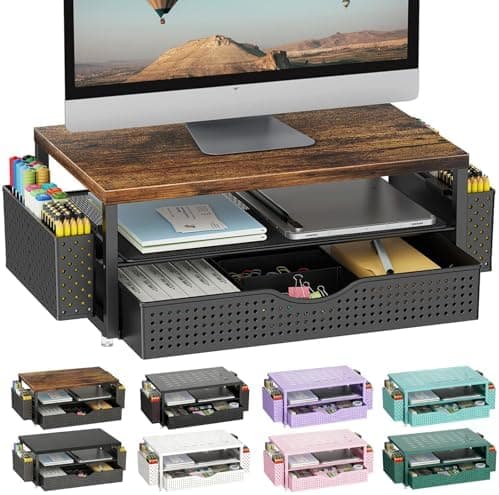
Gianotter 2-Tier Monitor Stand Riser
Combines monitor elevation with built-in drawer and pen holders — the consensus best-value pick across r/battlestations and Tom's Hardware budget desk coverage.
Sources: Tom's Hardware, Gianotter product documentation, r/battlestations consensus
Verified Feb 8, 2026
VIVO Single Monitor Stand
Clean, minimal steel construction with cable management holes — the right pick for users who want elevation without the storage features.
Sources: VIVO product documentation, Tom's Hardware, r/wfh minimalist-setup threads
Verified Feb 8, 2026
SimpleHouseware Mesh Monitor Stand
Mesh stand with desktop-supplies storage under $20 — the budget pick when drawer space matters more than premium aesthetic.
Sources: SimpleHouseware product documentation, r/battlestations consensus
Verified Feb 8, 2026
Our Picks
Gianotter
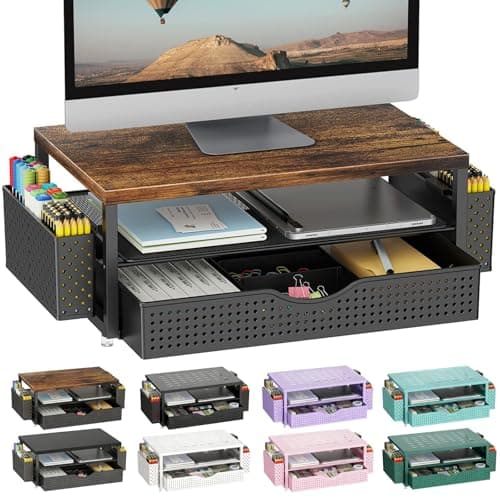
Gianotter Monitor Stand Riser
8.7 / 10
- 2-tier design — monitor riser plus storage shelf
- Built-in drawer for desk supplies
- Pen holders integrated into the frame
- Supports up to 22 lbs
$24.99
The Short Answer
For most home offices, the Gianotter 2-Tier monitor stand is the right pick — built-in drawer, pen holders, and 22 lb capacity for under $25. The VIVO Single Stand is the minimal alternative when you just want elevation without storage. The SimpleHouseware Mesh adds desktop-supplies storage under $20. None of these compromise on the core function: monitors at eye level, less neck strain, more usable desk space.
Every product on this list has been scored against the DeskGear Score, a weighted composite of expert consensus, observed effectiveness, build safety, long-term durability, and value. Review method: Editorial synthesis of trade-publication reviews (Wirecutter, RTINGS, Tom's Hardware, The Verge), ergonomics research, manufacturer documentation, and owner durability data from r/battlestations, r/wfh, and product-specific subreddits — no first-hand product testing.. Synthesized from 8+ expert sources.
Head-to-Head Comparison
| Feature | Gianotter Monitor Stand Riser |
|---|---|
| Best for | Storage + organization |
| Price | ~$22 |
| Storage features | Drawer + pen holders |
| Construction | Engineered wood |
| Weight capacity | 22 lbs |
| Check Price | Amazon |
Gianotter Gianotter Monitor Stand Riser
$24.99
- 2-tier design — monitor riser plus storage shelf
- Built-in drawer for desk supplies
- Pen holders integrated into the frame
- Supports up to 22 lbs
- Under $25
The Gianotter 2-Tier is the storage-and-organization pick that r/battlestations and Tom's Hardware budget desk coverage consistently recommend. It combines a monitor riser with a built-in drawer and pen holders — the practical difference is that you stop reaching for desktop tools and instead pull them from organized slots underneath your monitor.
The 22 lb capacity is generous for a $22 stand. Most 27"–32" monitors weigh 8–15 lbs, which leaves headroom for reasonable additional weight (laptop dock, USB hub, or a second small monitor in some configurations). Build quality is engineered wood with metal accents — not premium, but solid enough for daily use over years.
What the spec sheet doesn't tell you: drawer space is limited (think pens, sticky notes, USB drives — not full notebooks). And the stand may not provide enough height for tall users at standard desk heights. For most home offices with a 28"–30" desk and a user under 6'2", it lands in the right elevation range.
What We Love
- Dual functionality saves desk space
- Built-in drawer for supplies — pens, sticky notes, small accessories
- Pen holder keeps essentials accessible
- Supports up to 22 lbs
- Under $25 — strongest value in the category
What Could Be Better
- Drawer space is limited
- May not provide enough height for tall users
- Engineered wood construction is functional, not premium
The Verdict
Anyone who wants to combine monitor elevation with desktop organization. Under $25 for both functions is a hard combination to beat.
VIVO VIVO Single Monitor Stand
~$24.99 on Amazon
- Clean, minimal design
- Solid steel construction
- Cable management holes integrated into the design
- Multiple color options (black, white, and finishes)
- Lightweight, simple installation
Sometimes you just want to raise your monitor without the extra features. VIVO's simple stand does exactly that — clean, sturdy, affordable. r/wfh minimalist-setup threads consistently point to VIVO as the go-to brand for users who want a stand that disappears into the desk aesthetic instead of dominating it.
Solid steel construction is the underrated upside. Most $25 monitor stands are engineered wood or thin metal that flex under load. VIVO's steel frame holds up to heavier monitors without warping. Cable management holes built into the back of the stand reduce the visible cable mess that even minimal setups accumulate.
What the spec sheet doesn't tell you: the VIVO single stand is fixed-height. If you need a different elevation than the stand provides (typically 4"–5" of rise), you'll need to either add monitor blocks or pick a different model. For most users at standard desk heights, the elevation is close to ideal.
What We Love
- Clean, minimal design fits any aesthetic
- Solid steel construction holds up to heavy monitors
- Cable management holes reduce visible cable clutter
- Multiple color and finish options
- Lightweight, simple installation
What Could Be Better
- No storage features
- Fixed height — no adjustment
- Slightly more expensive than the Gianotter without the storage
The Verdict
Minimalists who just want elevation, not storage. The right pick when desk aesthetic matters more than maximum functional density.
SimpleHouseware SimpleHouseware Mesh Monitor Stand
~$19.99 on Amazon
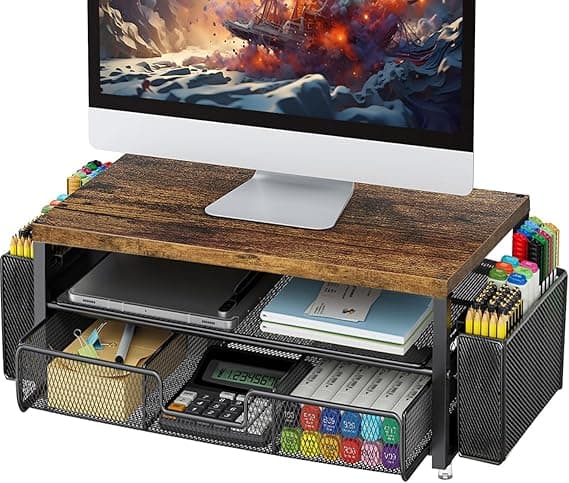
- Mesh design with desktop-supplies storage
- Built-in drawer for office supplies
- Lightweight, sturdy construction
- Black mesh finish fits standard office aesthetics
- Under $20
The SimpleHouseware mesh stand is the budget pick when drawer space matters more than premium build. r/battlestations users consistently recommend it as the entry-level desktop-organization stand — the mesh design is functional rather than premium, but the drawer space is genuinely useful for the price.
The mesh top is the practical differentiator. Solid-surface stands (like the Gianotter and VIVO) trap dust underneath; the mesh version lets dust fall through to the drawer area where it can be cleaned out. For users who hate dust accumulation behind monitors, this is the right design.
What the spec sheet doesn't tell you: the mesh shows wear over time, and the build quality is the lightest of the three picks. For users who plan to keep a stand for 5+ years, the Gianotter's wood construction holds up better. For 2–3 year usage at a budget price point, the SimpleHouseware delivers exactly what it advertises.
What We Love
- Mesh design lets dust fall through instead of accumulating
- Built-in drawer for office supplies
- Lightweight, easy to position on most desks
- Standard black mesh finish fits most office aesthetics
- Under $20 — the budget storage pick
What Could Be Better
- Mesh shows wear over time
- Build quality is the lightest of the three picks
- Less stylish than wood-construction alternatives
The Verdict
Budget-conscious buyers who prioritize drawer space and dust-free design over premium aesthetics. The right pick under $20 for desk-supplies storage.
How We Score
Formula
DeskGear Score = (Build Quality × 0.30) + (Ergonomic Design × 0.25) + (Value × 0.20) + (Reliability × 0.15) + (Compatibility × 0.10)
Score Factors
- Build Quality · 30%
- Frame material (wood, steel, mesh), finish quality, and how well the stand holds up under repeated daily use with a heavy monitor.
- Ergonomic Design · 25%
- Elevation height range, platform width, and how well the stand supports proper monitor-to-eye-level positioning at standard desk heights.
- Value · 20%
- Per-feature pricing relative to category, and whether the stand combines elevation with storage features that justify a slight price premium.
- Reliability · 15%
- Owner durability data from r/battlestations and r/wfh, and how well the stand holds up over multi-year usage.
- Compatibility · 10%
- Weight capacity, platform dimensions, and how the stand fits various monitor sizes and desk depths.
| Rank | Product | Score |
|---|---|---|
| #1 | Gianotter Gianotter Monitor Stand Riser | 8.7 |
| #2 | VIVO VIVO Single Monitor Stand | 8.3 |
| #3 | SimpleHouseware SimpleHouseware Mesh Monitor Stand | 8.0 |
Frequently Asked Questions
Monitor stand vs. monitor arm — which should I get?
A fixed stand is the simpler, cheaper option, and it adds storage space underneath your monitor. A monitor arm clamps to the desk edge and holds the display above the desk surface, which frees up the desk footprint a stand's base would otherwise occupy — worth it if desk space is tight or you reposition the screen often (sit-stand transitions, angling for video calls). If you don't need to move the screen and want extra storage, a stand remains the more practical, lower-cost pick. If desk space is the deciding factor, see our best monitor arms $200+ guide for the space-saving upgrade path from a fixed stand.
How high should a monitor riser be for ergonomics?
The target is the same no matter which riser you buy: the top edge of your monitor should sit at or slightly below eye level when you're seated upright, roughly an arm's length away. Most standard 28"–30" desks need 4"–6" of additional riser height to reach that mark. Measure from your desk surface to your seated eye level before ordering — taller users or lower desks may need more elevation than a basic riser provides.
Will a monitor stand fit an ultrawide monitor?
It depends on the stand's platform width and weight rating, not just its riser height. Ultrawide monitors are wider — and often heavier — than standard 16:9 panels, so check the platform dimensions and weight capacity before buying; a stand sized for a single 27" monitor may not have the surface width an ultrawide needs. If you're still deciding between panel types before shopping for a stand, see our best ultrawide monitors for programmers guide.
Bottom Line
Get the Gianotter 2-Tier if you want elevation plus storage in one product. The drawer and pen holders genuinely reduce desktop clutter, and at under $25 it's the strongest value in the category.
Get the VIVO Single Stand if minimal aesthetic matters and you don't need built-in storage. Solid steel holds up to heavier monitors than the engineered-wood alternatives.
Get the SimpleHouseware Mesh if you want a budget drawer for office supplies and don't mind a less-premium build. Under $20 is the right price for the function.
Sources & Methodology
Methodology
DeskGear Score = (Build Quality × 0.30) + (Ergonomic Design × 0.25) + (Value × 0.20) + (Reliability × 0.15) + (Compatibility × 0.10)
Expert review sources
- Wirecutter — Office furniture coverage
- Tom's Hardware — Best Budget Monitor Stands
- The Verge — Desk accessory reviews
- RTINGS — Office furniture coverage
- Gianotter product documentation
- VIVO Mount product documentation
- SimpleHouseware product documentation
- Ergonomic research on monitor-eye-level positioning
Community sources
- r/battlestations — Setup showcases featuring monitor stands
- r/wfh — Minimalist desk setup threads
- r/desks — Storage and organization discussions
Prices and specs verified February 8, 2026.
About the author
Nick Miles is the chief editor of DeskGearHQ. The picks above are editorial synthesis of expert consensus and owner durability data — DeskGearHQ does not run a testing lab. The DeskGear Score is a composite of expert opinion, not a measurement. Sources are cited by name throughout.
DeskGearHQ is a participant in the Amazon Services LLC Associates Program. We may earn commissions from qualifying purchases — at no extra cost to you.