
How to Fix (and Prevent) Wrist Pain at Your Desk (2026)
Wrist pain at a desk is a geometry problem before a gadget one. Fix the forearm twist first with a vertical mouse, then unsplay the hands with a split keyboard — in that order, because the cheapest posture fix beats the priciest device held at the wrong angle.
This article contains affiliate links. We may earn a commission at no extra cost to you. Learn more
Featured in this Guide
Logitech
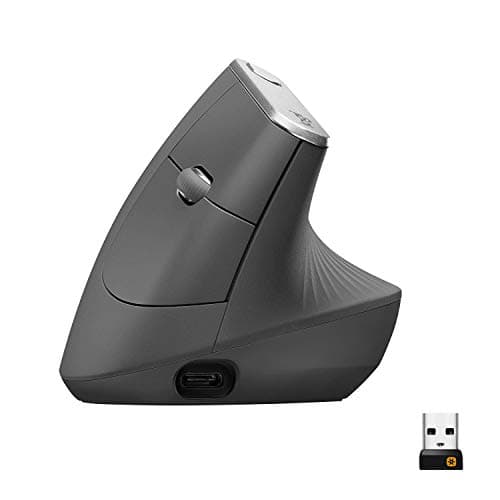
MX Vertical
- •The neutral-forearm anchor of the fix: a 57-degree handshake angle with a standard button layout
- •so the wrist changes but the workflow barely does.
Logitech
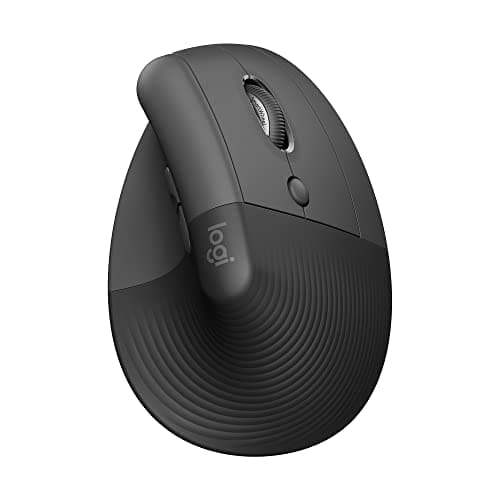
Lift Vertical Ergonomic Mouse
- •Same vertical geometry in a lighter body
- •plus a rare left-hand variant — the vertical mouse for hands the full-size one overwhelms.
Evoluent
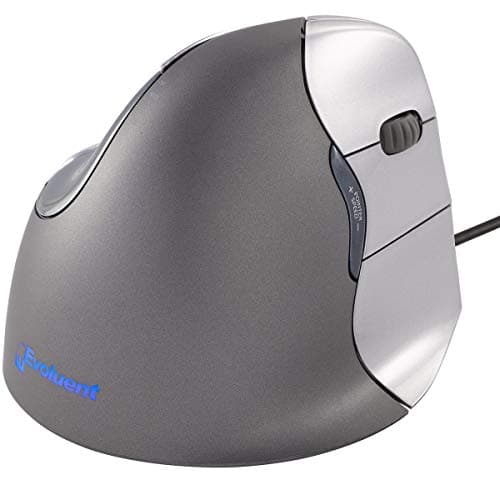
VerticalMouse 4
- •A near-90-degree upright angle
- •the steepest here
- •for wrists a milder vertical never settled. Longer to adapt to
Logitech
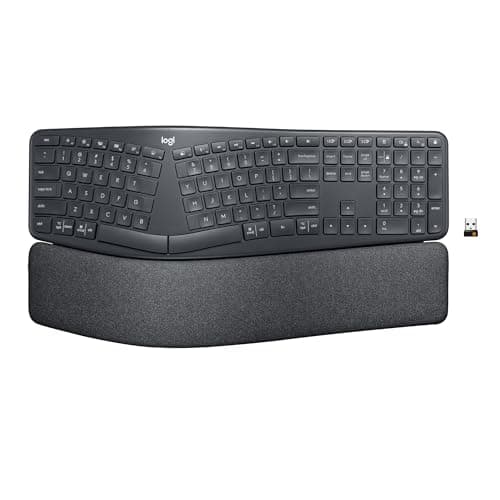
ERGO K860 Wireless Split Keyboard
- •The second geometry fix: a bowed split with 10-degree tilt that opens the hands to shoulder width
- •with a palm rest that holds shape past a year.
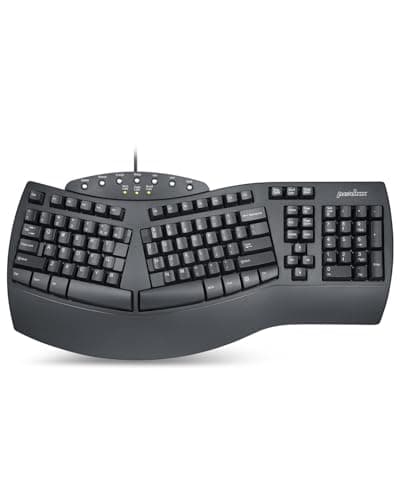
Perixx
PERIBOARD-512B Wired Ergonomic Split Keyboard
- •A wired split with negative tilt at under $50 — the low-risk way to test whether split typing helps before committing to a K860.
The Short Answer
Wrist pain at a desk usually starts with forearm geometry, not the mouse brand: get the forearm vertical first with an ergonomic vertical mouse, then unsplay the hands with a split or tented keyboard, and adjust height last — cheapest posture correction before priciest gadget.
Search for a fix to desk wrist pain and the results jump straight to gadgets, yet the ache almost always traces to forearm geometry that hardware corrects only in the right sequence. Pronation — the palm-down twist over a flat mouse — is where most desk wrist strain originates, so a vertical mouse that rotates the forearm toward a natural handshake is the opening move; a split or tented keyboard then unsplays the inward-angled hands, and height comes last. Order matters, because a correctly angled budget split outperforms a flat premium board that can cost 2.9x more, and even between the verticals a full-size shell runs about 1.3x a compact one. The DeskGear Wrist-Relief Score is a weighted composite whose dominant factor is wrist neutrality, ranked ahead of all-day comfort, adjustability, and value — the ergonomic priorities Wirecutter, PCMag, and TechRadar emphasize across vertical mice and split keyboards.
The fixes, side by side
Ergonomic Foundations
Chart
 DeskGearHQ.com
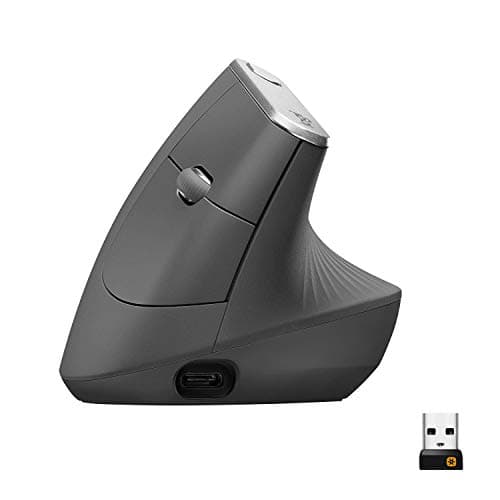
Best overall (vertical mouse): Logitech MX Vertical
Logitech MX Vertical
(Current price, subject to change)
Wirecutter and TechRadar treat the MX Vertical as the reference ergonomic mouse, and the reason is the handshake angle: it lifts the forearm out of the flat palm-down twist that drives most desk-mousing strain, and Logitech's own measurement puts forearm muscle activity down about 10%. On the DeskGear Wrist-Relief Score, wrist neutrality is the highest-weighted factor, and this 57-degree grip enables it. It sits near 1.5x the wired Perixx, while the K860 it pairs with runs about 1.9x as much again, so the angle costs less than the keyboard fix. What keeps it a first move rather than a leap is how little changes around it — the buttons sit where you expect and USB-C charging lasts roughly four months a top-up. The Logitech MX Vertical does ask for a week or two of adjustment and a bit more desk compared to a flat mouse, and it is not built for gaming reflexes. For an office worker whose wrist aches after a full day of clicking, this is the pick that corrects the angle first — and the best vertical mice for wrist pain guide ranks nine more if this shape does not suit your hand.
What We Love
- 57-degree handshake angle noticeably cuts wrist and forearm strain
- Standard button layout means minimal relearning
- Four-month battery on USB-C charging
- Premium build that holds up to daily use
What Could Be Better
- A one-to-two-week adaptation period before it feels natural
- Larger desk footprint than a standard mouse, and not a gaming pointer
The Verdict
If constant palm-down mousing is what aches by mid-afternoon, the Logitech MX Vertical fits the brief as the first move. Its 57-degree angle rotates the forearm toward a handshake, and the standard button layout keeps the relearning short. You give up gaming-grade speed, but for all-day office work this is the one to start with.
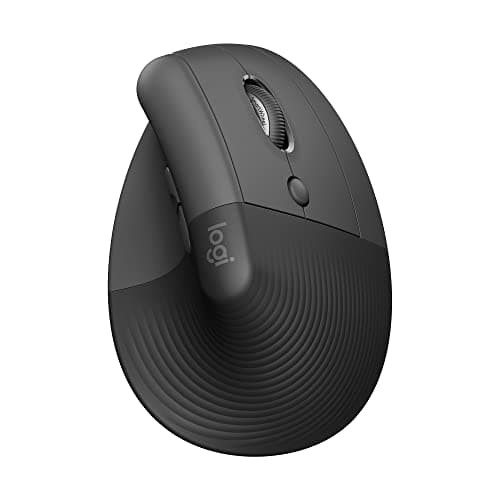
Best for small hands: Logitech Lift Vertical Ergonomic Mouse
Logitech Lift Vertical Ergonomic Mouse
(Current price, subject to change)
The Lift is the MX Vertical's smaller sibling, and Wirecutter and PCMag both flag it as the vertical mouse for hands the full-size body overwhelms. It keeps the same handshake geometry — the part doing the ergonomic work — in a lighter shell, which enables the identical neutrality factor in a body built for smaller hands; it also adds a genuine left-hand variant that is rare at any price and runs a 2-year stretch on a single AA cell, while the steeper Evoluent costs about 1.5x its price. The give-back versus the Logitech MX Vertical is tactile: softer plastics, a less premium scroll wheel, four buttons instead of the MX's fuller set, and swappable AA cells rather than a rechargeable pack. Against its bigger sibling, the Lift trades a little polish and a couple of buttons for a size and price that actually fit a smaller or left-handed desk — which, if that is your hand, makes it the better of the two.
What We Love
- Same 57-degree handshake angle as the MX Vertical in a smaller body
- A rare dedicated left-hand variant at this price
- Silent-click sensor, quieter than a standard mouse
- Roughly 24 months on a single AA battery
What Could Be Better
- Softer plastics and scroll wheel than the MX Vertical
- Four buttons only, and AA cells instead of rechargeable USB-C
The Verdict
For smaller hands that find the MX Vertical too big, the Logitech Lift Vertical Ergonomic Mouse lines up with what you actually need. The same vertical geometry sits in a lighter body, with a left-hand variant and about two years per AA battery. It is the pick for a compact hand or a left-handed desk that still wants the vertical fix without the full-size shell.
Max-angle vertical: Evoluent VerticalMouse 4
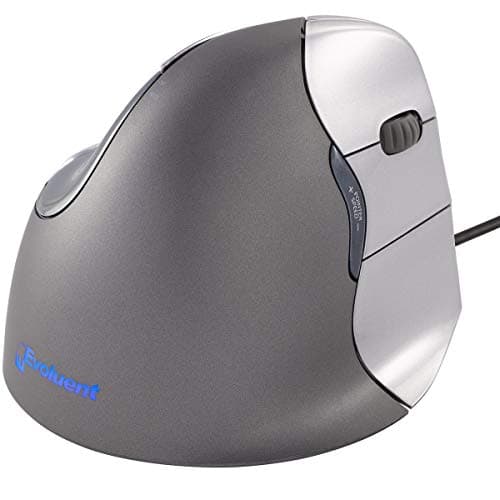
TechRadar and PCMag both cover the Evoluent as a clinical-grade option, and where the Logitech verticals ease you toward neutral, the VerticalMouse 4 goes almost all the way: its near-90-degree position is the steepest angle in this lineup, which is why it turns up in occupational-therapy and workplace-injury settings rather than gaming roundups. Six programmable buttons and a thumb-rest shelf let the hand settle rather than clench, and the wired USB connection means no battery to manage and no latency to notice. That steepest angle delivers the most pronation relief in the lineup, so the neutrality factor rewards it, and at about 1.2x the MX Vertical's price it stays close in cost compared to the gentler verticals. The cost of that steep angle is real — the Evoluent VerticalMouse 4 takes longer to adapt to than a gentler vertical, the standard model is wired-only, and the industrial styling has not changed in years. If a milder vertical mouse never fully calmed your wrist, this is the one to escalate to.
What We Love
- Near-90-degree angle is the steepest here — maximum pronation relief
- Used in occupational-therapy and injury-rehab contexts
- Six programmable buttons plus a thumb-rest shelf
- Wired USB means no battery management and zero latency
What Could Be Better
- The steep angle needs longer adaptation than a 57-degree mouse
- Wired-only on the standard SKU, with a dated industrial look
The Verdict
When a milder vertical mouse never quite settled your wrist, the Evoluent VerticalMouse 4 is a sensible pick for that setup. Its near-90-degree angle is the steepest here, used in occupational-therapy contexts, with a thumb-rest shelf that lets the hand rest instead of grip. The trade is a longer adjustment and a wired-only cable on the standard model.
Best split keyboard: Logitech ERGO K860 Wireless Split Keyboard
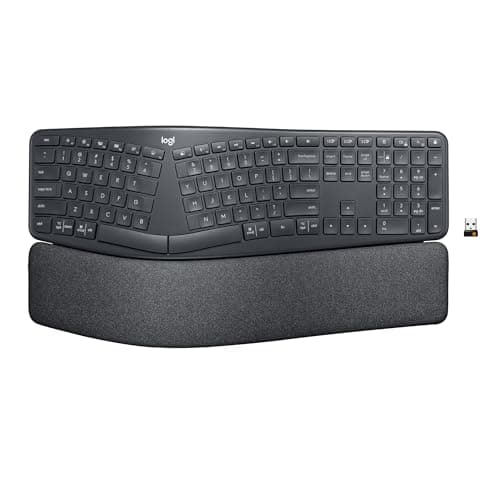
Logitech ERGO K860 Wireless Split Keyboard
(Current price, subject to change)
Once the mouse hand is sorted, the next ache tends to be the keyboard: hands angled inward across a flat board, wrists pronated the same way the mouse just fixed. The Logitech ERGO K860 is the split most reviewers land on, with Wirecutter and PCMag naming it the ergonomic-split consensus near its price. Its bowed layout and 10-degree negative tilt produce a shoulder-width hand position, the integrated palm rest holds its shape past the 1-year mark where standalone pads compress, and the shell uses 71% recycled plastic. What you accept for that is a full-size footprint that pushes the mouse further right, membrane keys rather than mechanical, and a wireless-only design with no wired fallback. The Logitech ERGO K860 Wireless Split Keyboard is the pricier keyboard here — about 1.7x the Evoluent and the costliest pick — and that is the trade you pay for the tenting, the build, and multi-device switching the budget split cannot match. Its standing on the DeskGear Wrist-Relief Score reflects that build as much as its angle, since the composite rewards durable all-day comfort rather than price alone. The best ergonomic split keyboards guide lines up the alternatives if the numpad or the price gives you pause.
What We Love
- Wirecutter consensus pick for an ergonomic split near this price
- Bowed split places both halves at natural shoulder width
- Integrated palm rest holds shape past 12 months
- Multi-device wireless via Logi Bolt and Bluetooth
What Could Be Better
- Full-size only — the numpad pushes the mouse further right
- Wireless-only with membrane keys, no wired or mechanical option
The Verdict
You've fixed the mouse and it's now splayed wrists and shoulders — the Logitech ERGO K860 Wireless Split Keyboard is the second geometry fix. Its bowed split and 10-degree tilt set the hands at shoulder width, and the palm rest holds shape past a year — you'll be well-served here. Against the wired Perixx it costs more, but the tenting and build are why it is the consensus split.
Best value split: Perixx PERIBOARD-512B Wired Ergonomic Split Keyboard
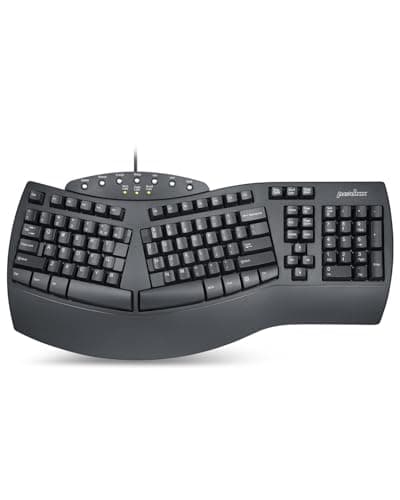
Perixx PERIBOARD-512B Wired Ergonomic Split Keyboard
(Current price, subject to change)
Not everyone needs to spend keyboard money to test whether a split helps, and the Perixx PERIBOARD-512B is the low-stakes way to find out. PCMag and TechRadar-tier budget coverage treats it as the floor of the ergonomic-split category, and at under $50 it undercuts the K860 by nearly a hundred dollars, and the Evoluent alone costs about 1.8x it. Compared to the tented K860, its value factor is what carries it, not its raw geometry. It is wired, so there is no receiver to lose or battery to swap; a split spacebar gives the thumbs a natural resting spot most flat budget boards skip, and a built-in negative tilt slopes the deck without a kickstand. The honesty is in the build — the Perixx PERIBOARD-512B Wired Ergonomic Split Keyboard uses budget plastic that flexes under heavy typing, its one-piece body cannot separate like a true split, and the thin wrist rest will underwhelm anyone with real pain. For a typist curious about split geometry who wants to try before committing to a K860, this is the sensible entry point.
What We Love
- Wired USB — no receiver to lose, no batteries to swap
- The lowest ergonomic-split price on Amazon with a wrist rest included
- Split spacebar gives the thumbs a natural resting position
- Built-in negative tilt without a kickstand
What Could Be Better
- Budget plastic flexes under heavy typing
- One-piece body can't separate, and the thin wrist rest underwhelms serious pain
The Verdict
If the split-keyboard idea appeals but $145 does not, the Perixx PERIBOARD-512B Wired Ergonomic Split Keyboard is the low-risk way in — for testing the format, that's the path of least friction. It is wired, with a split spacebar, built-in negative tilt, and the lowest ergonomic-split price on Amazon. The trade is budget plastic and a thin wrist rest, so a serious flare-up may want more.
How We Score: DeskGear Wrist-Relief Score
DeskGear Wrist-Relief Score
Score Formula
(Wrist Neutrality x 0.35) + (Comfort Over Hours x 0.25) + (Adjustability x 0.20) + (Value per Dollar x 0.20)Score Factors
- Wrist NeutralityHow far the device rotates the forearm and hand out of the palm-down, splayed posture that drives desk wrist strain — weighted highest because the angle is the fix
- Comfort Over HoursHow the pick feels across a full workday, not in a five-minute try: grip pressure, contact points, and heat
- AdjustabilityFit to different hands and desks — size options, tilt, left-hand variants, and tenting range
- Value per DollarDelivered wrist relief against list price, rewarding a correct angle over a premium badge
DeskGear Wrist-Relief Score — Ranked
Logitech MX Vertical
8.7/10Best overall — 57-degree vertical mouse, standard buttons, four-month USB-C battery; the neutral-forearm anchor.
Logitech ERGO K860 Wireless Split Keyboard
8.6/10Best split keyboard — bowed split with 10-degree tilt and a durable palm rest; the second geometry fix.
Logitech Lift Vertical Ergonomic Mouse
8.3/10Best for small hands — same vertical geometry in a lighter body, with a rare left-hand variant.
Evoluent VerticalMouse 4
8.1/10Max-angle vertical — near-90-degree upright angle, thumb-rest shelf, wired; the escalation pick.
Perixx PERIBOARD-512B Wired Ergonomic Split Keyboard
7.4/10Best value split — wired one-piece split with negative tilt under $50; the low-risk way to test split typing.
Match the angle to your hand and desk
The right angle depends on your hand and your desk, not just the price. A 57-degree vertical like the MX Vertical or Lift suits most people making the switch, because the wrist rotates without the hand feeling tipped over; the steeper Evoluent is the escalation for wrists a milder angle never settled, and it asks for more desk depth and a longer adjustment. On the keyboard side, a full-size split like the K860 needs room to the right for the numpad, which pushes the mouse out and can undo some of the shoulder gain on a narrow desk, so a tenkeyless or compact split fits tight setups better. Left-handed users have exactly one straightforward vertical here, the Lift, and pairing a right-hand-only mouse with a split keyboard is a common oversight. Wirecutter's ergonomics coverage frames the same formula the roster follows, and because the MX Vertical runs about 1.3x the Lift's price, hand size rather than budget should decide between the two. How the mouse, keyboard, and their spacing sit together is what the best mice for desk setups guide works through in more detail.
What the fix costs, and where to spend first
The spend here ranges from roughly $50 for the wired Perixx to about $145 for the K860, and the geometry lesson is that the inexpensive end is not the ineffective end, because a correctly angled budget split corrects posture that a flat premium keyboard never will. Measured against the Perixx floor, the ERGO K860 costs about 2.9x as much, the Evoluent roughly 1.8x, the MX Vertical near 1.5x, and the Lift about 1.2x, while the K860 runs close to 2.4x the Lift — differences that reward spending where the pain actually concentrates rather than where the marketing points. If mousing is the trigger, those dollars belong on a vertical first, whereas typing strain flips the order and the split leads. Value is the lowest-weighted factor in the DeskGear Wrist-Relief Score precisely because a correct angle yields relief that no premium badge delivers, a conclusion TechRadar's ergonomics coverage reaches when its picks are compared to costlier boards. Once the primary angles are corrected, supportive pads and monitor-height changes finish the job, and the best desk accessories for ergonomics guide covers those finishing pieces.
When NOT to Buy
This guide stays on the two changes that move wrist geometry the most — the vertical mouse and the split keyboard — so a few adjacent things sit outside it on purpose. Trackballs and ergonomic pens correct a different motion and belong in their own comparison, not this pronation-first sequence. Gaming-focused ergonomic mice were left off because their speed priorities pull against the all-day comfort this list weights. Wrist rests appear here only as a finishing add-on rather than a fix, because a rest under a still-pronated wrist can raise contact pressure instead of lowering it — the position matters more than the padding. And keyboard trays, which lower the whole board to correct height, are a desk-furniture answer to the third geometry problem rather than an input device, so they live in the accessories guide instead.
Who Should Buy What
Who Should Buy What
| If you are… | Recommended pick |
|---|---|
All-day office mouser Wrist aches from constant palm-down mousing; wants the biggest geometry fix with the least relearning. | Logitech MX Vertical |
Small or left-handed hand Finds the full-size vertical too big, or needs a genuine left-hand option, but still wants the vertical angle. | Logitech Lift Vertical Ergonomic Mouse |
Stubborn wrist, milder angle failed A 57-degree mouse never fully settled the wrist and wants the steepest available upright angle. | Evoluent VerticalMouse 4 |
Keyboard-driven strain Mouse is sorted but a flat keyboard still splays the wrists and shoulders; wants a proven tented split. | Logitech ERGO K860 Wireless Split Keyboard |
Budget-first split tester Curious whether split typing helps and wants to try it cheaply before spending premium-keyboard money. | Perixx PERIBOARD-512B Wired Ergonomic Split Keyboard |
Frequently Asked Questions
What causes wrist pain from computer use?
It is usually a combination held for hours, not a single injury: the forearm pronated palm-down on a flat mouse, the wrist bent back over the keyboard, and the hands angled inward, repeated across a full day. The mouse hand often flares before the typing hand because pronation plus fine clicking loads the same tendons. Worth knowing: some desk wrist and hand pain actually refers from a compressed nerve in the neck or shoulder, which no input device will fix.
Does a vertical mouse actually help wrist pain?
It targets one specific cause — the palm-down forearm twist — by rotating the hand toward a handshake, and that is the part of desk mousing most people can feel change. What it will not fix is strain from heavy clicking or a too-high desk; those are load and height problems, not angle problems. Results vary by hand size and how steep an angle you tolerate, which is why a milder-angle mouse suits most people and the steepest option is a targeted escalation.
Is a split keyboard worth it if my wrist already hurts?
A split addresses the inward hand splay and, with negative tilt, some of the wrist extension — but it does not calm inflamed tendons on its own. If your wrist is actively flared, fix the mouse angle first and cut typing load for a couple of weeks before adding a keyboard change, so you can tell which change did what. A budget wired split is a low-cost way to test the format before spending on a tented one.
How long until an ergonomic mouse or keyboard helps?
Plan on a one-to-two-week adaptation period where the new angle can feel slower or slightly worse before it feels normal — that is retraining, not a bad fit. Actual pain relief runs on its own clock and depends on how long the strain built up; a few weeks of consistent use is a fair trial. If nothing has improved after four to six weeks of correct setup, the cause is probably not the one this hardware fixes.
Do I need a wrist rest, or does it make things worse?
A wrist rest is for pauses, not for active typing or mousing. Resting the wrist on a pad while you move drags the joint across a fixed contact point and can raise carpal pressure — the opposite of the goal. Keep the wrists floating and neutral during active use and let the rest support the heel of the hand only between bursts. Position beats padding every time here.
When is wrist pain a sign to see a doctor?
This guide is ergonomic-setup guidance, not medical advice. See a clinician if you have numbness, tingling, or pins-and-needles in the fingers, pain that wakes you at night, weakness or dropping things, or pain that persists beyond a few weeks despite correcting your setup. Those can signal nerve involvement that a mouse or keyboard will not resolve, and early assessment matters — do not try to self-diagnose carpal tunnel from a symptom list.
Bottom Line
Get the Logitech MX Vertical if Your wrist aches from all-day mousing and you want the vertical angle fixed first, with the least relearning — start here..
Get the Logitech Lift Vertical Ergonomic Mouse if Your hand is small or left-handed and the full-size vertical feels oversized, but you still want the same angle..
Get the Evoluent VerticalMouse 4 if A gentler vertical never fully settled your wrist and you want the steepest upright angle available..
Get the Logitech ERGO K860 Wireless Split Keyboard if The mouse is sorted but a flat keyboard still splays your wrists — add the tented split second..
Get the Perixx PERIBOARD-512B Wired Ergonomic Split Keyboard if You want to test whether split typing helps without spending premium-keyboard money — the low-risk entry..
Your setup is already neutral and pain-free, or your symptoms point to a nerve issue — in that case a clinician comes before any hardware.
Sources & Methodology
Methodology: DeskGear Wrist-Relief Score — Formula: (Wrist Neutrality x 0.35) + (Comfort Over Hours x 0.25) + (Adjustability x 0.20) + (Value per Dollar x 0.20). Factors: Wrist Neutrality: How far the device rotates the forearm and hand out of the palm-down, splayed posture that drives desk wrist strain — weighted highest because the angle is the fix | Comfort Over Hours: How the pick feels across a full workday, not in a five-minute try: grip pressure, contact points, and heat | Adjustability: Fit to different hands and desks — size options, tilt, left-hand variants, and tenting range | Value per Dollar: Delivered wrist relief against list price, rewarding a correct angle over a premium badge
Expert review sources used in this analysis:
- Picks reflect aggregated editorial consensus across ergonomic input devices: Wirecutter, PCMag, TechRadar, The Verge, and Tom's Guide broadly cover vertical mice and split keyboards, and their category guidance informs the diagnose-then-fix sequencing here
- The DeskGear Wrist-Relief Score that orders these picks is a category-consensus composite, not a fresh lab re-score
- No individual ratings or verbatim quotes are attributed
- This is ergonomic-setup guidance, not medical advice
- Prices for the MX Vertical, Evoluent VerticalMouse 4, ERGO K860 and Perixx PERIBOARD-512B were re-checked live on Amazon on 2026-08-16
- The Logitech Lift figure is a stored consensus value last checked in May 2026
- All list around the amounts shown; confirm the live total before buying.
Nicholas Miles is the founder of DeskGearHQ and a longtime smart home enthusiast focused on helping everyday homeowners make better technology decisions. He researches, compares, and writes about products across security, climate, lighting, leak prevention, sensors, home energy, and automation, with an emphasis on real-world usefulness, ecosystem compatibility, reliability, privacy, and long-term value.
Affiliate disclosure: DeskGearHQ earns affiliate commissions on qualifying Amazon purchases. Our scoring methodology is independent of affiliate relationships.



