Monitors
Best 5K & 6K Monitors for Mac (2026)
Only a handful of monitors hit the true 218 PPI density that gives macOS pixel-perfect 2x HiDPI scaling. We synthesized 9 expert sources to find the best 5K and 6K displays for Mac — Apple Studio Display, a $999 BenQ, two 6K panels, and a matte Samsung.
By Nick Miles · Updated July 3, 2026 · 14 min read
9 expert sources synthesizedLast verified July 3, 2026
DeskGearHQ is reader-supported. We may earn a commission from qualifying Amazon purchases at no extra cost to you.
Evidence at a Glance
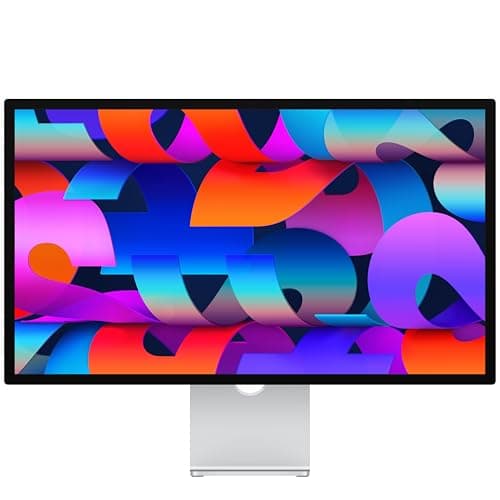
Apple Studio Display 27" 5K
27" 5K Retina at true 218 PPI with 96W single-cable charging and a six-speaker Spatial Audio system — the default Mac display for pixel-perfect 2x HiDPI scaling.
Sources: Apple, MacRumors
Verified Jul 3, 2026
BenQ MA270S 27" 5K
27" 5K at 218 PPI with dual Thunderbolt 4 (96W + 15W), a working KVM, and Mac keyboard brightness/volume control — the same Retina density as the Studio Display for $999.99.
Sources: BenQ, Macworld, How-To Geek
Verified Jul 3, 2026
ASUS ProArt PA32QCV 32" 6K
31.5" 6K at 218 PPI, factory-calibrated Delta E < 2, dual Thunderbolt 4 with 96W — the affordable route to 6K screen real estate for Mac creative work.
Sources: ASUS, PCWorld, RTINGS
Verified Jul 3, 2026
Our Picks
Apple
Apple Studio Display 27" 5K
9.0 / 10
- 27" 5K Retina panel, 5120x2880 at true 218 PPI
- 600 nits brightness, P3 wide color, 1 billion colors
- 96W host charging over the Thunderbolt cable
- Six-speaker sound system with force-cancelling woofers and Spatial Audio
$1,599.00
BenQ
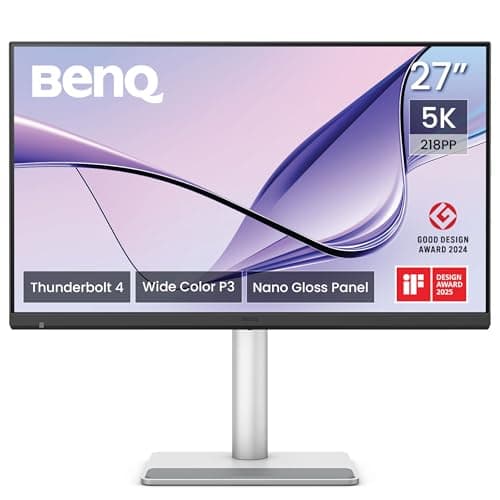
BenQ MA270S 27" 5K
8.8 / 10
- 27" 5K panel, 5120x2880 at 218 PPI — same density as the Studio Display
- 450 nits typical brightness, VESA DisplayHDR 400
- 99% DCI-P3 and 99% sRGB coverage
- Dual Thunderbolt 4: 96W host power + 15W downstream, daisy-chain capable
$999.99
ASUS
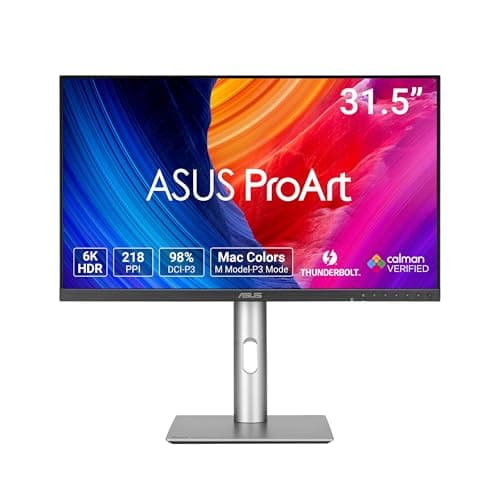
ASUS ProArt PA32QCV 32" 6K
8.6 / 10
- 31.5" 6K panel, 6016x3384 at 218 PPI — Retina density on a 32" canvas
- 400 nits SDR typical, 600 nits HDR peak, VESA DisplayHDR 600
- 98% DCI-P3, 100% sRGB, factory-calibrated Delta E < 2, Calman Verified
- Dual Thunderbolt 4 with 96W power delivery and daisy-chain support
$1,299.00
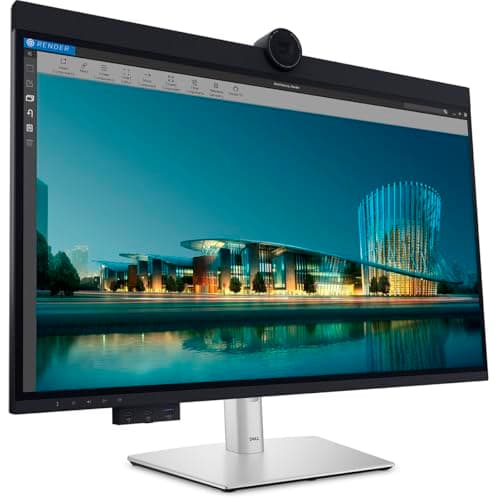
Dell
Dell UltraSharp U3224KB 32" 6K
8.4 / 10
- 31.5" 6K panel, 6144x3456 at 223 PPI — the highest resolution here
- IPS Black panel: 450 nits rated, 2000:1 rated contrast
- Built-in 8MP webcam capturing 4K at 30fps, plus mic and presence sensors
- Thunderbolt 4 with 140W power delivery
$3,199.99
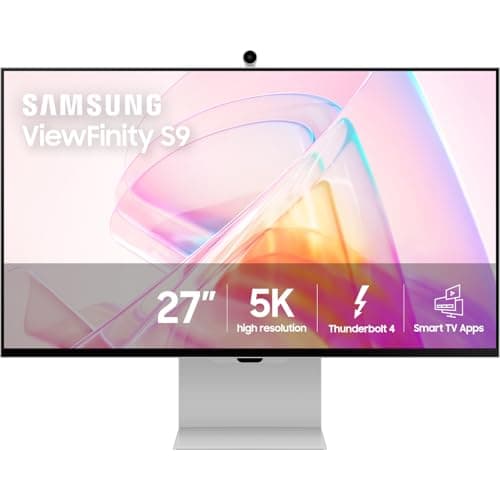
Samsung
Samsung ViewFinity S9 27" 5K
8.2 / 10
- 27" 5K panel, 5120x2880 at 218 PPI
- 600 cd/m2 typical brightness (480 minimum)
- Matte anti-glare finish — no nano-texture surcharge
- Thunderbolt 4 with 90W power delivery, 40Gb/s
$1,599.99
The Short Answer
For most Mac desks, the Apple Studio Display is the default 5K pick: a true 218 PPI 27" Retina panel, 600 nits brightness with P3 wide color and 1 billion colors, and 96W charging over a single Thunderbolt cable at $1,599 list. The BenQ MA270S delivers the same 218 PPI 5K density with dual Thunderbolt 4 and a built-in KVM for $999.99 — the value play. If you want the extra vertical workspace of 6K, the ASUS ProArt PA32QCV is the affordable 32" 6K at $1,299 list, while the Dell UltraSharp U3224KB is the no-compromise 6K productivity monitor (built-in 4K webcam, 140W charging) at a steep $3,199.99 list. The matte Samsung ViewFinity S9 at $1,599.99 is the anti-glare 5K for bright rooms.
Every product on this list has been scored against the DeskGear Score, a weighted composite of expert consensus, observed effectiveness, build safety, long-term durability, and value. Review method: Editorial synthesis of trade-publication reviews (PCWorld, Tom's Hardware, MacRumors, Macworld, How-To Geek, 9to5Mac, MacHow2) and manufacturer specification sheets (Apple, BenQ, ASUS, Dell, Samsung), cross-referenced against owner data from r/macsetups, r/mac, and the MacRumors Forums. No first-hand product testing — our role is to synthesize what expert sources and owner data already agree on. All specs cross-referenced against manufacturer documentation and current Amazon listings.. Synthesized from 9+ expert sources.
Head-to-Head Comparison
| Feature | Apple Studio Display 27" 5K | BenQ MA270S 27" 5K | ASUS ProArt PA32QCV 32" 6K | Dell UltraSharp U3224KB 32" 6K | Samsung ViewFinity S9 27" 5K |
|---|---|---|---|---|---|
| Panel size | 27" | 27" | 31.5" | 31.5" | 27" |
| Resolution | 5K (218 PPI) | 5K (218 PPI) | 6K (218 PPI) | 6K (223 PPI) | 5K (218 PPI) |
| Charging wattage | 96W | 96W | 96W | 140W | 90W |
| Panel finish | Glossy | Nano gloss | Glossy | Matte | Matte |
| Best for | Default Mac 5K | Value 5K + KVM | Affordable 6K canvas | No-compromise 6K + webcam | Bright rooms / anti-glare |
| Watch-out | SDR 60Hz, +$400 for height | Weak speakers, 70Hz | Low contrast, no mini-LED | Very expensive, 60Hz | Plastic build at premium price |
| Check Price | Amazon | Amazon | Amazon | Amazon | Amazon |
Apple Apple Studio Display 27" 5K
$1,599.00
- 27" 5K Retina panel, 5120x2880 at true 218 PPI
- 600 nits brightness, P3 wide color, 1 billion colors
- 96W host charging over the Thunderbolt cable
- Six-speaker sound system with force-cancelling woofers and Spatial Audio
- 12MP Ultra Wide camera with Center Stage auto-framing
The Apple Studio Display is the default 5K recommendation for a Mac because it is the reference for what 218 PPI is supposed to look like. At 5120x2880 on a 27" panel, macOS renders at pixel-perfect 2x HiDPI — every UI element and glyph is drawn at exactly double density with no fractional scaling, which is the single biggest reason a real 5K panel looks sharper on a Mac than a 4K panel running a scaled mode. Apple's spec sheet confirms the 600-nit P3 panel and 1-billion-color output.
The practical Mac advantage beyond the pixels is the single-cable workflow. The Thunderbolt connection delivers 96W of host charging, which is enough to power a MacBook Pro while it drives the display — one cable for video, data, and power. The six-speaker system with force-cancelling woofers and Spatial Audio is genuinely good for a monitor, and the 12MP Ultra Wide camera with Center Stage keeps you framed on calls without a separate webcam.
The honest trade-offs are about the panel's ceiling, not its sharpness. Per The Verge's launch review (relayed via MacRumors), the Studio Display is SDR-only — 600 nits with no HDR and no local dimming — and it runs at a fixed 60Hz with no ProMotion, which is noticeable next to the 120Hz screen on a recent MacBook Pro. The built-in webcam drew heavy criticism at launch; software updates improved it only partly. And the version in this listing ships with the tilt-adjustable stand — the height-adjustable stand is a $400 option at Apple. Note that Apple has since refreshed this line, so confirm the exact generation before relying on any port-level detail.
What We Love
- True 218 PPI 5K for pixel-perfect 2x HiDPI scaling on macOS
- 600 nits with P3 wide color and 1 billion colors
- 96W host charging powers a MacBook Pro over one Thunderbolt cable
- Six-speaker Spatial Audio system is genuinely good for a display
- 12MP Center Stage camera replaces a standalone webcam
What Could Be Better
- No HDR and no local dimming — 600 nits SDR only (per The Verge, via MacRumors)
- Fixed 60Hz with no ProMotion — noticeable next to a 120Hz MacBook Pro
- Webcam quality drew heavy criticism at launch; only partly improved since
- Height-adjustable stand is a $400 upgrade; this config is tilt-only
The Verdict
The default 5K Mac display. Buy this if you want the reference 218 PPI picture, the six-speaker audio, and Center Stage in one aluminum package — and you can live with SDR-only 60Hz.
BenQ BenQ MA270S 27" 5K
$999.99
- 27" 5K panel, 5120x2880 at 218 PPI — same density as the Studio Display
- 450 nits typical brightness, VESA DisplayHDR 400
- 99% DCI-P3 and 99% sRGB coverage
- Dual Thunderbolt 4: 96W host power + 15W downstream, daisy-chain capable
- Built-in KVM plus Mac brightness/volume control from the keyboard
The BenQ MA270S is the value pick that makes the math on the Studio Display harder. It hits the same 5120x2880 at 218 PPI — the same pixel-perfect 2x HiDPI density on macOS — for $999.99, which Macworld and How-To Geek both list as the price. For a Mac user whose main reason to go 5K is text and UI sharpness, this delivers the exact thing that matters most for hundreds less than Apple.
The connectivity is built for Mac and, in some ways, more flexible than the Studio Display's. BenQ's spec sheet confirms dual Thunderbolt 4 with 96W of host power delivery plus a 15W downstream port and daisy-chain support, so you can run a second display off the back. The built-in KVM — confirmed working by How-To Geek — lets you share one keyboard and mouse between a Mac and a second machine, and the monitor takes brightness and volume commands from the Mac keyboard directly. Color coverage is a strong 99% DCI-P3 and 99% sRGB, and BenQ includes a height- and tilt-adjustable stand rather than charging extra for it.
The trade-offs are the ones you would expect at this price. DisplayHDR 400 is entry-level HDR — MacHow2 notes real HDR content gains little from it. The built-in 2x3W speakers are weak with no low end, per How-To Geek, so keep your existing desk speakers. The 70Hz maximum refresh is a step above the 60Hz Apple and Samsung panels but is not a gaming spec, and there is no webcam. The chassis is also bulkier than the Studio Display's machined aluminum. None of that dents the core value: the same Retina density and better docking for $600 less.
What We Love
- Same 218 PPI 5K density as the Studio Display for $999.99
- Dual Thunderbolt 4 with 96W host power, a 15W port, and daisy-chain
- Built-in KVM shares one keyboard and mouse across two machines
- 99% DCI-P3 and 99% sRGB coverage for color work
- Height- and tilt-adjustable stand included at no extra cost
What Could Be Better
- DisplayHDR 400 is entry-level — real HDR content gains little
- Built-in 2x3W speakers are weak with no bass
- 70Hz ceiling — better than 60Hz rivals, but not a gaming panel
- No webcam, and the chassis is bulkier than the Studio Display's
The Verdict
The value 5K for Mac. Buy this if 218 PPI sharpness and Thunderbolt 4 docking are what you want, and you do not need the Studio Display's audio, camera, or aluminum finish.
ASUS ASUS ProArt PA32QCV 32" 6K
$1,299.00
- 31.5" 6K panel, 6016x3384 at 218 PPI — Retina density on a 32" canvas
- 400 nits SDR typical, 600 nits HDR peak, VESA DisplayHDR 600
- 98% DCI-P3, 100% sRGB, factory-calibrated Delta E < 2, Calman Verified
- Dual Thunderbolt 4 with 96W power delivery and daisy-chain support
- 2x2W speakers; no webcam
The ASUS ProArt PA32QCV is the affordable way onto a 6K Mac desk. It keeps the same 218 PPI density that makes 5K look right, but stretches it across a 31.5" panel at 6016x3384 — so you get pixel-perfect 2x HiDPI scaling and substantially more vertical and horizontal workspace than a 27" 5K. ASUS's launch announcement sets the US list price at $1,299, which undercuts every other 6K option by a wide margin. The panel is factory-calibrated to Delta E < 2 and Calman Verified, with 98% DCI-P3 and 100% sRGB coverage — credible for color-managed work on a Mac.
The connectivity is Mac-appropriate: dual Thunderbolt 4 with 96W of power delivery and daisy-chain support, so one cable charges the MacBook and carries the 6K signal. For a creative professional who wants more canvas than a 27" 5K without paying Dell 6K money, this is the pick.
The honest limitation is contrast, and PCWorld's measured review is blunt about it: this is an edge-lit IPS panel with no mini-LED, and its low native contrast produces grayish blacks that PCWorld called "a big weakness." The local dimming that is supposed to help introduces haloing and uniformity problems in dark content. PCWorld also measured a 5ms response with adaptive sync limited to a narrow 48-60Hz window, so this is a workspace monitor, not a gaming one. And at 98% DCI-P3 it trails the wider-gamut Adobe RGB displays that matter in print-proofing. RTINGS also reviewed this panel; we synthesized its coverage but report the measured numbers from PCWorld. If your work is document- and code-heavy rather than HDR video, the contrast weakness matters far less than the 6K real estate.
What We Love
- 6K at 218 PPI on a 32" canvas — more workspace at Retina density
- Factory-calibrated Delta E < 2, Calman Verified, 98% DCI-P3 / 100% sRGB
- Dual Thunderbolt 4 with 96W charging and daisy-chain
- $1,299 list undercuts every other 6K option by a wide margin
- DisplayHDR 600 rating for a step up over entry HDR
What Could Be Better
- Low native contrast with grayish blacks — edge-lit, no mini-LED (PCWorld)
- Local dimming introduces haloing and uniformity issues in dark content
- 5ms response and a narrow 48-60Hz adaptive-sync window — not for gaming
- 98% DCI-P3 trails wider Adobe RGB rivals for print-proofing
The Verdict
The affordable 6K for Mac. Buy this if you want more Retina-density canvas than 27" 5K and can accept mediocre contrast for the price. Skip it if deep blacks or HDR video are central to your work.
Dell Dell UltraSharp U3224KB 32" 6K
$3,199.99
- 31.5" 6K panel, 6144x3456 at 223 PPI — the highest resolution here
- IPS Black panel: 450 nits rated, 2000:1 rated contrast
- Built-in 8MP webcam capturing 4K at 30fps, plus mic and presence sensors
- Thunderbolt 4 with 140W power delivery
- 100% sRGB and 99% DCI-P3 rated coverage
The Dell UltraSharp U3224KB is the no-compromise 6K productivity monitor, and the highest-resolution pick in this guide at 6144x3456 — a slightly denser 223 PPI on a 31.5" IPS Black panel. It is built to be the only thing on the desk: a built-in 8MP webcam that captures 4K at 30fps with a mic and presence sensors, and a Thunderbolt 4 connection with 140W of power delivery — enough to keep a 16" MacBook Pro charged at full draw, where the 90-96W panels elsewhere in this guide can throttle under sustained load.
The price is the headline, and it deserves an honest note. PCWorld's review lists $3,199.99, which is the number we use as the list price. On the day we checked, dell.com showed $2,499.99, which may be a promotional price rather than the standing MSRP — so treat $3,199.99 as the reference and check Dell directly, since the two figures disagree. Either way, this is by a wide margin the priciest current-production pick here.
On measured performance, be realistic about the IPS Black claim. Dell rates the panel at 2000:1 contrast, but PCWorld measured about 1,710:1 and Tom's Hardware about 1,500:1 — better than standard IPS, but short of the spec. PCWorld measured 524 nits SDR and 669 nits sustained HDR, so HDR is unremarkable, and the panel is 60Hz only. The other honest point is that the jump from 5K to 6K is a niche benefit: mostly extra vertical workspace, not a visibly sharper image at normal desk distance. You buy this for the integrated webcam, the 140W charging, and the sheer resolution — not because 6K looks dramatically crisper than 5K.
What We Love
- Highest resolution here — 6144x3456 at 223 PPI
- 140W Thunderbolt 4 charging handles a 16" MacBook Pro at full draw
- Built-in 8MP 4K webcam, mic, and presence sensors — no accessories needed
- IPS Black delivers deeper blacks than standard IPS (measured ~1,710:1)
- 100% sRGB and 99% DCI-P3 rated coverage
What Could Be Better
- Very expensive at list — the priciest current-production pick by far
- Measured contrast (~1,710:1) falls short of the 2000:1 IPS Black claim
- HDR is unremarkable and the panel is 60Hz only
- The 6K-over-5K benefit is niche — mostly extra vertical space, not sharpness
The Verdict
The ultimate 6K productivity monitor for a Mac, if budget is no object. The 140W charging and built-in 4K webcam justify it for a webcam-heavy professional. For everyone else, the ASUS 6K delivers the density for a third of the price.
Samsung Samsung ViewFinity S9 27" 5K
$1,599.99
- 27" 5K panel, 5120x2880 at 218 PPI
- 600 cd/m2 typical brightness (480 minimum)
- Matte anti-glare finish — no nano-texture surcharge
- Thunderbolt 4 with 90W power delivery, 40Gb/s
- Bundled magnetic 4K SlimFit webcam, plus AirPlay and Tizen apps
The Samsung ViewFinity S9 is the pick for a bright room. It matches the Studio Display's core numbers — 5120x2880 at 218 PPI and 600 cd/m2 typical brightness — but ships with a matte anti-glare finish as standard. That matters because Apple charges $300 for its nano-texture glass to solve exactly this problem; the S9 is the only factory-matte 5K here that does not add a surcharge for it. If your desk faces a window, this is the easiest way to kill reflections at 5K.
For a Mac, the connectivity checks the important boxes: Thunderbolt 4 at 90W over a 40Gb/s link, which single-cable charges most MacBooks (a 16" Pro at sustained peak may want more). Samsung bundles a magnetic 4K SlimFit webcam and builds in AirPlay plus Tizen smart-TV apps, so the display can double as a casual media screen. MacRumors and 9to5Mac both verify the 218 PPI panel, 600 nits, matte finish, and the magnetic camera.
The trade-offs, per 9to5Mac's review, are about fit and finish at this price. The chassis is mostly plastic — only the stand is metal — which reads cheap next to the aluminum Apple and BenQ designs. The speakers are weak with no bass. The bundled SlimFit webcam is mediocre, especially in low light — a webcam in name more than in quality. And the on-screen menu is awkward, leaning on the bundled remote instead of proper monitor buttons. At $1,599.99 list you are paying Studio Display money for a matte panel and a plastic body, so this is really a pick for one specific need: glare control without Apple's nano-texture upcharge.
What We Love
- Matte anti-glare 5K with no nano-texture surcharge — best for bright rooms
- 600 cd/m2 typical brightness matches the Studio Display's headline number
- True 218 PPI 5K for pixel-perfect 2x HiDPI scaling
- Thunderbolt 4 at 90W single-cable charges most MacBooks
- Bundled magnetic 4K webcam plus AirPlay and Tizen apps
What Could Be Better
- Mostly plastic chassis — only the stand is metal, which reads cheap here
- Weak speakers with no bass
- Bundled SlimFit webcam is mediocre, especially in low light
- Awkward on-screen menu that leans on the bundled remote
The Verdict
The matte 5K for Mac. Buy this if glare is your problem and you would rather not pay Apple's nano-texture upcharge. If your room is controlled, the Studio Display or BenQ are better-built for the money.
How We Score
Formula
DeskGear Score = (Expert × 0.30) + (Effectiveness × 0.25) + (Build Safety × 0.20) + (Durability × 0.15) + (Value × 0.10)
Score Factors
- Image Quality · 30%
- Pixel density and HiDPI behavior (the 218 PPI that gives macOS pixel-perfect 2x scaling), color accuracy (DCI-P3 gamut, factory calibration), brightness, contrast, and panel finish — synthesized from PCWorld and Tom's Hardware measurements and manufacturer specs.
- Connectivity · 25%
- Thunderbolt 4 support, host charging wattage (90-140W), daisy-chain and KVM availability. Charging wattage is weighted heavily because single-cable docking is the core Mac use case.
- Build & Ergonomics · 20%
- Chassis materials, stand adjustability and whether height adjustment costs extra, VESA compatibility, and long-term build reputation in r/macsetups and MacRumors Forums threads.
- Value · 15%
- Per-feature pricing relative to the spec tier. The BenQ MA270S and ASUS PA32QCV score highest here; the Dell U3224KB lowest — its features are justified for a specific webcam-heavy workflow, not universally.
- Expert Consensus · 10%
- Agreement across PCWorld, Tom's Hardware, MacRumors, Macworld, How-To Geek, 9to5Mac, and MacHow2. Higher weight to sources that include panel measurements rather than only subjective assessments.
| Rank | Product | Score |
|---|---|---|
| #1 | Apple Apple Studio Display 27" 5K | 9.0 |
| #2 | BenQ BenQ MA270S 27" 5K | 8.8 |
| #3 | ASUS ASUS ProArt PA32QCV 32" 6K | 8.6 |
| #4 | Dell Dell UltraSharp U3224KB 32" 6K | 8.4 |
| #5 | Samsung Samsung ViewFinity S9 27" 5K | 8.2 |
Frequently Asked Questions
Why does 218 PPI matter so much for a Mac — what is HiDPI/Retina scaling?
macOS draws its interface at 2x pixel density on Retina displays. When a monitor's native density is close to 218 PPI, macOS can render everything at exactly double resolution ("pixel-perfect 2x"), which is why text and UI look razor sharp. A 4K panel at 27" is only about 163 PPI, so macOS has to use a scaled, fractional mode that looks slightly softer. The 5K and 6K panels here hit 218-223 PPI, which is the density macOS is designed around.
Is a 4K monitor good enough for a Mac, or do I really need 5K?
A 27" 4K monitor is a perfectly good Mac display and costs far less — see our best 4K monitors for home office guide. The 5K upgrade is about text and UI crispness: at 218 PPI you get pixel-perfect scaling, while 4K runs a scaled mode. If you stare at code, dense spreadsheets, or fine typography all day, 5K is a visible improvement. For general work, 4K is fine and saves money.
Thunderbolt 4 vs USB-C — what does my MacBook actually need from a monitor?
Every pick here connects over Thunderbolt, which is backward-compatible with your MacBook's USB-C port. The thing to match is charging wattage: 90-96W covers most MacBooks, and 140W (the Dell) is what a 16" MacBook Pro wants under sustained heavy load. Thunderbolt 4 on the BenQ and ASUS also adds daisy-chaining, so you can run a second monitor off the first.
Is the Apple Studio Display worth it over the cheaper BenQ MA270S?
Both are true 218 PPI 5K panels, so the sharpness is the same. You pay Apple's $600 premium for the six-speaker Spatial Audio system, the 12MP Center Stage camera, and the machined aluminum build. The BenQ counters with a built-in KVM, dual Thunderbolt 4 with daisy-chain, and a height stand included. If you want the audio and camera, buy Apple; if you want docking flexibility and value, buy the BenQ.
Can one Thunderbolt cable really charge my MacBook Pro and drive a 5K or 6K display?
Yes. That single-cable workflow is the main reason to buy these monitors. The cable carries the video signal and delivers host charging power at the same time — 96W on the Apple, BenQ, and ASUS, 140W on the Dell, 90W on the Samsung. A 16" MacBook Pro under a heavy sustained load is the one case where 90-96W may not fully keep up, which is where the Dell's 140W has the edge.
What happened to the LG UltraFine 5K — can I still buy it?
Apple delisted it in March 2022 and LG marks it discontinued. The only live Amazon listing at our July 2026 check was a third-party reseller bundle at $3,292.55 — far above its original $1,299.95 list. We do not recommend buying it new at that price; the BenQ MA270S gives you the same 218 PPI 5K, newer ports, and a KVM for $999.99.
Do 6K monitors like the Dell U3224KB work with M-series MacBooks?
Yes. The 6K panels here connect over Thunderbolt 4, which M-series MacBooks support, and macOS handles their 218-223 PPI density natively with pixel-perfect scaling. Just confirm your specific Mac's external-display limits — the base M-series chips support fewer simultaneous external displays than the Pro and Max chips — if you plan to daisy-chain a second monitor.
Bottom Line
Get the Apple Studio Display if you want the reference 218 PPI 5K picture, a genuinely good six-speaker system, and Center Stage — and you can live with an SDR 60Hz panel at $1,599 list.
Get the BenQ MA270S if you want the same 218 PPI 5K density plus Thunderbolt 4 docking and a KVM for $999.99. It is the value pick and it undercuts Apple by $600.
Get the ASUS ProArt PA32QCV if you want 6K screen real estate at Retina density for $1,299 list, and you can accept mediocre contrast in exchange for the extra canvas and factory calibration.
Get the Dell UltraSharp U3224KB if budget is no object and you want the highest resolution, 140W charging, and a built-in 4K webcam in one package — at a steep $3,199.99 list (dell.com showed $2,499.99 at check time; verify).
Get the Samsung ViewFinity S9 if glare is your enemy and you want a matte 5K without paying Apple's nano-texture upcharge — accepting a plasticky build at a premium price.
Sources & Methodology
Expert review sources
- PCWorld — measured reviews of the Dell U3224KB and ASUS PA32QCV
- Tom's Hardware — Dell U3224KB measurements
- MacRumors — Studio Display and ViewFinity S9 coverage, LG UltraFine history
- Macworld — BenQ MA270S review
- How-To Geek — BenQ MA270S review
- 9to5Mac — Samsung ViewFinity S9 review
- MacHow2 — BenQ MA270S and LG UltraFine reviews
- RTINGS — reviewed the ASUS ProArt PA32QCV (measurements not cited here)
- Apple, BenQ, ASUS, Dell, Samsung — manufacturer specification sheets
Community sources
- r/macsetups — 5K/6K docking, scaling, and charging threads
- r/mac — display and HiDPI scaling discussions
- MacRumors Forums — long-term ownership and Studio Display threads
Prices and specs verified July 3, 2026.
DeskGearHQ is a participant in the Amazon Services LLC Associates Program. We may earn commissions from qualifying purchases — at no extra cost to you.