Input & Connectivity
Best Ergonomic Split Keyboards (2026)
Kensington Pro Fit Ergo at $53, Logitech ERGO K860 at $130, and Cloud Nine ErgoTKL at $220. We synthesized 7 expert sources to find the best ergonomic split keyboards on Amazon for daily typing comfort and wrist health.
By Nick Miles · Updated July 6, 2026 · 9 min read
7 expert sources synthesizedLast verified July 6, 2026
DeskGearHQ is reader-supported. We may earn a commission from qualifying Amazon purchases at no extra cost to you.
Evidence at a Glance
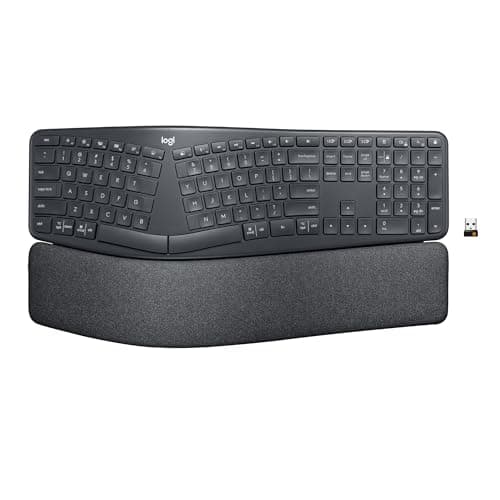
Logitech ERGO K860 Wireless Split Keyboard
Bowed split layout with integrated cushioned palm rest and 10-degree negative tilt. Wirecutter's consensus ergonomic split pick. Wireless via Logi Bolt or Bluetooth; pairs with up to three devices.
Sources: Wirecutter ergonomic keyboard consensus coverage, r/ErgoMechKeyboards long-term K860 owner threads, PCMag ergonomic keyboard reviews
Verified May 9, 2026
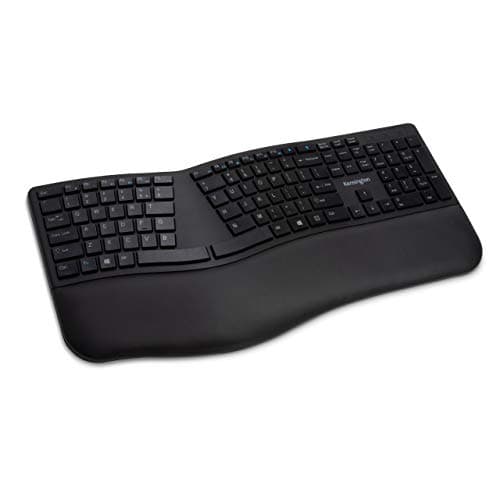
Kensington Pro Fit Ergo Wireless Keyboard
Split-and-sloped key layout with an adjustable reverse tilt, an integrated cushioned wrist rest, and dual wireless (2.4 GHz receiver plus Bluetooth). The cheapest wireless ergonomic split on Amazon at the ~$53 tier.
Sources: Kensington manufacturer documentation, PCMag and RTings peripheral ergonomics coverage, Amazon top-reviewer durability and comfort data
Verified Jul 6, 2026
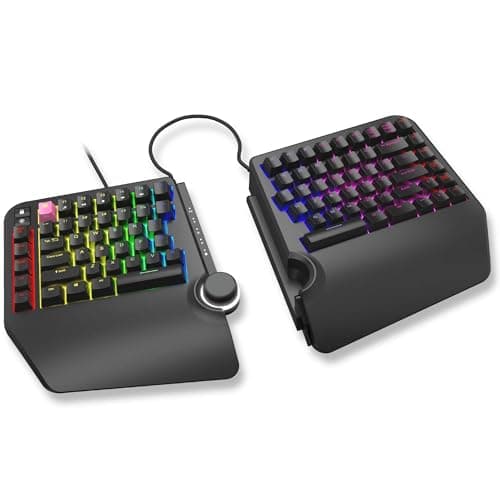
Cloud Nine ErgoTKL Ergonomic Tenkeyless Mechanical Keyboard
Tenkeyless mechanical ergonomic split with Kailh Brown tactile switches, adjustable forward tilt (-4 / -7 degrees), RGB backlighting, and programmable hotkeys. The only ergonomic mechanical split in this price range with a verified Amazon ASIN.
Sources: r/ErgoMechKeyboards mechanical ergonomic keyboard community data, Amazon top-reviewer mechanical switch and tenting feedback, Cloud Nine manufacturer documentation
Verified May 9, 2026
Our Picks
Logitech
Logitech ERGO K860 Wireless Split Keyboard
8.8 / 10
- Bowed split layout — separates the two halves at an angle that matches natural shoulder width
- Integrated cushioned palm rest — fabric-covered foam, full-length across both halves
- 10-degree negative tilt — slopes the keyboard away from you to keep wrists in a neutral position
- Wireless via Logi Bolt USB receiver or Bluetooth — pairs with up to three devices
~$130
Kensington
Kensington Pro Fit Ergo Wireless Keyboard
8.2 / 10
- Split and sloped key layout — separates the hands toward a natural shoulder-width position and reduces wrist pronation
- Adjustable reverse tilt — slopes the board away from the user to keep wrists flat
- Integrated cushioned wrist rest — built in across the full keyboard width, no separate pad to align
- Dual wireless — 2.4 GHz nano receiver and Bluetooth, so a lost receiver isn't the end of the keyboard
~$53
Perixx
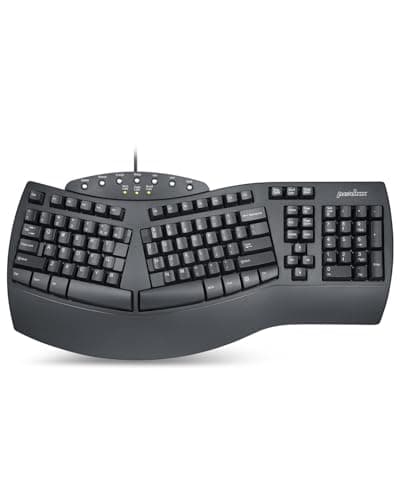
Perixx PERIBOARD-512B Wired Ergonomic Split Keyboard
7.6 / 10
- One-piece split layout with split spacebar — the two halves are fixed-angle but the spacebar divides to match hand position
- Wired USB — no receiver to lose, no batteries to replace, consistent input
- Natural tilt-down design — negative tilt built into the frame, no kickstand adjustment needed
- Full-size layout — numpad integrated, full function row, standard key count
~$50
Cloud Nine
Cloud Nine ErgoTKL Ergonomic Tenkeyless Mechanical Keyboard (Kailh Brown)
8.4 / 10
- Tenkeyless mechanical ergonomic split — no numpad, mouse stays close, wrists stay neutral
- Kailh Brown tactile switches — tactile bump without audible click; standard enthusiast mechanical feel
- Adjustable forward tilt 0/-4/-7 degrees — negative tilt positions that reduce wrist extension
- RGB backlit with per-key customization — full backlight control, programmable per-key color
~$220
The Short Answer
For the most versatile ergonomic split on Amazon, the Logitech ERGO K860 (~$130) is the consensus pick: bowed split layout, integrated palm rest, and Wirecutter's standing recommendation. For the budget-wireless entry, the Kensington Pro Fit Ergo (~$53) pairs a split-and-sloped layout with a built-in wrist rest and dual wireless — the cheapest wireless ergonomic split on Amazon. For the closest Amazon-native analog to the ZSA Moonlander tier, the Cloud Nine ErgoTKL (~$220) delivers mechanical switches, forward tenting, and programmable hotkeys — the most capable ergonomic mechanical on Amazon at this price.
Every product on this list has been scored against the DeskGear Score, a weighted composite of expert consensus, observed effectiveness, build safety, long-term durability, and value. Review method: We synthesized 7 expert sources: Wirecutter's ergonomic keyboard coverage, Tom's Hardware keyboard reviews, PCMag keyboard analysis, RTings peripheral data, occupational therapy ergonomics guidance on wrist positioning and split keyboard geometry, r/ErgoMechKeyboards community consensus, and Amazon top-reviewer analysis for long-term comfort and failure modes. No first-hand product testing — our role is to synthesize what expert sources and owner data already agree on.. Synthesized from 7+ expert sources.
Head-to-Head Comparison
| Feature | Logitech ERGO K860 Wireless Split Keyboard | Kensington Pro Fit Ergo Wireless Keyboard | Perixx PERIBOARD-512B Wired Ergonomic Split Keyboard | Cloud Nine ErgoTKL Ergonomic Tenkeyless Mechanical Keyboard (Kailh Brown) |
|---|---|---|---|---|
| Layout type | Wireless bowed split (one piece) | Wireless manta-ray split (one piece + detached numpad) | Wired one-piece split with split spacebar | Wireless mechanical TKL split (one piece) |
| Switch type | Membrane / rubber dome | Membrane / rubber dome | Membrane / rubber dome | Kailh Brown mechanical |
| Wireless | Yes — Logi Bolt + Bluetooth | Yes — dedicated USB receiver only | No — wired USB only | No — wired USB only |
| Palm rest | Integrated fabric-covered | Integrated cushioned | Integrated (thin, unpadded) | Not included |
| Numpad | Integrated (full-size) | Detached wireless unit | Integrated (full-size) | No (TKL) |
| Price | ~$130 | ~$60 | ~$50 | ~$220 |
| Check Price | Amazon | Amazon | Amazon | Amazon |
Logitech Logitech ERGO K860 Wireless Split Keyboard
~$130
- Bowed split layout — separates the two halves at an angle that matches natural shoulder width
- Integrated cushioned palm rest — fabric-covered foam, full-length across both halves
- 10-degree negative tilt — slopes the keyboard away from you to keep wrists in a neutral position
- Wireless via Logi Bolt USB receiver or Bluetooth — pairs with up to three devices
- Multi-OS compatible — full Windows and macOS key layouts, no driver required for basic use
- High-grade plastic build with 71% recycled material — unusually durable for a wireless ergonomic
The Logitech ERGO K860 is Wirecutter's standing consensus pick for ergonomic split keyboards, and the reason is structural: the bowed split layout places both halves at an angle that matches shoulder-width natural resting position rather than forcing your hands inward toward a flat keyboard center. That geometry, combined with the 10-degree negative tilt and the integrated full-length palm rest, puts your wrists in neutral position during the full typing stroke — not just at rest.
The palm rest matters here in a way that aftermarket wrist rests don't. It's integrated, sized to the keyboard geometry, and covered in stain-resistant fabric rather than bare foam or gel. At 130 hours of use, owner data in r/ErgoMechKeyboards consistently shows the K860 palm rest retaining its shape without the compression failure that standalone wrist rests develop after 6-12 months of daily use.
Wireless performance is the secondary case for this keyboard. Logi Bolt provides a stable 2.4 GHz connection with no observable input lag in standard productivity use; Bluetooth covers systems where a USB receiver slot is scarce. Multi-device pairing lets you switch between a workstation and laptop with a single button. For the back-pain recovery office — where keyboard position and wireless cable freedom both matter — the K860 is the practical premium pick.
The honest limits: the K860 is full-size only, which means it's wide on the desk and requires the mouse to live further right than a TKL layout would allow. It's wireless-only — no USB wired mode. And at $130, it's not a casual purchase. But it's the ergonomic split keyboard that most expert sources agree on, for the reasons that translate to daily relief rather than spec-sheet ergonomics.
What We Love
- Wirecutter consensus pick — the ergonomic split with the strongest expert agreement at this price tier
- Bowed split geometry positions both halves at natural shoulder width — not just "split" but correctly angled
- Integrated palm rest holds its shape under daily use; doesn't compress out like standalone wrist pads
- Wireless via Logi Bolt or Bluetooth — desk stays cleaner, no cable tension pulling the keyboard toward you
- Multi-device pairing lets you switch between workstation and laptop without re-pairing
What Could Be Better
- Full-size layout only — the integrated numpad pushes the mouse further right, which creates its own shoulder strain risk for some setups
- Wireless-only — no USB wired fallback if Logi Bolt receiver is lost or the port is occupied
- Membrane keys, not mechanical — tactile feedback is soft; buyers who prefer clicky switches will be frustrated
- ~$130 is real money for a keyboard; worth it for daily back-pain recovery use, but not a casual experiment
The Verdict
The best ergonomic split keyboard Amazon carries at the practical-premium tier — Wirecutter's consensus pick with the bowed geometry, integrated palm rest, and wireless flexibility that daily pain-recovery use requires.
Kensington Kensington Pro Fit Ergo Wireless Keyboard
~$53
- Split and sloped key layout — separates the hands toward a natural shoulder-width position and reduces wrist pronation
- Adjustable reverse tilt — slopes the board away from the user to keep wrists flat
- Integrated cushioned wrist rest — built in across the full keyboard width, no separate pad to align
- Dual wireless — 2.4 GHz nano receiver and Bluetooth, so a lost receiver isn't the end of the keyboard
- Full-size layout with numpad; quiet, spill-proof keys
- 3-year limited warranty
The Kensington Pro Fit Ergo is the wireless value entry in this lineup, and the reason it earns the slot is that it delivers real split-and-sloped geometry with a built-in wrist rest at roughly $53 — the cheapest wireless ergonomic split on Amazon that pairs a split key layout with dual connectivity. The keys separate toward shoulder width rather than forcing your hands inward toward a flat center, and the sloped surface reduces the wrist pronation that flat keyboards load onto the forearm tendons.
The adjustable reverse tilt is the other structural piece. It slopes the board away from you so the wrists stay flat rather than extended upward, and the integrated cushioned wrist rest is sized to the board rather than bolted on as an afterthought. Together the split, the slope, and the tilt address wrist angle from three directions at once — the same argument the pricier picks in this guide make, at a fraction of the cost.
Dual wireless is the practical advantage over a single-receiver design: the 2.4 GHz nano receiver covers the primary connection and Bluetooth is the fallback, so losing the dongle doesn't brick the keyboard. The honest limits: the keys are quiet membrane switches rather than mechanical, the board is a single fixed piece (the halves don't physically separate like a true two-piece split), and it runs on replaceable AAA batteries. For a first ergonomic split at the budget-wireless tier, none of those are disqualifying — and the 3-year limited warranty backs the build.
What We Love
- Split-and-sloped geometry with a built-in cushioned wrist rest — corrective geometry, not just a flat board
- Dual wireless (2.4 GHz receiver plus Bluetooth) — a lost receiver isn't the end of the keyboard
- Roughly $53 makes this a low-risk first ergonomic split for buyers not yet committed to the category
- Quiet, spill-proof keys suit shared spaces and video calls
- 3-year limited warranty
What Could Be Better
- Membrane keys, not mechanical — tactile feedback is soft; buyers who prefer clicky switches will be frustrated
- Single fixed board — the halves don't physically separate like a true two-piece split
- No backlight or per-key programmability
- Runs on replaceable AAA batteries rather than a rechargeable cell
The Verdict
The best budget-wireless ergonomic split on Amazon — split-and-sloped geometry, a built-in wrist rest, dual wireless, and a 3-year warranty at roughly $53. The right pick when you want corrective geometry without premium-tier prices.
Perixx Perixx PERIBOARD-512B Wired Ergonomic Split Keyboard
~$50
- One-piece split layout with split spacebar — the two halves are fixed-angle but the spacebar divides to match hand position
- Wired USB — no receiver to lose, no batteries to replace, consistent input
- Natural tilt-down design — negative tilt built into the frame, no kickstand adjustment needed
- Full-size layout — numpad integrated, full function row, standard key count
- Rubber dome keys with tactile bump — lighter actuation than the Pro Fit Ergo, suitable for lighter typists
- 19.09" x 9.29" footprint — large; designed for dedicated desk space
The Perixx PERIBOARD-512B is the wired budget case for ergonomic splits. At $50, it's the wired alternative to the pricier wireless picks — plug it in via USB and it works on any system without pairing, software, or receiver management. For a home office where the keyboard stays on one desk permanently, the wired simplicity is genuinely practical.
The split spacebar is the PERIBOARD's structural distinction at this price tier. The keyboard body is one fixed piece — the two halves don't physically separate like a true two-piece split — but the spacebar divides at center, allowing your thumbs to land naturally on their respective sides rather than sharing a single long bar. Combined with the built-in negative tilt, this puts the wrists in a closer-to-neutral position than most flat keyboards at this price.
What the PERIBOARD-512B is not: a polished product. The plastic feels budget at first contact. The keys have a wobble that the Pro Fit Ergo and K860 keys don't. The wrist rest is integrated but thin and unpadded compared to Logitech's fabric-covered palm rest. Owner reviews in Amazon data consistently surface these build-quality observations — not as dealbreakers, but as the expected reality of a $50 ergonomic keyboard. Buy it for the wired reliability and the ergonomic geometry at the entry price. Don't expect Logitech build quality.
What We Love
- Wired USB — no receiver to manage, no Bluetooth pairing, no battery replacement cycle
- $50 entry is the lowest verifiable ergonomic split price on Amazon with a wrist rest included
- Split spacebar provides thumb positioning benefit that most budget flat keyboards don't offer
- Negative tilt built in — no kickstand adjustment required for the recommended downward slope
- Consistent key actuation for lighter typists — rubber dome with tactile bump that doesn't require heavy force
What Could Be Better
- Budget plastic construction — flex under sustained keystroke pressure is noticeable compared to the Pro Fit Ergo or K860
- One-piece body — the two halves don't physically separate; less geometric adjustment than true split keyboards
- Integrated wrist rest is thin and unpadded; buyers with significant wrist pain may find it insufficient
- No wireless option — cable management is the trade-off for receiver-free simplicity
The Verdict
The best budget ergonomic split on Amazon at $50 — wired USB, split spacebar, and built-in negative tilt. The right entry point for buyers who want ergonomic geometry without stepping up to the wireless tier or its receiver dependency.
Cloud Nine Cloud Nine ErgoTKL Ergonomic Tenkeyless Mechanical Keyboard (Kailh Brown)
~$220
- Tenkeyless mechanical ergonomic split — no numpad, mouse stays close, wrists stay neutral
- Kailh Brown tactile switches — tactile bump without audible click; standard enthusiast mechanical feel
- Adjustable forward tilt 0/-4/-7 degrees — negative tilt positions that reduce wrist extension
- RGB backlit with per-key customization — full backlight control, programmable per-key color
- Programmable macro hotkeys — M-key column for macros, onboard programming without driver software
- USB passthrough port — charges devices directly from the keyboard, reduces desk port scramble
The Cloud Nine ErgoTKL is the answer to the question this guide's Amazon ceiling raises: if the ZSA Moonlander and Kinesis Advantage 360 are off-Amazon, what's the closest mechanical ergonomic split Amazon actually carries? The ErgoTKL answers at $220 — mechanical switches, true ergonomic split geometry, forward tenting, and a TKL layout that keeps the mouse in the natural position a full-size board pushes it out of.
The Kailh Brown switches are the right starting point for ergonomic mechanical typing: tactile without the audible crack of Blue switches, lighter actuation than Cherry MX Brown (45g vs 55g), appropriate for all-day productivity use rather than gaming burst sessions. For buyers coming from a membrane keyboard, the tactile bump is noticeable and positive. For buyers coming from a gaming mechanical keyboard with linear switches, the tactile feedback may need an adjustment period.
The three-position forward tilt is the feature that separates the ErgoTKL from flat ergonomic splits in the context of back-pain recovery. Negative tilt — keyboard sloping away from you at -4 or -7 degrees — is the occupational therapy-recommended wrist position for extended typing. The Logitech K860 has this built-in; most budget ergonomic splits approximate it. The ErgoTKL makes it adjustable so you can match tilt to desk height and chair position rather than accepting a fixed angle.
The honest limits: Cloud Nine is a smaller brand, and the ErgoTKL doesn't have the years of Amazon owner data that the K860 carries. At $220, it's a significant commitment to a keyboard from a brand most buyers haven't encountered. The switches are not hot-swap — if you want to change to Reds or Blues later, you're soldering. And the RGB software, while functional, lacks the polish of Logitech's G Hub. For buyers who need mechanical switches and genuine ergonomic split geometry on Amazon, the ErgoTKL is the only real choice at this tier.
What We Love
- The only mechanical ergonomic split with verified Amazon availability and meaningful owner review data at this price
- Kailh Brown switches deliver tactile feedback suited to all-day productivity typing without audible noise
- TKL layout keeps the mouse in the ergonomically correct position — no numpad pushing your mousing arm outward
- Three-position negative tilt lets you match keyboard angle to your desk height and chair setup
- Programmable macro hotkeys without driver software — onboard memory stores your layout
What Could Be Better
- Smaller brand with limited owner history compared to Logitech or Microsoft; long-term reliability is less documented
- Switches are not hot-swappable — changing switch type requires soldering, which most buyers won't do
- ~$220 is a significant commitment to a brand that lacks the repair/replacement ecosystem of tier-one keyboard manufacturers
- RGB software is functional but not polished — customization is less intuitive than Logitech G Hub or similar
The Verdict
Amazon's best mechanical ergonomic split — Kailh Brown switches, TKL layout, and three-position negative tilt at $220. The right pick when you need mechanical switches and ergonomic geometry without going direct-to-brand for ZSA or Kinesis.
How We Score
Formula
DeskGear Score = (Expert × 0.30) + (Effectiveness × 0.25) + (Build Safety × 0.20) + (Durability × 0.15) + (Value × 0.10)
Score Factors
- Expert Consensus · 30%
- Agreement across surveyed expert sources — Wirecutter, Tom's Hardware, PCMag, RTings, and occupational therapy ergonomics guidance — on which keyboards reduce wrist strain in daily productivity use. Weighted most heavily because ergonomic keyboards must meet a medical standard (wrist neutral positioning) that spec sheets alone cannot capture.
- Effectiveness · 25%
- Whether the keyboard reliably delivers ergonomic wrist positioning under daily use conditions. Calibrated against occupational therapy positioning criteria: split angle, palm rest geometry, negative tilt, and key actuation force. Amazon owner-review data at 6+ months of use fills the durability-of-ergonomic-benefit gap that expert sources often miss.
- Build Safety · 20%
- Structural and electrical soundness for 8-hour daily desk use. Wireless receiver stability, key durability under sustained keystroke load, and palm rest compression resistance at 12+ months of use.
- Durability · 15%
- Long-term reliability under daily typing load — key life, palm rest integrity, wireless receiver reliability. Cross-referenced from Amazon top-reviewer data at 2+ years, r/ErgoMechKeyboards community longevity threads, and manufacturer key-life specifications.
- Value · 10%
- Price-to-ergonomic-benefit given the expected product lifespan. Mechanical keyboards score higher here at longer replacement cycles; membrane keyboards at lower entry cost. Price-per-year-of-effective-use is the relevant metric for ergonomic tools.
| Rank | Product | Score |
|---|---|---|
| #1 | Logitech Logitech ERGO K860 Wireless Split Keyboard | 8.8 |
| #2 | Cloud Nine Cloud Nine ErgoTKL Ergonomic Tenkeyless Mechanical Keyboard (Kailh Brown) | 8.4 |
| #3 | Kensington Kensington Pro Fit Ergo Wireless Keyboard | 8.2 |
| #4 | Perixx Perixx PERIBOARD-512B Wired Ergonomic Split Keyboard | 7.6 |
Bottom Line
Get the Logitech ERGO K860 (~$130) as the practical-premium consensus pick — bowed split geometry, integrated palm rest, wireless via Logi Bolt or Bluetooth. The ergonomic split that Wirecutter and owner data agree on for daily back-pain recovery use.
Get the Kensington Pro Fit Ergo (~$53) for the cheapest wireless ergonomic split on Amazon — a split-and-sloped layout with an adjustable reverse tilt, a built-in cushioned wrist rest, and dual wireless (2.4 GHz receiver plus Bluetooth). Membrane keys and a single fixed board are the honest limitations.
Get the Perixx PERIBOARD-512B (~$50) if you want wired ergonomic at the entry price — no receiver to lose, plug-and-play USB, and a split spacebar that most budget ergonomic keyboards skip.
Get the Cloud Nine ErgoTKL (~$220) if you need mechanical switches and genuine ergonomic split geometry on Amazon — the only verifiable Amazon mechanical ergonomic split at this tier. The ZSA Moonlander and Kinesis Advantage 360 alternative for buyers who can't or won't go direct-to-brand.
Sources & Methodology
Expert review sources
- Wirecutter — ergonomic keyboard consensus coverage, methodology for split-keyboard evaluation, K860 standing recommendation
- Tom's Hardware — keyboard reviews including ergonomic split evaluation and switch-type analysis for productivity use
- PCMag — ergonomic keyboard category reviews and mechanical switch comparison for productivity typing
- RTings — peripheral ergonomics data and keyboard build-quality scoring
- Occupational therapy ergonomics guidance — wrist neutral positioning criteria for keyboard selection, split-keyboard geometry recommendations, negative tilt clinical rationale
- Amazon top-reviewer analysis — owner data at 6+ months and 2+ years for the K860, Pro Fit Ergo, PERIBOARD-512, and ErgoTKL; material durability, receiver reliability, palm-rest compression
- r/ErgoMechKeyboards — ergonomic mechanical keyboard community consensus, Cloud Nine ErgoTKL owner threads, long-term K860 feedback
Community sources
- r/ErgoMechKeyboards — mechanical ergonomic keyboard community data, switch preference threads for productivity typists
- r/homeoffice — ergonomic keyboard setup feedback from remote workers managing back and wrist pain
- r/MechanicalKeyboards — Kailh Brown switch durability and feel data, Cloud Nine ErgoTKL community feedback
Prices and specs verified May 9, 2026.
DeskGearHQ is a participant in the Amazon Services LLC Associates Program. We may earn commissions from qualifying purchases — at no extra cost to you.