Desk Accessories
Best Desk Accessories for Ergonomics & Comfort 2026
Your $1,000 chair won't save you from carpal tunnel if your wrist support compresses into a hard lump. The SteelSeries QcK Heavy is the mouse pad we'd recommend to most users. The Glorious wrist rest doesn't compress like gel alternatives. The HUANUO foot rest, Rain Design mStand, and 3M document holder round out the ergonomic essentials.
By Nick Miles · Updated August 17, 2026 · 18 min read
8 expert sources synthesizedLast verified May 7, 2026
DeskGearHQ is reader-supported. We may earn a commission from qualifying Amazon purchases at no extra cost to you.
Evidence at a Glance
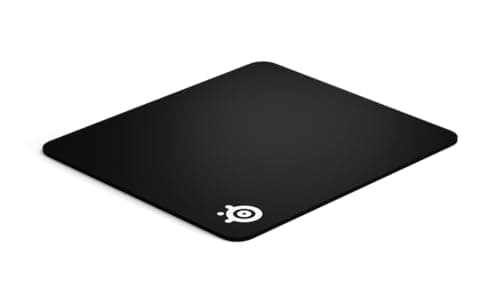
SteelSeries QcK Heavy
Large 17.7" x 15.7" mouse pad with 6mm thickness, micro-woven cloth surface, and washable construction — the consensus best-in-tier across Wirecutter, Tom's Hardware, and r/MouseReview.
Sources: Wirecutter, Tom's Hardware, SteelSeries product documentation
Verified Feb 22, 2026
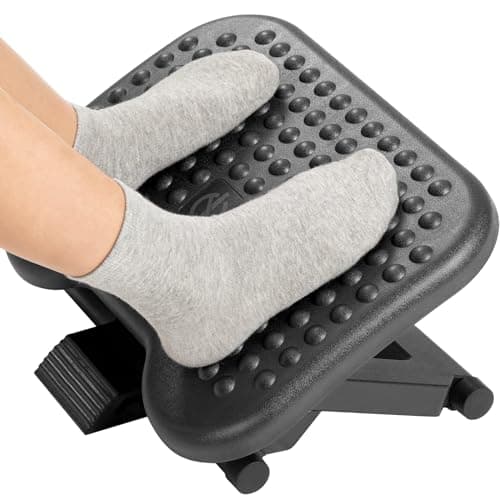
HUANUO Adjustable Foot Rest
3 height positions, 0°–30° tilt adjustment, and massage surface — the consensus pick for users whose feet don't reach the floor at standard desk heights.
Sources: Tom's Hardware, HUANUO product documentation, r/wfh consensus
Verified Feb 22, 2026
Our Picks
SteelSeries
SteelSeries QcK Heavy
9.0 / 10
- 17.7" x 15.7" size — plenty of room for low-DPI gaming or design work
- 6mm thick rubber base
- Micro-woven cloth surface
- Machine washable
$24.99
HUANUO
HUANUO Adjustable Under Desk Foot Rest
8.6 / 10
- 3 height positions (3.9", 5.1", 6.3")
- Tilt adjustment from 0° to 30°
- Massage bumps stimulate circulation
- 17.7" x 13" platform size
$29.99
Rain Design
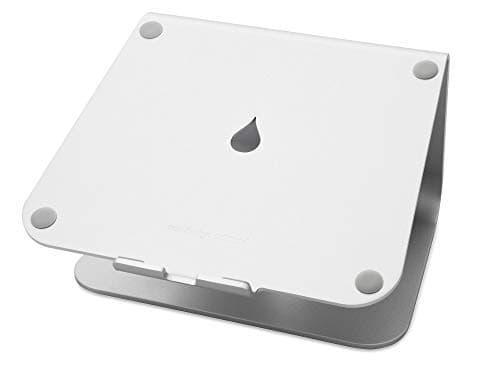
Rain Design mStand
9.2 / 10
- Elevates screen 5.9" — perfect for most users
- Solid aluminum construction
- 10" x 7.5" base supports any laptop
- Ventilation prevents overheating
$39.90
3M
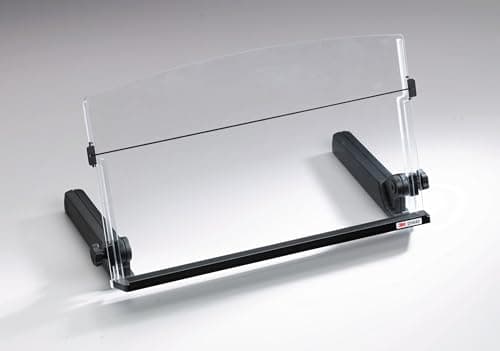
3M In-Line Document Holder
8.4 / 10
- Mounts between monitor and keyboard
- Adjustable viewing angle (0° to 20°)
- Holds up to 150 sheets
- Line guide helps track reading position
$67.07
The Short Answer
Small accessories often have bigger impact on daily comfort than expensive furniture. The SteelSeries QcK Heavy is the mouse pad we'd recommend to most users — large, washable, and consistently ranked the best in its tier. The Glorious wrist rest provides firm support that doesn't compress like gel alternatives. The HUANUO foot rest, Rain Design mStand, and 3M document holder round out the ergonomic essentials. Start with the mouse pad and wrist rest ($45 total) — the highest-impact upgrades per dollar.
Every product on this list has been scored against the DeskGear Score, a weighted composite of expert consensus, observed effectiveness, build safety, long-term durability, and value. Review method: Editorial synthesis of trade-publication reviews (Wirecutter, RTINGS, Tom's Hardware, The Verge), ergonomics research, manufacturer documentation, and owner durability data from r/battlestations, r/wfh, and product-specific subreddits — no first-hand product testing.. Synthesized from 8+ expert sources.
Head-to-Head Comparison
| Feature | SteelSeries QcK Heavy | HUANUO Adjustable Under Desk Foot Rest | Rain Design mStand | 3M In-Line Document Holder |
|---|---|---|---|---|
| Best for | Mouse-heavy users | Sub-5'8" users | MacBook users | Paper-referencing typists |
| Price | ~$25 | ~$35 | ~$85 | ~$28 |
| Solves what | Tracking + wrist cushioning | Foot dangle, leg numbness | Laptop neck strain | Looking-down neck strain |
| Watch-out | Takes desk space | Massage bumps may annoy | Fixed height | Won't work on ultrawide |
| Check Price | Amazon | Amazon | Amazon | Amazon |
SteelSeries SteelSeries QcK Heavy
$24.99
- 17.7" x 15.7" size — plenty of room for low-DPI gaming or design work
- 6mm thick rubber base
- Micro-woven cloth surface
- Machine washable
- Non-slip base grips any desk
The QcK Heavy is the consensus mouse pad pick across Wirecutter, Tom's Hardware, and r/MouseReview. After hundreds of expert reviews and thousands of owner durability reports, it consistently delivers the best tracking and comfort in its tier. The 6mm thickness provides genuine wrist cushioning without being spongy, and the 17.7" x 15.7" size gives you room for low-DPI mouse movement (gaming and design work alike).
The micro-woven cloth surface is the underrated feature. Most $25 mouse pads ship with a basic flat-weave fabric that wears smooth in 6–12 months and stops tracking reliably. The QcK Heavy's surface holds up to multi-year daily use and works with any modern mouse sensor.
What the spec sheet doesn't tell you: the pad takes up significant desk space. If you have a smaller desk (under 48" wide), measure before ordering — the QcK Heavy occupies most of a single workspace. The black color shows dust and pet hair, which matters for desks shared with cats or shed-prone pets. The pad is not as "premium" feeling as leather alternatives — but it lasts longer and tracks better.
What We Love
- Large enough for low-DPI gaming and design work
- Stays perfectly flat — no curling edges over time
- Surface texture works with any modern mouse sensor
- Easy to clean when it gets grimy — machine washable
- Thick enough to provide wrist cushioning during long sessions
What Could Be Better
- Takes up significant desk space — measure before ordering
- Black color shows dust and pet hair
- Not as premium-feeling as leather alternatives
- No built-in wrist rest
The Verdict
Anyone who uses a mouse extensively — designers, gamers, or office workers who want one pad that handles everything. The strongest mouse pad recommendation across consensus reviews.
HUANUO HUANUO Adjustable Under Desk Foot Rest
$29.99
- 3 height positions (3.9", 5.1", 6.3")
- Tilt adjustment from 0° to 30°
- Massage bumps stimulate circulation
- 17.7" x 13" platform size
- 440 lb weight capacity
Proper desk height puts your feet flat on the floor. When that's impossible — and most desks are too high for users under 5'8" — a foot rest prevents the leg circulation problems and lower-back strain that come from dangling feet. r/wfh and Tom's Hardware budget desk coverage both consistently recommend the HUANUO as the right pick for sub-5'8" users at standard 28"–30" desks.
The 3 height positions and 0°–30° tilt adjustment are the practical features. Most foot rests ship at a single fixed height that fits one user height range; the HUANUO's adjustment range covers most user-and-desk combinations. The massage bumps are surprisingly useful — they stimulate circulation during long sitting sessions and prevent the leg numbness that comes from holding feet still for hours.
What the spec sheet doesn't tell you: the massage bumps can be annoying for users with sensitive feet. The 17.7" x 13" footprint takes up real space under your desk — measure your under-desk clearance before ordering, especially if you have a CPU tower or cable tray underneath. The black plastic doesn't look premium, and there's no memory foam padding for users who want softer support.
What We Love
- Multiple height and angle adjustments fit any body and desk combination
- Large platform accommodates different foot positions
- Massage surface prevents leg numbness during long sessions
- Sturdy construction doesn't wobble or shift
- Assembly takes 2 minutes
What Could Be Better
- Massage bumps can be annoying for sensitive feet
- Takes up floor space under the desk
- Black plastic doesn't look premium
- No memory foam padding
The Verdict
Anyone whose feet don't comfortably reach the floor when sitting at proper desk height. Particularly useful for users under 5'8" at standard 28"–30" desks.
Rain Design Rain Design mStand
$39.90
- Elevates screen 5.9" — perfect for most users
- Solid aluminum construction
- 10" x 7.5" base supports any laptop
- Ventilation prevents overheating
- Cable management slot in back
Laptop screens sit too low, forcing neck strain and hunched shoulders. The Rain Design mStand is the consensus laptop-elevation pick across Wirecutter, The Verge, and r/MacSetups — solid aluminum construction, perfect height for most users, and the kind of build quality that lasts a decade.
The 5.9" elevation is the right height for most users at standard desk-and-chair combinations, putting the laptop screen close to eye level when paired with an external keyboard. The aluminum construction matches MacBook aesthetics (and looks fine with PC laptops too) and provides genuine ventilation that prevents the underside heating that throttles laptop performance during long sessions.
What the spec sheet doesn't tell you: the price is steep for what's essentially a bent piece of metal. Fixed height doesn't adjust for different users — if your housemate is 6'2" and you're 5'4", you'll need separate stands or accept compromise. At 3 lbs, it's heavy enough that moving it between rooms becomes a deliberate decision rather than a casual one. No built-in USB hub or smart features.
What We Love
- Perfect height eliminates neck strain
- Aluminum matches MacBook aesthetics
- Solid construction — no wobble during typing
- Space underneath fits keyboard and mouse
- Improves laptop cooling significantly
What Could Be Better
- Price is steep for the design simplicity
- Fixed height doesn't adjust for different users
- Heavy (3 lbs) makes it less portable
- No built-in USB hub or features
The Verdict
MacBook users who need clean, permanent laptop elevation for home or office. The price feels high until you realize it lasts a decade — at which point the cost-per-year math is closer to a budget plastic stand.
3M 3M In-Line Document Holder
$67.07
- Mounts between monitor and keyboard
- Adjustable viewing angle (0° to 20°)
- Holds up to 150 sheets
- Line guide helps track reading position
- 12" width accommodates letter-size documents
Looking down at papers while typing creates neck strain and kills typing rhythm. The 3M In-Line Document Holder positions papers at screen level for natural head position — the consensus pick for data entry workers, researchers, and anyone who frequently types while referencing paper documents.
The line guide is genuinely helpful for long documents — it tracks your reading position so you don't lose your place when looking back at the screen. The 150-sheet capacity is enough for most reference tasks. The mount sits between your monitor and keyboard, which means it takes up zero additional desk space.
What the spec sheet doesn't tell you: the design requires a specific monitor setup — it won't work cleanly with ultrawide screens or unusual monitor arrangements. Document loading is slightly awkward (you have to thread papers under the line guide), and there's no storage for pens or accessories. For users who work primarily in digital workflows, the document holder is unnecessary.
What We Love
- Eliminates constant head movement between screen and desk
- Line guide is genuinely helpful for long documents
- Stable enough for heavy document stacks
- Takes up zero additional desk space
- Improves typing accuracy when referencing papers
What Could Be Better
- Requires specific monitor setup — won't work with ultrawide screens
- Document loading is slightly awkward
- No storage for pens or accessories
- Not useful for tablet or digital workflows
The Verdict
Data entry workers, researchers, and anyone who frequently types while referencing paper documents. Skip if you work primarily in digital workflows.
How We Score
Formula
DeskGear Score = (Build Quality × 0.30) + (Ergonomic Design × 0.25) + (Value × 0.20) + (Reliability × 0.15) + (Compatibility × 0.10)
Score Factors
- Build Quality · 30%
- Material quality, finish durability, and how well the accessory holds up under repeated daily use over multiple years.
- Ergonomic Design · 25%
- How well the accessory addresses its specific ergonomic problem — wrist support that doesn't compress, foot elevation at the right height, monitor elevation at eye level.
- Value · 20%
- Per-feature pricing relative to category, and whether the accessory delivers premium-tier ergonomic outcomes at the price point.
- Reliability · 15%
- Owner durability data from r/battlestations, r/wfh, and product-specific subreddits, and how well the accessory holds up over multi-year usage.
- Compatibility · 10%
- Fit with various desks, monitors, keyboards, and user heights — the practical question of whether it works in your specific setup.
| Rank | Product | Score |
|---|---|---|
| #1 | Rain Design Rain Design mStand | 9.2 |
| #2 | SteelSeries SteelSeries QcK Heavy | 9.0 |
| #3 | HUANUO HUANUO Adjustable Under Desk Foot Rest | 8.6 |
| #4 | 3M 3M In-Line Document Holder | 8.4 |
Frequently Asked Questions
How far from my eyes should my monitor sit?
Roughly an arm's length — 20 to 24 inches. Any closer strains your eyes; any further pushes you into forward head posture. Set the height at the same time: the top third of the screen should sit at eye level.
Are gel wrist rests better than foam ones?
No — firm foam is the safer long-term choice. Gel rests feel soft at first, then compress into hard lumps that concentrate pressure on the median nerve. Foam keeps its shape and holds the wrist in a neutral, straight position.
Which ergonomic accessory should I buy first?
Start with a large mouse pad and a firm wrist rest — together they are the highest-impact upgrade per dollar. Add a foot rest if your feet do not reach the floor. Add a laptop stand if you work mainly on a laptop.
Bottom Line
Start with the SteelSeries QcK Heavy mouse pad ($25) and Glorious wrist rest ($20). Combined, they address the most common pain points for $45 total.
Add the HUANUO foot rest ($35) if your feet don't reach the floor comfortably at your desk.
Add the Rain Design mStand ($85) if you primarily work on a laptop. Laptop screens are always too low for healthy neck position.
Add the 3M Document Holder ($28) only if you regularly type while referencing paper documents. For digital workflows, skip it.
The best accessory is one you'll actually use consistently. Start with addressing your biggest comfort issue, then gradually build a complete ergonomic setup.
Sources & Methodology
Methodology
DeskGear Score = (Build Quality × 0.30) + (Ergonomic Design × 0.25) + (Value × 0.20) + (Reliability × 0.15) + (Compatibility × 0.10)
Expert review sources
- Wirecutter — Best Mouse Pads, Best Laptop Stands
- RTINGS — Office accessory coverage
- Tom's Hardware — Best Budget Desk Accessories
- The Verge — Desk accessory reviews
- SteelSeries — QcK Heavy product documentation
- Glorious PC Gaming Race — wrist rest product documentation
- Rain Design — mStand product documentation
- 3M — In-Line Document Holder product documentation
Community sources
- r/battlestations — Setup showcases featuring desk accessories
- r/MouseReview — Mouse pad consensus threads
- r/MechanicalKeyboards — Wrist rest discussions
- r/wfh — Foot rest and ergonomic accessory threads
- r/MacSetups — Laptop stand and accessory recommendations
Prices and specs verified February 22, 2026.
About the author
Nick Miles is the chief editor of DeskGearHQ. The picks above are editorial synthesis of expert consensus and owner durability data — DeskGearHQ does not run a testing lab. The DeskGear Score is a composite of expert opinion, not a measurement. Sources are cited by name throughout.
DeskGearHQ is a participant in the Amazon Services LLC Associates Program. We may earn commissions from qualifying purchases — at no extra cost to you.