Ergonomic Foundations
The Back-Pain Recovery Office 2026
Chronic back pain at the desk isn't a medication problem or a stretching problem — it's often a workspace problem. This hub sequences the ergonomic build that evidence says matters most: chair, monitor arm, lumbar support, footrest, standing desk, monitor stand.
By Nick Miles · Updated May 8, 2026 · 13 min read
12 expert sources synthesizedLast verified May 8, 2026
DeskGearHQ is reader-supported. We may earn a commission from qualifying Amazon purchases at no extra cost to you.
Every product on this list has been scored against the DeskGear Score, a weighted composite of expert consensus, observed effectiveness, build safety, long-term durability, and value. Review method: Editorial synthesis across 12 expert sources — ergonomic specialists, physical therapists, occupational health researchers, and equipment reviewers. DeskGearHQ does not run a testing lab. Every claim is synthesized from named expert sources, manufacturer documentation, peer-reviewed ergonomics research, and owner data from communities including r/backpain, r/HomeOfficeSetup, r/wfh, and r/Ergonomics. Spoke articles are linked throughout for product-level detail.. Synthesized from 12+ expert sources.
Frequently Asked Questions
How long should it take to feel a difference after fixing my workspace?
Most people notice a reduction in end-of-day pain within two to four weeks of consistent use — assuming the configuration is correct for their body. Some initial adjustment discomfort is normal; a properly positioned chair uses different muscular loading than what you've adapted to. The recovery from months of prior loading takes longer than the workspace change itself: the workspace stops being a daily contributor immediately, but accumulated tissue loading resolves on its own timeline. If you see no improvement after four to six weeks of correct ergonomic configuration, the pain may have causes beyond the workspace and warrants clinical evaluation.
Is $1,500+ on a chair really necessary, or is $300-$500 enough?
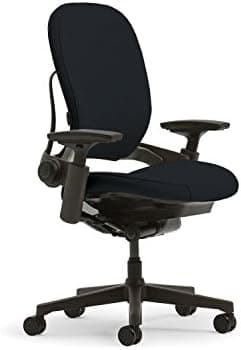
For most people with chronic back pain, the $300-$500 range can deliver significant improvement over a bad chair — but with meaningful limitations. The difference between a $400 ergonomic chair and a $1,500 Herman Miller or Steelcase isn't primarily materials; it's the range and precision of adjustability. A mid-range chair adjusts seat height, back angle, and sometimes lumbar height. A Steelcase Leap adjusts seat depth, seat-edge flex, back flex, lumbar height and projection, and armrest position in four axes — which means it can actually fit the specific geometry of your spine and hips rather than approximate it. For people with significant or specific back pain, that fit precision is clinically meaningful. For people with general back fatigue from a bad chair, a $400 option with solid lumbar adjustability may be sufficient. The spoke guide on ergonomic chairs covers both tiers honestly.
Should I see a physical therapist before buying any of this?
Yes, if your pain is significant, structural, or has a neurological component. A physical therapist who specializes in mechanical back pain can identify whether your pain pattern is posture-driven (workspace intervention is highly relevant), structural (workspace helps as supportive management), or something else entirely — which helps you prioritize the spend correctly. If your pain is moderate and clearly posture-related — worse after long desk sessions, better with movement — starting with the chair and monitor arm makes sense without a PT visit first. Get clinical guidance before investing heavily if the pain pattern is unclear or includes neurological symptoms.
What's the most common back-pain workspace mistake people make?
Addressing accessories before the foundation. A lumbar cushion and standing desk converter on top of a $200 mesh chair that doesn't fit your body changes the pain profile but doesn't solve it. Chair first — always chair first — then monitor height, then the supporting layers. The other common mistake is buying an ergonomic chair and never adjusting it correctly. A Herman Miller Aeron with the lumbar at the wrong position or armrests too high produces different pain than a bad chair, but still produces pain. The spoke guide includes adjustment guidance alongside the picks.
How do I tell if my pain is workspace-related or systemic?
Pain that's worse after long desk sessions and better with movement is a strong workspace-contribution signal. Pain that improves after short breaks or changing positions points the same direction. Localized lower-back, upper-back, or neck pain without leg or arm radiation is more likely mechanical and posture-related; bilateral symmetric pain is often postural. Pain that worsens after sleeping and improves through the day suggests inflammatory patterns. Neurological symptoms — numbness, tingling, or leg weakness — are a clinical red flag that warrants medical evaluation before workspace optimization. When in doubt, one or two sessions with a physical therapist can typically distinguish mechanical, workspace-addressable pain from causes that need clinical management first.
Bottom Line
The chair is the most consequential single purchase for chronic back pain at the desk. A properly adjusted ergonomic chair from Herman Miller or Steelcase eliminates the seated loading pattern that most off-the-shelf office chairs make worse. Nothing else in the build compensates for a chair that doesn't fit your body correctly.
Monitor height is the second variable with the highest clinical impact on upper-back and neck pain. A monitor arm that puts the top of your screen at eye level eliminates the sustained forward head tilt that compounds lower-back strain across a full workday. This is inexpensive leverage — a quality monitor arm runs $80-$200 — and consistently underweighted by people building ergonomic setups.
Lumbar support and footrests are corrective layers, not foundations. If your chair already has adjustable lumbar support that fits your spine, a cushion adds nothing. A footrest matters most for people under 5'8" who can't get their feet flat on the floor with their hips at the correct angle — that group should treat it as required, not optional.
The standing desk helps — but only if you actually use it. Owner data across r/HomeOfficeSetup and r/Ergonomics consistently shows that standing desks with programmable height presets get used; ones without become permanent sitting desks within weeks. Posture variation throughout the day is the therapeutic value; the desk is the mechanism. The mechanism only works when friction to use it is near zero.
This build removes the workspace as a contributor to pain. It does not replace physical therapy, movement breaks, or medical evaluation. If your back pain is severe or has a structural cause, get clinical guidance before buying anything — the gear will support recovery, not replace it.
All articles in this guide
Best Ergonomic Office Chairs 2026: Buying Guide
The Steelcase Leap V2 is the chair we'd recommend to most people. The Herman Miller Aeron is still the gold standard if budget isn't a constraint. The Sihoo M18 delivers 90% of premium ergonomics at a fraction of the price. We aggregate expert consensus — we don't run a lab.
12 min read
Best Monitor Arms $200+ for Ergonomic Setups (2026)
The Ergotron LX Single Tall Pole is the canonical premium single-arm choice. The Humanscale M8.1 Dual handles ultrawides and 4K heavyweights up to 40 lbs per arm. The Ergotron HX Dual is the heavy-duty Ergotron build for dual setups.
10 min read
Best Lumbar Support Cushions for Office Chairs (2026)
Most office chairs under $500 have no meaningful adjustable lumbar support. A cushion is the lever. The Everlasting Comfort Memory Foam Lumbar Cushion is the all-rounder for most people. The McKenzie Lumbar Roll is the clinical standard — if a PT has recommended a lumbar roll, this is what they meant. The LoveHome High-Density cushion is the upgrade for chronic pain. The Samyoung Mesh is the choice for hot climates. The Tempur-Pedic is the premium anchor for those who want mattress-grade foam on their chair.
10 min read
Best Ergonomic Footrests for Under-Desk Use (2026)
If your feet don't reach the floor at standard desk height, a footrest is not optional — it's the fix. The HUANUO is our adjustable-platform pick for most users. ComfiLife memory foam is the budget-tier call. VIVO's steel frame is the minimalist option. StrongTek's wood rocker is for active sitters who want passive movement through the day.
9 min read
Best Standing Desks 2026: Complete Buying Guide
The Uplift V3 is the standing desk we'd buy for most home offices — customizable desktop, frame color, and accessories with a 15-year warranty on both frame and motor. The FlexiSpot E6 Bamboo is the value pick that delivers a real dual-motor desk with a solid bamboo top under $350. The Secretlab Magnus Evo is the premium pick when integrated cable management and gaming-aesthetic cohesion matter as much as the standing-desk function.
14 min read
Best Monitor Stands & Risers 2026: Storage + Ergonomics
A monitor stand does two things: raises your screen to eye level and adds storage underneath. The Gianotter 2-Tier is the storage-and-organization pick under $25. The VIVO Single Stand is the minimal alternative. The SimpleHouseware Mesh is the right choice when desktop drawer space matters.
8 min read
Best Premium Ergonomic Office Chairs 2026: The $1,000+ Tier
The Herman Miller Aeron is our top pick — the all-mesh reference at the top of the range. The Steelcase Leap is the value-and-fit alternative, out-adjusting it for most bodies at a lower list price. We synthesized Ergonomic Trends, btod.com, and manufacturer specs to rank five $1,000-and-up flagships. We aggregate expert consensus — we don't run a lab.
13 min read
Best Blue Light Glasses for Screen Time (2026)
Cochrane 2023 reviewed 17 trials and found little evidence blue light glasses relieve eye strain. We lead with that — then cover the four best Amazon picks for sleep support, aesthetics, or a well-informed placebo.
9 min read
Best Ergonomic Split Keyboards (2026)
Kensington Pro Fit Ergo at $53, Logitech ERGO K860 at $130, and Cloud Nine ErgoTKL at $220. We synthesized 7 expert sources to find the best ergonomic split keyboards on Amazon for daily typing comfort and wrist health.
9 min read
Best Kneeling Chairs and Posture Stools (2026)
DRAGONN DN-CH-K01B is the most-recommended rolling kneeling chair on Amazon for good reason — adjustable height, padded cushions, and a sub-$150 price that keeps this category honest. Sleekform's birch rocker is the camera-shelf pick. Defy Desk is the serious rocking-base option. VIVO's saddle stool is the posture-stool alternative for buyers who want active hip engagement instead.
10 min read
Best Vertical Mice for Wrist Pain (2026)
Four vertical mice that rotate your wrist into neutral — from the $25 Anker budget pick to the $100 Logitech MX Vertical. The cheapest ergonomic intervention available if your wrist has started talking back after long workdays.
8 min read
Sources & Methodology
Expert review sources
- McKenzie Institute — McKenzie Method mechanical diagnosis and spinal loading research
- Herman Miller — Aeron and Embody ergonomic documentation, seating research
- Steelcase — Leap ergonomic research, LiveBack technology documentation
- RTINGS — Ergonomic chair evaluation methodology and category coverage
- Wirecutter — Ergonomic chair, standing desk, and monitor arm buying guides
- OSHA — Computer Workstations eTool: ergonomic guidelines for display positioning and seating
- Cornell Human Factors and Ergonomics Research Group — seated workstation research
- American Physical Therapy Association — workplace ergonomics resources and PT guidance
- Human Factors and Ergonomics Society — seated workstation standards
- Uplift Desk — standing-desk motor specs, ergonomic positioning documentation
- Humanscale — monitor arm ergonomic positioning and load-balance research
- r/Ergonomics, r/backpain, r/HomeOfficeSetup — chronic back pain workspace setup discussions and owner data
Community sources
- r/backpain — workspace setup threads for chronic lower-back and neck pain
- r/Ergonomics — evidence-based ergonomic setup discussions and posture research
- r/HomeOfficeSetup — ergonomic build threads, standing desk usage patterns
Prices and specs verified May 8, 2026.
About the author
Nick Miles is the chief editor of DeskGearHQ. DeskGearHQ does not run a testing lab — every claim on this page is synthesized from ergonomic research, occupational health standards, manufacturer documentation, expert publication reviews, and community owner data. Sources are cited by name in body prose; the bibliography above lists every primary source consulted for this hub. Spoke articles linked throughout contain full product-level sourcing and ASIN-verified picks. Nothing on this page constitutes medical advice — consult a qualified clinician for back pain with structural or acute causes.
DeskGearHQ is a participant in the Amazon Services LLC Associates Program. We may earn commissions from qualifying purchases — at no extra cost to you.