Your First Home-Office Setup: The New-Job Checklist (2026)
Kit out a first remote-work desk in buy-first order: the desk and chair you use all day before the monitor, the monitor before the dock, extras last. The point is sequencing a roughly $900 provision so comfort lands first and nothing bought early gets replaced later.
This article contains affiliate links. We may earn a commission at no extra cost to you. Learn more
Featured in this Guide
FlexiSpot
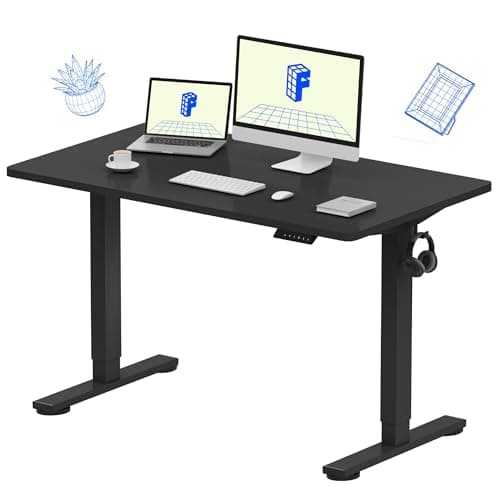
EN1 48" Electric Standing Desk
- •Start on the surface everything sits on: a 176 lbs
- •48x24-inch electric sit-stand desk near $110 that fits a spare corner.
SIHOO
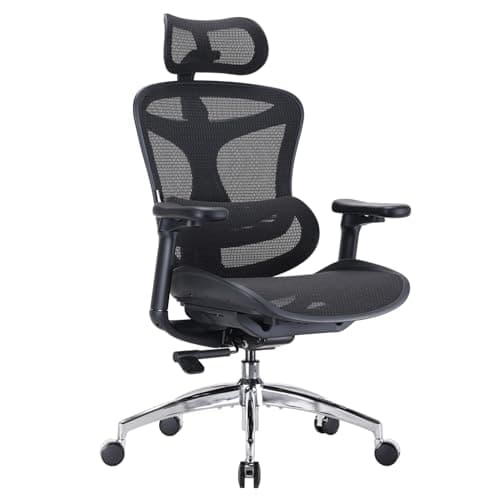
Doro C300 Ergonomic Office Chair
- •Comfort compounds daily
- •so fund the chair early: self-adjusting lumbar and three recline angles at $289.99.
Dell
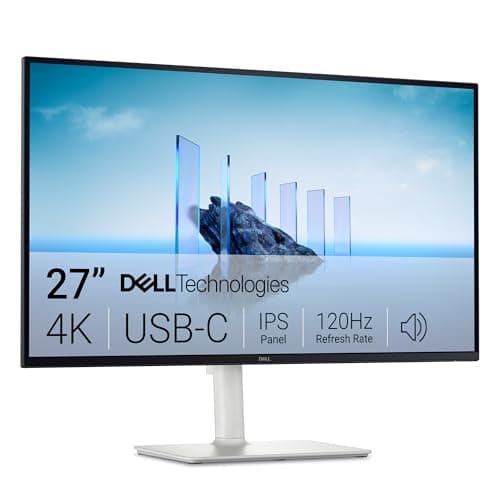
S2725QC 27" 4K USB-C
- •One good 27-inch 4K panel over a single USB-C cable beats two cheap screens for a clean first desk.
Belkin
Connect Thunderbolt 4 Dock (5-in-1 Core)
- •A palm-sized 96W Thunderbolt 4 dock adds ports over one cable without the flagship port farm you will not use.
Logitech
C920x HD Pro Webcam
- •A 1080p clip-on cam with auto light correction and dual mics fixes a bad laptop camera for around $70.
Apple
Mac mini M4 (Base)
- •Skip unless the job issues no machine
- •then buy Apple's $899 M6 Mac mini new; this M4 is the previous-generation reference.
The Short Answer
A first home office is best assembled in dependency order: the desk and ergonomic chair you occupy all day come first, followed by a single 4K monitor, a right-sized Thunderbolt dock, and a webcam, with a Mac mini reserved only for hires whose employer issues no working laptop.
A first home office is bought in dependency order, because a comfort failure compounds every workday while a missing gadget simply waits its turn. This guide sequences a roughly $900 provision so the pieces you sit at all day land first and nothing bought early gets replaced later. The weighted DeskGear First-Office Readiness Score ranks each pick on daily comfort, setup simplicity, value, and upgrade path, and the composite leans hardest on the comfort factor. Category consensus from Wirecutter, TechRadar, and PCMag backs the same buy-first logic: because you occupy a chair and desk 8 hours a day across 3-year job stretches, they earn their place before any screen, and a rushed 2x-monitor splurge is exactly the regret this order prevents. Prices list around the figures shown as of August 2026 (2026-08-12) and shift often, so confirm the live total before buying.
The checklist, side by side
Ergonomic Foundations
Chart
 DeskGearHQ.com
Buy first — the desk: FlexiSpot EN1 48" Electric Standing Desk
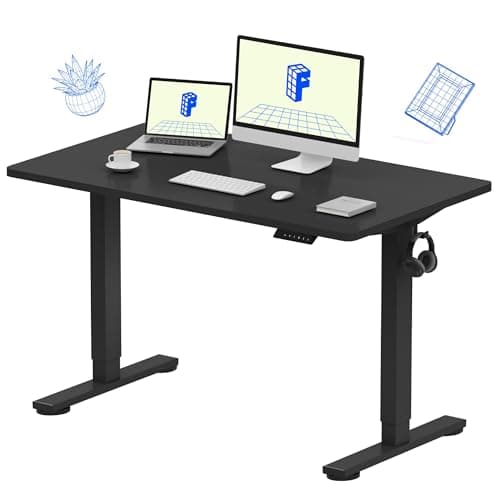
FlexiSpot EN1 48" Electric Standing Desk
(Current price, subject to change)
TechRadar and Wirecutter both treat FlexiSpot as the default budget sit-stand brand, and the EN1 is the entry that clears a first office without draining the budget. The weighted DeskGear First-Office Readiness Score rewards it on the value factor and on simplicity: a 176 lbs top holds a monitor, dock, and laptop with margin, and four memory presets make sit-to-stand a one-touch move. Buy the desk first because everything else sits on it, and a 48x24-inch footprint tucks into a spare-bedroom corner; if your room can take a wider top, the full best standing desks guide ranks nine more. The honest limits are physical. The one-piece top arrives as a single large box, two-person assembly runs about 30 mins, and the entry-tier frame shows a little wobble at full standing height even after 5-year use. For a first desk on a tight budget, this is the surface to start the checklist on.
What We Love
- Four memory presets make sit-to-stand a one-touch move
- 176 lbs capacity holds a full desk load with margin
- A 48x24-inch one-piece top tucks into a spare-room corner
What Could Be Better
- Slight frame wobble at maximum standing height
- One-piece top means a bulky box and a ~30-minute build
The Verdict
If you are outfitting a spare-room corner and want sit-stand without overspending, the FlexiSpot EN1 48" Electric Standing Desk fits the brief as your first buy. The 8.4 reflects a 176 lbs top, four memory presets, and a price near $110 that leaves budget for the chair. You give up some max-height rigidity, the honest trade at this tier.
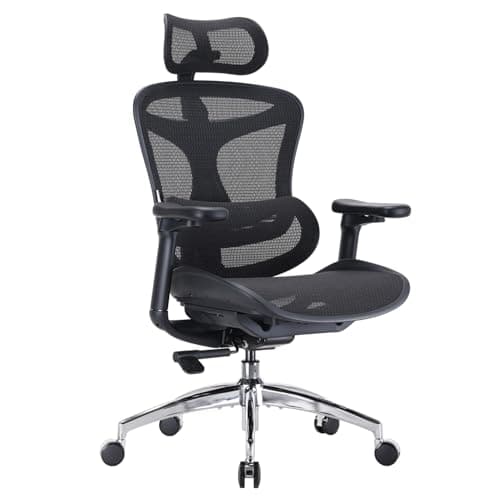
Buy second — the chair: SIHOO Doro C300 Ergonomic Office Chair
SIHOO Doro C300 Ergonomic Office Chair
(Current price, subject to change)
Wirecutter and PCMag place the Sihoo Doro C300 among the strongest ergonomic chairs anyone can buy near $300, and its 8.9 consensus score is the highest of the everyday picks here. Buy it second because comfort compounds across 8 hours a day: a chair failure aches a little more each afternoon, versus a fixed-lumbar seat that never quite fits. The dynamic self-adjusting lumbar tracks your spine as you shift, a feature usually reserved for chairs costing 2x as much, and the three recline angles at 105, 120, and 135 degrees give a genuine mid-day break. Full breathable mesh on the seat and back runs cooler than a foam pad, and the 300 lb capacity and wide seat fit a broad range of bodies, so the composite leans on real comfort here; taller users and executive budgets can compare the best ergonomic office chairs guide. The trade is cushioning: mesh feels firmer, and support beats plushness for long sitting. The firmness-for-airflow trade is the right call when you sit all day.
What We Love
- Self-adjusting dynamic lumbar tracks your spine as you move
- Three locking recline angles give a real mid-day break
- Full breathable mesh runs cooler than a foam seat
What Could Be Better
- Mesh seat feels firmer than a padded cushion
- Seat depth runs shallow for very tall users
The Verdict
If you spend full days at the desk, the SIHOO Doro C300 Ergonomic Office Chair is the pick to buy second, right behind the desk. Its self-adjusting lumbar and three recline angles bring real all-day support at $289.99, and comfort is the factor the readiness score weights highest. You trade plush cushioning for breathable mesh, the sensible call for long sitting.
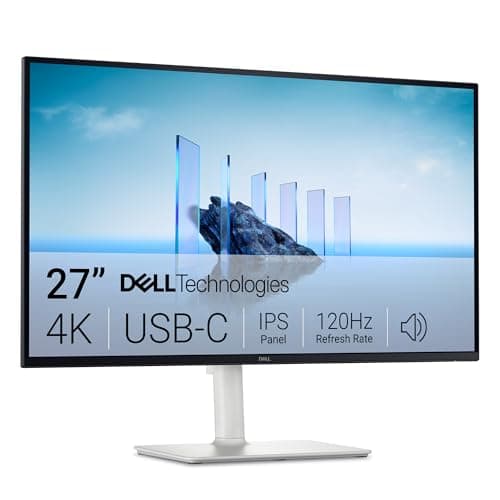
Buy third — the monitor: Dell S2725QC 27" 4K USB-C
Dell S2725QC 27" 4K USB-C
(Current price, subject to change)
TechRadar and The Verge both favor one well-built high-resolution panel over a pair of budget 1080p screens for a first desk, and the Dell S2725QC delivers exactly that. A single USB-C cable carries video, data, and 65W of laptop charging, which enables a clean one-cable desk and replaces three separate cords. The 27-inch 3840x2160 panel at 120Hz keeps text sharp and motion smooth across 8 hours of screen time, accurate sRGB and DCI-P3 color needs no tuning for office work, and it packs roughly 2x the pixels of a 1080p screen. Its 9.1 consensus score rates it high on comfort and value, and the weighted DeskGear First-Office Readiness Score treats it as the display anchor of the checklist. Compared to two cheap monitors, a single sharp panel yields less cable clutter and a cleaner upgrade path, though it gives up raw width and real HDR. The best home-office monitors guide ranks wider and color-critical options. Against a dual-budget setup, this is the tidier, more future-proof way to add a screen.
What We Love
- 27-inch 4K at 120Hz — rare at this price tier
- A single USB-C cable handles video plus 65W laptop charging
- Accurate sRGB and DCI-P3 color out of the box, on a full height-tilt-swivel-pivot stand
What Could Be Better
- 65W may not fully charge a 16-inch workstation laptop at peak load
- No HDR worth the name, and it is not color-calibration-grade
The Verdict
If your laptop screen is the bottleneck, the Dell S2725QC 27" 4K USB-C is the third buy and the one-cable centerpiece. A 27-inch 4K panel at 120Hz over a single USB-C cable that also delivers 65W of charging earns its 9.1 consensus score, and it keeps a first desk uncluttered. Skip it only if your work is spreadsheet-wide and you truly need two panels.
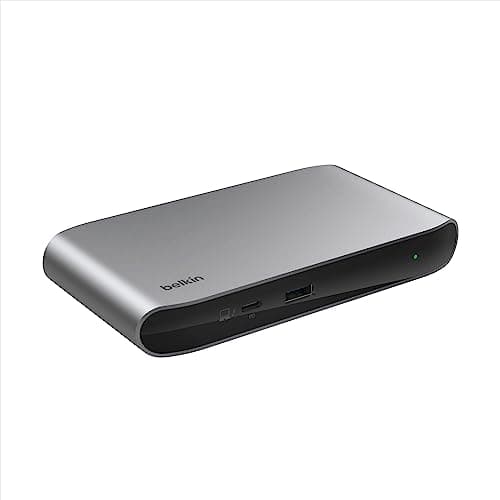
Buy fourth — the dock: Belkin Connect Thunderbolt 4 Dock (5-in-1 Core)
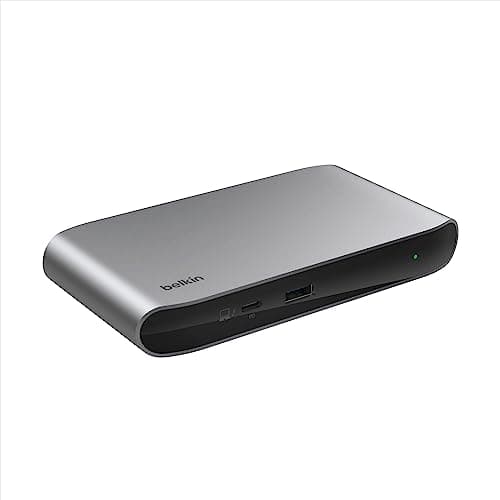
Belkin Connect Thunderbolt 4 Dock (5-in-1 Core)
(Current price, subject to change)
PCMag and TechRadar rate the Belkin Connect Thunderbolt 4 Core as a clean, compact dock, and for a first office it is deliberately right-sized. It delivers 96W upstream over a single Thunderbolt 4 cable and adds three usable downstream TB4 ports plus a 10Gbps USB-A, enough for a monitor, a drive, and a keyboard without clutter. Buy the dock fourth, after the monitor it feeds, because a first setup rarely needs more, and the composite rewards that right-sizing. The honest gap is real: there is no HDMI, Ethernet, audio jack, or card reader, so an HDMI-only monitor needs an adapter. The named overkill contrast is the CalDigit TS4, an 18-port flagship that costs roughly 2x more and buys ports a first desk never plugs in. The best USB-C docking stations guide ranks fuller docks for bigger rigs. For a first office, the right-sized dock is the one you finish the day never thinking about.
What We Love
- 96W charging and three TB4 ports over one cable
- Palm-sized aluminum with no desk clutter
- Cable and power supply included in the box
What Could Be Better
- No HDMI, Ethernet, audio, or card reader
- Fewest ports of the full-size docks
The Verdict
If your laptop is short on ports, the Belkin Connect Thunderbolt 4 Dock (5-in-1 Core) is the fourth buy and the right-sized first dock. Palm-sized, 96W over one Thunderbolt 4 cable, and $149.99, it covers a first desk without the port farm you will not use. If you already run three monitors and heavy peripherals, size up instead.
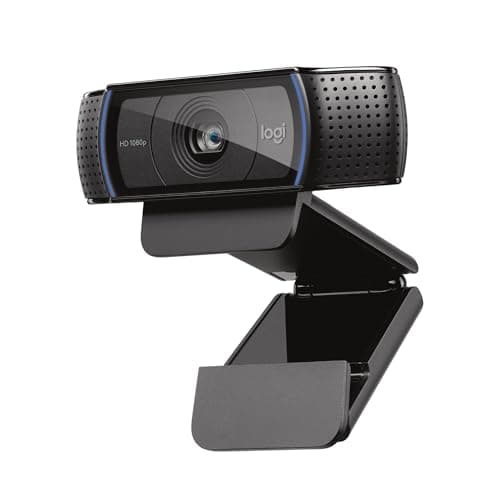
Buy fifth — the webcam: Logitech C920x HD Pro Webcam
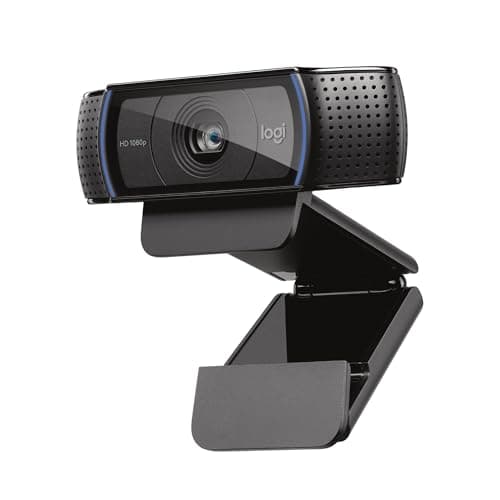
Logitech C920x HD Pro Webcam
(Current price, subject to change)
Wirecutter and The Verge keep the Logitech C920x on their default-webcam shortlists because it produces a clean 1080p image for a fraction of a premium cam. Buy it fifth, once the desk, chair, monitor, and dock are set, since a decent camera is a comfort upgrade rather than a day-one blocker, and the value factor is where it earns its place; anyone who wants sharper, auto-framing video can step up through the best webcams guide instead. It delivers full HD 1080p at 30fps with automatic light correction that evens out a backlit room, and dual built-in mics carry casual meetings without a separate headset. Setup is the easy part: it clips to any monitor bezel in under 2 mins, plugs in over USB, and works across Teams, Meet, and Zoom with no driver hunt, roughly 2x sharper than a typical built-in camera. The honest ceiling is 1080p/30 and a fixed focal length, so it is a calls camera, not a studio rig, and this SKU ships without a privacy shutter. For a new remote worker who just needs to look present, this clears the bar cheaply.
What We Love
- 1080p with automatic light correction for dim rooms
- Dual mics handle casual calls without a headset
- Plug-and-play on Teams, Meet, and Zoom
What Could Be Better
- Caps at 1080p/30 with a fixed focal length
- This SKU ships without a privacy shutter
The Verdict
If your laptop camera makes you look washed out on calls, the Logitech C920x HD Pro Webcam is the fifth buy and an easy fix. Full HD 1080p, auto light correction, and dual mics for around $70 clip onto any monitor with zero desk footprint. Skip it only if you shoot polished creator video, where 1080p/30 runs short.
Previous-gen reference (buy the M6): Apple Mac mini M4 (Base)
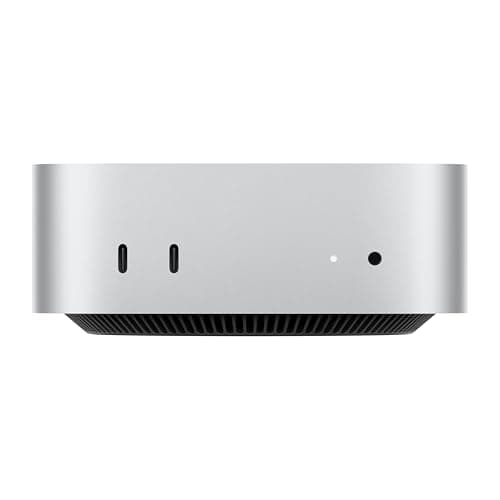
Apple Mac mini M4 (Base)
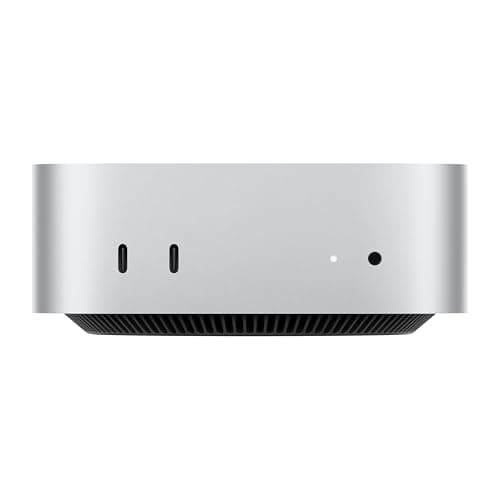
(Current price, subject to change)
TechRadar and PCMag rated the Apple Mac mini M4 as the value benchmark among small desktops at its launch price, and its 9.1 consensus score dates from its launch, but a Mac mini earns a spot only if the job leaves you without a machine. Buy a new M6 last and only then, because most new roles issue a laptop that already docks to the monitor. When you do need compute, the M4 delivers desktop-class speed from a silent 5-inch square chassis, three Thunderbolt 4 ports drive external displays natively, and it stays silent across 8 hours of work while the 38 TOPS Neural Engine runs on-device AI without a fan spinning up. The trade is Apple-tax storage: the base 256GB SSD fills fast and upgrades cost more than rivals charge, which is why the composite docks it slightly on upgrade path. Compared to a bulkier Windows box, it yields a quieter, tidier desk. Apple's $899 M6 Mac mini replaced it in August 2026, so buy the M6 new instead. The best mini PCs guide covers Windows and higher-RAM options. The trade you accept is sealed storage for silence and speed, reasonable when a laptop is not in the picture.
What We Love
- M4 delivers desktop-class speed in a silent 5-inch chassis
- Three Thunderbolt 4 ports drive external displays natively
- 38 TOPS Neural Engine runs on-device AI without a fan spinning up
What Could Be Better
- Base 256GB storage fills fast and upgrades cost more
- Sealed memory and storage — no later upgrades
The Verdict
If the new job does not issue a laptop, a Mac mini is the optional sixth buy that turns the desk into a full workstation, but buy Apple's $899 M6 model new rather than the previous-generation Apple Mac mini M4 (Base) shown here. Its 9.1 is the M4's launch-era consensus score. If your employer hands you a work laptop, skip this line entirely.
How We Score: DeskGear First-Office Readiness Score
DeskGear First-Office Readiness Score
Score Formula
(Daily Comfort x 0.30) + (Setup Simplicity x 0.25) + (Value per Dollar x 0.25) + (Upgrade Path x 0.20)Score Factors
- Daily ComfortHow much the piece affects your body over a full workday — the highest-weighted factor because comfort failures compound daily
- Setup SimplicityHow close to plug-in-and-work the piece is, from a one-cable monitor to a two-person desk build
- Value per DollarDelivered capability against list price, rewarding right-sized picks over flagship overspend
- Upgrade PathHow well the piece fits the laptop you start with and the room to grow into later
DeskGear First-Office Readiness Score — Ranked
Dell S2725QC 27" 4K USB-C
9.1/10Step 3 monitor — 27-inch 120Hz 4K over one 65W USB-C cable; category consensus score, the display anchor.
SIHOO Doro C300 Ergonomic Office Chair
8.9/10Step 2 chair — self-adjusting lumbar and breathable mesh near $290; category consensus score, the comfort anchor.
FlexiSpot EN1 48" Electric Standing Desk
8.4/10Step 1 desk — 176 lbs electric sit-stand near $110; strong value and simplicity, dinged on frame rigidity.
Belkin Connect Thunderbolt 4 Dock (5-in-1 Core)
8.3/10Step 4 dock — palm-sized 96W Thunderbolt 4; right-sized for a first desk, category consensus score.
Logitech C920x HD Pro Webcam
8.3/10Step 5 webcam — 1080p clip-on with light correction and dual mics; an easy, cheap fix for a bad camera.
What the employer provides vs. what you buy
The single fact that reshapes a first-office budget is that most new employers issue the laptop, the software licenses, and occasionally a stipend, yet almost never the desk, chair, monitor, or webcam, so the money concentrates on the physical layer the organization skips. The cabling arithmetic becomes obvious once you visualize it: a modern work laptop with a USB-C or Thunderbolt port drives the Dell monitor across one reversible cable that simultaneously recharges it, while the Belkin dock supplies additional ports whenever the machine runs short. The weighted DeskGear First-Office Readiness Score deliberately emphasizes that upgrade path, because a first desk should still accommodate whatever laptop arrives on day one. Confirm two specifications before purchasing, that your laptop port carries video and that it accepts USB-C charging, since The Verge and comparable outlets caution that a 5-year-old laptop may require an adapter, and a consolidated docked setup runs roughly 1.5x tidier than a tangle of separate cords versus connecting every peripheral independently.
The overspend traps to skip in month one
The quickest route to overspending a first office is purchasing the trophy pieces before the foundational ones, and the traps are remarkably predictable. A flagship chair is perpetually tempting, but the Sihoo that Wirecutter favors covers the comfort factor for dramatically less, and the difference comfortably funds the monitor and the dock together. A two-screen wall photographs as productive, yet a single well-chosen UHD panel yields a cleaner desk while costing roughly 2x less than two premium screens plus mounting arms. An eighteen-port flagship dock is another recurring trap, because a first desk realistically populates barely a third of those connectors. The weighted DeskGear First-Office Readiness Score deliberately rewards value per dollar, precisely because disciplined sequencing outperforms indiscriminate splurging. During month one, postpone the mechanical keyboard, the second monitor, the studio microphone, and the ambient lighting, since those upgrades become 3x easier to justify once your genuine workflow reveals itself. Relative to acquiring everything simultaneously, this checklist keeps the entire provision near a sensible total and measurably reduces buyer regret.
When NOT to Buy
What to leave off the list entirely, at least at first: a treadmill desk, a second monitor, studio lighting, and a mesh-Wi-Fi overhaul the day you start. PCMag and others note that most first-week friction is comfort and camera, not throughput. Buy the desk, chair, monitor, dock, and webcam — the desk build is the only real project of the five, at about 30 mins — add the optional Mac mini only if no work laptop arrives, and let the rest wait until a real workflow tells you what is missing. The one durable rule: comfort and a clean single-cable desk first, gadgets later.
Who Should Buy What
Who Should Buy What
| If you are… | Recommended pick |
|---|---|
First-time remote worker Starting a new work-from-home job and buying a desk setup from scratch on a sensible budget. | FlexiSpot EN1 48" Electric Standing Desk |
All-day desk sitter Spends full days at the desk and needs supportive, breathable seating before any screen upgrade. | SIHOO Doro C300 Ergonomic Office Chair |
Laptop-first professional Works on a company laptop and wants one 4K screen over a single USB-C cable that also charges it. | Dell S2725QC 27" 4K USB-C |
Port-starved laptop user Has a modern USB-C laptop short on ports and needs a right-sized dock, not a flagship port farm. | Belkin Connect Thunderbolt 4 Dock (5-in-1 Core) |
Daily video-call worker On camera often and wants a clean 1080p image and clear mics without a studio budget. | Logitech C920x HD Pro Webcam |
No-work-laptop hire Started a job that issues no computer: skip the previous-generation M4 shown here and buy Apple's $899 M6 Mac mini new. | Apple Mac mini M4 (Base) |
Frequently Asked Questions
What do I actually need on day one of a remote job?
Day one needs less than the internet suggests: a stable surface, a supportive chair, and a working camera and mic for the first call. The desk and chair carry the day; the monitor, dock, and webcam can arrive within the first week. If a call is scheduled before your gear lands, a laptop propped to eye level in a quiet room beats a rushed, bad-angle setup.
How much should a first home office cost?
Budget roughly $800 to $1,000 for the five core pieces here, before any optional computer. The sequencing matters more than the total: spend on the desk and chair you touch all day, keep the monitor to one solid 4K, and right-size the dock. Where an employer offers a stipend, it usually covers a meaningful chunk of that.
Should I buy a standing desk or a regular desk first?
Either works, but a budget electric sit-stand desk costs only a little more than a fixed desk and adds posture flexibility you cannot retrofit later. If the room or budget is very tight, a sturdy fixed desk plus a good chair beats an unstable standing desk. Stability at typing height matters more on day one than the standing feature itself.
Is a second monitor better than one 4K monitor for a first setup?
For most first setups, one 27-inch 4K panel wins: sharp text, a clean single-cable desk, and a simpler upgrade path than two budget screens plus arms and cables. Choose dual monitors first only if your work is genuinely spreadsheet-wide or code-and-reference heavy, where horizontal space beats pixel density.
What does my employer usually provide vs what do I buy?
Most employers provide the laptop, software licenses, and sometimes a stipend or a monitor; they rarely provide the desk, chair, webcam, or dock. Ask specifically what is reimbursable before buying, since some companies cover ergonomic furniture but not electronics, and keep receipts. The physical comfort layer is almost always on you.
What can I safely skip until month two?
Skip the second monitor, mechanical keyboard, studio microphone, ring light, and any smart-home extras until you have worked a few weeks. Real workflow, not a shopping list, should trigger those buys. The one thing not to defer is the chair: back and neck strain from a bad seat compounds faster than any productivity gain from a gadget.
Bottom Line
Get the FlexiSpot EN1 48" Electric Standing Desk if You are setting up a first remote desk on a budget and want sit-stand without overspending — buy this surface first..
Get the SIHOO Doro C300 Ergonomic Office Chair if You sit all day and want real ergonomic support and airflow near $300 — fund the chair right after the desk..
Get the Dell S2725QC 27" 4K USB-C if You want one clean 4K screen over a single USB-C cable instead of two budget panels — the third buy..
Get the Belkin Connect Thunderbolt 4 Dock (5-in-1 Core) if Your laptop is short on ports and you want a right-sized dock, not an 18-port flagship — add it after the monitor..
Get the Logitech C920x HD Pro Webcam if Your laptop camera looks washed out and you want a cheap, proven 1080p fix — the fifth and easiest buy..
Get the Apple Mac mini M4 (Base) if The job issued no computer: skip the previous-generation M4 and buy Apple's $899 M6 Mac mini new as the optional last piece..
You already own a comfortable chair and a working desk, your laptop screen is enough for now, or your employer ships a full kit — buy only the gaps, in order.
Sources & Methodology
Methodology: DeskGear First-Office Readiness Score — Formula: (Daily Comfort x 0.30) + (Setup Simplicity x 0.25) + (Value per Dollar x 0.25) + (Upgrade Path x 0.20). Factors: Daily Comfort: How much the piece affects your body over a full workday — the highest-weighted factor because comfort failures compound daily | Setup Simplicity: How close to plug-in-and-work the piece is, from a one-cable monitor to a two-person desk build | Value per Dollar: Delivered capability against list price, rewarding right-sized picks over flagship overspend | Upgrade Path: How well the piece fits the laptop you start with and the room to grow into later
Expert review sources used in this analysis:
- Picks reflect aggregated editorial consensus and buyer feedback across the desk, chair, display, docking, webcam, and mini-PC categories: TechRadar, PCMag, Wirecutter, The Verge, and Tom's Guide broadly cover these products, and their category guidance informs the buy-first sequencing here
- No individual ratings or quotes are attributed
- Prices verified via the Amazon Creators API as of August 2026 (2026-08-12)
- The Mac mini M4 was re-checked on 2026-09-29, when a third-party seller held the base 16GB/256GB buy box
- Mac mini M6 pricing follows MacRumors and Macworld coverage of Apple's August 25, 2026 announcement.
Nicholas Miles is the founder of DeskGearHQ and a longtime smart home enthusiast focused on helping everyday homeowners make better technology decisions. He researches, compares, and writes about products across security, climate, lighting, leak prevention, sensors, home energy, and automation, with an emphasis on real-world usefulness, ecosystem compatibility, reliability, privacy, and long-term value.
Affiliate disclosure: DeskGearHQ earns affiliate commissions on qualifying Amazon purchases. Our scoring methodology is independent of affiliate relationships.



