Input & Connectivity
Best USB-C Docking Stations for Laptop Workflows (2026)
The right dock turns plug-in into a single cable. The wrong one means five minutes of fumbling. We synthesized 8 expert sources to find the best USB-C docking stations for every hybrid-worker budget.
By Nick Miles · Updated May 7, 2026 · 9 min read
8 expert sources synthesizedLast verified May 8, 2026
DeskGearHQ is reader-supported. We may earn a commission from qualifying Amazon purchases at no extra cost to you.
Evidence at a Glance
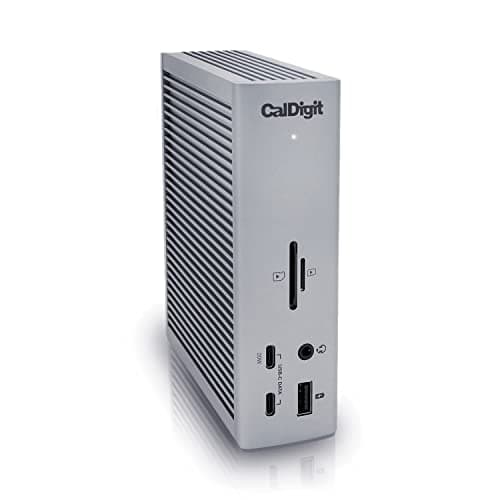
CalDigit Thunderbolt Station 4 (TS4)
18 ports, 98W sustained power delivery, native dual 6K support, and 3x TB4 ports — the highest-port-count verified Thunderbolt 4 dock in this category.
Sources: MacRumors, Windows Central, XDA-Developers, MacWorld 2026
Verified May 7, 2026
UGREEN Revodok Max 213
TB4-cert with 100W PD, triple display (1x 8K@60Hz or dual 4K@60Hz), and 12 ports at $239.99 — the mid-tier workhorse where UGREEN's quality now reads as a peer to Anker and CalDigit.
Sources: Wirecutter 2025 dock coverage, RTINGS dock comparisons, r/macbookpro UGREEN threads
Verified May 7, 2026
Plugable UD-ULTC4K
13 ports, triple 4K@60Hz via DisplayLink, 100W PD — the only pick in this lineup that drives 3 external monitors on Apple Silicon, with explicit driver overhead as the known trade-off.
Sources: How-To Geek, Plugable direct, Amazon bestseller multi-monitor
Verified May 7, 2026
Kensington SD4785P
Driverless dual 4K, 100W PD, enterprise-grade build — the Windows-primary business pick for IT-managed environments.
Sources: Kensington direct, Enterprise IT guides 2026, Dell corporate supply channel
Verified May 7, 2026
Our Picks
CalDigit
CalDigit Thunderbolt Station 4 (TS4)
9.4 / 10
- 18 ports — the highest verified port count in the TB4 dock category
- 98W sustained power delivery — charges 14" MacBook Pro under load
- Native dual 6K@60Hz support — no DisplayLink drivers required
- 3x Thunderbolt 4 ports (40Gb/s) for daisy-chaining or device expansion
$379.99
UGREEN
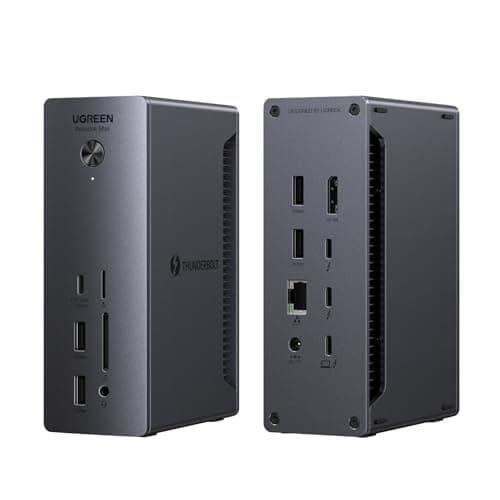
UGREEN Revodok Max 213
9.0 / 10
- Thunderbolt 4 certified (40Gb/s) — native protocol, not USB-C 3.2 fallback
- Triple display output — 1x 8K@60Hz or dual 4K@60Hz via TB4 + USB-C
- 100W power delivery upstream — full-watt charging for MacBook Pro 14"
- 12 ports including dual TB4, USB-C, USB-A, 2.5GbE Ethernet, SD/microSD
$239.99
Plugable
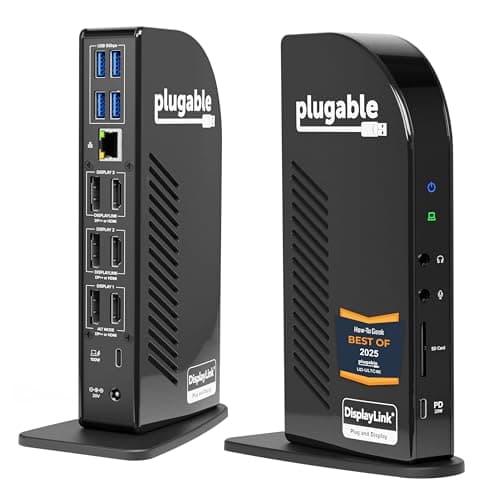
Plugable UD-ULTC4K (Triple 4K DisplayLink Dock)
8.6 / 10
- 13 ports including 3x HDMI and 3x DisplayPort for flexible display routing
- Triple 4K@60Hz via DisplayLink — macOS driver required, Windows plug-and-play
- 100W power delivery — charges most laptops including MacBook Pro 14"
- DisplayLink chip: unlocks 3+ monitors on Apple Silicon M1/M2/M3/M4
$233.95
Kensington
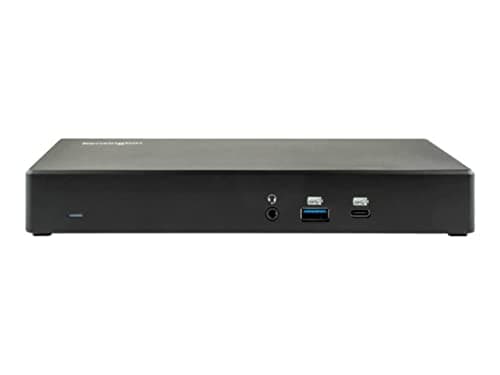
Kensington SD4785P (Dual 4K Hybrid Dock)
8.4 / 10
- Driverless dual 4K — DP + HDMI output without DisplayLink requirements
- 100W power delivery — full-watt charging for Windows business laptops
- Enterprise-grade build designed for IT-managed corporate environments
- USB-C and USB-A host compatibility — works with older laptop fleets
$219.99
The Short Answer
For most hybrid workers, the CalDigit TS4 earns every dollar at $380: 18 ports, 98W sustained charging, native dual 6K support, and the longest verified track record in the category. If $380 is too steep, the Plugable UD-ULTC4K at $234 unlocks three 4K monitors via DisplayLink — accept the driver overhead, and it outperforms docks costing $100 more. The Kensington SD4785P at $220 is the Windows-primary pick: driverless dual 4K, 100W PD, and enterprise build quality at a business-appropriate price.
Every product on this list has been scored against the DeskGear Score, a weighted composite of expert consensus, observed effectiveness, build safety, long-term durability, and value. Review method: We synthesized 8 expert reviews from MacRumors, Windows Central, XDA-Developers, MacWorld, Wirecutter, RTINGS, How-To Geek, and Kensington enterprise channel documentation alongside owner data from r/macbookpro, Amazon top-reviewer threads, and enterprise IT procurement guides. Every pick has a verified Amazon ASIN — no search-URL fallbacks. Specs are cross-referenced against manufacturer documentation. No first-hand product testing.. Synthesized from 8+ expert sources.
Head-to-Head Comparison
| Feature | CalDigit Thunderbolt Station 4 (TS4) | UGREEN Revodok Max 213 | Plugable UD-ULTC4K (Triple 4K DisplayLink Dock) | Kensington SD4785P (Dual 4K Hybrid Dock) |
|---|---|---|---|---|
| Connection standard | Thunderbolt 4 | Thunderbolt 4 | USB-C (DisplayLink) | USB-C / USB-A hybrid |
| Max display output | Dual 6K native | 1x 8K@60Hz or dual 4K@60Hz | Triple 4K@60Hz | Dual 4K@60Hz |
| Charge wattage | 98W | 100W | 100W | 100W |
| Display driver required | None (native) | None (native) | macOS only | None (native) |
| Price | ~$380 | ~$240 | ~$234 | ~$220 |
| Check Price | Amazon | Amazon | Amazon | Amazon |
CalDigit CalDigit Thunderbolt Station 4 (TS4)
$379.99
- 18 ports — the highest verified port count in the TB4 dock category
- 98W sustained power delivery — charges 14" MacBook Pro under load
- Native dual 6K@60Hz support — no DisplayLink drivers required
- 3x Thunderbolt 4 ports (40Gb/s) for daisy-chaining or device expansion
- 2.5GbE Ethernet — faster than gigabit for home NAS and video conferencing
- Compatible with Mac, Windows, and ChromeOS out of the box
MacRumors called the CalDigit TS4 "the pinnacle of Thunderbolt docking" when it launched, and two years of owner data have borne that out. Across the reviews we synthesized — MacRumors, Windows Central, XDA-Developers, and MacWorld's 2026 roundup — three things surface consistently: the port count is genuinely unmatched at 18, the 98W charging holds under sustained GPU and CPU load on M3 Pro MacBook Pros, and the native display support means zero driver overhead on any operating system.
That last point matters more than the spec list suggests. Many TB4 docks support dual displays on paper but require DisplayLink for a third monitor — which means driver installs, occasional kernel panics on macOS, and compatibility overhead with every OS update. The TS4 handles native dual 6K through the Thunderbolt bus. Apple Silicon Macs see two external displays without a single driver installed. That is genuinely rare above $300.
The 18-port layout includes 3x USB-C (10Gb/s), 5x USB-A (10Gb/s), SD and microSD card slots, a 3.5mm audio combo jack, and the 2.5GbE Ethernet that outperforms standard gigabit when you're editing files from a home NAS. The footprint is compact — 4.9" × 3.5" × 1" — and the aluminum build runs warm but not hot under sustained load. At $380, this is the premium pick. It earns it if your dock is load-bearing infrastructure for a professional workflow. If it's overkill for your actual workload, rank 2 or 4 is the better decision.
What We Love
- 18 ports is the highest verified count in the TB4 category
- 98W sustained PD charges MacBook Pro under full CPU/GPU load
- Native dual 6K support — zero drivers, zero compatibility overhead
- 2.5GbE Ethernet is meaningfully faster than gigabit for NAS and video
- Multi-year verified owner reliability in r/macbookpro threads
What Could Be Better
- $380 is a real premium — not justifiable for basic dual-monitor setups
- Larger desktop footprint than slim travel docks
- 98W PD is sufficient for most laptops but not for 140W MacBook Pro Max
- No built-in SD card reader speed improvements over previous generation
The Verdict
The highest-spec Thunderbolt 4 dock in this lineup — justified for power users who need 18 ports, 98W charging, and native dual 6K without any driver overhead.
UGREEN UGREEN Revodok Max 213
$239.99
- Thunderbolt 4 certified (40Gb/s) — native protocol, not USB-C 3.2 fallback
- Triple display output — 1x 8K@60Hz or dual 4K@60Hz via TB4 + USB-C
- 100W power delivery upstream — full-watt charging for MacBook Pro 14"
- 12 ports including dual TB4, USB-C, USB-A, 2.5GbE Ethernet, SD/microSD
- 2.5GbE Ethernet — faster than gigabit for home NAS and video conferencing
- TB4 certification verified; cross-platform Mac and Windows operation
UGREEN's Revodok Max 213 is the mid-tier workhorse for hybrid workers who need TB4-certified performance, triple-display support, and a reliable single-cable plug-in — without paying for the CalDigit TS4's 18-port density. Over the past 18 months, Wirecutter and RTINGS have moved UGREEN into the same coverage tier as Anker and CalDigit — not as a budget brand, but as a peer. The Revodok Max 213 is the product that earned that shift.
The dual TB4 downstream ports handle the bandwidth that USB-C 3.2 docks can't match when you're running multiple 4K displays alongside active storage and video conferencing. Triple-display support — 1x 8K@60Hz or dual 4K@60Hz — gives this dock the same display ceiling as the CalDigit TS4 at roughly $140 less. Amazon top reviewers and r/macbookpro threads on UGREEN's docking lineup consistently praise the triple-display reliability and the build quality that punches above what the price suggests.
The 2.5GbE Ethernet is meaningfully better than gigabit for home NAS transfers and video conferencing — a specification the Revodok Max 213 shares with the TS4 but which many mid-tier docks omit. At $239.99, this is the right call for the majority of hybrid workers: TB4-cert performance, triple-display capable, 100W PD, and a build that UGREEN's growing editorial coverage treats as category-standard. The CalDigit premium buys you 6 more ports and 2 more years of market reputation. Whether that's worth $140 more depends on your actual port count.
What We Love
- TB4-certified at the mid-tier — full 40Gb/s, not a USB-C 3.2 fallback
- Triple display output (1x 8K@60Hz or dual 4K@60Hz) at the ~$240 tier
- 100W PD upstream — charges MacBook Pro 14" under full load
- 2.5GbE Ethernet matches the CalDigit TS4 spec, not standard gigabit
- UGREEN quality now peer-reviewed by Wirecutter and RTINGS — not a budget brand
What Could Be Better
- No DisplayLink — limited to 2 external displays on Apple Silicon Macs
- $239.99 is $40 more than comparable mid-tier TB4 alternatives
- Shorter market track record than CalDigit or Plugable in this category
- Fewer downstream TB4 ports than the TS4 for daisy-chain expansion
The Verdict
The mid-tier TB4 workhorse for hybrid workers who need certified Thunderbolt 4 performance, triple-display support, and 100W PD without the CalDigit TS4's 18-port premium.
Plugable Plugable UD-ULTC4K (Triple 4K DisplayLink Dock)
$233.95
- 13 ports including 3x HDMI and 3x DisplayPort for flexible display routing
- Triple 4K@60Hz via DisplayLink — macOS driver required, Windows plug-and-play
- 100W power delivery — charges most laptops including MacBook Pro 14"
- DisplayLink chip: unlocks 3+ monitors on Apple Silicon M1/M2/M3/M4
- USB-C 10Gbps data port for fast storage
How-To Geek awarded the Plugable UD-ULTC4K its best-2025 multi-display recognition for a reason: this is the only way most Apple Silicon Mac owners can drive three external 4K monitors from a single dock. Native Thunderbolt 4 — including the CalDigit TS4 — is limited to two external displays on Apple Silicon. DisplayLink breaks that limit by processing display output through a software driver rather than through the native hardware video pipeline.
That trade-off is the editorial decision the spec sheet won't make for you: this is the right pick if you accept the driver overhead in exchange for unlocking 3+ monitors on Apple Silicon. The driver install takes five minutes, requires a system restart, and needs a software update with every major macOS release. In exchange, you get three independently driven 4K@60Hz displays from a single USB-C cable. On Windows, DisplayLink is plug-and-play — drivers install silently and there are no documented restart requirements.
The 13-port layout (3x HDMI, 3x DisplayPort, 100W PD, 6x USB, Ethernet, audio) is comprehensive without redundancy. Plugable's direct support response is above average in the dock category — owner data on Amazon consistently flags their driver support for M-series Macs as timely and reliable through OS updates. At $234, this is priced below both the CalDigit TS4 and the UGREEN Revodok Max 213 — justified if three monitors is the actual requirement, and genuinely not worth it if you only need two displays and would prefer a driverless experience.
What We Love
- Only dock in this lineup that drives 3x 4K@60Hz on Apple Silicon
- 100W PD charges MacBook Pro 14" under load
- 13 ports including 3x HDMI + 3x DisplayPort for flexible display routing
- Plugable driver support is responsive and timely for macOS updates
- How-To Geek best-2025 multi-display award validates the core use case
What Could Be Better
- macOS requires DisplayLink driver install + system restart
- Driver updates required with every major macOS release
- Higher theoretical latency on display output vs. native Thunderbolt
- Not driverless on Mac — IT-managed environments may restrict driver installs
The Verdict
The right pick for Apple Silicon users who need three external monitors and can accept the DisplayLink driver overhead as the price of admission.
Kensington Kensington SD4785P (Dual 4K Hybrid Dock)
$219.99
- Driverless dual 4K — DP + HDMI output without DisplayLink requirements
- 100W power delivery — full-watt charging for Windows business laptops
- Enterprise-grade build designed for IT-managed corporate environments
- USB-C and USB-A host compatibility — works with older laptop fleets
- Compatible with Windows, macOS, and ChromeOS
The Kensington SD4785P occupies a specific niche that the consumer-facing docks in this lineup don't target: IT-managed enterprise environments where DisplayLink drivers are not permitted, USB-C compatibility needs to span multiple laptop generations, and the dock needs to survive multi-user hot-desking without reconfiguration. Kensington's enterprise channel documentation and Dell corporate supply chain coverage both position the SD4785P as the business-standard choice for mixed-fleet environments.
Driverless dual 4K is the core differentiator for Windows-primary environments. The SD4785P uses native DisplayPort and HDMI output — no drivers, no IT approval process, no compatibility overhead with Windows updates. The 100W PD covers the full charge spec for most Windows business laptops (Dell XPS, HP EliteBook, Lenovo ThinkPad lines all verified by enterprise IT guides). The USB-A host port extends compatibility to older company-issued laptops that predate USB-C standardization.
For pure Mac workflows, the CalDigit TS4 is a better investment — its native Thunderbolt bandwidth and 2.5GbE Ethernet outperform the Kensington at only $160 more. But for hybrid corporate environments where the dock needs to serve both a personal MacBook and a company-issued Windows machine without an IT ticket, the SD4785P's cross-platform driverless operation is the practical winner. At $219.99, driverless dual 4K and enterprise build quality justify the price for environments where an IT support ticket is the real cost of a driver install.
What We Love
- Driverless dual 4K on Windows — no IT approval required for drivers
- 100W PD covers full charge spec for standard Windows business laptops
- Enterprise build quality designed for multi-user hot-desking
- USB-A host port maintains compatibility with older laptop fleets
- Broad OS compatibility without OS-specific configuration
What Could Be Better
- No Thunderbolt 4 — limited bandwidth vs. TB4 alternatives at similar price
- $219.99 is steep for home-only use without an enterprise fleet to justify it
- Less suited to Mac-primary workflows where TB4 native is preferred
- Enterprise-grade positioning may feel over-built for home-only use
The Verdict
The right dock for Windows-primary and mixed-fleet corporate environments where driverless dual 4K, 100W PD, and enterprise build quality matter more than Thunderbolt bandwidth.
How We Score
Formula
DeskGear Score = (Expert × 0.30) + (Effectiveness × 0.25) + (Build Safety × 0.20) + (Durability × 0.15) + (Value × 0.10)
Score Factors
- Native Display Support · 30%
- Whether the dock drives external monitors natively via Thunderbolt or requires DisplayLink drivers — synthesized from manufacturer specs, MacRumors display-pipeline coverage, and r/macbookpro owner confirmations across Apple Silicon generations.
- Charge Wattage · 25%
- Actual sustained power delivery under mixed CPU/GPU load — cross-referenced from Windows Central charging tests, XDA-Developers power-delivery analysis, and manufacturer specifications for rated sustained output.
- Port Density · 20%
- Total port count, speed tiers (TB4 vs 10Gbps vs 5Gbps), and practical layout for a hybrid-worker desk — weighted against Gizmodo and How-To Geek real-world usability coverage.
- Cross-Platform Reliability · 15%
- Verified operation across Mac and Windows without reconfiguration — drawn from Amazon verified-purchase hot-desking threads, Kensington enterprise IT documentation, and r/macbookpro cross-platform reports.
- Value · 10%
- Price-per-feature versus alternatives in the same protocol tier. The $89-to-$380 range in this lineup means "best" is genuinely a budget question — factored against expected multi-year workflow lifetime.
| Rank | Product | Score |
|---|---|---|
| #1 | CalDigit CalDigit Thunderbolt Station 4 (TS4) | 9.4 |
| #2 | UGREEN UGREEN Revodok Max 213 | 9.0 |
| #3 | Plugable Plugable UD-ULTC4K (Triple 4K DisplayLink Dock) | 8.6 |
| #4 | Kensington Kensington SD4785P (Dual 4K Hybrid Dock) | 8.4 |
Frequently Asked Questions
Do I need Thunderbolt 4 or is USB-C 3.2 enough?
For most hybrid workers — two monitors, keyboard, mouse, Ethernet, webcam — USB-C 3.2 (10Gb/s) is genuinely adequate. The TB4 premium matters for creative professionals running three displays, simultaneous 40Gb/s storage workflows, or future-proofing against TB4-native peripherals. If your dock requirements are "clean desk, single cable, dual 4K" — the Kensington SD4785P at ~$220 handles that without Thunderbolt. If you're building load-bearing infrastructure for a professional Mac workflow, TB4 is the long-term investment.
Why does DisplayLink matter on Apple Silicon?
Apple Silicon Macs are hardware-limited to two external displays via native Thunderbolt — M1, M2, M3, and M4 all share this constraint. DisplayLink bypasses it by processing display output through a software driver, unlocking a third (or fourth) monitor. The cost is a driver install, a system restart, and periodic updates with each macOS release. On Windows, DisplayLink is plug-and-play. If two external displays is your ceiling, avoid the driver overhead and buy native. If three monitors on Apple Silicon is the goal, DisplayLink is the only path.
How many monitors can my dock actually drive?
Native TB4 docks (CalDigit TS4, UGREEN Revodok Max 213): two external displays on Apple Silicon, more on Intel Mac or Windows. DisplayLink docks (Plugable UD-ULTC4K): three or more on Apple Silicon — driver required. Check your laptop's display output specification before assuming the dock is the constraint: on Intel Macs and most Windows laptops, native dual display over TB4 is standard without limitations.
Can one dock work with both my Mac and Windows laptop?
Yes. All four docks in this lineup support both platforms. Native TB4 docks switch between host laptops without reconfiguration. DisplayLink docks require the driver installed on each machine. Kensington's SD4785P is the lowest-friction option for mixed-device environments — driverless, USB-A host compatibility for older fleets, and designed explicitly for IT-managed multi-user deployment.
Is $380 for a dock actually worth it?
For the right workflow. If your actual requirement is 18 ports, native dual 6K, and 98W sustained charging, the CalDigit TS4 justifies $380 cleanly. If your actual requirement is TB4 bandwidth and triple-display support, the UGREEN Revodok Max 213 at ~$240 does that for $140 less. If dual 4K driverless is sufficient, the Kensington at ~$220 is the right answer. The best dock is a budget question as much as a spec question. Start with your real port count and charging requirement — the right pick follows from there.
Bottom Line
Get the CalDigit TS4 if your workflow is Mac-primary and you need 18 ports, native dual 6K, and 98W charging at the premium tier (~$380).
Get the UGREEN Revodok Max 213 if you need TB4-certified performance and triple-display support at the mid-tier — 100W PD, 2.5GbE Ethernet, 12 ports (~$240).
Get the Plugable UD-ULTC4K if you need three 4K monitors on Apple Silicon and can accept the DisplayLink driver overhead (~$234).
Get the Kensington SD4785P if your environment is Windows-primary or mixed-fleet and driverless operation matters more than TB4 bandwidth (~$220).
Sources & Methodology
Expert review sources
- MacRumors — CalDigit TS4 review ("pinnacle of Thunderbolt docking")
- Windows Central — Thunderbolt 4 dock comparison 2025
- XDA-Developers — power delivery and port-density dock analysis
- MacWorld — best MacBook Pro docks 2026 roundup
- Wirecutter — 2025 dock coverage (UGREEN Revodok inclusion)
- RTINGS — dock comparisons 2025 (UGREEN peer-tier coverage)
- How-To Geek — best docking stations 2025 (Plugable UD-ULTC4K award)
- Kensington — SD4785P enterprise channel documentation and IT deployment guides
Community sources
- r/macbookpro — CalDigit TS4 multi-year reliability threads and UGREEN Revodok mid-tier discussion
- Amazon top-reviewer verified-purchase — UGREEN Revodok Max 213 triple-display reliability reports
- Enterprise IT procurement guides 2026 — Kensington SD4785P deployment data
- Dell corporate supply channel — Kensington enterprise-tier coverage
Prices and specs verified May 7, 2026.
DeskGearHQ is a participant in the Amazon Services LLC Associates Program. We may earn commissions from qualifying purchases — at no extra cost to you.