Best Thunderbolt 5 Docks 2026: 5 Picks Compared
Thunderbolt 5 brings 80Gb/s each way, up to 120Gb/s with Bandwidth Boost, and 140W host charging as the baseline. The CalDigit TS5 is the pick most people should read first; if you need ten-gig networking or an onboard SSD, two others earn the premium.
This article contains affiliate links. We may earn a commission at no extra cost to you. Learn more
Featured in this Guide
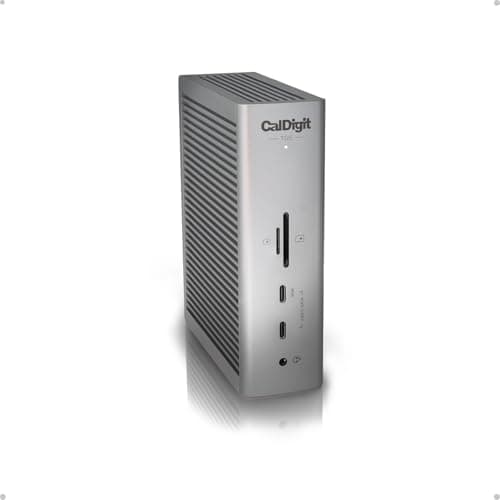
CalDigit
TS5 Thunderbolt 5 Dock
- •For the buyer who wants the cleanest Thunderbolt 5 experience without paying for ports they will never plug in — 15 ports
- •140W
- •fanless
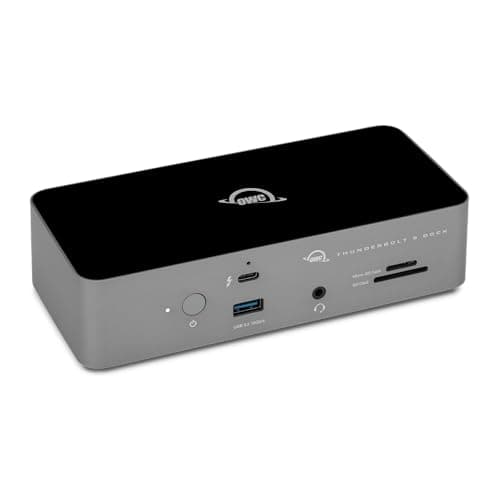
OWC
11-Port Thunderbolt 5 Dock
- •For the buyer who wants four Thunderbolt 5 ports and 140W charging for the least money — fanless
- •compact
- •and rated for up to three 8K displays.
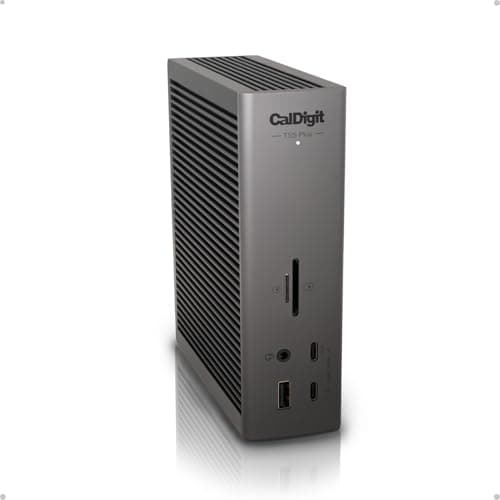
CalDigit
TS5 Plus Thunderbolt 5 Dock
- •For the power user who genuinely fills 20 ports and needs ten-gigabit networking — a 330W supply feeds everything without throttling the host.
Kensington
SD7100T5 EQ Pro Thunderbolt 5 Dock
- •For the buyer who wants a built-in NVMe SSD and a CompactFlash reader in the dock itself — a feature set almost nothing else in this class offers.
Kensington
SD5000T5 EQ Thunderbolt 5 Dock
- •For the buyer who wants Thunderbolt 5 and 140W at the lowest price here
- •plus a rare 60W downstream port that fast-charges a second device.
The Short Answer
For most people the CalDigit TS5 is the pick: 15 ports, 4x Thunderbolt 5 connectors, 140W host charging, and the highest DeskGear Thunderbolt 5 Dock Score in our weighted comparison. A Thunderbolt 5 laptop unlocks the full 80Gb/s; a Thunderbolt 4 machine still works with every dock here, just at Thunderbolt 4 speeds.
Searching "best Thunderbolt 5 dock" as of July 2026 tangles three questions together: whether the added bandwidth reaches your laptop, whether the charging sustains a 16-inch machine under load, and whether you pay for ports you will never populate. The generational improvement is substantial, because Thunderbolt 5 transmits 80Gb/s bidirectionally compared to Thunderbolt 4's 40Gb/s — approximately 2x the throughput — while Bandwidth Boost elevates display data as high as 120Gb/s, roughly 3x the video headroom a Thunderbolt 4 dock delivers. Our weighted DeskGear Thunderbolt 5 Dock Score normalized all 5 contenders across charging, bandwidth, display, port mix, and value, aggregating Macworld, 9to5Mac, TechRadar, PCWorld, and Windows Central coverage. The determinative question remains which laptop you own, since a Thunderbolt 5 host unlocks the complete 80Gb/s whereas a Thunderbolt 4 machine still connects and charges reliably — future-proofing only materializes once your laptop catches up.
Side-by-side: the five Thunderbolt 5 docks ranked
Input & Connectivity
Chart
 DeskGearHQ.com
Best overall: CalDigit TS5 Thunderbolt 5 Dock
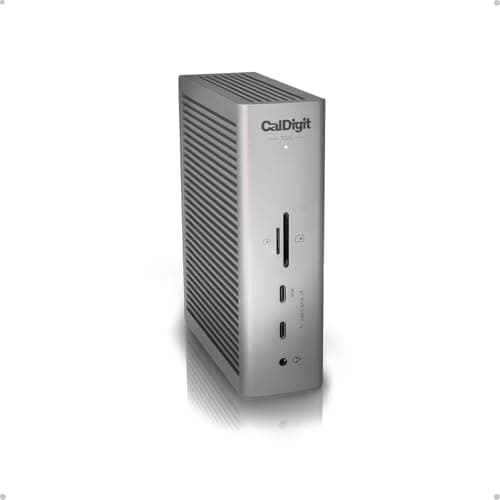
9to5Mac names the CalDigit TS5 Thunderbolt 5 Dock the best Thunderbolt 5 dock for most Mac users after a month of daily use, and Macworld reaches the same conclusion on the strength of its port balance, which is why it earns the highest weighted DeskGear Thunderbolt 5 Dock Score here. The argument sits in the specification sheet: 15 ports built around 4x Thunderbolt 5 connectors provide a host, 3x downstream 80Gb/s ports, 3x USB-C 10Gbps, 2x USB-A, 2.5GbE, and dual UHS-II card readers, so most desks stop juggling adapters. The 140W host figure matters under load, because CalDigit states the supply maintains full 140W to the laptop even as connected devices draw their own budget, which keeps a 16-inch MacBook Pro charging through a lengthy export rather than trickling. Bandwidth Boost reallocates lanes to carry as much as 120Gb/s of display data, sufficient for dual 4K at 240Hz or 4x 4K panels at 144Hz on a Max-class Mac. The fanless chassis stays literally silent under sustained draw, reviewers note. The honest counterweight is networking, because compared to the TS5 Plus you get 2.5GbE rather than 10GbE, so a NAS-heavy workflow is the single reason to spend up.
What We Love
- 15 ports including four Thunderbolt 5 (80Gb/s) — one host plus three downstream, three USB-C 10Gbps, two USB-A, 2.5GbE, and audio.
- 140W host charging that CalDigit says holds at full 140W even as downstream devices draw power, rather than throttling the host.
- Bandwidth Boost pushes display data to 120Gb/s — dual 4K@240Hz, triple 4K@144Hz, or up to four 4K@144Hz on an M-series Max Mac.
- Compact fanless aluminum body that stays silent under sustained load, with UHS-II SD and microSD readers built in.
What Could Be Better
- $399.95 sits above several capable Thunderbolt 5 rivals with similar port counts.
- 2.5GbE Ethernet, not the 10GbE on the pricier TS5 Plus, so NAS-heavy desks may want to step up.
The Verdict
If you want the cleanest Thunderbolt 5 setup without paying for ports you will never plug in, the CalDigit TS5 Thunderbolt 5 Dock reads first. The 9.4 reflects 15 ports, four Thunderbolt 5 connectors, 140W host charging CalDigit says never drops, and a fanless chassis reviewers call dead silent. The 20-port TS5 Plus adds 10GbE; the TS5 is for everyone who does not need that.
Best value: OWC 11-Port Thunderbolt 5 Dock
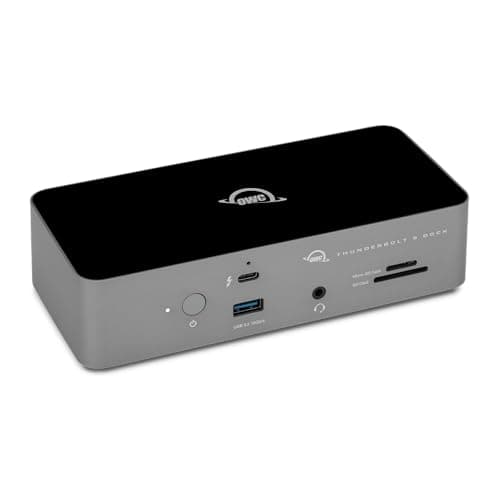
Macworld frames the OWC 11-Port Thunderbolt 5 Dock as a Goldilocks dock with just enough ports, and the price converts that framing into the value pick, because it matches the CalDigit TS5 on the Thunderbolt 5 count and the 140W charging floor while costing meaningfully less, which is precisely how its weighted DeskGear Thunderbolt 5 Dock Score normalized to within a fraction of the flagship composite. The layout splits sensibly: the front panel carries a Thunderbolt 5 port, a USB 3.2 port, a 3.5mm jack, and an SD/microSD combo reader, while the rear holds power, 2.5GbE, 2x additional USB ports, and 3x downstream Thunderbolt 5 connectors — 4x Thunderbolt 5 total. OWC rates it for up to 3x 8K displays or 2x 6K monitors, and the 140W delivery fast-charges the laptop while still powering accessories. The fanless aluminum build is a genuine advantage for editors and audio engineers, since Cult of Mac and Macworld both single out its silent operation, and the compact footprint conserves desk space. The honest gaps are the 2.5GbE ceiling and the absence of a native HDMI or DisplayPort jack, so compared to a CalDigit, anyone requiring 10GbE or additional ports steps up while everyone else banks the saving.
What We Love
- Four Thunderbolt 5 ports (one host, three downstream) plus 2.5GbE at a lower price than the CalDigit TS5 or TS5 Plus.
- 140W power delivery fast-charges a MacBook while still leaving budget for connected accessories.
- Fanless aluminum chassis in a compact 7 x 3.1 x 1.7-inch footprint that Cult of Mac and Macworld both note runs silent.
- Front-panel SD/microSD reader, 3.5mm audio jack, and a Thunderbolt 5 port for quick peripheral access; drives up to three 8K displays.
What Could Be Better
- Fewer total ports than the CalDigit TS5 or the 20-port TS5 Plus, so a heavily loaded desk may outgrow it.
- 2.5GbE rather than 10GbE, and no DisplayPort or HDMI jack — monitors connect over Thunderbolt 5 or an adapter.
The Verdict
If you want real Thunderbolt 5 without the flagship price, the OWC 11-Port Thunderbolt 5 Dock suits most desks. At $329.99 it delivers four Thunderbolt 5 ports, 140W charging, and 2.5GbE in a fanless body for less than the CalDigit flagships. Skip it only if you need more than 11 ports or 10-gigabit networking — otherwise it is the easiest way into the new standard.
Best for maximum ports + 10GbE: CalDigit TS5 Plus Thunderbolt 5 Dock
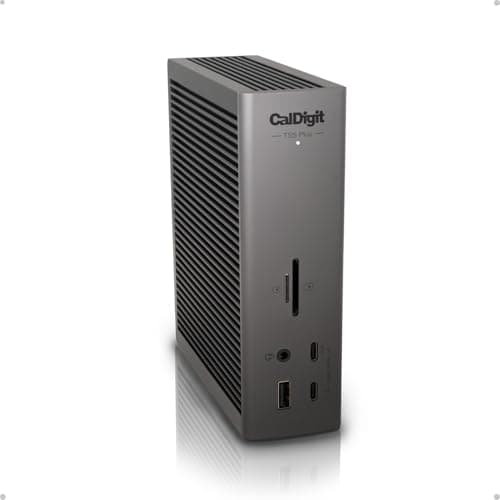
CalDigit TS5 Plus Thunderbolt 5 Dock
(Current price, subject to change)
AppleInsider and Macworld both treat the CalDigit TS5 Plus Thunderbolt 5 Dock as the maximum-connectivity option in the class, and the specification sheet substantiates that framing, because 20 ports built around 3x Thunderbolt 5 connectors, 5x USB-A and 5x USB-C 10Gbps ports, DisplayPort 2.1, dual UHS-II card readers, and 10 Gigabit Ethernet constitute more downstream capability than anything else assembled here. The 10GbE is the decisive differentiator compared to the standard TS5, since it multiplies the wired-networking ceiling roughly 4x for a NAS pull or a wired video pipeline. CalDigit pairs the dock with a 330W supply that reviewers note is dimensioned to feed all 12 powered ports while still maintaining 140W to the host, so nothing throttles the laptop charge, and the display side reaches dual 8K@60Hz or dual 4K@240Hz on capable Macs. Two caveats preserve the honesty: at $499.99 it ranks among the priciest docks available, and Cult of Mac measured the chassis climbing to 40-41°C under sustained load, warm to the touch though not a safety concern. Versus the standard CalDigit TS5 Thunderbolt 5 Dock, a desk that cannot articulate a use for 10GbE and twenty ports gets the identical Thunderbolt 5 core for roughly $100 less.
What We Love
- 20 ports — 3x Thunderbolt 5 (80Gb/s), 5x USB-A 10Gbps, 5x USB-C 10Gbps, DisplayPort 2.1, dual UHS-II readers, and three audio jacks.
- 10 Gigabit Ethernet, a real step up from the 2.5GbE most rivals carry, which matters on a NAS-heavy or wired-video desk.
- A 330W power supply feeds every powered port while still holding full 140W host charging with no throttling.
- Dual controllers and up to dual 8K@60Hz or dual 4K@240Hz output, plus a native DisplayPort 2.1 jack that frees a Thunderbolt port.
What Could Be Better
- $499.99 is among the most expensive docks on the market, and it is more ports than most single-desk setups will ever fill.
- Cult of Mac measured the chassis reaching 40-41°C (104-106°F) under sustained load — warm to the touch, not dangerous.
The Verdict
If you genuinely fill twenty ports or need ten-gigabit networking, the CalDigit TS5 Plus Thunderbolt 5 Dock is built for that without compromise. Its 330W supply feeds all 12 powered ports while holding 140W to the host, and it pushes dual 8K@60Hz output. Two caveats: it is $499.99, among the priciest made, and reviewers measured the chassis reaching 40-41°C under load.
Best for onboard storage: Kensington SD7100T5 EQ Pro Thunderbolt 5 Dock
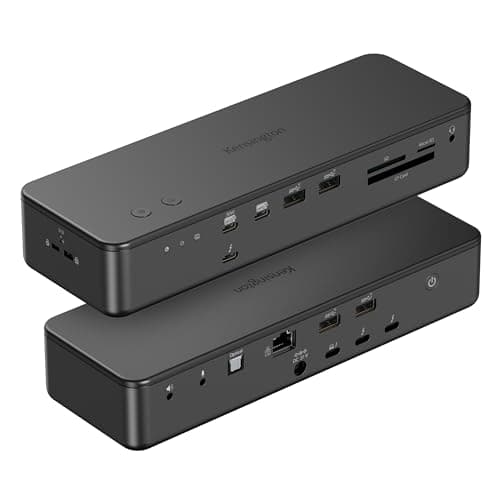
Kensington SD7100T5 EQ Pro Thunderbolt 5 Dock
(Current price, subject to change)
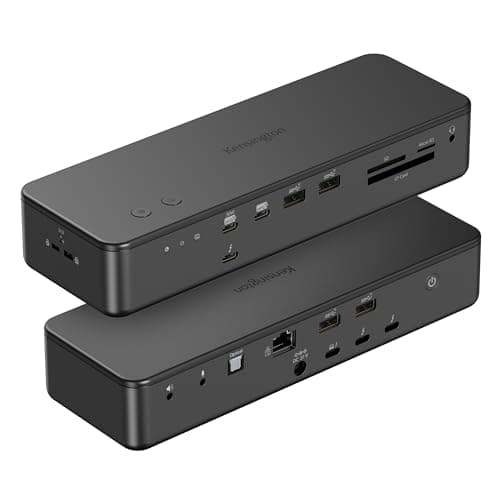
Windows Central singles out the built-in M.2 SSD slot on the Kensington SD7100T5 EQ Pro Thunderbolt 5 Dock as its new favorite docking-station feature, and TechRadar arrives at the same conclusion, because the combination of onboard storage, a CompactFlash reader, optical audio, and programmable hotkeys is a feature set that essentially does not exist elsewhere in this category. The differentiating capability is the storage: the top panel detaches to reveal a lockable M.2 slot equipped with thermal pads and a fastener that accommodates any PCIe 3.0 or 4.0 NVMe drive, and once seated the SSD becomes accessible to every connected computer, transforming the dock into a bootable or scratch volume rather than another peripheral dongle. The remaining 19-in-1 configuration is comprehensive: 4x Thunderbolt 5 ports, 4x USB-A 10Gbps, 2x USB-C 10Gbps with one supplying 30W, CF/SD/microSD 4.0 readers, and four audio options, collectively powered by 140W host charging and up to 120Gb/s Bandwidth Boost driving dual 6K on a Mac. Kensington manufactures the fanless chassis from 97% post-consumer recycled aluminum, and TechRadar documents no overheating despite the deliberate absence of a fan. Compared to a conventional dock, the honest limitations are an SSD you purchase separately and 2.5GbE networking rather than 10GbE.
What We Love
- A built-in lockable PCIe M.2 NVMe SSD slot (PCIe 4.0, accepts 3.0 or 4.0 drives) — a genuinely rare feature in a docking station.
- 19-in-1 layout: four Thunderbolt 5 ports total, 4x USB-A 10Gbps, 2x USB-C 10Gbps (one at 30W), CF/SD/microSD 4.0 readers, and four audio options.
- 140W host charging and up to 120Gb/s Bandwidth Boost over a single cable, with dual 6K on Mac or triple 4K on Windows.
- Fanless chassis in 97% post-consumer recycled aluminum that TechRadar reports runs without overheating despite the lack of a fan.
What Could Be Better
- At $378.00 the dock is only worth it if you actually use the M.2 slot — the SSD is an extra purchase on top.
- The slot ships empty, and networking is 2.5GbE rather than 10GbE.
The Verdict
If you want fast storage living inside the dock itself, the Kensington SD7100T5 EQ Pro Thunderbolt 5 Dock offers what almost nothing else here does. Its lockable PCIe 4.0 M.2 slot turns the dock into a boot or scratch drive, and it adds a CompactFlash reader for camera cards. The catch is the empty slot — you supply the SSD — and 2.5GbE networking rather than 10GbE.
Best value entry to Thunderbolt 5: Kensington SD5000T5 EQ Thunderbolt 5 Dock
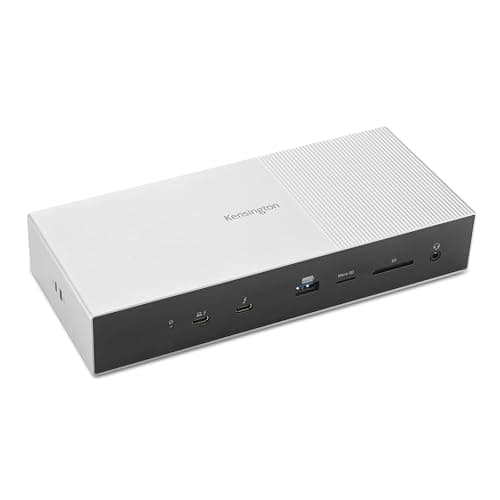
Kensington SD5000T5 EQ Thunderbolt 5 Dock
(Current price, subject to change)
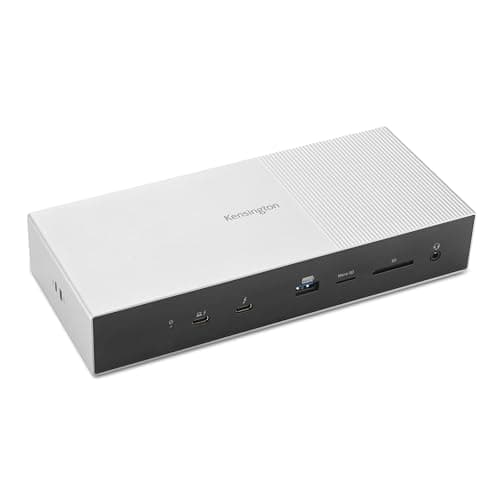
Macworld and PCWorld both position the Kensington SD5000T5 EQ Thunderbolt 5 Dock as a value entry into Thunderbolt 5, and the pricing is what earns that designation, because it delivers the 140W host charging and 4x Thunderbolt 5 ports that define the standard at the lowest cost in this roundup, which is why its weighted DeskGear Thunderbolt 5 Dock Score still lands respectably despite trailing on port count. The genuinely uncommon feature is the 60W downstream Thunderbolt 5 port that Macworld highlights, since most docks reserve fast charging for the host and leave downstream ports trickling, so this one replenishes a phone or tablet at real speed while the laptop charges. The remaining 11-port layout covers the essentials: 3x downstream Thunderbolt 5 connectors, 3x USB-A 10Gbps ports, dual SD and microSD readers, 2.5GbE, and a combo audio jack, all transmitting 80Gb/s with up to 120Gb/s Bandwidth Boost. Display support reaches triple 4K@144Hz or dual 8K@60Hz across M1-through-M5 MacBooks and Windows machines. Compared to the OWC you forgo port depth, and versus the TS5 Plus you forgo 10GbE, yet you retain the components most desks genuinely use at the lowest price available here.
What We Love
- One of the more affordable routes into Thunderbolt 5, with 140W host charging over a single cable.
- A rare 60W downstream Thunderbolt 5 port that fast-charges a phone or tablet — most docks trickle-charge their downstream ports.
- 11 ports: three downstream Thunderbolt 5, three USB-A 10Gbps, dual SD/microSD readers, 2.5GbE, and a combo audio jack.
- 80Gb/s data with up to 120Gb/s Bandwidth Boost, supporting triple 4K@144Hz or dual 8K@60Hz across M1-through-M5 Macs and Windows.
What Could Be Better
- Fewer ports than the CalDigit and OWC picks, and no DisplayPort or HDMI jack — monitors connect over the downstream Thunderbolt 5 ports.
- 2.5GbE rather than 10GbE, so a NAS-heavy desk should look at the TS5 Plus instead.
The Verdict
If you want into Thunderbolt 5 for the least money, the Kensington SD5000T5 EQ Thunderbolt 5 Dock is a sensible pick for that budget. At $299.99 it delivers 140W host charging and four Thunderbolt 5 ports, and it adds a rare 60W downstream port that fast-charges a second device where most docks only trickle. Just know the port count and 2.5GbE trail the CalDigit and OWC picks.
How We Score: DeskGear Thunderbolt 5 Dock Score
DeskGear Thunderbolt 5 Dock Score
Score Formula
(Charging Headroom x 0.25) + (Bandwidth Throughput x 0.25) + (Display Capability x 0.20) + (Port Density & Mix x 0.20) + (Value per Dollar x 0.10)Score Factors
- Charging HeadroomUpstream host power delivery — 140W is the baseline across true Thunderbolt 5 docks, with the downstream port budget as a tiebreaker
- Bandwidth ThroughputThunderbolt 5 data ceiling — 80Gb/s each way with up to 120Gb/s Bandwidth Boost for high-refresh displays and external SSDs
- Display CapabilityNative monitor support: count, resolution and refresh from dual 6K@60Hz to dual 8K@60Hz and dual 4K@240Hz
- Port Density & MixTotal downstream ports and balance of Thunderbolt 5, USB-C, USB-A, Ethernet speed (2.5GbE vs 10GbE), card readers, and onboard storage
- Value per DollarDelivered capability against current Amazon price — rewards docks covering the essentials without flagship-tier extras you will not use
DeskGear Thunderbolt 5 Dock Score — Ranked
CalDigit TS5 Thunderbolt 5 Dock
9.4/10Best overall — 15 ports, four Thunderbolt 5 connectors, 140W held at full even under downstream draw, fanless and silent.
OWC 11-Port Thunderbolt 5 Dock
9.1/10Best value — four Thunderbolt 5 ports, 140W, 2.5GbE, fanless, up to three 8K displays, the lowest-priced full dock here.
CalDigit TS5 Plus Thunderbolt 5 Dock
9.0/10Best for maximum ports — 20 ports, 10GbE, 330W supply, dual 8K@60Hz, offset by price and a warm chassis under load.
Kensington SD7100T5 EQ Pro Thunderbolt 5 Dock
8.8/10Best for onboard storage — built-in lockable M.2 NVMe slot, CompactFlash reader, 140W, dual 6K on Mac.
Kensington SD5000T5 EQ Thunderbolt 5 Dock
8.7/10Best value entry — 140W and four Thunderbolt 5 ports at the lowest price, with a rare 60W downstream fast-charge port.
Which laptops work best with these docks
The single compatibility fact that reshapes this decision: a Thunderbolt 5 host is what unlocks the full 80Gb/s and the 120Gb/s Bandwidth Boost, so a Thunderbolt 4 or Thunderbolt 3 laptop plugged into any of these docks still connects and charges reliably, just at Thunderbolt 4's 40Gb/s ceiling. CalDigit, OWC, and Kensington all confirm their Thunderbolt 5 docks are backward-compatible with Thunderbolt 5, Thunderbolt 4, Thunderbolt 3, and USB4 hosts across both Mac and Windows, which means buying one today future-proofs the desk while the laptop underneath catches up. On the Mac side, Apple's M-series Pro and Max chips drive the multi-monitor configurations these docks advertise, whereas a base M-series chip still caps external displays at the chip's own limit regardless of the dock, so check your specific MacBook before counting on triple 4K. The 140W host charging is uniform across all five picks, which is enough to keep a 16-inch MacBook Pro topped up under sustained CPU and GPU load rather than trickle-charging it, and a smaller MacBook Air or 14-inch Pro simply draws less of that budget. A Windows laptop needs a genuine Thunderbolt 5 or USB4 port to reach full speed, since a plain USB-C port may limit both bandwidth and display output.
Cost vs. capability across the field
The price spread across this field tracks genuine capability rather than brand tax, which is exactly why the weighted value factor inside our composite calculation rewards the docks that cover the essentials without forcing you to buy networking or storage you will never use. The Kensington SD5000T5 anchors the entry tier as the lowest-cost route into Thunderbolt 5 that still delivers 140W and the uncommon 60W downstream port, while the OWC then lands the inflection point because it normalizes to nearly the CalDigit TS5 composite on charging and Thunderbolt 5 count while costing less. Each step upward buys one specific thing, since the Kensington SD7100T5 adds an onboard NVMe SSD slot and a CompactFlash reader, the standard CalDigit TS5 adds four more ports and a slightly deeper port mix, and the CalDigit TS5 Plus adds the 10-gigabit Ethernet and the full 20-port layout. The decisive comparison is OWC versus TS5 Plus, because that roughly $170 gap buys 10GbE, nine more ports, and dual 8K output, so if you cannot name a daily use for ten-gig networking and twenty ports the OWC produces the smarter outcome while the TS5 Plus yields real headroom for anyone who can.
When NOT to Buy
This guide is Thunderbolt 5 first, so the exclusions follow one rule: certified 80Gb/s Thunderbolt 5, not a Thunderbolt 4 dock relabeled for the new year. Thunderbolt 4 docks — still an excellent and cheaper choice for anyone on a Thunderbolt 4 laptop who will not upgrade soon — belong in our sibling Thunderbolt 4 docks guide, not here, because they cap at 40Gb/s and cannot carry the 120Gb/s Bandwidth Boost these picks deliver. We also skipped DisplayLink-driven docks that inflate monitor counts through a compression-and-software layer, since they trade native Thunderbolt output for driver overhead and live in our USB-C docking stations guide instead. And we left out the generic USB-C hubs that advertise "Thunderbolt 5 speeds" without the certification, because certification is the difference between a guaranteed spec floor and a marketing claim a vendor can legally undershoot by as much as 2x on bandwidth, display support, or charging. When the Thunderbolt 5 logo is real, the 80Gb/s floor is real.
Who Should Buy What
Who Should Buy What
| If you are… | Recommended pick |
|---|---|
Best-balanced buyer Wants the cleanest Thunderbolt 5 dock without flagship extras: 15 ports, 140W held at full, fanless silence, and 2.5GbE. | CalDigit TS5 Thunderbolt 5 Dock |
Value-first buyer Wants four genuine Thunderbolt 5 ports and 140W charging for the least money, in a compact fanless body with 2.5GbE. | OWC 11-Port Thunderbolt 5 Dock |
Maximum-connectivity power user Truly fills close to twenty ports and needs 10-gigabit networking; wants dual 8K output and a 330W supply that never throttles. | CalDigit TS5 Plus Thunderbolt 5 Dock |
Onboard-storage buyer Wants a built-in NVMe SSD and a CompactFlash reader inside the dock; shoots on CF cards or needs fast scratch space. | Kensington SD7100T5 EQ Pro Thunderbolt 5 Dock |
Budget Thunderbolt 5 buyer Wants the lowest-cost route into Thunderbolt 5 with full 140W charging and the rare 60W downstream fast-charge port. | Kensington SD5000T5 EQ Thunderbolt 5 Dock |
Frequently Asked Questions
What's the difference between a Thunderbolt 5 dock and a Thunderbolt 4 dock?
Thunderbolt 5 doubles the bandwidth to 80Gb/s in each direction against Thunderbolt 4's 40Gb/s, and adds Bandwidth Boost that reallocates lanes to carry up to 120Gb/s of display data. It also raises the baseline host charging to 140W. A Thunderbolt 4 dock still works well on a Thunderbolt 4 laptop, but it cannot reach those bandwidth or display ceilings.
Will a Thunderbolt 5 dock work with my Thunderbolt 4 laptop?
Yes. Every dock here is a Thunderbolt 5 host that stays backward-compatible with Thunderbolt 4, Thunderbolt 3, and USB4 laptops on Mac and Windows. You get reliable connectivity and charging at Thunderbolt 4 speeds today, and the dock unlocks the full 80Gb/s once you move to a Thunderbolt 5 laptop.
How many watts do I need to charge a MacBook Pro 16 through a Thunderbolt 5 dock?
Under sustained CPU and GPU load a 16-inch MacBook Pro can draw past 100W, so you want real headroom above that. All five docks here deliver 140W host charging, which is the Thunderbolt 5 baseline and enough to keep a 16-inch charging with margin rather than trickle-feeding it during a long export or compile.
What is Bandwidth Boost on a Thunderbolt 5 dock?
Bandwidth Boost is a Thunderbolt 5 mode that reallocates the connection's lanes to push display data as high as 120Gb/s when a monitor needs it, rather than holding the fixed 80Gb/s split. In practice it is what lets these docks drive dual 8K@60Hz or high-refresh 4K panels that a Thunderbolt 4 dock cannot.
Is the CalDigit TS5 Plus worth the extra money over the standard TS5?
It depends on two things: whether you need 10-gigabit Ethernet and whether you genuinely fill close to twenty ports. The TS5 Plus adds 10GbE, five more ports, and dual 8K output for about $100 more. If you cannot name a daily use for those, the standard TS5 gives you the same Thunderbolt 5 core and runs cooler.
Which Thunderbolt 5 dock has a built-in SSD slot?
The Kensington SD7100T5 EQ Pro is the pick here with a built-in lockable PCIe M.2 NVMe slot; it accepts any PCIe 3.0 or 4.0 drive, which you supply separately since the slot ships empty. Once seated, the SSD is accessible to any connected computer, turning the dock into a boot or scratch drive.
Do Thunderbolt 5 docks work with Windows laptops as well as Macs?
Yes. All five picks work on Windows Thunderbolt 5 and USB4 laptops as well as Macs. Your actual speed and display output depend on the host port — a true Thunderbolt 5 or USB4 port gets the full spec, while a plain USB-C port may limit bandwidth or video. On Windows, several docks support triple 4K where a Mac drives dual displays.
Do I need to install drivers for a Thunderbolt 5 dock on a Mac?
No. These are native Thunderbolt docks, so on a Mac they connect with no driver download — you plug in one cable and the ports appear. Optional utilities like Kensington's DockWorks exist for managed IT fleets, but an individual user does not need them. That is a key contrast with DisplayLink docks, which require a separate app.
Can a base M-series MacBook run dual monitors through these docks?
The display limit is set by your Mac's chip, not the dock. A base M-series chip caps external displays at its own limit regardless of the Thunderbolt 5 dock, while Pro and Max chips drive the multi-monitor setups these docks advertise. Check your specific MacBook's display support before counting on dual or triple 4K.
Does the CalDigit TS5 Plus run hot?
Under sustained load, yes, somewhat. Cult of Mac measured the chassis reaching 40-41°C (104-106°F) during heavy use — warm to the touch but not hot enough to be a safety concern or to throttle performance. The fanless design trades a little surface heat for silent operation, which most desks will accept.
Bottom Line
Get the CalDigit TS5 Thunderbolt 5 Dock if You want the best-balanced Thunderbolt 5 dock — 15 ports, 140W held at full, fanless silence — without paying for flagship extras you cannot use..
Get the OWC 11-Port Thunderbolt 5 Dock if You want four genuine Thunderbolt 5 ports and 140W charging for the least money, and 11 ports plus 2.5GbE cover your desk..
Get the CalDigit TS5 Plus Thunderbolt 5 Dock if You truly fill close to twenty ports and need 10-gigabit networking, and the extra $100 over the TS5 buys capability you can name..
Get the Kensington SD7100T5 EQ Pro Thunderbolt 5 Dock if You want a built-in NVMe SSD and a CompactFlash reader inside the dock, and the premium price fits your budget or IT spec..
Get the Kensington SD5000T5 EQ Thunderbolt 5 Dock if You want the lowest-cost path into Thunderbolt 5 with full 140W charging and the rare 60W downstream fast-charge port..
You're on a Thunderbolt 4 laptop you won't upgrade soon — a cheaper Thunderbolt 4 dock delivers the same day-to-day experience, since you can't use the 80Gb/s until the laptop supports it.
Sources & Methodology
Methodology: DeskGear Thunderbolt 5 Dock Score — Formula: (Charging Headroom x 0.25) + (Bandwidth Throughput x 0.25) + (Display Capability x 0.20) + (Port Density & Mix x 0.20) + (Value per Dollar x 0.10). Factors: Charging Headroom: Upstream host power delivery — 140W is the baseline across true Thunderbolt 5 docks, with the downstream port budget as a tiebreaker | Bandwidth Throughput: Thunderbolt 5 data ceiling — 80Gb/s each way with up to 120Gb/s Bandwidth Boost for high-refresh displays and external SSDs | Display Capability: Native monitor support: count, resolution and refresh from dual 6K@60Hz to dual 8K@60Hz and dual 4K@240Hz | Port Density & Mix: Total downstream ports and balance of Thunderbolt 5, USB-C, USB-A, Ethernet speed (2.5GbE vs 10GbE), card readers, and onboard storage | Value per Dollar: Delivered capability against current Amazon price — rewards docks covering the essentials without flagship-tier extras you will not use
Expert review sources used in this analysis:
- Picks reflect aggregated editorial review and manufacturer specifications: 9to5Mac on the CalDigit TS5 "best Thunderbolt 5 dock for most Mac users" verdict and the TS5 Plus review; Macworld on the CalDigit TS5, the OWC "Goldilocks" review, the TS5 Plus, and the Kensington SD5000T5 charging review; Windows Central on the Kensington SD7100T5 M.2 slot and the SD5000T5 hands-on; TechRadar on the Kensington SD7100T5 and SD5000T5 reviews; PCWorld on the first Thunderbolt 5 dock hands-on; AppleInsider and MacRumors on the CalDigit TS5 Plus review; Cult of Mac on the OWC 11-port dock and the CalDigit TS5 Plus chassis-temperature measurement
- Charging, port, and display figures verified against CalDigit, OWC, and Kensington specification sheets
- Prices verified via the Amazon Creators API as of August 2026 (2026-08-12).
Nicholas Miles is the founder of DeskGearHQ and a longtime smart home enthusiast focused on helping everyday homeowners make better technology decisions. He researches, compares, and writes about products across security, climate, lighting, leak prevention, sensors, home energy, and automation, with an emphasis on real-world usefulness, ecosystem compatibility, reliability, privacy, and long-term value.
Affiliate disclosure: DeskGearHQ earns affiliate commissions on qualifying Amazon purchases. Our scoring methodology is independent of affiliate relationships.



