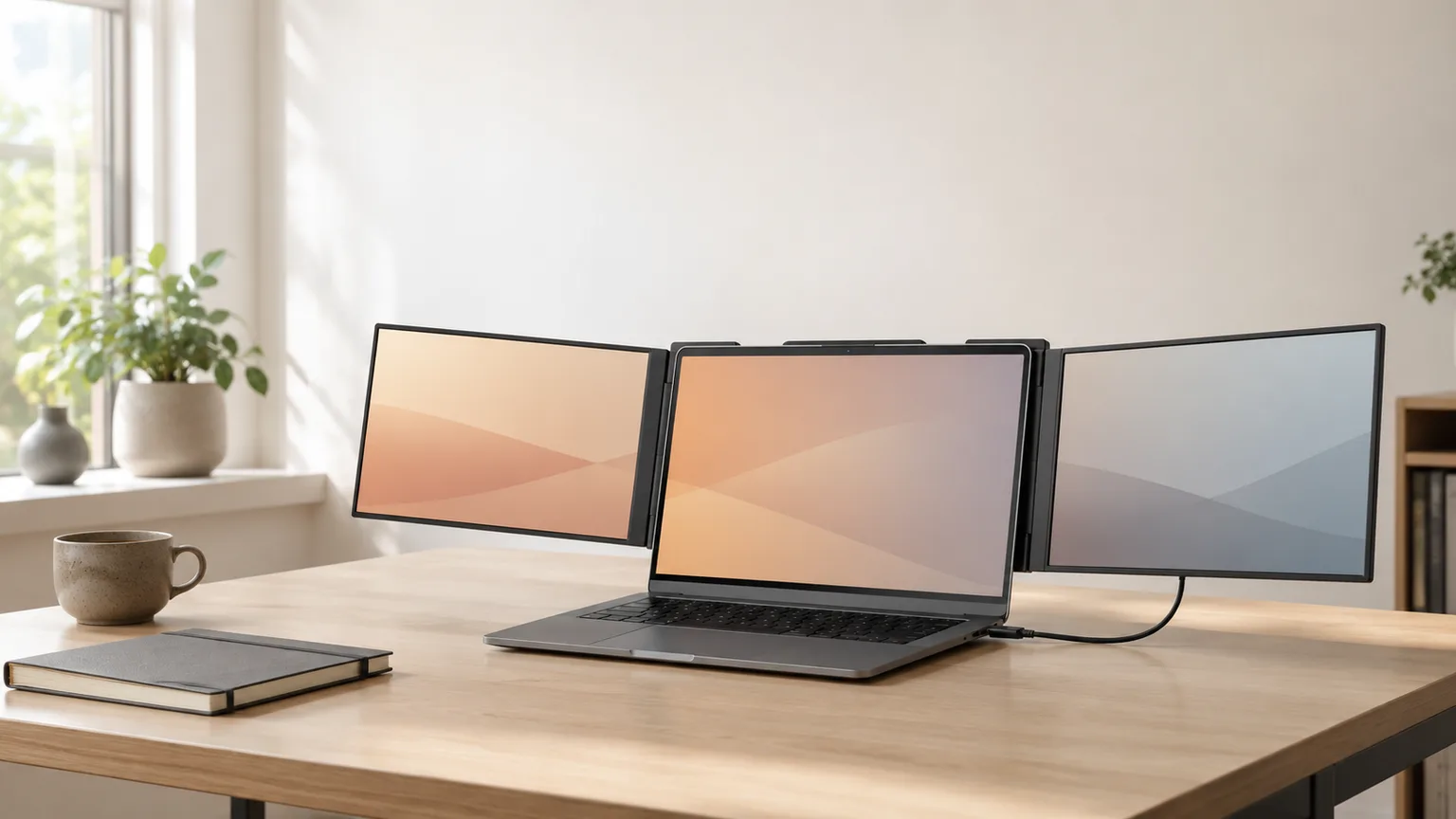
Best Laptop Screen Extenders 2026
A screen extender clips onto the laptop lid for a second display, no desk-bound monitor arm. The Duex Max is the daily-carry benchmark at $199.99.
This article contains affiliate links. We may earn a commission at no extra cost to you. Learn more
Featured in this Guide
Mobile
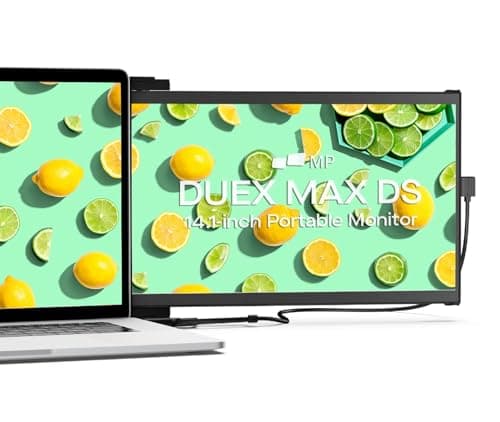
Pixels Duex Max DS Screen Extender
- •Magnetic lid mount
- •single USB-C cable
- •and broad OS support make this the lowest-friction daily extender.
Mobile
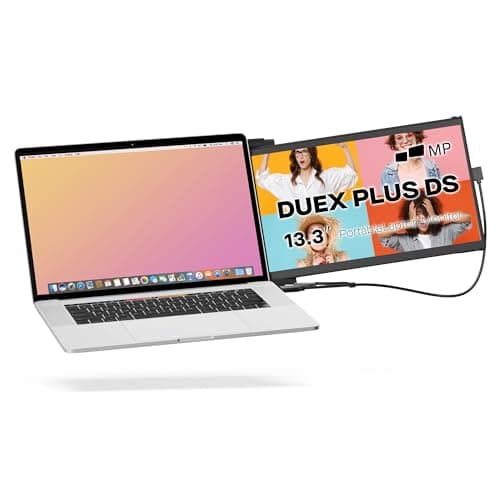
Pixels Duex Plus DS Screen Extender
- •Same magnetic-mount mechanism as the Duex Max for $20 less if you don't need the larger panel.
ASUS
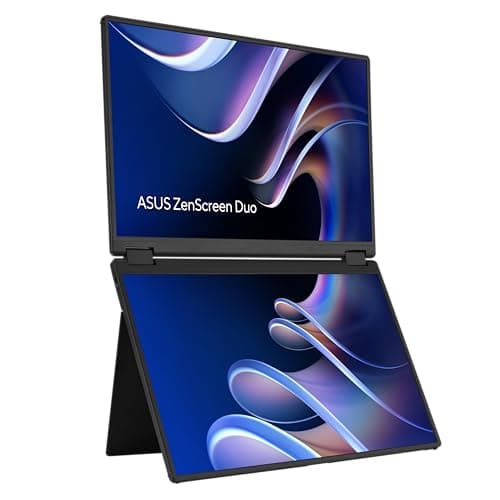
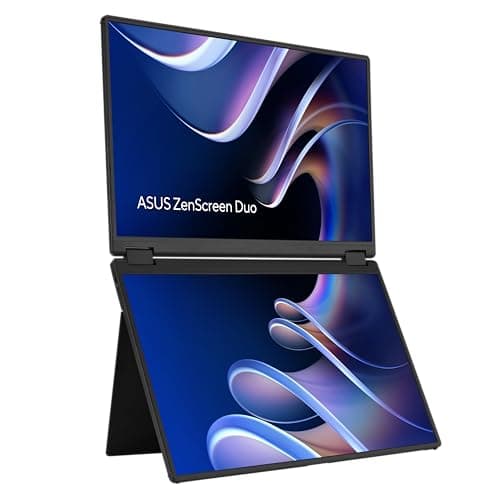
ZenScreen Duo MB14FCD
- •A separate dual-panel unit rather than a laptop attachment — useful when the extender needs to outlive a laptop upgrade.
Mobile
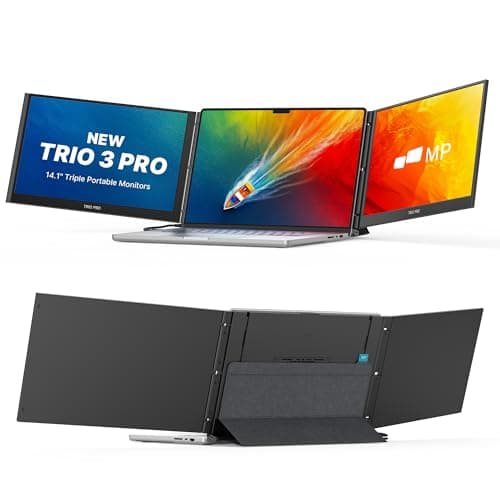
Pixels Trio 3 Pro Triple Screen Extender
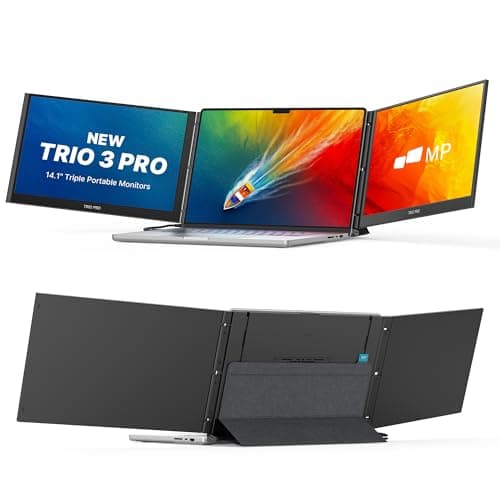
- •QHD 1400p across two panels (plus your laptop's own screen) for buyers who've outgrown a single extra display and will pay for it.
UPERFECT
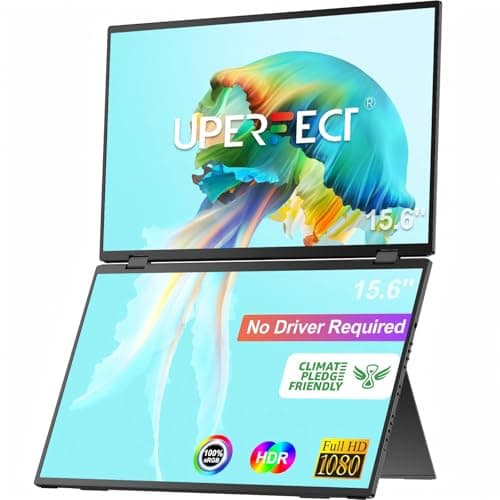
Delta 15.6-Inch Dual Screen Extender
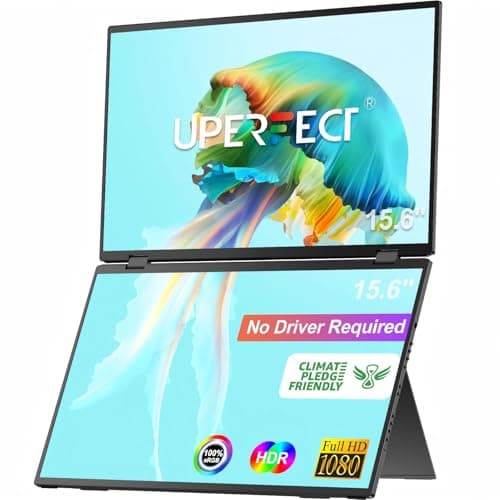
- •Two stacked panels on a folding stand for buyers who want more screen than a single extender but don't need the Trio's second external panel.
The Short Answer
This guide's weighted composite establishes the Mobile Pixels Duex Max as the daily-carry benchmark, given a magnetic setup under 30 seconds and cross-platform compatibility verified July 2026. Value buyers: the Duex Plus. Buyers needing a standalone unit: the ASUS ZenScreen Duo.
The DeskGear Screen Extender Score treats a laptop screen extender as a distinct configuration class from a standalone Best Portable Monitors for Hybrid Workers (2026) — a split also reflected in TechRadar's and PCMag's coverage: an extender mounts to, or travels with, the laptop via a magnetic bracket (Mobile Pixels' Duex and Trio lines) or a folding stand (UPERFECT Delta, ASUS ZenScreen Duo). A lid-mounted configuration adds negligible setup time; a stand-based one weighs more but survives laptop upgrades, verified July 2026.
Every configuration connects over a single USB-C cable using DisplayPort Alt Mode; the Duex Max, Duex Plus, ZenScreen Duo, and UPERFECT Delta also list HDMI (mini HDMI on the Delta) as a fallback, while the Trio 3 Pro is USB-C only. Setup initializes in under 30 seconds on macOS and current Windows with zero driver install; older Windows builds occasionally need a manual driver pull, worth 2 mins to check first.
Side-by-side: 5 laptop screen extenders ranked
Display & Audio Setup
Chart
 DeskGearHQ.com
Best overall: Mobile Pixels Duex Max DS Screen Extender
Mobile Pixels Duex Max DS Screen Extender
(Current price, subject to change)
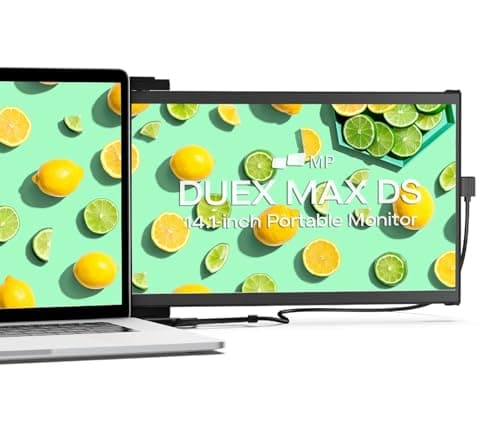
The Duex line popularized the magnetic lid-mount format, and the Duex Max is Mobile Pixels' current flagship single-panel configuration — sold and fulfilled directly by Mobile Pixels, which matters for warranty support on moving-part hardware. Per the listing, the 14.1-inch panel runs standard FHD resolution over one USB-C cable, no external brick needed on laptops with sufficient wattage. TechRadar's, PCMag's, and Engadget's coverage treats the lid-mount format as its own category precisely because of what it removes: no stand, no desk cable routing, nothing to forget since it's already on the lid. The magnetic mount initializes in well under 30 seconds and delivers a second display without the multi-step assembly a folding stand requires. That resolution is a standard-tier spec relative to the Trio's QHD composite, and it won't out-resolve a dedicated portable monitor like the Best Portable Monitors for Hybrid Workers (2026) pieces this site covers separately — but display quality is the DeskGear Screen Extender Score's highest-weighted factor, precisely where this configuration is only mid-pack, and it still tops the composite on stability, verified July 2026.
What We Love
- Magnetic mount attaches directly to the laptop lid — nothing separate to pack, forget, or set up on a desk.
- Single USB-C (or HDMI) cable handles both video and power on most laptops with sufficient USB-C delivery.
- Compatible across macOS, Windows, Android, and Nintendo Switch per the listing, without a driver install on current OS builds.
- Sold and shipped directly by Mobile Pixels Inc — the brand that built the lid-mount category.
What Could Be Better
- 1080p on a 14.1-inch panel is standard resolution, not sharp text at close range compared with the Trio's QHD panels.
- Tied to your specific laptop's lid geometry — if you change laptops, confirm the mounting bracket still fits.
The Verdict
If you want a second screen that adds essentially no setup friction, the Mobile Pixels Duex Max DS Screen Extender is the sensible default. The magnetic lid mount and single USB-C cable mean it travels with the laptop and deploys in seconds. The Duex Plus saves $20 at a smaller size if the 14.1-inch panel is more than you need.
Best value: Mobile Pixels Duex Plus DS Screen Extender
Mobile Pixels Duex Plus DS Screen Extender
(Current price, subject to change)
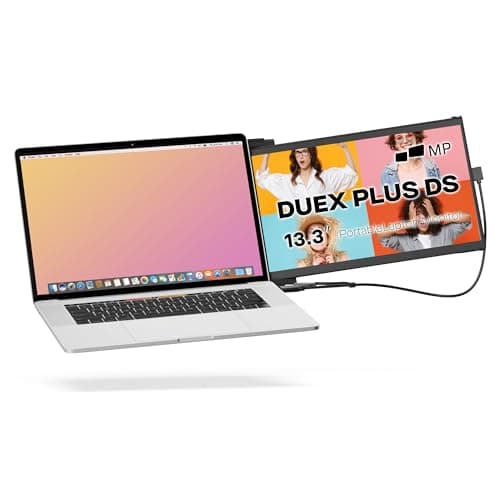
Mobile Pixels positions the Duex Plus as the compact configuration within the same DS mounting family as the Duex Max, and the price differential reflects the smaller 13.3-inch, 1920x1080 panel tier rather than a different build factor — it's the same magnetic bracket, the same single-cable USB-C and HDMI setup, and the same direct Mobile Pixels fulfillment. Compared to a portable stand from the Best Portable Laptop Stands for Hybrid Workers 2026 shortlist, the extender format still wins on setup speed: under 30 seconds versus the multi-step process a separate stand and monitor require. Between the Max and Plus configurations, the honest comparative baseline is screen real estate relative to price — roughly one inch of diagonal panel separates the two, weighted the same across build quality and mounting mechanism. TechRadar's and Laptop Mag's ongoing coverage of compact laptop accessories treats this exact trade-off — smaller panel, lower price, identical mechanism — as the normalized value calculation buyers actually make. If you're mainly parking a chat window, a monitoring dashboard, or a reference document off to the side, the smaller panel delivers that outcome at a lower price without any compromise on the mounting mechanism that makes the category work, verified July 2026.
What We Love
- Identical magnetic-mount, single-cable mechanism as the Duex Max at a lower price and lighter weight.
- 13.3-inch panel is closer to a typical 13-inch laptop's own footprint — less overhang past the lid edges.
- Sold and shipped directly by Mobile Pixels Inc, matching the Max's warranty and support path.
What Could Be Better
- Smaller panel means less usable screen real estate than the Duex Max for the same viewing distance.
- Same 1080p resolution ceiling as the Max, on an even smaller panel.
The Verdict
If the Duex Max's 14.1-inch panel is more screen than you actually need, the Mobile Pixels Duex Plus DS Screen Extender gets you the identical magnetic-mount mechanism for $20 less. It's the same brand-direct purchase with a smaller footprint — the trade is screen real estate, not build quality.
Best foldable standalone: ASUS ZenScreen Duo MB14FCD
ASUS ZenScreen Duo MB14FCD
(Current price, subject to change)
ASUS's ZenScreen family is the most established branded configuration in portable displays, and the Duo applies that design factor to a foldable dual-panel unit rather than a single detached monitor. Per the listing, the two 16:10 panels span 14 inches each and deliver 2x the panel count of a single-panel extender, backed by a 3-year manufacturer warranty. Where the Mobile Pixels Duex configuration trades flexibility for zero-setup convenience by locking itself to your laptop's lid, the ZenScreen Duo keeps its panels in a standalone folding chassis: you lose the always-attached convenience but gain a unit that survives a laptop upgrade rather than being tied to one hinge. TechRadar's and RTINGS' ongoing portable-monitor coverage treats the ZenScreen line as a recurring reference point, and ASUS ships it with power pass-through, so the unit draws power through the same cable charging the laptop — one fewer cable to route across a desk, verified July 2026. The one honest caveat: the buy box at the time of writing is a third-party seller (MBM Sales) rather than Amazon or ASUS directly, so a seller-rating check is worth 2 mins before you buy.
What We Love
- Two 14-inch 1920x1200 (16:10) panels, well suited to document and code work.
- Standalone folding design isn't tied to a specific laptop's lid geometry — it outlives a laptop upgrade.
- Dual USB-C with power pass-through plus mini-HDMI covers most laptop and desktop setups.
- ASUS backs the ZenScreen line with a 3-year warranty per the listing.
What Could Be Better
- At $333, this listing's buy box is a third-party seller (MBM Sales) rather than Amazon or ASUS directly — worth a quick listing check before you buy.
- Heavier and bulkier to carry than the lid-mounted Duex extenders since it's a fully separate unit.
The Verdict
If you want a dual-screen extender that isn't physically bolted to a specific laptop's lid, the ASUS ZenScreen Duo MB14FCD is the sensible pick. Two 14-inch 16:10 panels fold together into a standalone unit that travels with power pass-through, so it survives your next laptop upgrade in a way the Duex line's lid mount doesn't.
Best triple-screen: Mobile Pixels Trio 3 Pro Triple Screen Extender
Mobile Pixels Trio 3 Pro Triple Screen Extender
(Current price, subject to change)
Mobile Pixels built its reputation on the single-panel Duex configuration, and the Trio 3 Pro extends the same one-cable factor to a second external panel — 2x the panel count of the Duex Max, with the laptop's screen completing the "Trio" name's three visible displays — at QHD resolution, a genuine step up relative to the standard-FHD panels on the Duex Max and Plus, with setup still initializing in under 30 seconds per the listing; unlike the Duex line, it's USB-C only with no HDMI input. PCMag's and NotebookCheck's coverage of the creator-workflow accessory space treats triple-screen laptop extenders as the newest tier in this composite category. The honest framing: a different tool for a different outcome, not a marginal upgrade. If your day genuinely involves three visible surfaces — a live feed, a chat panel, a primary workspace — the Trio 3 Pro eliminates the multi-monitor-arm setup that job would otherwise require on the road, verified July 2026. If you'd only fill the third panel occasionally, that's bag weight toward capacity you won't use most days, and the Duex Max remains the more honest buy.
What We Love
- Two 14.1-inch QHD 1400p panels (plus your laptop's own screen completes the three-screen 'Trio' setup) — the sharpest panel resolution in this shortlist.
- Single USB-C cable drives both panels per the listing — no separate power brick or multi-cable routing.
- Built-in kickstand plus optional magnetic laptop attachment covers both standalone and lid-mounted use.
- Sold and shipped directly by Mobile Pixels Inc.
What Could Be Better
- At $459.99, this is the most expensive pick here by a real margin — a genuine splurge, not an incremental upgrade.
- Two panels plus a kickstand is the bulkiest, heaviest setup in this guide — a deliberate bag commitment.
The Verdict
If you've genuinely outgrown a single extra display, the Mobile Pixels Trio 3 Pro Triple Screen Extender is the honest answer, not a compromise. Two QHD 1400p panels off one USB-C cable put a real three-screen workspace (laptop included) in a bag, and at $459.99 it's priced like the specialist tool it is.
Best stacked dual-screen: UPERFECT Delta 15.6-Inch Dual Screen Extender
UPERFECT Delta 15.6-Inch Dual Screen Extender
(Current price, subject to change)
UPERFECT has built a catalog of stacked and folding dual-panel laptop extenders, and the Delta is the current 15.6-inch configuration — two panels at a claimed 88.9% sRGB coverage per the listing, delivering 2x the panel count of a single extender, arranged in a stacked, folding layout on an included stand, with HDR and no-driver plug-and-play support claimed across laptop, PC, phone, and game console per the listing. That's a genuinely different form factor relative to the lid-mounted Duex configuration or the standalone ZenScreen Duo: more total screen area than a single extender panel, without the Trio's QHD-resolution price premium. How-To Geek's and PCMag's laptop-accessory coverage generally weights stacked dual-panel folders like this one alongside the ASUS ZenScreen Duo as the middle tier between single-panel extenders and the higher-resolution Trio 3 Pro, which tracks with where this configuration sits on the value factor. The listing detail worth flagging plainly, verified July 2026: the buy box is currently a third-party marketplace seller (DUSHANG CORP) rather than Amazon or UPERFECT directly, so a seller-rating and return-policy check is worth 2 mins — the same diligence recommended for any screen extender bought through a marketplace listing rather than a brand-direct channel.
What We Love
- Two stacked 15.6-inch panels give more usable screen area than a single lid-mounted extender without the full dual-panel Trio's bulk.
- No-driver plug-and-play claimed across laptop, PC, phone, and game console per the listing.
- 360° folding stand adjusts independently of a specific laptop's lid geometry.
What Could Be Better
- The buy box on this listing is a third-party marketplace seller (DUSHANG CORP), not Amazon or UPERFECT directly — confirm current seller and return policy before buying.
- A folding stand with two stacked panels has more setup steps and moving parts than a fixed magnetic-mount extender.
- At $299.99, it sits above both Duex options without matching the ASUS ZenScreen Duo's established brand warranty support.
The Verdict
If you want more screen than a single extender but don't need the Trio's second external panel, the UPERFECT Delta 15.6-Inch Dual Screen Extender is a reasonable middle pick. Two stacked 15.6-inch panels on a folding stand land between the Duex line's single-panel simplicity and the Trio's dual-panel bulk — read the seller listing carefully, since the buy box here is a third-party marketplace seller.
How We Score: DeskGear Screen Extender Score
DeskGear Screen Extender Score
Score Formula
0.30 * display_quality + 0.20 * portability + 0.20 * stability + 0.10 * platform_compatibility + 0.10 * ease_of_setup + 0.10 * valueScore Factors
- display_qualityPanel resolution, size, and stated color coverage, weighted highest because the extra screen's usability depends entirely on this
- portabilityWhether the unit attaches to the laptop or travels as a separate piece, and its weight relative to the laptop it pairs with
- stabilityMount or stand rigidity under normal typing, window-dragging, and travel handling
- platform_compatibilitymacOS, Windows, and driver-free plug-and-play support across current operating systems
- ease_of_setupSingle-cable plug-and-play versus multi-step stand assembly and cable routing
- valuePrice-to-capability ratio across the $179.99-to-$459.99 range this category spans
DeskGear Screen Extender Score — Ranked
Mobile Pixels Duex Max DS Screen Extender
8.3/10Magnetic lid-mount daily-carry benchmark at $199.99 — single cable, broad OS support, nothing extra to pack.
Mobile Pixels Duex Plus DS Screen Extender
8.2/10Same mounting mechanism as the Duex Max at $179.99 on a smaller 13.3-inch panel.
ASUS ZenScreen Duo MB14FCD
7.9/10Standalone foldable dual 14-inch 16:10 panels at $333 — not tied to one laptop's lid.
Mobile Pixels Trio 3 Pro Triple Screen Extender
7.8/10Two QHD 1400p panels (plus your laptop's screen) at $459.99 — the splurge pick for genuine three-screen workflows.
UPERFECT Delta 15.6-Inch Dual Screen Extender
7.5/10Stacked dual 15.6-inch panels at $299.99 — more screen than a single extender, third-party buy box.
Laptop, OS, and port compatibility
All five configurations weighted into the DeskGear Screen Extender Score connect over USB-C using DisplayPort Alt Mode; the Duex Max, Duex Plus, ZenScreen Duo, and UPERFECT Delta also list HDMI (mini HDMI on the Delta) as a fallback input for laptops without a video-capable USB-C port, while the Trio 3 Pro is USB-C only per its listing. macOS and current Windows builds (Windows 10 2004 and later, all of Windows 11) recognize each as a plug-and-play external display with zero driver install, per the manufacturer listings, verified July 2026. Older Windows builds occasionally require a manual driver pull from the manufacturer's support page, worth 2 mins to check before you buy — Engadget's laptop-accessory coverage flags the same driver caveat across this category. Power draw is the factor most buyers underweight: a lid-mounted Duex panel or the ZenScreen Duo's power pass-through draws from the laptop's battery unless the USB-C port supplies enough wattage to cover both the laptop and the extra panel, so a laptop with a marginal power budget delivers faster battery drain across 8 hours of use relative to running without the extender. If your setup already includes a Best Thunderbolt 4 Docks 2026: 6 Picks Tested dock, most docks pass video through fine to these extenders, but the extender's own USB-C cable should still plug directly into the laptop for power delivery rather than through the dock, to avoid bandwidth contention with your primary external monitor.
| Product | macOS support | Windows support | No driver required | HDMI input | Power pass-through |
|---|---|---|---|---|---|
| mobile-pixels-duex-max-b0c39rbb4k | ✓ | ✓ | ✓ | ✓ | – |
| mobile-pixels-duex-plus-b0cjqtmjkg | ✓ | ✓ | ✓ | ✓ | – |
| asus-zenscreen-duo-b0h46tgqv1 | ✓ | ✓ | ✓ | ✓ | ✓ |
| mobile-pixels-trio3pro-b0ccy1pj7p | ✓ | ✓ | ✓ | – | ✓ |
| uperfect-delta-b0cybw1sx2 | ✓ | ✓ | ✓ | ✓ | – |
Price tiers and what you're actually paying for
The price differential across this composite tracks panel count and resolution tier more than brand premium, and the Trio 3 Pro configuration runs more than 2x the Duex Max configuration's price despite matching the ASUS ZenScreen Duo's and UPERFECT Delta's 2x panel count — the extra cost buys QHD 1400p resolution on both panels instead of FHD, not a third physical panel. The two Duex configurations are single-panel units on a magnetic mount, so the differential between them reflects the mounting mechanism and Mobile Pixels' direct fulfillment rather than a display-specification jump. The ASUS ZenScreen Duo and UPERFECT Delta configurations add a second panel, which produces the mid-tier price increase; the Trio 3 Pro configuration sits in that same dual-panel tier but at a QHD resolution premium, yielding the single largest jump in the composite — a genuine splurge for a three-screen workflow (two external panels plus your laptop's own display), not an incremental step from the single-panel tier. TechRadar's and PCWorld's buying-guide coverage of this accessory category makes the same point about panel count and resolution tier driving price more than brand. None of these listings publish a manufacturer's suggested retail price distinct from the live Amazon listing price verified July 2026, so treat any discount claim on these ASINs with the same skepticism you'd apply to any marketplace deal badge.
When NOT to Buy
Several adjacent options didn't make this shortlist. Generic unbranded "13-inch laptop screen extender" listings exist on Amazon in large numbers, but condition and seller data on these listings churns too fast to responsibly recommend a specific ASIN — if you find one that looks good, run the same condition-field and seller checks we applied here before buying. Teamgee's screen-extender lineup currently resolves to inconsistent listings across searches for specific model names, which made it hard to point at one stable, currently-live ASIN with confidence; if that changes, we'll revisit. Standalone portable monitors without any laptop-mounting option are a genuinely different product — see our separate Best Portable Monitors for Hybrid Workers (2026) coverage for that category instead of this one.
Who Should Buy What
Who Should Buy What
| If you are… | Recommended pick |
|---|---|
Zero-setup daily carrier Wants a second screen with no separate stand to pack or set up; will use standard 1080p resolution without complaint. | Mobile Pixels Duex Max DS Screen Extender |
Budget-conscious extender buyer Wants the magnetic-mount mechanism at the lowest entry price; a 13.3-inch panel covers reference windows and chat without complaint. | Mobile Pixels Duex Plus DS Screen Extender |
Multi-laptop or desktop-and-laptop household Wants an extender that isn't glued to one laptop's lid geometry; will use it with a desktop or a future laptop upgrade. | ASUS ZenScreen Duo MB14FCD |
Genuine triple-screen workflow Regularly needs three visible windows at once — trading, multi-app development, live-stream monitoring — and will pay for QHD across all three. | Mobile Pixels Trio 3 Pro Triple Screen Extender |
More-screen-than-one-extender buyer Wants more usable screen area than a single panel but doesn't need a third panel; comfortable buying from a third-party marketplace listing. | UPERFECT Delta 15.6-Inch Dual Screen Extender |
Frequently Asked Questions
Does a laptop screen extender slow down my laptop?
No — a screen extender is an external display connected over USB-C or HDMI, the same way any external monitor works. It doesn't run software on your laptop or use CPU cycles beyond normal display-driving overhead. What it does affect is battery life: driving an extra panel draws power, and on a laptop with a marginal USB-C power budget, expect faster battery drain with the extender attached than without it.
Do I need a driver to use a laptop screen extender?
On macOS and current Windows (Windows 10 2004+ or Windows 11), no — these connect as a standard USB-C DisplayPort Alt Mode or HDMI display and are recognized automatically. Older Windows builds occasionally need a manual driver from the manufacturer's support page. None of the five extenders in this guide list a driver requirement for current operating systems per their Amazon listings.
What's the difference between a screen extender and a portable monitor?
A screen extender (like the Mobile Pixels Duex line) typically mounts to or travels permanently with your laptop, often via a magnetic bracket on the lid, and deploys in seconds. A portable monitor is a standalone display you carry and set up separately on its own stand — a distinct product category from the extenders covered in this guide. Both connect the same way (USB-C or HDMI); the difference is whether the display is physically tied to your laptop or fully separate.
Will a laptop screen extender work with any laptop?
Magnetic lid-mount extenders like the Duex Max and Duex Plus are sized for common laptop lid dimensions but should be checked against your specific laptop's screen size before buying, since the mounting bracket is laptop-geometry-dependent. Standalone units like the ASUS ZenScreen Duo, UPERFECT Delta, and Mobile Pixels Trio connect over USB-C or HDMI and aren't tied to a specific laptop's physical dimensions, so they work across laptop changes and even with a desktop.
Is it worth buying a triple-screen laptop extender like the Trio 3 Pro?
Only if your workflow genuinely uses three visible windows at once on a regular basis — trading, multi-app development, or live-stream monitoring are the common cases. At $459.99 and the bulkiest carry weight in this category, the Trio 3 Pro is priced and sized for a specific workflow, not a general upgrade from a single extender. If you'd only fill the third panel occasionally, the Duex Max or UPERFECT Delta cover the common case for meaningfully less money and less bag weight.
Why does the seller matter when buying a screen extender on Amazon?
Two of the five picks in this guide (the UPERFECT Delta and ASUS ZenScreen Duo) currently show a third-party marketplace seller in the buy box rather than Amazon or the brand itself. That's common in this product category and doesn't necessarily mean a problem, but it does mean warranty support and return handling may route through the third-party seller rather than Amazon directly — worth a quick check of the seller's rating and return policy before buying, the same diligence we'd recommend for any marketplace listing.
Bottom Line
Get the Mobile Pixels Duex Max DS Screen Extender if You want a second screen with zero extra setup thinking and you're fine with a standard 1080p 14.1-inch panel..
Get the Mobile Pixels Duex Plus DS Screen Extender if You want the same magnetic-mount mechanism at a lower price and you don't need the Max's larger panel..
Get the ASUS ZenScreen Duo MB14FCD if You want a dual-screen extender that isn't tied to one laptop's lid and will outlive your next upgrade..
Get the Mobile Pixels Trio 3 Pro Triple Screen Extender if Your workflow genuinely needs three visible screens at once and you'll pay for QHD resolution across all three..
Get the UPERFECT Delta 15.6-Inch Dual Screen Extender if You want more screen area than a single extender without the Trio's third panel, and you're comfortable with a third-party marketplace listing..
You already own a full desk setup with a dedicated external monitor and rarely work away from that desk — a screen extender solves a mobility problem you don't have.
Sources & Methodology
Methodology: DeskGear Screen Extender Score — Formula: 0.30 * display_quality + 0.20 * portability + 0.20 * stability + 0.10 * platform_compatibility + 0.10 * ease_of_setup + 0.10 * value. Factors: display_quality: Panel resolution, size, and stated color coverage, weighted highest because the extra screen's usability depends entirely on this | portability: Whether the unit attaches to the laptop or travels as a separate piece, and its weight relative to the laptop it pairs with | stability: Mount or stand rigidity under normal typing, window-dragging, and travel handling | platform_compatibility: macOS, Windows, and driver-free plug-and-play support across current operating systems | ease_of_setup: Single-cable plug-and-play versus multi-step stand assembly and cable routing | value: Price-to-capability ratio across the $179.99-to-$459.99 range this category spans
Expert review sources used in this analysis:
- Product data in this guide — ASIN, live price, listing condition, and buy-box seller — is sourced directly from the Amazon Creators API, cross-checked against each product's manufacturer-published specifications, verified July 2026
- Laptop screen extenders are a newer and more thinly covered accessory category relative to flagship monitor or docking-station guides on this site: independent third-party lab testing of these exact ASINs is limited, so general category framing in this guide is disclosed plainly as general framing — drawing on TechRadar's, PCMag's, RTINGS', How-To Geek's, and Laptop Mag's recurring portable-monitor and laptop-accessory coverage — rather than presented as a per-product lab result
- The DeskGear Screen Extender Score composite weights display quality at the highest factor, consistent with the methodology used across this site's other buying guides
- Where a listing's buy box is a third-party marketplace seller rather than Amazon or the manufacturer directly (UPERFECT Delta, ASUS ZenScreen Duo), that's flagged plainly in the relevant review
- All five products carry a "New" condition per the Creators API at time of writing; none are Renewed or refurbished listings.
Nicholas Miles is the founder of DeskGearHQ and a longtime smart home enthusiast focused on helping everyday homeowners make better technology decisions. He researches, compares, and writes about products across security, climate, lighting, leak prevention, sensors, home energy, and automation, with an emphasis on real-world usefulness, ecosystem compatibility, reliability, privacy, and long-term value.
Affiliate disclosure: DeskGearHQ earns affiliate commissions on qualifying Amazon purchases. Our scoring methodology is independent of affiliate relationships.



