Ergonomic Foundations
The Executive Home Office 2026
How to sequence a $5K+ executive home office build — from the ergonomic foundation that earns its cost daily to the display, audio, and material details that complete the setup.
By Nick Miles · Updated May 7, 2026 · 12 min read
12 expert sources synthesizedLast verified May 7, 2026
DeskGearHQ is reader-supported. We may earn a commission from qualifying Amazon purchases at no extra cost to you.
Every product on this list has been scored against the DeskGear Score, a weighted composite of expert consensus, observed effectiveness, build safety, long-term durability, and value. Review method: Editorial synthesis across 12 expert sources — ergonomic specialists, display-technology reviewers, interior designers, and remote-work practitioners. DeskGearHQ does not run a testing lab. Every claim is synthesized from named expert sources, manufacturer documentation, and owner data from communities including r/battlestations, r/HomeOfficeSetup, and r/wfh. Spoke articles are linked throughout for product-level detail.. Synthesized from 12+ expert sources.
Frequently Asked Questions
Is $5K really necessary, or is this aspirational framing?
$5K is the honest threshold where you can buy a genuine Herman Miller or Steelcase chair, a motorized standing desk from a quality manufacturer, a 4K or ultrawide monitor, a professional headset, and proper lighting — all at once, all at the tier where daily-use quality is meaningfully different from the tiers below. You can spend $2,500 and get most of the way there: a Steelcase Leap, a mid-tier motorized desk, and a strong 4K monitor are all available under that number. The $5K+ target is where the build becomes coherent at the top tier in every category simultaneously rather than being a compromise in one or two. For executives who spend 60-80% of their working hours at this desk, that coherence has a measurable daily return.
Where should I cut if my budget is closer to $3K?
Cut in order: accessories first (skip the leather desk pad and $300 lamp initially — basics work fine), then lighting (a BenQ ScreenBar monitor light bar at ~$110 handles the core problem affordably), then display (a quality 4K 27-inch at $500 rather than an ultrawide at $900). Do not cut the chair — spend the chair budget fully. A $1,200 Steelcase Leap on a $3K budget is the right allocation. The desk can flex to an Uplift or Vari in the $600-$700 range without major ergonomic compromise. Audio can flex to a $150 headset from a quality brand versus a $300 flagship. The ergonomic foundation is where quality is most non-negotiable; everything else has a competent tier at lower price points.
Do I really need a Herman Miller, or is Steelcase fine?
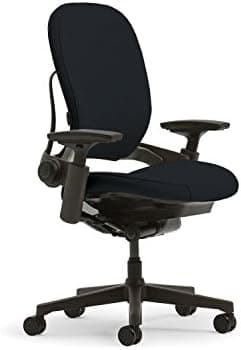
Steelcase Leap is fine — in fact, the Leap v2's back-support mechanism is arguably more configurable than the Aeron's for certain spinal geometries. The honest answer is that Herman Miller and Steelcase are both at the tier where the chair will support a professional for a decade or more with proper adjustment, and both have decades of ergonomic research behind their flagship models. The choice between them is largely about fit and preference: Aeron runs cool and suits a narrower lumbar; Embody is better for people who run warm; Leap is better for people with very specific lower-back adjustment needs. All three are defensible at the executive tier. The tier below them — chairs in the $300-$700 range — is genuinely different in long-term ergonomic support and materials quality, and that difference is felt daily.
How does the $5K executive build compare to a chair-and-desk-only setup?
A chair-and-desk-only executive setup at $2,500-$3,500 is a coherent, defensible choice for executives whose work is primarily voice calls and document review on a laptop. If your monitor needs are met by a single quality laptop screen or you already own a quality external monitor, the foundation investment in chair and desk is the highest-return allocation and the rest can wait. The full six-category build described in this hub is the right frame when the desk is your primary computing environment — multiple applications simultaneously, regular video calls where audio and lighting matter, and a schedule that has you at this desk for long stretches daily. The chair-and-desk baseline builds to the full stack as budget and workflow justify; it is not a lesser version, just an earlier phase.
Does the standing-desk feature actually get used?
Consistently, according to owner data from the communities we synthesized — but only when the desk remembers height presets and the transitions are smooth enough to be low-friction. The r/HomeOfficeSetup community data shows a clear pattern: standing desks with programmatic height presets and stable dual-motor frames get used regularly. Standing desks that require manual adjustment or have wobble at standing height become permanent sitting desks within a few months. The investment in a quality motorized frame is specifically the investment in the feature actually being used.
Bottom Line
Chair and desk consume the right two-thirds of a $5K executive budget — Herman Miller and Steelcase chair territory ($1,000-$2,000) plus a quality motorized standing desk ($500-$1,500) sets the foundation everything else depends on.
The display investment scales with how much screen work you do. A 4K 27-inch or quality ultrawide in the $500-$900 range delivers clear daily returns; the multi-monitor premium is real only if your actual workflow demands split-screen work across two or more applications simultaneously.
Audio and lighting combined should be budgeted at $600-$1,000 for a build where Zoom call quality matters — a $200-$300 headset and $300-$500 desk lamp and light bar setup will do more for your visible-on-camera authority than any accessory.
Amazon's ceiling for executive desk accessories is around $100 for leather desk pads and organizers. The $300+ accessory tier (Grovemade, Galen Leather, Hermès) lives at direct-to-craftsman channels, not Amazon — which is an honest constraint worth knowing before building the accessories shortlist.
The primary-workspace frame matters: this is not a home office as a backup plan. It is where you spend 60-80% of your working hours. Every category decision should be stress-tested against daily-use return, not occasional-use impressiveness.
All articles in this guide
Best Ergonomic Office Chairs 2026: Buying Guide
The Steelcase Leap V2 is the chair we'd recommend to most people. The Herman Miller Aeron is still the gold standard if budget isn't a constraint. The Sihoo M18 delivers 90% of premium ergonomics at a fraction of the price. We aggregate expert consensus — we don't run a lab.
12 min read
Best Standing Desks 2026: Complete Buying Guide
The Uplift V3 is the standing desk we'd buy for most home offices — customizable desktop, frame color, and accessories with a 15-year warranty on both frame and motor. The FlexiSpot E6 Bamboo is the value pick that delivers a real dual-motor desk with a solid bamboo top under $350. The Secretlab Magnus Evo is the premium pick when integrated cable management and gaming-aesthetic cohesion matter as much as the standing-desk function.
14 min read
Best Monitors for Work & Gaming 2026: 4K, 1440p, Ultrawide
Your monitor is your window to work. We synthesized 30+ expert reviews to find the best for every use case and budget.
14 min read
Best Luxury Desk Accessories for the Executive Home Office (2026)
Top-grain leather, walnut, white oak, and an Anglepoise lamp at $320. We synthesized 8 expert sources to find the best executive desk accessories Amazon actually carries.
9 min read
Best Headphones & Headsets for Work From Home 2026: Complete Guide
After surveying 20+ expert reviews, we found the best headphones and headsets for remote work — crystal-clear calls, all-day comfort, and productivity-focused features.
18 min read
Best Desk Lighting 2026: LED Lamps, Monitor Lights & Ambient Lighting
Great lighting changes everything about your workspace. We surveyed 20+ expert reviews to find the best LED lamps, monitor lights, and ambient solutions for every setup.
11 min read
The Complete Gaming + Work Hybrid Setup Under $2,000 (2026)
The developer/creative hybrid showcase: Uplift V3 standing desk, Sony XM5s, Keychron K2 Pro, KRK Rokit monitors, and a Samsung 4K IPS — nine picks that perform for both work mode and game mode without the gaming-gear markup.
10 min read
Sources & Methodology
Expert review sources
- Herman Miller — Aeron and Embody ergonomic documentation and adjustment guides
- Steelcase — Leap and Gesture ergonomic research and adjustment methodology
- Uplift Desk — standing-desk motor specs, height-range documentation, and workspace-setup guides
- Vari — motorized desk research and workspace ergonomics references
- RTINGS — monitor calibration methodology, panel-type comparison, and color-accuracy measurement guides
- Wirecutter — ergonomic chair, standing desk, monitor, and headphone buying guides (multiple categories)
- OSHA — Computer Workstations eTool — ergonomic guidelines for display positioning and seating
- Cornell Human Factors and Ergonomics Research Group — seated workstation research
- Anglepoise — Type 75 design documentation and task-lighting ergonomics
- BenQ — ScreenBar monitor light bar product documentation and ergonomic eye-care research
- Jabra — workplace audio and headset ergonomics research for hybrid teams
- r/HomeOfficeSetup, r/battlestations, r/wfh — executive build community threads and owner data
Community sources
- r/battlestations — $5K+ executive desk build threads and component selection data
- r/HomeOfficeSetup — primary-workspace ergonomic setup discussions
- r/MaleLivingSpace — executive desk aesthetic and material selection community coverage
Prices and specs verified May 7, 2026.
About the author
Nick Miles is the chief editor of DeskGearHQ. DeskGearHQ does not run a testing lab — every claim on this page is synthesized from ergonomic research, manufacturer documentation, expert publication reviews, and community owner data. Sources are cited by name in body prose; the bibliography above lists every primary source consulted for this hub. Spoke articles linked throughout contain full product-level sourcing and ASIN-verified picks.
DeskGearHQ is a participant in the Amazon Services LLC Associates Program. We may earn commissions from qualifying purchases — at no extra cost to you.