Best Prebuilt Gaming PCs for a Work-and-Play Desk (2026)
Micron expects the RAM shortage to tighten into 2028, so a prebuilt with memory included deserves a fresh look. For one desk that does calls and games, start with the quiet Alienware Aurora, then check memory, PSU and warranty.
This article contains affiliate links. We may earn a commission at no extra cost to you. Learn more
Featured in this Guide
Alienware
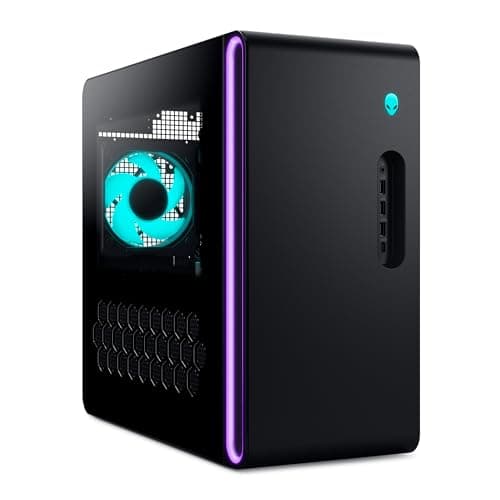
Aurora (ACT1250) Gaming Desktop, Core Ultra 7 265F, RTX 5070
- •PCMag found the Aurora chassis remarkably quiet under gaming loads
- •and Dell's onsite service covers year one.
CyberPowerPC
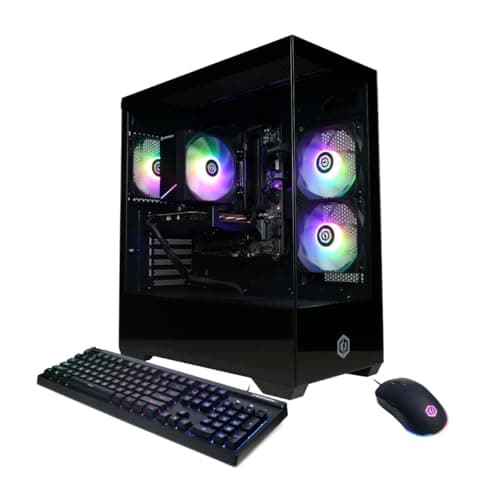
Gamer Xtreme Gaming PC, Core i5-14400F, RTX 5060 8GB, 16GB DDR5, 1TB
- •Three trade ratings and the highest average here; the fan noise matters less once your headset is on.
Alienware
Aurora (ACT1250) Gaming Desktop, Core Ultra 7 265F, RTX 5060 Ti
- •Same chassis and service as the RTX 5070 Aurora
- •and its listing's memory and 500W Platinum PSU lines match its own configuration.
MSI
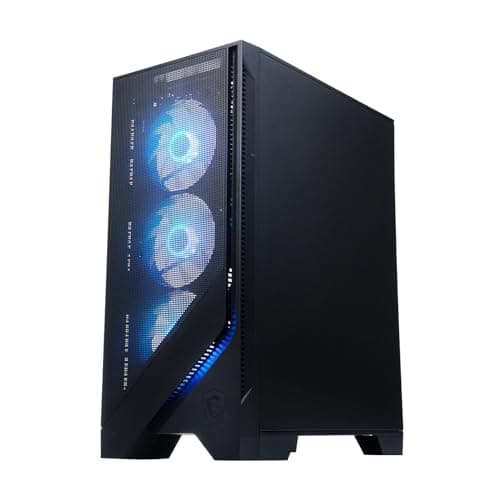
Codex R2 Gaming Desktop (A14NVL5), Core i5-14400F, RTX 5060, 16GB DDR5, 1TB
- •Ports sit on top of the case
- •so a daily drive or controller plug-in never means reaching around the tower.
The Short Answer
For work-and-gaming desks, the Alienware Aurora (RTX 5070) fits: PCMag found its chassis remarkably quiet, plus 1-year onsite service. The CyberPowerPC Gamer Xtreme suits budgets despite noise and no USB-C; desk-mounted towers suit the MSI Codex R2. Only four of fourteen contenders earned a DeskGear Composite Score.
Deal-thread regulars now do build-versus-buy arithmetic in memory. One Slickdeals poster noticed the same price once included “32gb DDR5,” and a Level1Techs builder has “bought zero RAM/hardware this past year due to these insane prices.” Anecdotes, admittedly, but they explain why a prebuilt with memory included deserves reconsideration.
IGN reported in April 2026 that 32GB of DDR5 cost “around $450–$500, as opposed to just $90 six months ago,” roughly a 5x increase. The Register then quoted Micron's chief executive anticipating “greater tightness in the industry in 2027 and in 2028 versus 2026,” so waiting for relief looks optimistic.
This guide therefore evaluates delivered memory, power-supply disclosure, warranty responsibility and operating noise, since 64% of shortlisted listings omit PSU wattage. A Hacker News commenter noted buyers “will happily pay to 1) not have to build it, and 2) have e2e warranty, and 3) have someone else do the software setup.”
How the four towers compare
AI & Smart Office
Chart
 DeskGearHQ.com
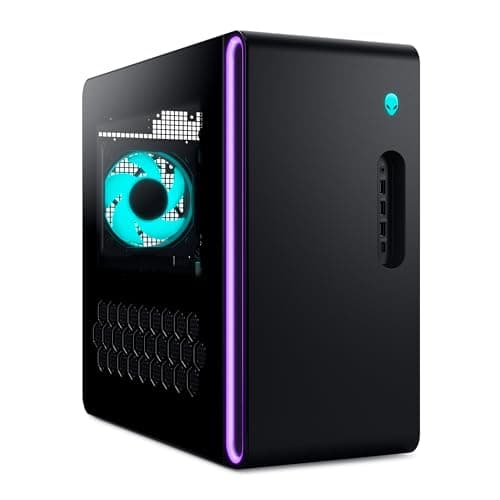
My gaming PC sits next to me on work calls, so it has to be quiet: Alienware Aurora (ACT1250) Gaming Desktop, Core Ultra 7 265F, RTX 5070
Alienware Aurora (ACT1250) Gaming Desktop, Core Ultra 7 265F, RTX 5070
(Current price, subject to change)
PCMag's Charles Jefferies described the 2025 Aurora as “nearly silent at idle” and “remarkably quiet under gaming loads,” precisely the behavior a shared desk demands during daytime video calls. His review configuration was liquid-cooled, with a Core Ultra 7 265KF and an RTX 5070 Ti, whereas this listing is air-cooled, so anticipate somewhat more fan activity in demanding games. The front panel delivers practical convenience: PCMag counted a 10Gbps USB-C port plus three USB-A ports at mid-height, reachable whether the chassis sits on the desktop or beside it. Two disclosure problems deserve attention before checkout. The listing contradicts itself on memory capacity, and its only power-supply line, a 500W Platinum unit, sits in a feature block written for an RTX 5060 Ti configuration. PCMag says the base Aurora configuration relies on a 500-watt unit, so ask the seller which supply this RTX 5070 build ships with. Dell's 1-year Basic Onsite Service, which can bring a technician to your desk after remote diagnosis, compensates considerably. You accept some specification uncertainty and a higher price tier in exchange for the calmest chassis here.
What We Love
- PCMag found the 2025 Aurora chassis remarkably quiet under gaming loads
- Front USB-C plus three USB-A at mid-height, easy to reach on or beside the desk
- Dell's 1-year Basic Onsite Service on the Amazon listing
What Could Be Better
- The listing contradicts itself on memory: 32GB in the tech table, 16GB elsewhere
- PCMag's quiet result came from a liquid-cooled unit; this listing is air-cooled
- The listing's only PSU line, 500W Platinum, sits in text written for an RTX 5060 Ti build
The Verdict
If your gaming PC sits within microphone range of your work calls, the Alienware Aurora (ACT1250) Gaming Desktop, Core Ultra 7 265F, RTX 5070 fits the brief: a chassis PCMag found quiet, front USB-C at hand and Dell onsite service in year one. The trade is paperwork. Confirm the memory configuration with the seller first, because the listing contradicts itself.
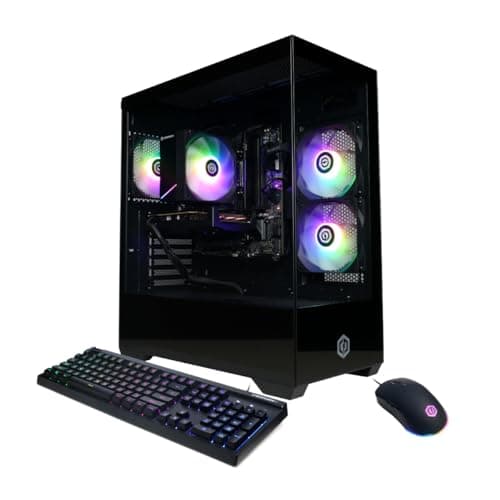
I want the most rated value for 1080p and I wear headphones anyway: CyberPowerPC Gamer Xtreme Gaming PC, Core i5-14400F, RTX 5060 8GB, 16GB DDR5, 1TB
CyberPowerPC Gamer Xtreme Gaming PC, Core i5-14400F, RTX 5060 8GB, 16GB DDR5, 1TB
(Current price, subject to change)
Measured by ratings alone, this is the strongest line here. Tom's Hardware awarded the 2025 Gamer Xtreme four and a half stars, PCMag gave it four in January 2026, and Tom's Hardware's earlier review scored the 2024 model four. Tom's Hardware also praised it as “Easily upgradeable using standard components,” which matters when today's memory prices encourage upgrading later instead of immediately. The listing clearly documents 16GB of DDR5-4800 alongside a 1TB PCIe 4.0 SSD, although the rated 2025 configurations carried 2x that memory. Noise is the obvious compromise, because the stock cooler produces what Tom's Hardware called obnoxiously loud operation, and PCMag notes the fans can get loud. There is no USB-C port anywhere, the power supply goes unnamed, and PCMag warns its wattage may limit future upgrades. Warranty coverage is a 1-year term on Amazon, versus the 3-year coverage Tom's Hardware's 2024 review noted for direct purchases. That combination still earns a respectable DeskGear Composite Score, and it suits the headset-wearing player who mutes between rounds and connects work peripherals through a hub.
What We Love
- Strongest ratings here: Tom's Hardware 4.5/5 for the 2025 model, plus two 4/5 reviews
- Tom's Hardware calls it easily upgradeable using standard components
- The spec table states memory type, speed and SSD interface plainly
What Could Be Better
- Loud under load: Tom's Hardware called the CPU cooler obnoxiously loud
- No USB-C port, front or rear, on this listing
- PSU not named, and PCMag warns its wattage may limit future upgrades
The Verdict
For a 1080p player who already games in a headset, the CyberPowerPC Gamer Xtreme Gaming PC, Core i5-14400F, RTX 5060 8GB, 16GB DDR5, 1TB lines up with what you actually need: the best-reviewed line here, standard parts you can swap later and a clearly stated spec sheet. Add a USB-C hub for your work gear and you'll be well-served.
I want Dell onsite service without paying for an RTX 5070: Alienware Aurora (ACT1250) Gaming Desktop, Core Ultra 7 265F, RTX 5060 Ti
Alienware Aurora (ACT1250) Gaming Desktop, Core Ultra 7 265F, RTX 5060 Ti
(Current price, subject to change)
This is the identical 2025 Aurora chassis behind the quiet pick, with the same mid-height front ports and the same 1-year Basic Onsite Service. It sits one GPU tier lower, with an RTX 5060 Ti and 8GB of graphics memory. What it contributes is a consistent listing. Its feature text names a 500W Platinum power supply for this RTX 5060 Ti configuration. The same text specifies dual-channel 16GB of DDR5-5200 in a 2x 8GB layout, matching the tech table. It shares the RTX 5070 version's DeskGear Composite Score, because both rely on the same PCMag review of a liquid-cooled RTX 5070 Ti machine with 32GB. Expect a quiet companion throughout the workday, although an air-cooled configuration will generate more noise under heavy games relative to PCMag's review unit. PCMag's criticisms apply equally: some proprietary components, which complicate later upgrades, and plastic rather than tempered glass. This is the Aurora to choose if onsite service matters more to you than stepping up to an RTX 5070.
What We Love
- Its listing's 500W Platinum PSU line matches its own RTX 5060 Ti configuration
- Same quiet 2025 Aurora chassis and mid-height front USB-C as the RTX 5070 model
- Dual-channel memory in two 8GB sticks, spelled out in the listing text
What Could Be Better
- The RTX 5060 Ti has 8GB of graphics memory versus 12GB on the RTX 5070
- PCMag lists some proprietary components, which can complicate later upgrades
The Verdict
You've shortlisted the Aurora for its quiet chassis and Dell service, but you don't need an RTX 5070. The Alienware Aurora (ACT1250) Gaming Desktop, Core Ultra 7 265F, RTX 5060 Ti is a sensible pick for that setup. Its listing agrees with itself on memory and power supply, unlike the RTX 5070 Aurora's, so you have a clearer idea of what ships inside.
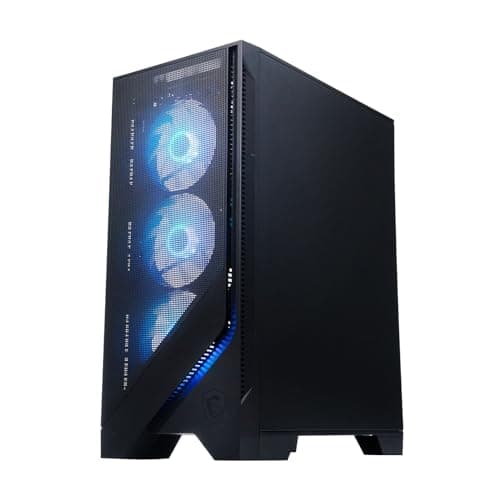
The tower lives on my desk and I plug things in every day: MSI Codex R2 Gaming Desktop (A14NVL5), Core i5-14400F, RTX 5060, 16GB DDR5, 1TB
MSI Codex R2 Gaming Desktop (A14NVL5), Core i5-14400F, RTX 5060, 16GB DDR5, 1TB
(Current price, subject to change)
The Codex R2's most valuable attribute is the positioning of its connectivity. PCMag noted that “The front panel I/O sits atop the case, yielding easy access to those ports.” That top-mounted arrangement enables effortless daily connections whenever the tower sits beside your monitor. PCMag's 2024 review unit ran its memory as two modules in dual-channel mode, and this listing specifies 16GB of DDR5-5600. All three ratings, from PCMag, Tom's Guide and Tom's Hardware, describe 2024 RTX 40-series machines, so they characterize the product line rather than this RTX 5060 configuration. The criticisms are consistent. PCMag says “the fans ramp up and get a bit loud” during games, Tom's Hardware found the air cooler loud, and Tom's Guide flagged slow storage and sluggish vendor software. The listing calls the power supply 80+ Gold but never states its wattage, and the warranty is a 1-year limited term. Compared to the Gamer Xtreme, its DeskGear Composite Score trails slightly, but you gain connectivity you can conveniently reach from your chair.
What We Love
- Front I/O sits on top of the case, easy to reach when the tower is on the desk
- PCMag named the R2 an Editors' Choice budget pick and found no bloatware
- Memory type, speed and SSD size stated plainly on the listing
What Could Be Better
- Fans get loud in games, per both PCMag and Tom's Hardware
- All three ratings cover 2024 RTX 40-series units, not this RTX 5060 build
- Tom's Guide flagged slow SSD speeds and slow vendor software
The Verdict
If the tower lives on your desk and you plug things in daily, the MSI Codex R2 Gaming Desktop (A14NVL5), Core i5-14400F, RTX 5060, 16GB DDR5, 1TB checks the boxes that matter for that setup: ports on top, a PCMag Editors' Choice line and clear memory specs. The Gamer Xtreme scores higher; the Codex R2 is the easier one to live with on a desktop.
How We Score: DeskGear Score
DeskGear Score
Score Formula
DeskGear Score = (Expert Consensus × 0.30) + (Effectiveness × 0.25) + (Build Safety × 0.20) + (Durability × 0.15) + (Value × 0.10)Score Factors
- Expert Consensus (30%)How strongly the trade-review, ergonomics-research, and specialist sources we cite endorse the product or its category. The single largest weight, because it is the only factor that doesn't depend on a single editor's judgment.
- Effectiveness (25%)Whether the product actually does what its category requires, judged against the functional standards described in the source stack (e.g., monitor color accuracy adequate for design work; chair adjustment range covering the body sizes the spec sheet advertises).
- Build Safety (20%)Electrical, material, and structural soundness for daily desk use: UL/ETL certification, off-gassing disclosures, BIFMA testing, wattage-handling claims, and known failure modes. A safety shortcoming caps the score regardless of effectiveness.
- Durability (15%)Build quality and longevity, triangulated from manufacturer documentation, brand warranty terms, and practitioner-community failure reports across multiple years of 8h/day use.
- Value (10%)Price relative to the field, on the dated lastProductCheck shown in every guide. Re-checked monthly; we update the score if the price-to-field relationship moves.
DeskGear Score — Ranked
Alienware Aurora (ACT1250) Gaming Desktop, Core Ultra 7 265F, RTX 5070
7.7/10Quietest chassis per PCMag, plus onsite service; held back by one rating of a stronger unit and a memory conflict.
Alienware Aurora (ACT1250) Gaming Desktop, Core Ultra 7 265F, RTX 5060 Ti
7.7/10Same PCMag rating and score as its RTX 5070 sibling; its listing's memory and PSU lines match its own build.
CyberPowerPC Gamer Xtreme Gaming PC, Core i5-14400F, RTX 5060 8GB, 16GB DDR5, 1TB
7.6/10Best-reviewed line here, and an RTX 5060 tower a tenth behind the RTX 5070 one: this is a quality score, not a frame-rate rank.
MSI Codex R2 Gaming Desktop (A14NVL5), Core i5-14400F, RTX 5060, 16GB DDR5, 1TB
7.3/10Three positive 2024 reviews of the line; loud fans, slow storage and vendor-software cons put it at Mixed.
Buyer checklist and desk logistics
Begin with memory, and trust the specification table over the headline. One Slickdeals buyer discovered a listing where the “Title says ddr5 but specs have it listed as ddr4.” The Alienware Aurora RTX 5070 listing shows a similar inconsistency, displaying one capacity in its technical table and another in its variant description, so confirm the configuration with the seller. Channel configuration matters too, because Tom's Hardware listed “Single-channel memory from the factory” as a Gamer Xtreme criticism. CNET likewise found that Lenovo's LOQ Tower shipped with single-channel memory. Running two matched modules in dual-channel mode results in steadier performance for games and creative applications alike. Tom's Hardware additionally found an Asus ROG G700 shipping without XMP enabled, so verify the rated memory speed in the BIOS after setup.
Next, examine the power supply. Most shortlisted towers omit wattage entirely, and PCMag flagged “Power supply wattage may limit future upgrades” among the Gamer Xtreme's drawbacks. On a PCPartPicker thread about a CyberPowerPC with a Ryzen 5 5500 and Radeon RX 6500 XT, one respondent speculated the unit “could be an Apevia Prestige 600W unit.” The same respondent recommended replacing it “before upgrading the GPU,” which remains an individual's guess rather than a confirmed specification. The underlying advice still holds: remove the side panel, photograph the power-supply label, and budget for replacement before installing a larger graphics card. PC Gamer made a comparable observation about the ABS Cyclone Aqua's 650W supply, describing it as “getting a little tight” for the biggest RTX 50-series cards.
Then establish who actually stands behind the machine. All four picks carry a 1-year term through Amazon, whereas Tom's Hardware's 2024 review noted the Gamer Xtreme included 3-year coverage “when you buy direct” from CyberPowerPC. Corsair, for comparison, sells its Vengeance a7500 with a 2-year warranty, which Tom's Hardware considered more support than most prebuilts. The retailer matters as well: one Slickdeals buyer reported “ABS will also not warranty it since Walmart sold it,” highlighting how resellers complicate coverage. A Level1Techs participant explained that component failures route through “the system integrator, not the card manufacturer,” meaning one company handles everything. Shipping damage represents the other early risk, since one deal-thread purchaser described a torn carton and a case “very dented on all sides.” Unbox immediately and document everything photographically while the return window remains open.
Finally, decide where the tower physically lives. Underneath a desk, front ports sit near ankle level, so the MSI Codex R2's top-mounted panel or the Aurora's mid-height connectors prevent repeated crawling for a USB stick. Tom's Hardware said the Gamer Supreme's bottom-mounted ports “pretty much necessitate on-desk placement.” PCMag similarly criticized the AMD Legion Tower 5 Gen 10 for a non-standard design that “eats up more desk space.” PC Gamer considered the iBuyPower RDY Element 9 Pro R07 comfortable on a desktop but warned that “under the desk, it's a pain.” Measure available desk depth against each listing's published dimensions, and preserve several inches behind the chassis for unobstructed exhaust.
Memory included: the 32GB towers we couldn't score
If included memory motivates your purchase, several sold-by-Amazon towers ship with 32GB, although none had a trade rating covering its model line. Consequently they receive neither a score nor a purchase button here, and unscored certainly does not mean inferior. The Skytech Crystal combines a Ryzen 7 7700, an RTX 5060 Ti and DDR5-5600, and its listing names a 650W Gold power supply. Skytech's King 95 (Ryzen 7 9800X3D, RTX 5070 Ti) and Azure 3 (9800X3D, RTX 5080) specify DDR5-6000 alongside an 850W Gold ATX 3 unit. Every Skytech listing also cautions that the graphics card “brand may vary.” The MSI Codex Z2 (Ryzen 7 8700F, RTX 5070) adds DDR5-6000 and a 2TB SSD at the RTX 5070 tier. Meanwhile, the Lenovo Legion Tower 5i (Core Ultra 7 265F, RTX 5070 Ti) and iBUYPOWER Element EWA9N5702 (Ryzen 9 7900X, RTX 5070, DDR5-4800) leave power-supply wattage unstated. Each of these listings carries a 1-year warranty.
The economical alternative for reaching that capacity is DDR4. Skytech's other Crystal pairs a Ryzen 7 5700 with an RTX 5060 and DDR4-3200, again naming a Gold-rated supply. DDR4 performs measurably slower, but one Slickdeals poster argued it means “adding 16GB RAM later won't cost you two arms half a kidney and a liver sample.” That represents a reasonable compromise for a productivity desk running spreadsheets by day and competitive esports by night. The larger unknown is the graphics card itself. A “brand may vary” GPU can mean, as a Level1Techs poster warned, “a blower design gpu, or really small downsized one with barley sufficient cooling.” Positioned at arm's length, that represents an acoustic liability as much as a performance consideration.
When NOT to Buy
If your current computer still handles your games and your workday, waiting is reasonable, but don't expect a price collapse. Micron anticipates tighter memory supply through 2027 and 2028, a 2-year outlook, and IGN reported in January that manufacturers planned to raise prebuilt prices. Wait for a specific trigger, like a failing graphics card or a demanding new monitor, rather than for memory relief. Skip the under-$1,000 category built around 8GB of DDR4 and a Radeon RX 6500 XT, such as the cheapest CyberPowerPC Gamer Master on Amazon. It needs a memory upgrade immediately, and its 4GB graphics card restricts you to lightweight esports. If you only need a work machine, a mini PC or an all-in-one is the better investment.
Who Should Buy What
Who Should Buy What
| If you are… | Recommended pick |
|---|---|
The calls-and-games desk You take video calls beside the tower and game after hours, and you value low noise and onsite service over the lowest price. | Alienware Aurora (ACT1250) Gaming Desktop, Core Ultra 7 265F, RTX 5070 |
The headset-on budget gamer You play at 1080p with a headset on, want the best-rated line for the money, and can add USB-C through a hub. | CyberPowerPC Gamer Xtreme Gaming PC, Core i5-14400F, RTX 5060 8GB, 16GB DDR5, 1TB |
The service-first buyer You want Dell onsite support and a listing whose PSU line matches its build, and an RTX 5060 Ti covers the games you actually play. | Alienware Aurora (ACT1250) Gaming Desktop, Core Ultra 7 265F, RTX 5060 Ti |
The on-desk plugger The tower sits next to your monitor and you connect drives, controllers or a headset to it every day. | MSI Codex R2 Gaming Desktop (A14NVL5), Core i5-14400F, RTX 5060, 16GB DDR5, 1TB |
Frequently Asked Questions
Is it cheaper to buy a prebuilt PC than build one right now?
Often, while memory stays expensive. A DIY builder pays retail for RAM and an SSD, and IGN reported in April 2026 that both had jumped sharply; a prebuilt folds them into one price. Building still wins on parts quality, because you choose the power supply and memory brand yourself, while many prebuilt listings name neither.
Are prebuilt gaming PCs worth it in 2026?
For a shared work-and-play desk, usually yes. PC Gamer calls a good prebuilt “PC gaming on easy mode”: no build day, one warranty and Windows already set up. They make less sense if you already own a good case, power supply and drives, because a DIY upgrade reuses parts you have paid for.
Is 16GB of RAM enough for gaming in 2026, or should I get 32GB?
16GB still runs most games, and three of the four picks here ship with it. A gaming-and-work desk is where 32GB pays off, because a game, a full browser, chat apps and a video call all draw from the same pool. If you buy 16GB, check for two sticks in dual-channel and free slots, so upgrading later means adding a kit.
DDR4 or DDR5 in a prebuilt: does it matter?
DDR5 is faster and is what current Intel Core Ultra and AMD AM5 platforms use, so it is the better base for a tower you will keep for years. DDR4 is cheaper to expand during the shortage. Choosing DDR4 also means choosing an older CPU platform, so your upgrade ceiling is the motherboard, not just the memory.
How do I find out which power supply a prebuilt uses, and when should I replace it?
Look for wattage and efficiency rating in the listing's spec table or on the builder's own product page. If neither names it, the label is visible once the side panel is off. Replace it before a GPU upgrade if its wattage falls short of the new card's recommended supply, and keep the original in case a warranty claim needs it.
Who handles the warranty if I buy a prebuilt on Amazon instead of from the builder?
The builder handles repairs through its own support line, while Amazon handles the return window. Terms can differ by where you buy: Tom's Hardware's 2024 review noted a three-year CyberPowerPC warranty for direct purchases, while the Amazon listing shows one year. Registering the serial number with the builder when the PC arrives makes a later claim easier to start.
Can a gaming PC double as my work computer without being loud at my desk?
Yes, if you treat noise as part of the purchase. PCMag described the Aurora as nearly silent at idle, which is where a work PC spends most of its day, though that review unit was liquid-cooled. Budget towers tend to get loud under gaming load. PCMag also suggested adjusting the stock fan curve on the Codex R2 to tame it.
Should the tower go on the desk or under it?
On the desk keeps ports in reach and the tower away from carpet dust, but it costs desk depth and puts fan noise closer to your microphone. Under the desk is quieter on calls and frees surface space. Pick a tower with top or mid-height front ports, and keep it off thick carpet so the intake fans can breathe.
Will prebuilt prices go down soon?
Probably not before 2028. Micron's CEO said industry tightness will be greater in 2027 and 2028 than in 2026, and The Register reported that new fabs coming in 2028 won't immediately ease prices. Watch seasonal sales rather than waiting for the shortage to end, and judge any deal by its spec table, not its discount badge.
Bottom Line
Get the Alienware Aurora (ACT1250) Gaming Desktop, Core Ultra 7 265F, RTX 5070 if You share the desk with work calls and want the quietest tower here with onsite service; confirm the memory configuration first..
Get the CyberPowerPC Gamer Xtreme Gaming PC, Core i5-14400F, RTX 5060 8GB, 16GB DDR5, 1TB if You game at 1080p in a headset and want the best-reviewed line for the money, accepting fan noise and no USB-C..
Get the Alienware Aurora (ACT1250) Gaming Desktop, Core Ultra 7 265F, RTX 5060 Ti if You want the Aurora's quiet chassis and Dell service at a lower GPU tier, from a listing whose 500W Platinum PSU line matches its build..
Get the MSI Codex R2 Gaming Desktop (A14NVL5), Core i5-14400F, RTX 5060, 16GB DDR5, 1TB if Your tower sits on the desk and you plug in gear daily, so ports on top matter more than the top score..
Wait if your current PC still covers your games and work; memory prices aren't expected to ease soon, so buy for a need, not a discount.
Sources & Methodology
Methodology: DeskGear Score — Formula: DeskGear Score = (Expert Consensus × 0.30) + (Effectiveness × 0.25) + (Build Safety × 0.20) + (Durability × 0.15) + (Value × 0.10). Factors: Expert Consensus (30%): How strongly the trade-review, ergonomics-research, and specialist sources we cite endorse the product or its category. The single largest weight, because it is the only factor that doesn't depend on a single editor's judgment. | Effectiveness (25%): Whether the product actually does what its category requires, judged against the functional standards described in the source stack (e.g., monitor color accuracy adequate for design work; chair adjustment range covering the body sizes the spec sheet advertises). | Build Safety (20%): Electrical, material, and structural soundness for daily desk use: UL/ETL certification, off-gassing disclosures, BIFMA testing, wattage-handling claims, and known failure modes. A safety shortcoming caps the score regardless of effectiveness. | Durability (15%): Build quality and longevity, triangulated from manufacturer documentation, brand warranty terms, and practitioner-community failure reports across multiple years of 8h/day use. | Value (10%): Price relative to the field, on the dated lastProductCheck shown in every guide. Re-checked monthly; we update the score if the price-to-field relationship moves.
Expert review sources used in this analysis:
- We compared published trade reviews
- PCMag covered the Alienware Aurora 2025, MSI Codex R2, CyberPowerPC Gamer Xtreme and Lenovo Legion Tower 5 Gen 10
- Tom's Hardware covered the Gamer Xtreme (2024 and 2025), Codex R2, Gamer Supreme and Asus ROG G700, plus RAM-shortage news
- Tom's Guide reviewed the Codex R2 14, and CNET reviewed the Lenovo LOQ Tower
- PC Gamer reviewed the iBuyPower RDY Element 9 Pro R07, ABS Cyclone Aqua and HP Omen 35L
- Market context comes from IGN and from The Register's report on Micron
- Owner anecdotes come from public threads on Slickdeals, Level1Techs, PCPartPicker and Hacker News
- Each DeskGear Composite Score follows the published formula, with ratings normalized to a 10-point scale
- Every factor is weighted: Expert Consensus 30%, Effectiveness 25%, Build Safety 20%, Durability 15% and Value 10%
- Listing specs and warranty terms were read from Amazon on October 3, 2026, and power-supply lines were rechecked on October 4.
Nicholas Miles is the founder of DeskGearHQ and a longtime smart home enthusiast focused on helping everyday homeowners make better technology decisions. He researches, compares, and writes about products across security, climate, lighting, leak prevention, sensors, home energy, and automation, with an emphasis on real-world usefulness, ecosystem compatibility, reliability, privacy, and long-term value.
Affiliate disclosure: DeskGearHQ earns affiliate commissions on qualifying Amazon purchases. Our scoring methodology is independent of affiliate relationships.



