Best Capture Cards for Creators 2026: 5 Picks Compared
Sort the 'capture resolution vs. passthrough' confusion, match the interface to your rig, and stop overpaying for a spec your console cannot transmit. The Elgato 4K X establishes the 4K144 benchmark, yet a $149.99 card captures the same 1080p footage as the flagship.
This article contains affiliate links. We may earn a commission at no extra cost to you. Learn more
Featured in this Guide
Elgato
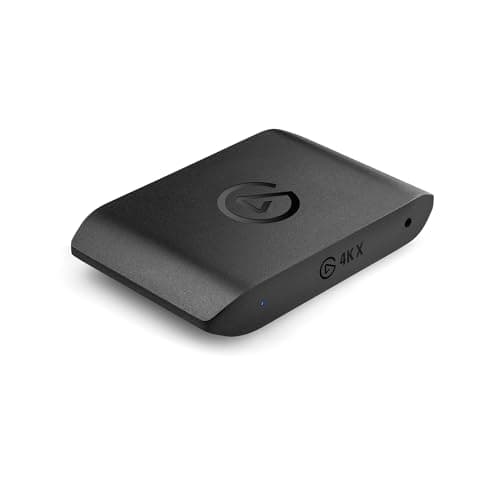
Game Capture 4K X
- •For the creator capturing a high-refresh 4K feed who wants the highest ceiling and never thinks about it again — 4K144
- •HDMI 2.1
- •VRR
AVerMedia
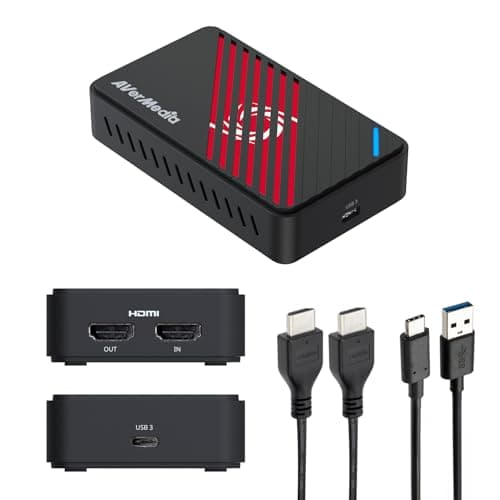
Live Gamer Ultra S (GC553Pro)
- •The cheapest card here sold new: at $149.99 it captures the same 1080p footage as the flagship and adds 1080p240
- •from a box that travels on USB power.
Elgato
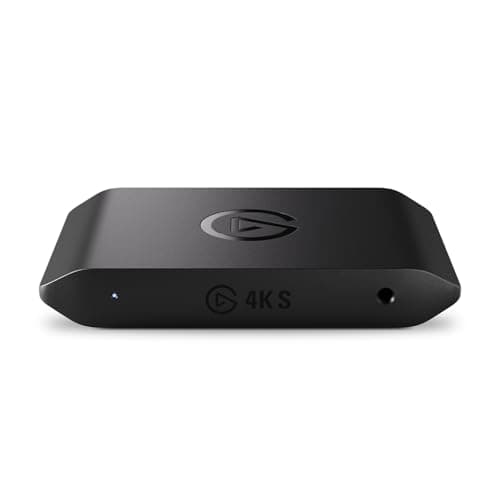
Game Capture 4K S
- •For the OBS user who wants Elgato's software polish and 4K60 capture over a single USB-C cable without paying flagship money
- •at $159.99.
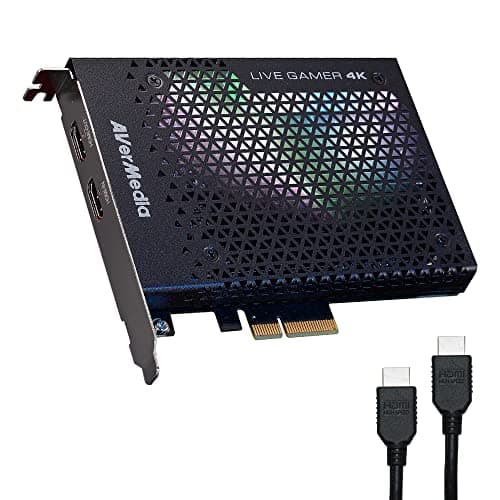
AVerMedia
Live Gamer 4K (GC573)
- •For the desktop streamer with a spare PCIe slot who wants 4K60 HDR10 capture on a dedicated bus with roughly 4x the sustained headroom of a shared USB port.
The Short Answer
For most creators the AVerMedia Live Gamer Ultra S is the value recommendation, because it records 4K60 alongside 1080p240 — roughly 4x the framerate the entry tier captures — from a pocketable USB-powered box while earning a strong DeskGear Capture Card Score; creators outputting genuine 4K144 should choose the 4K X.
Searching "best capture card" conflates two fundamentally different numbers, because a card's passthrough specification describes what your monitor displays while the capture specification describes what actually gets recorded — and marketing consistently headlines the larger figure. As of July 2026 the listings still blur "4K144" against a recording ceiling that is frequently far lower, which is precisely why our weighted DeskGear Capture Card Score normalized every pick on capture fidelity first, then passthrough. Outlets that evaluate capture hardware — TechPowerUp, TweakTown, Engadget, and AppleInsider among them — repeatedly converge on the same fundamental fork: your source dictates everything. Consequently a console limited to 4K60 gains nothing from a 4K144 card, whereas a gaming PC transmitting 1080p240 records 4x the framerate a 1080p60 device manages. An internal PCIe card additionally delivers approximately 4x the sustained bandwidth of a shared USB connection.
Side-by-side: the five capture cards ranked
Input & Connectivity
Chart
 DeskGearHQ.com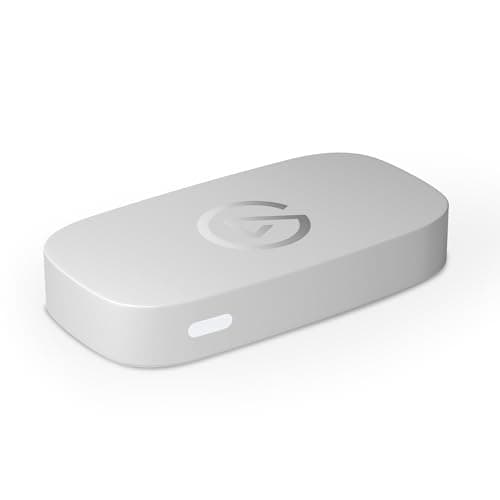
Best overall: Elgato Game Capture 4K X
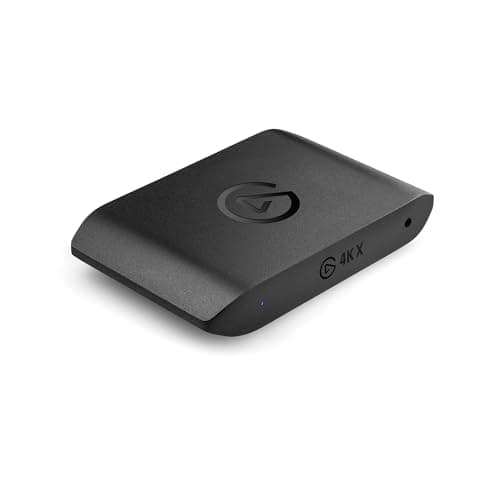
Outlets that cover capture hardware — Engadget among them — treat the Elgato Game Capture 4K X as the current high-end reference, and the case is in the spec sheet Elgato publishes: it captures up to 4K144 with HDR10 and passes 4K144 through with VRR over HDMI 2.1, which is the highest ceiling in this roundup. That capture number is the one that matters, because a 1080p240 gaming PC or a 4K120 PC feed gets recorded rather than merely mirrored, which is precisely how its weighted DeskGear Capture Card Score normalized to the top on the capture-fidelity factor. The USB 3.2 Gen 2 connection is not a headline spec so much as the plumbing that delivers those framerates without drops, offering roughly 2x the bandwidth of a USB 3.2 Gen 1 link, and the included HDMI 2.1 and USB-C cables mean the rated speed works out of the box. The honest counterweight is your source, since a console that maxes at 4K60 sends the same signal to the AVerMedia Live Gamer Ultra S (GC553Pro) for $100 less. The 4K X earns its premium only when you output above 4K60, and on DSC displays the passthrough steps down to 4K120 — worth checking against your monitor.
What We Love
- 4K144 capture is the highest ceiling here — it records what a high-refresh gaming PC actually outputs, not just a passthrough number.
- HDMI 2.1 with VRR and HDR10 passthrough keeps your own monitor tear-free at up to 4K144 while it records.
- USB 3.2 Gen 2 gives it the bus headroom — roughly 2x a Gen 1 link — to sustain the top framerates without the drops a slower connection can cause.
- HDMI 2.1 and USB-C cables are both included in the box, so there's no separate cable purchase to hit the rated speed.
What Could Be Better
- $249.99 is a genuine premium — real overkill if your source is a PS5 or Xbox that tops out at 4K60.
- Passthrough drops to 4K120 on displays using Display Stream Compression, so check your monitor's DSC behavior.
The Verdict
If you capture a high-refresh 4K feed and want the highest ceiling in the class, the Elgato Game Capture 4K X fits that brief without compromise. The 9.2 reflects 4K144 capture, HDMI 2.1, VRR, and HDR10 over a USB 3.2 Gen 2 link. On a console that maxes at 4K60 you'd pay $100 more for headroom you can't send yet, so match it to a PC feed.
Best budget / beginner: AVerMedia Live Gamer Ultra S (GC553Pro)
AVerMedia Live Gamer Ultra S (GC553Pro)
(Current price, subject to change)
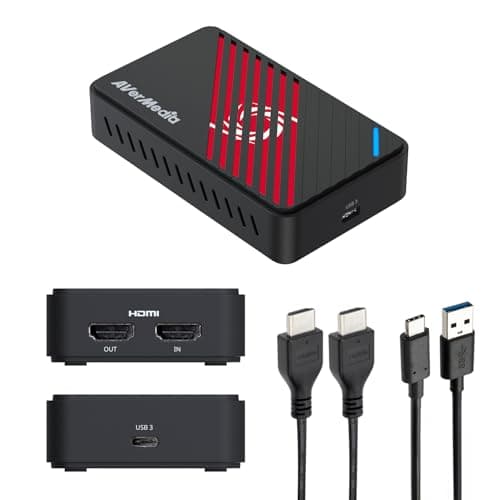
TechPowerUp and TweakTown both put the AVerMedia Live Gamer Ultra S (GC553Pro) through hands-on capture testing, and AVerMedia's own spec sheet frames why it anchors the value tier: it records 4K60 and 1080p240, passes 4K60 through with HDR and VRR, and does it from a box that weighs under 100 grams and draws its power from the USB port. That capture ceiling covers what most creators actually send, which is why its weighted DeskGear Capture Card Score normalized to within a fraction of the flagship composite while costing far less. The uncompressed RGB24 output is the detail color-focused creators feel, and its 1080p240 mode records 4x the framerate the entry Neo manages while the USB-C form factor produces a clean feed whether it's tethered to a desktop or riding in a laptop bag. Two limits keep this honest, because the HDMI 2.0 interface caps passthrough at 4K60 rather than the 4K120 an HDMI 2.1 card manages, and full VRR recording runs through AVerMedia's Streaming Center on Windows. Compared to the Elgato Game Capture 4K X, you trade the 4K144 ceiling and native HDMI 2.1 for a pick that delivers the same day-to-day footage and yields a real saving for anyone whose source stops at 4K60.
What We Love
- Captures 4K60 or 1080p240 — the same recording ceiling most console and PC creators actually use, and 4x the framerate of the entry Neo at 1080p.
- USB-powered and pocket-sized, so it moves between a desk PC and a laptop without an external power adapter.
- 4K60 HDR and VRR passthrough plus uncompressed RGB24 output for creators who care about color fidelity.
- Works across Windows, Mac, and iPad, so it fits a mixed creator setup rather than locking you to one platform.
What Could Be Better
- HDMI 2.0, not 2.1 — passthrough tops out at 4K60, so a 4K120 PC feed can't pass at full refresh.
- Full VRR recording runs through AVerMedia's Windows software, so Mac users lose that specific capture mode.
The Verdict
If you want most of the flagship experience without the flagship price, the AVerMedia Live Gamer Ultra S (GC553Pro) lines up with what most streamers actually record. At $149.99 it captures 4K60 and 1080p240 from a USB-powered box under 100 grams, $100 less than the 4K X. Step past it only if you output above 4K60 or need HDMI 2.1.
Best external 4K on a budget: Elgato Game Capture 4K S
Elgato Game Capture 4K S
(Current price, subject to change)
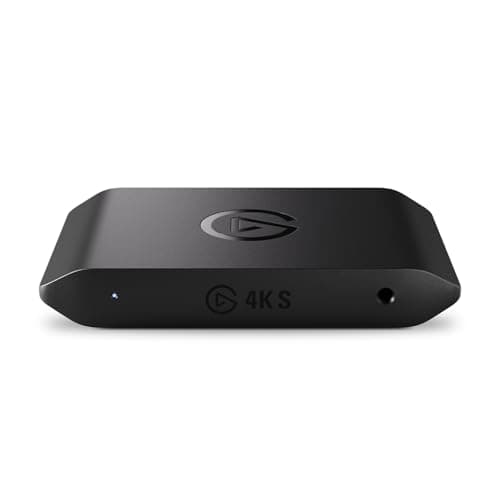
AppleInsider's review frames the Elgato Game Capture 4K S as the pick for a Mac or PC creator who wants Elgato's software layer wrapped around a straightforward 4K60 external card, and the spec sheet backs the positioning: it captures up to 4K60, offers 1080p120 as its high-framerate mode — half the 1080p240 the Ultra S records, so the AVerMedia grabs 2x the framerate at that resolution — and passes 4K60 through with HDR10 and VRR over a single USB-C cable. That combination normalized well on the setup factor of its weighted DeskGear Capture Card Score, because it runs in OBS on Mac or PC with no driver hunt and no internal slot to fill. The honest comparison is right next door, since the AVerMedia Live Gamer Ultra S (GC553Pro) records 1080p240 rather than 1080p120 and lists for roughly $10 less, which means the 4K S leans on Elgato's ecosystem and beginner-friendly capture software rather than raw specs to justify its place. For a creator already invested in that software, or one who values a gentler on-ramp than raw OBS, it delivers a reliable 4K60 feed and yields the polish that eases a first streaming setup — a clean trade if the ecosystem matters to your workflow.
What We Love
- 4K60 capture with 1080p120 as a high-framerate option over a single USB-C cable — no internal install required.
- 4K60 HDR10 and VRR passthrough, so your own display stays tear-free and color-accurate while you record.
- Runs cleanly in OBS on both Mac and PC, so a mixed-platform creator isn't locked to one operating system.
- Elgato's capture software and wide app compatibility give beginners a gentler on-ramp than raw OBS alone.
What Could Be Better
- 1080p tops out at 1080p120 capture, versus the 1080p240 the AVerMedia Ultra S and GC573 both record.
- $159.99 sits above the AVerMedia Ultra S for a broadly similar 4K60 ceiling, so it leans on software as the edge.
The Verdict
If you live in OBS and want Elgato's software polish with a clean 4K60 external card, the Elgato Game Capture 4K S is a sensible pick for that workflow. At $159.99 it captures 4K60 over a single USB-C cable with HDR10 and VRR passthrough. The AVerMedia Ultra S undercuts it by roughly $10 with a similar ceiling, so the tie-breaker is which software you prefer.
Best internal for a desktop PC: AVerMedia Live Gamer 4K (GC573)
AVerMedia Live Gamer 4K (GC573)
(Current price, subject to change)
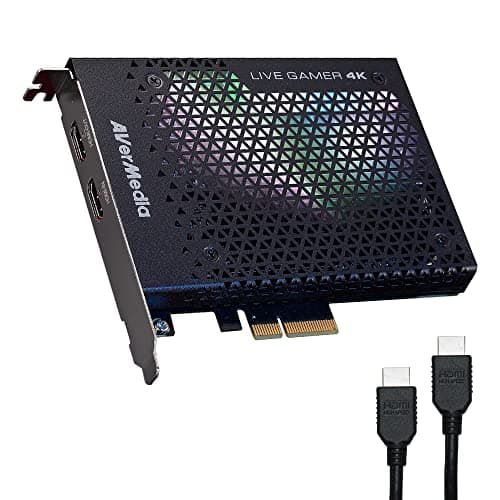
As an internal PCIe x4 card, the AVerMedia Live Gamer 4K (GC573) sits in a niche of its own, and the reason reduces to the bus: as a PCIe x4 card it captures over its own dedicated bandwidth rather than sharing a USB port, which delivers roughly 4x the sustained headroom of an external box under a long recording. AVerMedia rates it for 4K60 HDR10 capture and 1080p240, so it matches the external AVerMedia Live Gamer Ultra S (GC553Pro) on the recording ceiling while freeing a desk USB port and eliminating cable clutter, which is how it still normalizes respectably on the DeskGear Capture Card Score despite its age. The trade-off is structural rather than a spec miss, because it only works inside a desktop tower and its capture software is Windows-centric, so a laptop creator or a Mac-first editor gets no path to use it. Compared to the external field, it produces the cleanest sustained-bandwidth capture for a desktop streamer who has the slot to spare, yet it yields nothing at all to anyone whose setup can't house an internal card — a sharp fork that makes the recommendation unusually easy to self-select.
What We Love
- Internal PCIe x4 card with its own dedicated bus — roughly 4x the sustained headroom of a shared USB port.
- Captures 4K60 with HDR10 plus 1080p240 for high-framerate PC gameplay, matching the external Ultra S ceiling.
- No cable clutter or USB port to give up on your desk, since the card lives inside the tower.
- A long-shipping, well-documented card that streaming creators have relied on across multiple GPU generations.
What Could Be Better
- Desktop-only — it needs a free PCIe slot, so it's a non-starter for laptop or console-first creators.
- Capture software and full feature support are Windows-centric, so Mac creators are better served elsewhere.
The Verdict
If you run a desktop with a free PCIe slot and want capture that doesn't share a USB bus, the AVerMedia Live Gamer 4K (GC573) fits that setup. At $159.99 the internal card records 4K60 HDR10 and 1080p240 with its own dedicated bandwidth. It only makes sense inside a tower, though — a laptop or a console-only creator should look at the external picks instead.
1080p capture, folds flat — no new-stock listing: Elgato Game Capture Neo
Elgato Game Capture Neo
(Current price, subject to change)
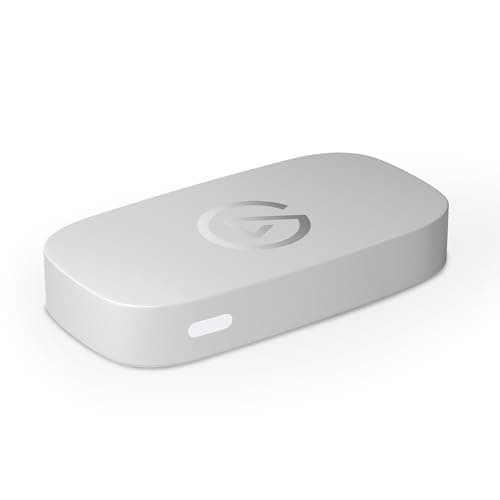
PC Gamer reviewed the Elgato Game Capture Neo as a beginner-friendly entry point, and Elgato's spec sheet fits that read exactly: it records 1080p60 while passing a full 4K60 HDR signal through to your own display, so your monitor never drops resolution — though stepping up to the Ultra S buys 4x the framerate at 1080p — while the capture stays at a manageable 1080p. That single-resolution focus is why it sits at the value end of the DeskGear Capture Card Score rather than the top, but the reason it is not our beginner pick is availability: there is no new-stock offer for it at present, only a used third-party listing. The built-in USB-C cable and folding body mean there's nothing to lose in a bag, and it drops into OBS or QuickTime with zero drivers. The honest ceiling is real, because 1080p60 is as high as it records and HDR capture is Windows-only, so a creator who outgrows 1080p will feel the wall. For a new streamer buying today, the AVerMedia Live Gamer Ultra S (GC553Pro) is the card we point to instead.
What We Love
- 1080p60 recording with 4K60 HDR passthrough — your monitor stays 4K while you capture the stream at 1080p, with no resolution lost on your live display.
- Folds flat with the cable attached — the most travel-ready shape in the group.
- Built-in USB-C cable and a folding design mean nothing to lose and a bag-friendly footprint.
- Truly plug-and-play into OBS or QuickTime with zero drivers.
What Could Be Better
- 1080p60 is the capture ceiling — no 1440p or 4K recording, so it's a starter card you can outgrow.
- HDR capture is Windows-only, and there's no high-framerate 1080p240 mode like the AVerMedia picks offer.
The Verdict
Listed for completeness rather than as a buy: the Elgato Game Capture Neo has no new-stock offer at present, only a used third-party listing, so first-time streamers should take the AVerMedia Ultra S instead. On paper it records 1080p60, passes 4K60 HDR through, and folds flat.
How We Score: DeskGear Capture Card Score
DeskGear Capture Card Score
Score Formula
(Capture Fidelity x 0.30) + (Passthrough & Latency x 0.25) + (Setup & Software x 0.20) + (Connectivity & Form x 0.15) + (Value per Dollar x 0.10)Score Factors
- Capture FidelityThe recorded resolution and framerate ceiling plus HDR capture — the footage you actually keep, from 1080p60 to 4K144
- Passthrough & LatencyPassthrough resolution, VRR and HDR support, and near-zero latency so your own display stays tear-free while recording
- Setup & SoftwarePlug-and-play into OBS, driver requirements, capture-software quality, and cross-platform Mac, PC, and iPad support
- Connectivity & FormInterface generation (USB 3.2 gen vs internal PCIe), portability, cable inclusion, and whether it shares a USB bus
- Value per DollarDelivered capture ceiling against current price — rewards cards that record what most creators output without overpaying
DeskGear Capture Card Score — Ranked
Elgato Game Capture 4K X
9.2/10Best overall — 4K144 capture, HDMI 2.1, VRR and HDR10 passthrough, USB 3.2 Gen 2, cables included, $249.99.
AVerMedia Live Gamer Ultra S (GC553Pro)
8.9/10Best value — 4K60 and 1080p240 capture from a USB-powered box under 100 grams, 4K60 HDR/VRR passthrough, $149.99.
Elgato Game Capture 4K S
8.7/10Best external 4K on a budget — 4K60 capture over one USB-C cable, Elgato software, OBS on Mac or PC, $159.99.
AVerMedia Live Gamer 4K (GC573)
8.4/10Best internal — PCIe x4 card, 4K60 HDR10 and 1080p240 on a dedicated bus, desktop and Windows only, $159.99.
Elgato Game Capture Neo
8.1/101080p60 capture, 4K60 HDR passthrough, folds flat, zero drivers — no new-stock offer at present.
Which sources and platforms work with these cards
The single compatibility fact that reshapes this decision, which outlets like TechPowerUp, TweakTown, and Engadget echo in their capture coverage: a capture card can only record what your source sends, so a PS5 or Xbox Series X that outputs a maximum of 4K60 gains nothing from the 4K X's 4K144 capture ceiling, whereas a gaming PC pushing 1080p240 — 4x the framerate of a 1080p60 feed — or a 4K120 signal is exactly what justifies the flagship. A 4K signal carries 4x the pixels of a 1080p feed, so the recording target scales directly with the source, and a 1080p240 PC output records 4x the framerate of a 1080p60 console. All five picks handle console capture, since a PS5, Xbox, or Switch 2 sends an unencrypted HDMI signal these cards accept, and every external pick here works across Windows, Mac, and iPad — with the sharp exception of the internal AVerMedia Live Gamer 4K (GC573), which needs a desktop PCIe slot and is Windows-centric for its full feature set. HDR capture is the other asterisk, because it is frequently Windows-only across this field even when passthrough carries HDR on any platform, so a Mac creator who needs recorded HDR should verify that specific mode. VRR passthrough behaves the same way: the signal passes to a compatible display on all the HDMI 2.1 and 4K60 picks, but full VRR recording often routes through the manufacturer's Windows software rather than the Mac path.
Cost vs. capability across the field
The considerable price spread across this field tracks genuine capture capability rather than brand taxation, which is precisely why the weighted value factor inside our composite calculation rewards the cards that record what most creators actually output without compelling you to purchase a ceiling your source cannot reach. The AVerMedia Ultra S anchors the entry tier as the cheapest card here sold new, and it also occupies the value inflection point, because it approaches the flagship recording ceiling — 4K60 alongside 1080p240, essentially 4x the framerate of the Neo — for substantially less. Each incremental step upward purchases exactly one specific capability, since the 4K S introduces Elgato's software polish, the GC573 contributes a dedicated internal bus delivering roughly 4x the sustained headroom of a shared USB connection, and the 4K X establishes a genuine 4K144 ceiling over HDMI 2.1 that captures roughly 2x the framerate a 4K60 card records. The decisive comparison remains Ultra S versus 4K X, because that premium purchases 4K144 capture and native HDMI 2.1; consequently a source limited to 4K60 makes the Ultra S the smarter acquisition, whereas the 4K X yields headroom only a high-refresh PC feed can genuinely exploit. Engadget's launch coverage and TechPowerUp's hands-on testing both frame the ceiling this way.
When NOT to Buy
This guide is external-and-current-first, so the exclusions follow one rule that outlets like Engadget, TechPowerUp, and TweakTown apply in their own capture coverage: cards a working creator can buy new and drop into OBS today. We left off the pro-tier PCIe cards aimed at multi-camera studios, because a creator who needs simultaneous 4K60 inputs and SDI is buying a different class of hardware than the desk-scale picks here — often at 3x the price — and pricing those against the entry tier here would mislead more than it helps. We also skipped the generic no-name USB "4K" dongles that flood marketplace listings, since many advertise a 4K passthrough number while quietly capturing at 1080p30 through a compression layer — the exact resolution-vs-passthrough confusion this guide exists to cut through, and a claim a vendor can legally undershoot by a wide margin. And we held back cards without current, documented driver support, because a capture card is only as good as its software pipeline into OBS, and an abandoned driver turns a capable box into a paperweight after the next OS update. When the capture spec is real and the software is maintained, the footage is real.
Who Should Buy What
Who Should Buy What
| If you are… | Recommended pick |
|---|---|
High-refresh PC creator Captures a 4K120 or 1080p240 gaming-PC feed and wants the highest recording ceiling with VRR and HDR10 intact on their own display. | Elgato Game Capture 4K X |
Value-first streamer Wants 4K60 and 1080p240 capture from a pocketable USB-powered box that travels between a desk PC and a laptop, at a mid-tier price. | AVerMedia Live Gamer Ultra S (GC553Pro) |
OBS + Elgato ecosystem user Wants a clean 4K60 external card with Elgato's software polish and single-cable USB-C simplicity on Mac or PC. | Elgato Game Capture 4K S |
Desktop tower streamer Has a spare PCIe x4 slot and wants 4K60 HDR10 capture on a dedicated internal bus that never competes with USB devices. | AVerMedia Live Gamer 4K (GC573) |
First-time / budget streamer Captures at 1080p, wants the cheapest box sold new that drops into OBS with zero drivers and nothing to configure. | AVerMedia Live Gamer Ultra S (GC553Pro) |
Frequently Asked Questions
What's the difference between capture resolution and passthrough resolution?
Passthrough is what your own monitor sees live from the console or PC; capture resolution is what actually gets recorded to your computer. Marketing often headlines the higher passthrough number — a card can pass 4K60 through while only recording 1080p60, like the Elgato Neo. For footage quality, the capture number is the one that matters.
Do I need a 4K144 capture card for a PS5 or Xbox?
No. A PS5 or Xbox Series X outputs at most 4K60, so a card that captures 4K144 like the Elgato 4K X records no more from those consoles than a 4K60 card does. The 4K144 ceiling only pays off with a high-refresh gaming PC. For console capture, the AVerMedia Live Gamer Ultra S covers you for about $100 less.
Internal PCIe or external USB capture card — which should I get?
External USB cards like the AVerMedia Ultra S and Elgato 4K S work with laptops, desktops, Macs, and iPads and travel easily. An internal PCIe card like the AVerMedia GC573 needs a desktop tower with a free slot, but captures over its own dedicated bus with roughly 4x the sustained headroom of a shared USB port. Pick internal only if you have the slot and record on a Windows desktop.
Will these capture cards work on a Mac?
The external picks — Elgato 4K X, 4K S, Neo, and the AVerMedia Live Gamer Ultra S — all run in OBS on macOS. The internal AVerMedia GC573 is a Windows-desktop card. One caveat: HDR capture and full VRR recording are frequently Windows-only across this field even when passthrough carries HDR on a Mac, so verify that specific mode if you need it.
Is the AVerMedia Live Gamer Ultra S worth it over the Elgato 4K S?
It depends on software preference and framerate. The Ultra S records 1080p240 versus the 4K S's 1080p120 and lists for roughly $10 less, so on raw specs it wins. The Elgato 4K S counters with Elgato's capture software and a gentler beginner on-ramp. If you want the most capture for the money, the Ultra S; if you value the software ecosystem, the 4K S.
What does HDMI 2.1 add on a capture card?
HDMI 2.1 lets a card like the Elgato 4K X pass and capture up to 4K144, where an HDMI 2.0 card such as the AVerMedia Ultra S caps passthrough at 4K60. It only matters if your source actually outputs above 4K60 — a high-refresh gaming PC. On a console limited to 4K60, HDMI 2.1 changes nothing you can use.
Do capture cards add lag to my gameplay?
Not to what you play on, if you use passthrough. These cards send the source signal straight to your own monitor with near-zero latency while a separate copy records, so your gameplay stays responsive. VRR passthrough on the HDMI 2.1 and 4K60 picks also keeps that feed tear-free. The recorded file may be a beat behind, but your live view is not.
Can I use these cards for a second-PC streaming setup?
Yes — a dual-PC setup is a core use case. The gaming PC's HDMI output feeds the capture card in a second streaming PC, which handles OBS and encoding so gameplay performance isn't taxed. Any external pick here works; match the capture ceiling to your gaming PC's output, and remember the card only records what that PC sends.
Which capture card is best for a beginner on a budget?
The AVerMedia Live Gamer Ultra S at $149.99 — the cheapest card here sold new. It records 4K60 and 1080p240, travels on USB power, and drops into OBS on Mac or PC. The Elgato Neo is cheaper on paper but currently has no new-stock offer. The Ultra S is the lowest-risk way to find out whether streaming sticks before spending up to a 4K-capture card.
Why do some capture cards record HDR only on Windows?
HDR capture depends on the manufacturer's capture software and the operating system's HDR pipeline, and that software support frequently ships for Windows first or only. Passthrough HDR — sending the signal to your display — usually works on any platform, but recording HDR to a file often does not on a Mac. If recorded HDR matters, confirm the mode for your OS before buying.
Bottom Line
Get the Elgato Game Capture 4K X if You capture a high-refresh 4K feed from a gaming PC and want the highest ceiling — 4K144, HDMI 2.1, VRR — and can justify the $249.99..
Get the AVerMedia Live Gamer Ultra S (GC553Pro) if You want 4K60 and 1080p240 capture from a pocketable USB box that travels, for roughly $100 less than the flagship, at $149.99..
Get the Elgato Game Capture 4K S if You want a clean 4K60 external card with Elgato's software polish and single-cable USB-C simplicity on Mac or PC, at $159.99..
Get the AVerMedia Live Gamer 4K (GC573) if You run a desktop tower with a spare PCIe slot and want 4K60 HDR10 capture on a dedicated internal bus, recording on Windows..
Get the Elgato Game Capture Neo if You already own one, or you deliberately want a used unit — there is no new-stock offer for it at present..
You don't need a capture card at all: a webcam-only creator, a screen-share streamer whose PC captures its own output in OBS, or anyone not recording an external HDMI source.
Sources & Methodology
Methodology: DeskGear Capture Card Score — Formula: (Capture Fidelity x 0.30) + (Passthrough & Latency x 0.25) + (Setup & Software x 0.20) + (Connectivity & Form x 0.15) + (Value per Dollar x 0.10). Factors: Capture Fidelity: The recorded resolution and framerate ceiling plus HDR capture — the footage you actually keep, from 1080p60 to 4K144 | Passthrough & Latency: Passthrough resolution, VRR and HDR support, and near-zero latency so your own display stays tear-free while recording | Setup & Software: Plug-and-play into OBS, driver requirements, capture-software quality, and cross-platform Mac, PC, and iPad support | Connectivity & Form: Interface generation (USB 3.2 gen vs internal PCIe), portability, cable inclusion, and whether it shares a USB bus | Value per Dollar: Delivered capture ceiling against current price — rewards cards that record what most creators output without overpaying
Expert review sources used in this analysis:
- Picks reflect manufacturer specifications cross-checked against capture-hardware coverage: Elgato's published technical specifications for the Game Capture 4K X, 4K S, and Neo; AVerMedia's specifications for the Live Gamer Ultra S GC553Pro and the internal Live Gamer 4K GC573; TechPowerUp and TweakTown on the Live Gamer Ultra S hands-on capture testing; PC Gamer and AppleInsider on the Game Capture 4K S; PC Gamer on the Game Capture Neo; and Engadget on the Game Capture 4K X
- Prices verified via the Amazon Creators API as of August 2026 (2026-08-12) and stated as manufacturer list prices, which change frequently — check the current price on Amazon.
Nicholas Miles is the founder of DeskGearHQ and a longtime smart home enthusiast focused on helping everyday homeowners make better technology decisions. He researches, compares, and writes about products across security, climate, lighting, leak prevention, sensors, home energy, and automation, with an emphasis on real-world usefulness, ecosystem compatibility, reliability, privacy, and long-term value.
Affiliate disclosure: DeskGearHQ earns affiliate commissions on qualifying Amazon purchases. Our scoring methodology is independent of affiliate relationships.



