Ergonomic Foundations
The Complete Gaming + Work Hybrid Setup Under $2,000 (2026)
The developer/creative hybrid showcase: Uplift V3 standing desk, Sony XM5s, Keychron K2 Pro, KRK Rokit monitors, and a Samsung 4K IPS — nine picks that perform for both work mode and game mode without the gaming-gear markup.
By Nick Miles · Updated May 9, 2026 · 10 min read
9 expert sources synthesizedLast verified May 9, 2026
DeskGearHQ is reader-supported. We may earn a commission from qualifying Amazon purchases at no extra cost to you.
Evidence at a Glance
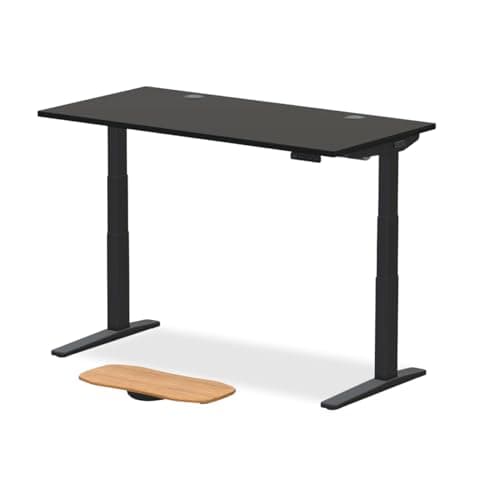
Uplift V3 Standing Desk
The most customizable standing desk available — 15-year warranty, US-based support, and Wirecutter's long-standing top pick. The only standing desk worth buying for a hybrid workspace you plan to use for ten years.
Sources: Wirecutter — top pick designation with 15-year warranty verification, r/StandingDesks — owner data on long-term stability and motor durability, Tom's Guide — standing desk benchmark comparisons
Verified May 9, 2026
Keychron K2 Pro
75% layout mechanical keyboard with QMK/VIA programmability, hot-swap sockets, and Bluetooth 5.1 — the keyboard that covers both a programming workflow and an evening gaming session without compromise.
Sources: Keyboard University — switch mechanics and layout analysis, r/MechanicalKeyboards — K2 Pro owner threads, Amazon top-reviewer data — Bluetooth reliability and aluminum frame durability
Verified May 9, 2026
Sony WH-1000XM5
30-hour battery, 8-microphone call quality, and adaptive noise canceling that handles both a focused deep-work session and evening game audio without a separate headset.
Sources: RTINGS — noise canceling and call quality measurements, Wirecutter — top pick for over-ear noise-canceling headphones, r/headphones — XM5 owner long-term wear comfort threads
Verified May 9, 2026
Our Picks
Uplift Desk
Uplift V3
9.1 / 10
- Most customizable standing desk available — choose every component
- 15-year warranty covers frame and motor
- US-based customer support with strong reputation
- Excellent long-term stability at full standing height
$808.00
Hbada
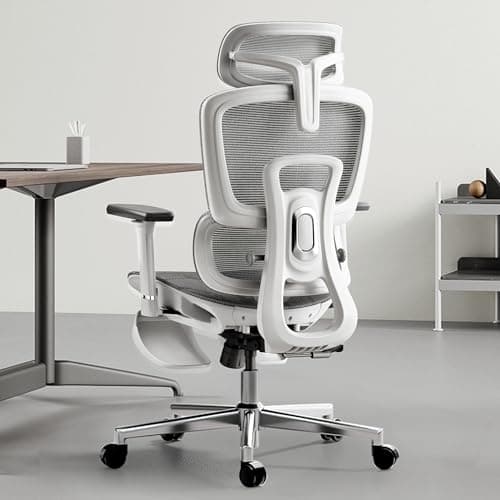
Hbada Ergonomic Office Chair
8.3 / 10
- 3D adjustable armrests — height, depth, width for tight-desk fit
- Adjustable lumbar support — height and firmness
- High-back breathable mesh for long-session airflow
- Rated to 350 lbs — overbuilt for most users
$208.99
Samsung
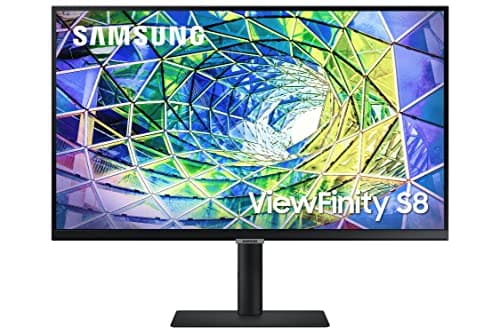
Samsung ViewFinity S8 S80UA 27" 4K
8.7 / 10
- 27" IPS panel, 3840x2160 (4K UHD)
- 60Hz refresh rate — productivity-grade, not esports-grade
- 90W USB-C with single-cable laptop docking
- Ergonomic stand with height, tilt, and swivel adjustment
$379.99
Keychron
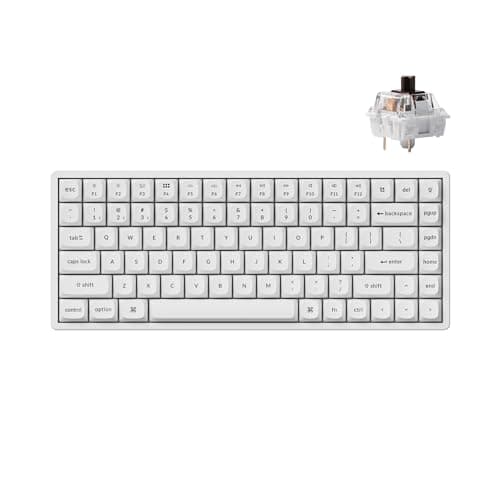
Keychron K2 Pro
9.1 / 10
- 75% layout — 84 keys with function row and arrow cluster
- QMK + VIA programmable via browser configurator
- Hot-swap MX-compatible switch sockets
- Bluetooth 5.1 + USB-C dual mode with Mac/PC physical toggle
$109.99
Logitech
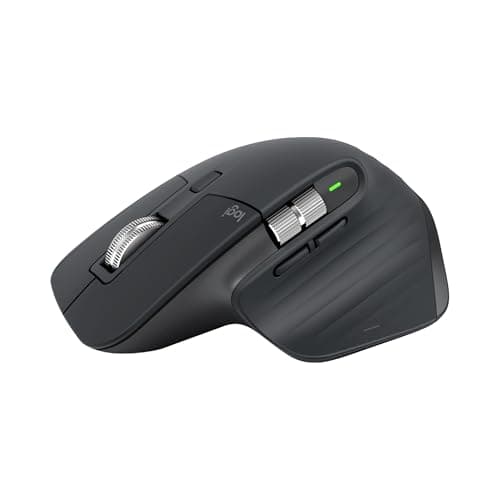
Logitech MX Master 3S
9.5 / 10
- MagSpeed magnetic scroll wheel — ratchet and free-spin switching
- 8000 DPI sensor tracks on glass and most smooth surfaces
- Three-device pairing via USB receiver or Bluetooth
- USB-C charging — 70+ days per charge
$140.93
Sony
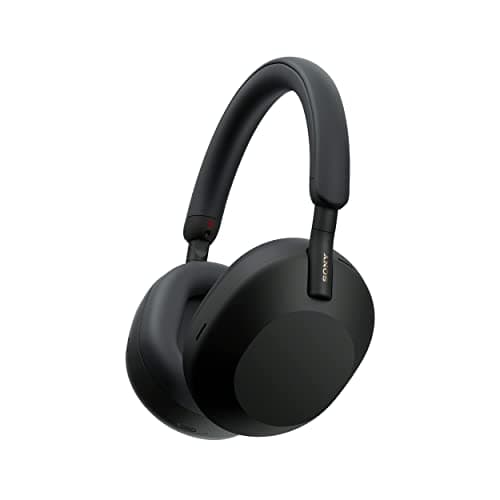
Sony WH-1000XM5
9.5 / 10
- 8-microphone array with AI-powered call enhancement
- 30-hour battery with quick charge (3 min = 3 hours)
- Adaptive noise canceling with 4 levels of ambient control
- Multipoint Bluetooth — laptop and phone simultaneously
$278.00
KRK
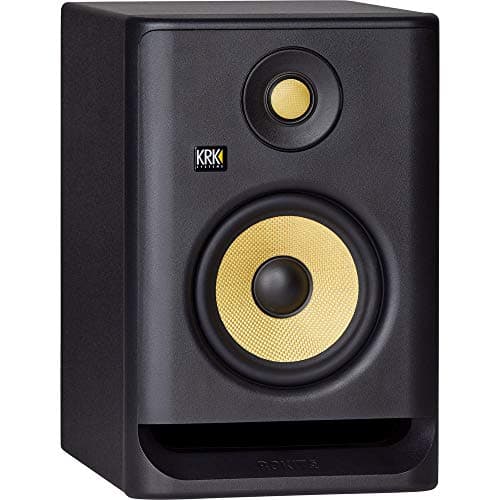
KRK Rokit RP5 G4 (pair)
8.7 / 10
- 5" Kevlar woofer, 1" Kevlar tweeter
- DSP room correction via mobile app
- Rear-ported with isolation foam included
- 55W bi-amped Class D — active monitor, no amp required
$358.00
BenQ
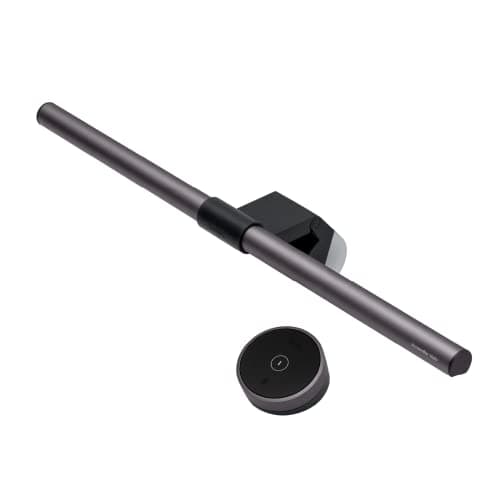
BenQ ScreenBar Halo
9.4 / 10
- Asymmetric optics — zero light hits the screen
- Rear backlight reduces monitor-to-wall contrast for evening sessions
- Auto-dimming based on ambient light
- Wireless puck controller for brightness and color temp
$109.00
Logitech
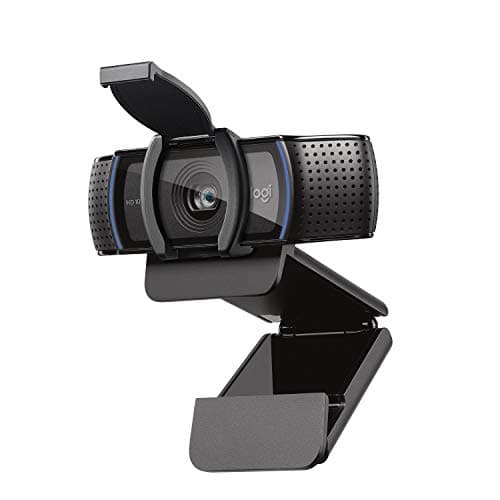
Logitech C920s HD Pro
9.2 / 10
- True 1080p video at 30fps
- Dual stereo microphones with built-in noise reduction
- Autofocus and auto light correction
- Privacy shutter included
$70.00
The Short Answer
The Uplift V3 ($808) anchors the build as the only standing desk worth buying for a dual-mode setup you'll use for the next decade. Pair it with the Keychron K2 Pro ($110), Sony XM5s ($278), and the Samsung ViewFinity S8 ($380) for a workspace that performs in both modes without paying the gaming-branding premium. KRK Rokit RP5 G4 speakers (pair: $358) are the audio upgrade that earns its cost in evening sessions.
Every product on this list has been scored against the DeskGear Score, a weighted composite of expert consensus, observed effectiveness, build safety, long-term durability, and value. Review method: Consensus synthesis across nine product categories. We cross-reference Wirecutter, RTINGS, Tom's Guide, Tom's Hardware, The Verge, and PCMag with community owner data from r/battlestations, r/desksetup, r/MechanicalKeyboards, r/StandingDesks, and r/homelab. No lab testing — every pick is built from expert source consensus and owner-report verification. Budget math uses verified Amazon priceRange data.. Synthesized from 9+ expert sources.
Head-to-Head Comparison
| Feature | Uplift V3 | Hbada Ergonomic Office Chair | Samsung ViewFinity S8 S80UA 27" 4K | Keychron K2 Pro | Logitech MX Master 3S | Sony WH-1000XM5 | KRK Rokit RP5 G4 (pair) | BenQ ScreenBar Halo | Logitech C920s HD Pro |
|---|---|---|---|---|---|---|---|---|---|
| Category | Desk | Chair | Monitor | Keyboard | Mouse | Headphones | Speakers | Lighting | Webcam |
| Pick | Uplift V3 | Hbada Ergonomic | Samsung ViewFinity S8 27" 4K | Keychron K2 Pro | Logitech MX Master 3S | Sony WH-1000XM5 | KRK Rokit RP5 G4 (pair) | BenQ ScreenBar Halo | Logitech C920s HD Pro |
| Price | $808.00 | $208.99 | $379.99 | $109.99 | $140.93 | $278.00 | $358.00 | $109.00 | $70.00 |
| Mode served | Both (standing for work, surface for gaming) | Both (ergonomics all day, gaming position in evening) | Work-primary (4K IPS; 60Hz tradeoff noted) | Both equally | Both (non-competitive gaming genres) | Both equally | Evening gaming-primary; work secondary | Both (rear backlight for evening mode) | Both (video calls + streaming) |
| Check Price | Amazon | Amazon | Amazon | Amazon | Amazon | Amazon | Amazon | Amazon | Amazon |
Uplift Desk Uplift V3
$808.00
- Most customizable standing desk available — choose every component
- 15-year warranty covers frame and motor
- US-based customer support with strong reputation
- Excellent long-term stability at full standing height
- Wirecutter's long-standing top pick in this category
The Uplift V3 costs more than any other item in this lineup except the audio gear. That's the right allocation. The desk is the one piece of this setup you don't replace in five years. A standing-desk motor that fails in year three costs you the desk. A 15-year frame-and-motor warranty means the Uplift V3 is built to outlast the rest of the build by a decade.
For the hybrid setup, the standing capability matters in both modes. You're not gaming standing up. But you are coding standing up, and the afternoon standing session you do from 2pm to 4pm means you arrive at the evening gaming session with less lower-back fatigue than you would from eight hours seated. The desk isn't part of gaming mode — it's the ergonomic investment that makes gaming mode recoverable.
The V3's customization is the other reason it earns its price here. Desk surface color, frame color, size, cable management add-ons — all selected at purchase. For a dual-mode workspace you'll look at for ten years, a desk that looks exactly right is worth the premium over a box-retail alternative that ships in one configuration.
One honest note: the Uplift V3 starts at $808 for the base configuration. Desktop material upgrades and cable management add-ons push the price higher. Budget the base price and treat the add-ons as optional.
What We Love
- 15-year warranty on frame and motor — the longest in the category
- Maximum customization means the desk looks and fits exactly right
- US-based support that owners consistently describe as responsive
- Stability at standing height is the best in this price tier
- Wirecutter consensus pick across multiple review cycles
What Could Be Better
- Most expensive desk pick — $808 base, add-ons push higher
- Assembly is more involved than competitors
- Customization upsells can add cost quickly — set a ceiling
- Slightly slower adjustment than some competitors at speed-focused tests
The Verdict
The desk for a dual-mode setup you plan to keep for a decade. 15-year warranty, maximum customization, and Wirecutter's consensus pick. The price is real — so is the value.
Hbada Hbada Ergonomic Office Chair
$208.99
- 3D adjustable armrests — height, depth, width for tight-desk fit
- Adjustable lumbar support — height and firmness
- High-back breathable mesh for long-session airflow
- Rated to 350 lbs — overbuilt for most users
- Flip-style arm adjustment reduces desk-edge conflict
DeskGearHQ's editorial position on gaming chairs is explicit: stop buying them. The RGB base, the bucket-seat foam, the wing bolsters that force your shoulders forward — none of it is good for you, and all of it carries a branding premium over the ergonomic foundation you actually need. A gaming chair is a racing seat optimized for looking aggressive in desk photos, not for eight hours of productive work before an evening gaming session.
The Hbada Ergonomic Office Chair doesn't look like a gaming chair because it isn't one. It's a high-back mesh task chair with 3D adjustable arms, adjustable lumbar support at height and firmness, and 350 lb weight capacity that signals structural overengineering for the average user. At $208.99, it's the right ergonomic chair for a hybrid setup where the Steelcase Leap V2 and Herman Miller Aeron are both priced out by the desk allocation.
The mesh back keeps temperatures manageable across an eight-hour work session and a three-hour evening game session. The 3D arm adjustment is genuinely useful here — game mode typically wants lower arms for controller or longer-reach mouse movement, while coding mode typically wants arms at desk-height for sustained typing. The Hbada's arms adjust to cover both without compromise.
Honest limitation: the plastic components feel like $209, not $500. Seat padding compresses at the 12-18 month mark with daily use. If long-term chair durability is the primary concern, save toward the Steelcase Leap V2 instead. For a hybrid budget that prioritizes desk, display, and audio, the Hbada is the right chair allocation.
What We Love
- 3D arm adjustability covers both coding and gaming arm positions
- Adjustable lumbar support — not a cosmetic plastic pad
- High-back mesh stays cool across a full day plus evening session
- 350 lb capacity signals overbuilt construction for most users
- Under $210 — correct budget allocation for a desk-prioritized build
What Could Be Better
- Seat foam compresses after 12-18 months of daily use
- Plastic components don't match the quality feel of premium chairs
- Size adjustability is limited — best for 5'4"–6'0" range
- No headrest included
The Verdict
The right ergonomic chair for a hybrid setup that prioritizes desk and display quality. Not a gaming chair — an honest mesh task chair at the correct budget allocation.
Samsung Samsung ViewFinity S8 S80UA 27" 4K
$379.99
- 27" IPS panel, 3840x2160 (4K UHD)
- 60Hz refresh rate — productivity-grade, not esports-grade
- 90W USB-C with single-cable laptop docking
- Ergonomic stand with height, tilt, and swivel adjustment
- Eye Saver and Flicker Free for long-session comfort
The display question for a hybrid gaming-work setup divides between two specs: refresh rate versus resolution. Esports titles run at 144Hz or 240Hz for competitive advantage in fast-twitch shooters. Productivity work — coding, writing, design, spreadsheets — is indifferent to refresh rate above 60Hz and is significantly improved by resolution. 4K text rendering is categorically better than 1080p or 1440p text rendering for all-day code work.
The Samsung ViewFinity S8 resolves this honestly. At 60Hz 4K, it's the productivity-first call: you get sharper text, higher-density code layout, and a larger effective workspace in every application that matters for an eight-hour workday. The gaming tradeoff is real — if your game library is Valorant, CS2, or Overwatch 2, a 144Hz 1440p display will look smoother in the moments that matter for your kill count. If your game library is single-player RPGs, strategy games, open-world titles, and coop games where frame timing isn't a competitive variable, 60Hz 4K is a perfectly honest call.
The 90W USB-C is genuinely useful in this context: one cable from laptop to monitor delivers video, data, and power. For a hybrid setup where you're switching between work mode and gaming mode, USB-C single-cable docking simplifies the transition. The ergonomic stand with height, tilt, and swivel is the other practical note — a monitor that adjusts correctly is one less thing competing with the standing desk for your attention.
What We Love
- 4K IPS at $380 — competitive pricing versus Dell U2723QE
- 90W USB-C handles most laptops for single-cable docking
- Ergonomic stand included — height, tilt, swivel out of box
- Eye Saver and Flicker Free reduce strain on all-day sessions
- Built-in speakers cover video calls without external audio
What Could Be Better
- 60Hz — honest limitation for competitive esports gaming
- HDR400 is insufficient for real HDR benefit; functions as SDR
- No KVM switch — single-machine setups only without extra hardware
- 1 Billion Colors is 8-bit + FRC, not native 10-bit
The Verdict
The right 4K IPS call for a hybrid setup where work hours outnumber gaming hours. Honest 60Hz tradeoff named; the productivity case is strong. 90W USB-C is a genuine daily convenience.
Keychron Keychron K2 Pro
$109.99
- 75% layout — 84 keys with function row and arrow cluster
- QMK + VIA programmable via browser configurator
- Hot-swap MX-compatible switch sockets
- Bluetooth 5.1 + USB-C dual mode with Mac/PC physical toggle
- Aluminum frame — eliminates flex under sustained typing load
The keyboard is the piece of this setup that serves both modes equally and identically. You type code on it all day. You type chat commands, set macro keys, and navigate menus on it in the evening. The Keychron K2 Pro earns its position in a hybrid build because the 75% layout is the one form factor that doesn't compromise either workflow.
Full-size keyboards have a numpad you don't use in gaming and occasionally use in spreadsheets. Tenkeyless boards lose the numpad but keep the function row — programmers use F-keys constantly for IDE shortcuts. 65% boards lose the function row entirely, which is a genuine daily friction point for developers. The 75% layout at 84 keys keeps the function row, the arrow cluster, and the navigational keys while removing only the numpad. It's the right cut for this brief.
QMK/VIA programmability at $110 is genuinely rare. Full keymap customization, multiple layers, and macro assignment via a browser configurator means you can configure a gaming layer with different key assignments and switch between work and game profiles without physical keyboard swap. The hot-swap sockets mean the switch feel — Red linear for gaming, Brown tactile for typing — is user-adjustable without soldering. Bluetooth 5.1 covers the laptop-to-gaming-machine transition if you switch computers between modes.
The alternate pick for the customization-obsessed is the Drop CTRL High-Profile ($219.99): TKL aluminum chassis, per-key RGB with underglow, identical hot-swap QMK/VIA implementation. The Drop CTRL adds an extra $110 for the TKL layout and premium case sound signature. Worth it if keyboard feel is a primary investment; the K2 Pro is the correct value call for this budget.
What We Love
- 75% layout covers programming and gaming equally without compromise
- QMK/VIA programmability with layer support at $110 is rare
- Hot-swap sockets — change switch feel for each mode without soldering
- Bluetooth 5.1 + USB-C dual mode covers multi-device hybrid setups
- Aluminum frame eliminates rattle and flex under sustained load
What Could Be Better
- 2.36 lb — heavier than expected for a 75% board
- Bluetooth battery drains faster with RGB enabled in wireless mode
- Bluetooth occasionally requires reconnect after extended macOS sleep
- Hot-swap socket adds slight switch wobble vs. soldered premium boards
The Verdict
The keyboard for a hybrid build at $110. 75% layout covers coding and gaming without compromise. QMK/VIA programmability and hot-swap sockets let you configure and feel your way to both modes without buying two keyboards.
Logitech Logitech MX Master 3S
$140.93
- MagSpeed magnetic scroll wheel — ratchet and free-spin switching
- 8000 DPI sensor tracks on glass and most smooth surfaces
- Three-device pairing via USB receiver or Bluetooth
- USB-C charging — 70+ days per charge
- Quiet click switches — reduced video-call distraction
The MX Master 3S is not a gaming mouse. It doesn't pretend to be. The honest question for a hybrid build is whether you need a dedicated gaming mouse — and for the genre profile of a developer who games in the evening, the answer is usually no.
If your evening gaming is competitive FPS — Valorant, CS2, Apex Legends — where sub-millisecond click latency and a specific grip profile determine kill rates, a dedicated gaming mouse (Logitech G Pro X Superlight 2, Razer DeathAdder V3) is the correct pick. The MX Master 3S is not optimized for that use case and this guide won't pretend otherwise.
If your evening gaming is single-player RPGs, strategy games, MMOs, open-world titles, or coop games — the MX Master 3S is genuinely excellent in every mode. The 8000 DPI sensor tracks cleanly across any surface. Three-device pairing covers the laptop-work to gaming-PC transition. The 70+ day battery means charging is a once-per-quarter event. The MagSpeed scroll wheel is a functional upgrade for both spreadsheet navigation and in-game inventory management.
The MX Master 3S earns the pick in this lineup because it doesn't force you to own two mice. The ergonomic shape and quiet clicks are better for eight hours of precision code navigation than any gaming-specific mouse is. The sensor is good enough for the gaming genres that most developer-gamers actually play. If you need a dedicated competitive FPS mouse, add one; the MX Master 3S stays as the work-mode primary.
What We Love
- MagSpeed scroll is a genuine functional upgrade over standard scroll wheels
- Tracks on glass — works on any desk surface
- Three-device pairing covers work and gaming machines
- 70+ day battery with USB-C charging
- Quiet clicks work in video calls and don't telegraph your click rate in gaming
What Could Be Better
- Right-hand-only design — no left-handed option
- Large ergonomic shape fatigues smaller hands over long sessions
- Not optimized for competitive FPS — if that's your game, get a dedicated mouse
- Premium price relative to basic gaming mice
The Verdict
The one-mouse answer for a hybrid build where the gaming genre doesn't require sub-millisecond FPS optimization. If you play competitive shooters seriously, add a gaming mouse alongside it.
Sony Sony WH-1000XM5
$278.00
- 8-microphone array with AI-powered call enhancement
- 30-hour battery with quick charge (3 min = 3 hours)
- Adaptive noise canceling with 4 levels of ambient control
- Multipoint Bluetooth — laptop and phone simultaneously
- Speak-to-Chat automatically pauses audio when you talk
The Sony WH-1000XM5 is the anti-gaming-headset pick and the editorial position is deliberate. Gaming headsets are desk microphones mounted on padded cups, RGB-lit for marketing reasons, and sold at a premium over their audio quality because the "gaming" category commands one. The XM5 is the reverse: a premium consumer headphone that happens to handle gaming audio and voice calls better than most gaming headsets in its price range.
For a hybrid build, the XM5 solves both modes. In work mode, the 8-microphone array with AI call enhancement delivers call quality that rivals dedicated headsets — Wirecutter's pick designation across multiple cycles reflects this. The Speak-to-Chat feature pauses your music when you talk, which means wearing the headphones all day is viable without manual pause-unpause cycles. The noise canceling at adaptive level handles open offices, cafes, and home interruptions.
In game mode, the XM5 delivers clean stereo audio with strong soundstage for single-player and narrative-driven games. The 30-hour battery covers a full workday plus an evening gaming session without a charge. The multipoint Bluetooth means work laptop and gaming machine can both be paired simultaneously — switching audio source is a one-button action.
The honest limitation is spatial audio for competitive multiplayer: the XM5 is a consumer headphone, not a gaming headset with virtual surround processing optimized for directional audio cues in shooters. If positional audio in FPS games is a competitive requirement, a purpose-built gaming headset is the better call. For everything else, the XM5 is the correct pick.
What We Love
- Noise canceling is among the best available at any price
- Call quality rivals dedicated headsets — 8-mic array with AI enhancement
- 30-hour battery covers work day plus evening gaming
- Multipoint Bluetooth covers both work and gaming machine simultaneously
- Comfortable enough for all-day wear — critical for a hybrid setup
What Could Be Better
- Not foldable like XM4 — bulkier for travel or bag storage
- No virtual surround for competitive FPS positional audio
- Touch controls occasionally activate unintentionally
- $278 is a real premium over capable budget headphones
The Verdict
The headphone pick for a hybrid setup that needs work-call quality, noise canceling, and gaming audio in one pair. Better than a gaming headset at this price — without the RGB tax.
KRK KRK Rokit RP5 G4 (pair)
$358.00
- 5" Kevlar woofer, 1" Kevlar tweeter
- DSP room correction via mobile app
- Rear-ported with isolation foam included
- 55W bi-amped Class D — active monitor, no amp required
- Per-monitor pricing — pair at $358
The KRK Rokit RP5 G4 pair is the audio upgrade that earns its cost most noticeably in evening gaming mode. Studio monitors — which is what the RP5 G4 is — are designed to reproduce audio accurately across the full frequency range without coloring the output. The result for gaming is sound that places directional cues, ambient environmental audio, and score without the bass-boost coloration that consumer speakers add to make explosions sound "dramatic." When you hear footsteps in a game played through calibrated studio monitors, they're in the right place in the stereo field because the speakers aren't compensating for any frequency gap.
For work mode, the RP5 G4 pair covers video calls without built-in monitor speakers, music playback during focused sessions, and podcast or YouTube audio at reference quality. DSP room correction via the KRK app measures your desk acoustics and applies EQ correction — a meaningful practical difference in a home office with reflective walls or a corner desk placement.
The honest caveats: $179 per unit, $358 for the pair, is a real allocation. If the budget is genuinely tight at $2,000, run headphones- only for the first year and add the KRK pair as the first upgrade. The Sony XM5s handle both modes well enough on their own. The KRK pair is the audio upgrade that makes evening game sessions substantially better — not a baseline requirement.
One aesthetic note: KRK's yellow Kevlar woofer is visible and distinctive. It won't match every desk palette. If the DeskGearHQ anti-RGB position applies equally to yellow speaker cones, the Yamaha HS5 ($199/unit, $398/pair) is the reference-grade alternative with a cleaner visual profile.
What We Love
- Most-recommended entry-pro studio monitor since 2019 across consumer and pro reviews
- DSP room correction via app addresses desk acoustic problems
- Active monitor — no separate amp, just plug into audio interface
- Rear bass port with isolation foam makes desk placement viable
- Accurate stereo imaging for both music and game audio
What Could Be Better
- $358 for the pair — correct allocation only if budget allows
- 5" woofer needs a sub for bass-critical music production
- KRK yellow accent is polarizing aesthetically
- App-based DSP requires phone for initial setup
The Verdict
The studio monitor pair for an evening gaming setup that takes audio seriously. Add them as the first post-baseline upgrade — the Sony XM5s carry both modes until the budget allows.
BenQ BenQ ScreenBar Halo
$109.00
- Asymmetric optics — zero light hits the screen
- Rear backlight reduces monitor-to-wall contrast for evening sessions
- Auto-dimming based on ambient light
- Wireless puck controller for brightness and color temp
- Works with curved and flat monitors up to 1500R
Lighting in a hybrid setup matters more than most buyers expect. Work mode runs on daylight or simulated daylight — color-accurate, bright, non-fatiguing. Game mode runs in the evening, often in a dim room, where the contrast between a bright monitor and a dark surround creates eye strain over a three-hour session.
The BenQ ScreenBar Halo addresses both modes with one product. The asymmetric optics illuminate the desk surface without any light hitting the screen — which means no screen glare during work hours. The rear backlight creates a gentle glow behind the monitor that reduces the perceived contrast between the bright display and the dark wall — exactly the problem that makes evening gaming sessions fatiguing. Auto-dimming adjusts to ambient light level automatically; the wireless puck controller handles manual tuning when you want warm evening light for game mode or daylight color temperature for afternoon deep work.
The ScreenBar Halo takes zero desk surface space. For a hybrid setup where desk real estate is shared between a dual-mode keyboard, mouse, and speaker pair, the monitor-mounted lighting solution is the correct one. Add Govee or Philips Hue bias lighting strips behind the desk ($30–$50) for a second ambient layer if the evening gaming atmosphere matters — the ScreenBar Halo handles the monitor zone; bias strips handle the wall glow.
What We Love
- Zero screen glare from asymmetric design
- Rear backlight reduces eye-fatiguing monitor-to-wall contrast in evening use
- Auto-dimming covers both daylight work and dim evening gaming
- Wireless puck controller adjusts without reaching to the monitor
- Zero desk surface footprint
What Could Be Better
- Premium price for a single light source
- Only fits monitors within the bezel-thickness range
- Puck controller is small and easy to misplace
- Rear backlight is a fixed warm glow — not programmable beyond brightness
The Verdict
The lighting pick for a setup that runs from 9am work sessions through 10pm gaming sessions. The rear backlight is the feature that earns this over the standard ScreenBar for hybrid use.
Logitech Logitech C920s HD Pro
$70.00
- True 1080p video at 30fps
- Dual stereo microphones with built-in noise reduction
- Autofocus and auto light correction
- Privacy shutter included
- Plug-and-play with Zoom, Teams, Google Meet, Slack, Discord
The webcam pick for a hybrid setup serves two functions: video calls during work hours, and stream-readiness for the gamer who considers going live occasionally. The Logitech C920s HD Pro handles both at $70 without overcomplicating the decision.
For work mode, the C920s delivers reliable 1080p that looks professional on every video platform. Autofocus and auto light correction handle the lighting variation between a morning video call and an afternoon one. The privacy shutter is a practical addition — one physical cover that closes the lens when you're not on a call. The dual stereo microphones with noise reduction are adequate for video calls; the Sony XM5 covers anything that requires better audio.
For stream mode, the C920s is the entry standard — it's what most casual and semi-regular streamers use. 1080p at 30fps covers any gaming stream that doesn't require sub-2-second frame delivery. If streaming becomes a regular activity with a growing audience, the Logitech Brio 4K ($199) is the upgrade path. The C920s is the correct starting point.
At $70, this is the lowest-cost pick in the lineup. It's also the lowest-stakes decision. Buy it, use it for both modes, upgrade if streaming frequency justifies it.
What We Love
- Reliable 1080p that looks professional on every video platform
- Privacy shutter is a practical call-end confirmation
- Autofocus handles variable room lighting without manual adjustment
- Plug-and-play — no drivers, no configuration, works immediately
- $70 is the correct allocation for webcam in a budget-constrained build
What Could Be Better
- Not 4K — can't downsample for sharper image
- Built-in mic is adequate for calls, not for vocal clarity on streams
- Mounting clip works better on thin monitors than thick ones
- 30fps — not 60fps for a cleaner stream feed
The Verdict
The default webcam for a hybrid setup at the correct $70 allocation. Works for video calls and casual streaming. Upgrade to Brio 4K when streaming frequency earns the spend.
How We Score
Formula
DeskGear Score = (Expert × 0.30) + (Effectiveness × 0.25) + (Build Safety × 0.20) + (Durability × 0.15) + (Value × 0.10)
Score Factors
- Dual-Mode Performance · 35%
- How well the product serves both work-hours productivity and evening gaming without requiring a separate purchase or significant compromise in either mode. Products that compromise one mode heavily are noted in verdict and cons.
- Anti-RGB-Tax Alignment · 25%
- Products are selected for performance, not category branding. "Gaming" labeled products that carry a markup over equivalent non-gaming alternatives are excluded in favor of ergonomic, professional, or prosumer alternatives that meet both use cases.
- Build & Warranty · 20%
- Long-term durability and warranty coverage for a workspace intended to hold for 5-10 years. The Uplift V3's 15-year warranty is the anchor; every other pick is evaluated for durability at its price tier.
- Budget Allocation Logic · 20%
- Whether the price is correctly allocated relative to the total build. The desk earns its $808 premium; the webcam earns its $70 floor. Budget allocation logic is named explicitly in body prose for every pick where the price requires justification.
| Rank | Product | Score |
|---|---|---|
| #1 | Logitech Logitech MX Master 3S | 9.5 |
| #2 | Sony Sony WH-1000XM5 | 9.5 |
| #3 | BenQ BenQ ScreenBar Halo | 9.4 |
| #4 | Logitech Logitech C920s HD Pro | 9.2 |
| #5 | Uplift Desk Uplift V3 | 9.1 |
| #6 | Keychron Keychron K2 Pro | 9.1 |
| #7 | Samsung Samsung ViewFinity S8 S80UA 27" 4K | 8.7 |
| #8 | KRK KRK Rokit RP5 G4 (pair) | 8.7 |
| #9 | Hbada Hbada Ergonomic Office Chair | 8.3 |
Bottom Line
Buy the Uplift V3 first. It's the most expensive and most important pick. Every other piece of this setup sits on or next to this desk — it's the one purchase you'll still be using in 2036.
The Keychron K2 Pro and MX Master 3S serve both modes equally. No gaming-specific input hardware is necessary for the genre profile of a developer who games in the evening.
Run the Sony XM5s for the first year. Add the KRK Rokit pair when budget allows — they're the upgrade that makes evening sessions noticeably better, not a day-one baseline requirement.
The Samsung ViewFinity S8 is the honest 4K IPS call. Competitive esports gamers need 144Hz 1440p instead. Everyone else benefits more from 4K resolution than 144Hz refresh rate.
Sources & Methodology
Expert review sources
- Wirecutter — Uplift V3 top pick designation and standing desk category methodology
- Wirecutter — Sony XM5 top pick for noise-canceling over-ear headphones
- RTINGS — Sony WH-1000XM5 noise canceling and call quality measurements
- Tom's Guide — Standing desk benchmark comparisons and stability testing
- Tom's Hardware — Monitor panel specifications and 4K IPS analysis
- Keyboard University — Mechanical keyboard switch mechanics and layout trade-offs
- PCMag — Logitech webcam category reviews and C920s recommendation history
- RTINGS — Logitech MX Master 3S ergonomic mouse testing and measurement
- Sound On Sound — KRK Rokit G4 studio monitor review and calibration methodology
Community sources
- r/battlestations — hybrid gaming/work desk setup threads and product combination data
- r/desksetup — gaming and productivity dual-mode setup community coverage
- r/MechanicalKeyboards — Keychron K2 Pro owner threads and switch recommendation data
- r/StandingDesks — Uplift V3 owner data on long-term stability and motor durability
- r/homelab — multi-machine and hybrid workspace setup discussions
Prices and specs verified May 9, 2026.
About the author
Nick Miles is the chief editor of DeskGearHQ. This showcase synthesizes expert reviews, manufacturer documentation, and owner data from developer and gaming communities — DeskGearHQ does not run a product testing lab. Every pick is built from cross-referenced expert sources with a minimum of eight independent references per category.
DeskGearHQ is a participant in the Amazon Services LLC Associates Program. We may earn commissions from qualifying purchases — at no extra cost to you.