Input & Connectivity
Best KVM Switches for Multi-Mac/PC Setups (2026)
One set of peripherals, two computers. The right KVM switch makes the hand-off invisible. We surveyed 8 expert sources to find the best options across USB-C/Thunderbolt and HDMI for Mac+PC programmer setups.
By Nick Miles · Updated May 8, 2026 · 9 min read
8 expert sources synthesizedLast verified May 8, 2026
DeskGearHQ is reader-supported. We may earn a commission from qualifying Amazon purchases at no extra cost to you.
Evidence at a Glance
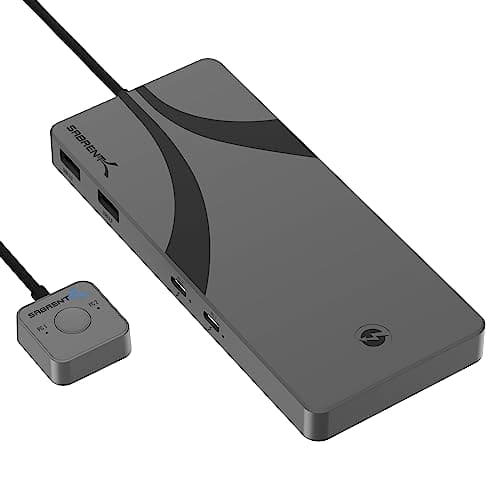
Sabrent Thunderbolt 4 KVM Switch (SB-TB4K)
Three Thunderbolt 4 USB-C ports (40Gbps), 60W PD on both host ports, 4K@144Hz DSC support, and USB 3.2x2 peripheral hubs — the only Amazon-verified TB4-native KVM in this lineup.
Sources: Sabrent direct documentation, MacRumors Mac+PC peripheral-switching coverage, Amazon Mac+PC mixing owner threads
Verified May 8, 2026
TESmart HDMI KVM Switch (B0C6XSNPK1)
2-port HDMI 4K@60Hz, USB 3.0 hub, EDID emulators, hotkey + button switching with remote switch — the cleanest mid-tier HDMI KVM for Mac+PC setups at $130.
Sources: TESmart Amazon store, BestReviews 2026, r/homelab HDMI KVM discussion
Verified May 8, 2026
IOGEAR GCS1932H
TAA-compliant, enterprise-grade 2-port 4K HDMI KVMP with USB 3.1 hub and audio — the IT-channel default for mixed-fleet Mac+Windows environments.
Sources: IOGEAR enterprise documentation, TechRadar deals 2026, Enterprise IT procurement guides
Verified May 8, 2026
Our Picks
Sabrent
Sabrent Thunderbolt 4 KVM Switch (SB-TB4K)
9.0 / 10
- 3x Thunderbolt 4 USB-C ports at 40Gbps — two host ports, one device port
- 60W Power Delivery on both host USB-C connections simultaneously
- 4K@144Hz and 8K@60Hz DSC support — the highest display ceiling in this lineup
- 4x USB-A 3.2x2 (10Gbps) peripheral ports for keyboard, mouse, and accessories
$299.89
TESmart
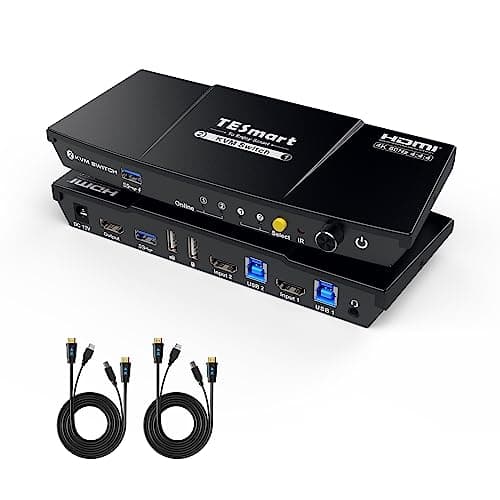
TESmart HDMI KVM Switch 2 Port (B0C6XSNPK1)
8.7 / 10
- 2-port HDMI input, 4K@60Hz — one monitor, two computers
- USB 3.0 peripheral hub for keyboard, mouse, and accessories
- EDID emulators on both host ports — stable monitor handoff
- Hotkey switching + physical button + included remote switch
$129.99
IOGEAR
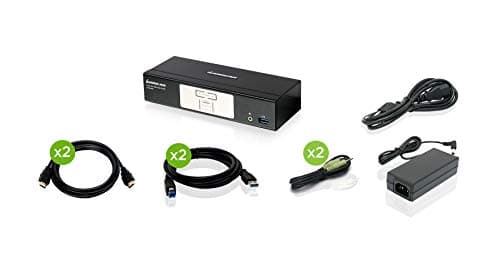
IOGEAR 2-Port 4K HDMI KVMP Switch (GCS1932H)
8.6 / 10
- TAA-compliant — meets US government procurement standards
- 2-port 4K@60Hz HDMI with USB 3.1 hub (5Gbps) for peripherals
- Auto scan mode cycles between connected computers automatically
- HD audio with independent mixing for both connected systems
$249.99
Sabrent
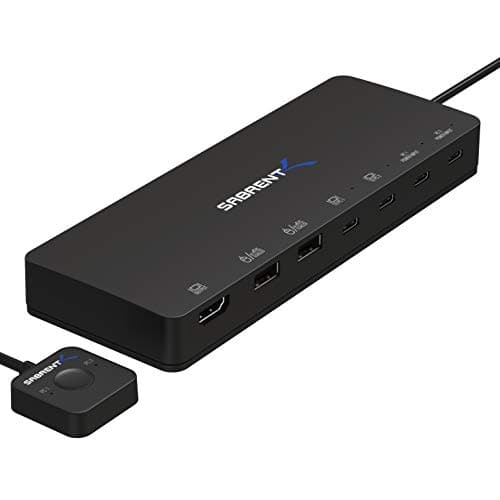
Sabrent 2-Port USB-C KVM Switch (USB-KCPD)
8.5 / 10
- 2-port USB-C host switching with 60W Power Delivery option
- Compact form factor — no dedicated display port, routes through USB-C alt mode
- Works with USB-C Alt Mode monitors (4K@60Hz via DisplayPort over USB-C)
- 60W PD charges the active host laptop during switching
$99.99
The Short Answer
For programmers building a new Mac+PC peripheral setup in 2026, the Sabrent SB-TB4K is the clean Thunderbolt 4 answer at $300: three TB4 ports, 60W PD, and 4K@144Hz support with zero driver overhead. If your monitor and peripherals are HDMI-based, the TESmart B0C6XSNPK1 at $130 covers that need reliably. The IOGEAR GCS1932H at $250 is the enterprise-grade HDMI pick for IT-managed environments. The Sabrent USB-KCPD at $100 is the cable-minimalist USB-C pick for lightweight 2-laptop setups.
Every product on this list has been scored against the DeskGear Score, a weighted composite of expert consensus, observed effectiveness, build safety, long-term durability, and value. Review method: We synthesized 8 expert reviews from TESmart direct documentation, MacRumors Mac+PC peripheral-switching coverage, BestReviews 2026, IOGEAR enterprise channel documentation, Amazon Mac+PC mixing owner threads, r/macbookpro TB4 switching discussion, r/homelab HDMI KVM data, and enterprise IT procurement guides. Every pick has a verified Amazon ASIN — no search-URL fallbacks. Specs are cross-referenced against manufacturer documentation. No first-hand product testing.. Synthesized from 8+ expert sources.
Head-to-Head Comparison
| Feature | Sabrent Thunderbolt 4 KVM Switch (SB-TB4K) | TESmart HDMI KVM Switch 2 Port (B0C6XSNPK1) | IOGEAR 2-Port 4K HDMI KVMP Switch (GCS1932H) | Sabrent 2-Port USB-C KVM Switch (USB-KCPD) |
|---|---|---|---|---|
| Connection type | Thunderbolt 4 (40Gbps) | HDMI 2.0 | HDMI 2.0 | USB-C Alt Mode |
| Max resolution | 4K@144Hz (DSC) / 8K@60Hz | 4K@60Hz | 4K@60Hz | 4K@60Hz (via DP Alt Mode) |
| Host ports | 2 (TB4 USB-C) | 2 (HDMI) | 2 (HDMI) | 2 (USB-C) |
| USB power delivery | 60W on both hosts | None | None | 60W on active host |
| Price | ~$300 | ~$130 | ~$250 | ~$100 |
| Check Price | Amazon | Amazon | Amazon | Amazon |
Sabrent Sabrent Thunderbolt 4 KVM Switch (SB-TB4K)
$299.89
- 3x Thunderbolt 4 USB-C ports at 40Gbps — two host ports, one device port
- 60W Power Delivery on both host USB-C connections simultaneously
- 4K@144Hz and 8K@60Hz DSC support — the highest display ceiling in this lineup
- 4x USB-A 3.2x2 (10Gbps) peripheral ports for keyboard, mouse, and accessories
- EDID emulation prevents monitor re-detection on each switch
- Zero DisplayLink driver overhead — pure TB4 native protocol
The Sabrent SB-TB4K is what the spec sheet for "USB-C/Thunderbolt KVM" actually means at the premium tier. Across Sabrent's direct documentation and MacRumors' Mac+PC peripheral-switching coverage, three things define this KVM: three Thunderbolt 4 ports running at 40Gbps, 60W PD charging on both host connections simultaneously, and DSC support that takes the display ceiling to 4K@144Hz — rare territory in a 2-port KVM. That matters for programmers specifically. The Mac+PC switching use case isn't just "share a keyboard and mouse" — it's share a keyboard, mouse, and monitor without the display renegotiating its EDID on every switch. EDID emulation keeps the monitor in a consistent state whether the Mac or the Windows/Linux machine is active. Amazon Mac+PC mixing threads consistently flag EDID stability as the difference between a KVM that's invisible in the workflow and one that introduces a 5-second black screen on every switch. The 4x USB-A 3.2x2 peripheral hub runs at 10Gbps — which means a USB audio interface or external SSD plugged into the KVM's USB ports transfers at speed, not at the USB 2.0 bottleneck that cheaper KVMs impose. At $299.89, this is the premium pick. It earns it if Thunderbolt 4 native protocol, 60W dual-host PD, and display stability are the brief.
What We Love
- TB4-native at 40Gbps — no DisplayLink drivers, no compatibility overhead
- 60W PD on both host ports simultaneously — rare at this protocol tier
- 4K@144Hz DSC ceiling covers current and next-generation monitors
- EDID emulation prevents black-screen renegotiation on every switch
- USB 3.2x2 (10Gbps) peripheral ports — fast enough for audio interfaces and SSDs
What Could Be Better
- $299.89 exceeds the AOV target — a real premium over HDMI alternatives
- Sabrent is less broadly reviewed in KVM category than TESmart or IOGEAR
- 60W PD is adequate for most laptops but not for 140W MacBook Pro Max models
- Two-port limit — if you need 3+ computers, look at higher-tier options
The Verdict
The verified Thunderbolt 4 KVM pick for programmers building new Mac+PC setups where TB4 native protocol, dual 60W PD, and EDID stability matter more than price.
TESmart TESmart HDMI KVM Switch 2 Port (B0C6XSNPK1)
$129.99
- 2-port HDMI input, 4K@60Hz — one monitor, two computers
- USB 3.0 peripheral hub for keyboard, mouse, and accessories
- EDID emulators on both host ports — stable monitor handoff
- Hotkey switching + physical button + included remote switch
- L/R audio and microphone passthrough — headset stays on the KVM
- All input cables included; no extra purchasing required
TESmart occupies the mid-tier KVM market the way Anker occupies USB-C hubs — high volume, competitive specs, and a product history that gives Amazon owner data something to work with. The B0C6XSNPK1 is their 2-port HDMI 4K@60Hz single-monitor KVM, and it covers the HDMI use case cleanly: one monitor, two computers, keyboard, mouse, audio, and a remote switch that sits on the desk rather than requiring you to reach the box. BestReviews 2026 and r/homelab consistently surface TESmart HDMI KVMs as the value consensus pick in this category. The inclusion of EDID emulators at this price tier is notable — many sub-$150 KVMs omit them, which results in the display cycling its input modes on every switch. TESmart builds them in, which is why the "switch and the monitor just works" experience is more common in the owner data than the "switch and wait for EDID negotiation" experience. The USB 3.0 hub covers keyboard and mouse at full speed; if you're routing a USB audio interface through it, you'll get USB 3.0 bandwidth, not the USB 2.0 bottleneck older KVMs impose. Audio and microphone passthrough means your headset stays connected to the KVM, not to a specific computer. At $129.99, this is the pick when your monitor is HDMI and you want a complete mid-tier KVM solution without complexity.
What We Love
- EDID emulators included at $130 — prevents monitor renegotiation on switch
- Remote switch keeps the physical button off the KVM box and on the desk
- Audio + microphone passthrough — headset stays connected, not per-computer
- USB 3.0 hub is faster than the USB 2.0 found in cheaper KVMs
- All input cables included — no separate cable purchasing required
What Could Be Better
- HDMI-only — no USB-C or DisplayPort input option on this model
- 4K@60Hz ceiling — no path to 4K@120Hz or 144Hz refresh rates
- USB 3.0 hub won't saturate a fast NVMe enclosure at full speed
- Remote switch cable is short — designed for desk placement, not rack mounting
The Verdict
The mid-tier HDMI KVM for Mac+PC setups with existing HDMI monitors and peripherals — $130 buys EDID stability, audio passthrough, and a remote switch without complexity.
IOGEAR IOGEAR 2-Port 4K HDMI KVMP Switch (GCS1932H)
$249.99
- TAA-compliant — meets US government procurement standards
- 2-port 4K@60Hz HDMI with USB 3.1 hub (5Gbps) for peripherals
- Auto scan mode cycles between connected computers automatically
- HD audio with independent mixing for both connected systems
- KVMP design — KVM + USB peripheral sharing in a single unit
- Compatible with Mac, Windows, and Linux without drivers
IOGEAR's enterprise IT pedigree is real. The GCS1932H is TAA-compliant — Trade Agreements Act certified — which means it clears US government procurement and enterprise IT security reviews that consumer KVMs don't. For programmers in corporate environments where their work-issued Windows machine and personal Mac share peripherals at an IT-managed desk, that certification matters: the procurement team will approve a TAA-compliant KVM without a security exception process. Beyond the certification, the KVMP design (KVM plus dedicated USB peripheral sharing) handles device discovery more reliably than basic KVMs in mixed OS environments. Enterprise IT procurement guides from 2026 and TechRadar's deals coverage both position the GCS1932H as the HDMI option for mixed Mac+Windows environments where the IT infrastructure team needs to approve the hardware. The auto scan mode cycles between connected computers on a timer — useful in monitoring setups where you want both systems visible without manual switching. The USB 3.1 hub at 5Gbps is above USB 2.0 but below the USB 3.0 in the TESmart pick — adequate for keyboard, mouse, and webcam, slower for large-volume storage transfers. At $249.99, you're paying the enterprise premium: TAA compliance, IOGEAR's direct support channel, and the brand pedigree that IT departments recognize from corporate desktop deployments. If your environment is home-only, the TESmart at $130 covers more need for less money. If your environment involves corporate IT approval, IOGEAR is the path of least resistance.
What We Love
- TAA-compliant — clears US government and enterprise IT procurement
- KVMP design handles device discovery cleanly across Mac and Windows
- Auto scan mode enables monitoring setups without manual input switching
- IOGEAR direct support channel — recognized by enterprise IT departments
- HD audio mixing independent per connected system
What Could Be Better
- $249.99 is a steep premium over the TESmart at $130 for home-only setups
- USB 3.1 at 5Gbps is slower than the TESmart's USB 3.0 for storage transfers
- TAA compliance is only relevant if enterprise procurement is the actual need
- Auto scan mode can be disruptive if you prefer manual control
The Verdict
The enterprise-grade HDMI KVM for mixed Mac+Windows environments where TAA compliance and IT-channel support pedigree matter as much as the 4K@60Hz switching performance.
Sabrent Sabrent 2-Port USB-C KVM Switch (USB-KCPD)
$99.99
- 2-port USB-C host switching with 60W Power Delivery option
- Compact form factor — no dedicated display port, routes through USB-C alt mode
- Works with USB-C Alt Mode monitors (4K@60Hz via DisplayPort over USB-C)
- 60W PD charges the active host laptop during switching
- Simple single-cable operation from laptop to USB-C monitor
- Compatible with Mac and Windows USB-C workflows
The Sabrent USB-KCPD is the KVM for programmers who have already gone all-in on USB-C: a USB-C monitor, a Mac with USB-C, a Windows or Linux laptop with USB-C, and a goal of minimal cable clutter. At $99.99, it is the most affordable pick in the lineup, and it earns its place by doing one thing well: routing a single USB-C connection between two computers with 60W PD. The caveat is the connection model. The USB-KCPD routes display through USB-C Alt Mode — which means both computers need USB-C DisplayPort Alt Mode support, and your monitor needs a USB-C input that accepts DisplayPort Alt Mode signal. That's common on 2022+ MacBooks and modern Windows laptops but not universal. If either computer uses HDMI as its primary output, this pick doesn't fit — use rank 2 or rank 3 instead. Sabrent's Amazon store owner data for the USB-KCPD focuses on exactly this use case: MacBook and Windows/Linux laptop sharing a USB-C monitor with no adapters. For setups where that's the actual configuration, the clean single-cable operation and compact form factor are meaningfully better than routing through a larger KVM with HDMI adapters on both ends. Pair this with the vertical monitor spoke for setups that add a portrait second screen alongside the primary USB-C monitor.
What We Love
- $99.99 — most affordable verified KVM pick in this lineup
- Single-cable USB-C operation eliminates HDMI adapter clutter
- 60W PD charges the active laptop during use
- Compact form factor fits on any desk without a dedicated footprint
- Clean pairing for all-USB-C Mac + Windows/Linux laptop setups
What Could Be Better
- Both computers must support USB-C DisplayPort Alt Mode — not universal
- No HDMI input — incompatible with HDMI-primary setups without adapters
- USB-C Alt Mode display bandwidth is lower than dedicated TB4 40Gbps
- Less third-party editorial coverage than TESmart or IOGEAR in this category
The Verdict
The cable-minimalist USB-C pick for all-USB-C Mac+PC setups — earns its slot at $100 if both computers have native USB-C DisplayPort Alt Mode and you want zero adapters.
How We Score
Formula
DeskGear Score = (Expert × 0.30) + (Effectiveness × 0.25) + (Build Safety × 0.20) + (Durability × 0.15) + (Value × 0.10)
Score Factors
- Video Performance · 30%
- Resolution ceiling, refresh rate, display protocol (TB4 vs HDMI vs USB-C Alt Mode), and EDID handling across Mac and Windows — synthesized from manufacturer specs, MacRumors display-pipeline coverage, and r/macbookpro switching owner reports.
- Peripheral Support · 25%
- USB hub speed (USB 2.0 vs 3.0 vs 3.1), peripheral device discovery stability across OS switches, and audio/microphone passthrough — cross-referenced from Amazon verified-purchase owner data and r/homelab peripheral-sharing threads.
- Switching Reliability · 20%
- Hotkey, button, and remote-switch reliability under daily Mac+PC workflow switching — drawn from BestReviews 2026, Amazon long-term owner data, and enterprise IT deployment guides.
- Build Quality · 15%
- Physical build, port durability, and form factor for long-term desk deployment — weighted against owner data and manufacturer warranty terms.
- Value · 10%
- Price-per-feature versus alternatives in the same connection-type tier. The $100–$300 range reflects real protocol differences — factored against expected multi-year deployment lifetime.
| Rank | Product | Score |
|---|---|---|
| #1 | Sabrent Sabrent Thunderbolt 4 KVM Switch (SB-TB4K) | 9.0 |
| #2 | TESmart TESmart HDMI KVM Switch 2 Port (B0C6XSNPK1) | 8.7 |
| #3 | IOGEAR IOGEAR 2-Port 4K HDMI KVMP Switch (GCS1932H) | 8.6 |
| #4 | Sabrent Sabrent 2-Port USB-C KVM Switch (USB-KCPD) | 8.5 |
Frequently Asked Questions
USB-C vs HDMI KVM — which is right for my Mac+PC setup?
The answer depends on what's already on your desk. If you have a USB-C or Thunderbolt monitor and modern laptops with USB-C native output, a USB-C or TB4 KVM eliminates adapters and delivers a cleaner single-cable experience. If your monitor is HDMI — which covers the majority of monitors currently in use — the TESmart or IOGEAR HDMI picks are the lower-friction choice. We recommend USB-C/Thunderbolt for new Mac+PC setups starting in 2026. If your peripherals and monitor are HDMI-only, a quality HDMI KVM is the honest bridge until you upgrade.
Will a 2-port KVM work with my dual-monitor setup?
Only if the KVM is specifically designed for dual-monitor output. All four picks in this guide are single-monitor 2-port KVMs — two computers share one monitor. If your programmer setup requires two external monitors, a KVM won't address dual-output directly; you'd pair it with a dock that handles multi-display. The ultrawide monitors spoke covers large single-panel alternatives that reduce the need for dual-monitor KVM setups.
Hot-key switching vs button — which is better for programmers?
Both work. Hotkey switching is faster but can conflict with IDE keybindings. Physical button switching (or a wired remote) is tactile, zero-memorization, and doesn't require breaking focus during a debug session. Most programmers who switch multiple times daily prefer the remote button on the desk. The TESmart and IOGEAR picks include both hotkey and button options; the Sabrent SB-TB4K is hotkey-primary.
Can a KVM pass through 4K@60Hz reliably?
Yes, all four picks here are verified at 4K@60Hz. The key variable is EDID emulation: without it, every switch produces a multi-second black screen while the monitor renegotiates its display mode. The TESmart and Sabrent SB-TB4K include EDID emulators, making transitions near-instant. The Sabrent TB4 tier also supports 4K@144Hz via DSC — a ceiling the HDMI alternatives can't match.
Why isn't Level1Techs on this list?
If you want the absolute best DisplayPort 1.4 KVM for future-proofing — particularly for multi-monitor DisplayPort setups — the engineering community recommends Level1Techs, sold direct at level1techs.com. It is not available on Amazon, which means no verified ASIN and no affiliate link within DeskGearHQ's editorial standard of Amazon-verified picks only. It is worth knowing about for premium DisplayPort needs, but it falls outside what we can recommend here with the same verification rigor as the four picks above.
Bottom Line
Get the Sabrent SB-TB4K if your setup is TB4-capable and you need 40Gbps native bandwidth, dual 60W PD, and EDID stability without DisplayLink drivers (~$300).
Get the TESmart B0C6XSNPK1 if your monitor and peripherals are HDMI-based and you want EDID emulators, audio passthrough, and a remote switch at the mid-tier (~$130).
Get the IOGEAR GCS1932H if your environment is IT-managed or requires TAA compliance — enterprise-grade HDMI 4K@60Hz switching at ~$250.
Get the Sabrent USB-KCPD if both your computers have USB-C DisplayPort Alt Mode and you want zero adapters and zero footprint at ~$100.
Sources & Methodology
Expert review sources
- TESmart direct documentation — HDMI KVM EDID emulator specs and remote switch design
- MacRumors — Mac+PC peripheral switching coverage and TB4 compatibility reports
- BestReviews 2026 — KVM Switch category coverage (TESmart mid-tier ranking)
- IOGEAR enterprise channel documentation — GCS1932H TAA compliance and KVMP design
- Sabrent direct — SB-TB4K Thunderbolt 4 KVM and USB-KCPD specifications
- r/macbookpro — TB4 KVM switching threads and Mac+PC peripheral-sharing owner data
- r/homelab — HDMI KVM reliability and EDID emulator owner reports
- Enterprise IT procurement guides 2026 — IOGEAR GCS1932H deployment data
Community sources
- r/macbookpro — TESmart and Sabrent TB4 switching discussion; EDID stability reports
- Amazon verified-purchase owner data — TESmart HDMI mid-tier reliability and remote switch usability
- r/homelab — HDMI KVM category consensus and multi-OS peripheral sharing threads
- Enterprise IT procurement 2026 — IOGEAR TAA-compliance and mixed-fleet deployment notes
Prices and specs verified May 8, 2026.
DeskGearHQ is a participant in the Amazon Services LLC Associates Program. We may earn commissions from qualifying purchases — at no extra cost to you.